A procurement management system is usually a software that organizes and automates the process of buying goods and services, from purchase requests and approvals through purchase orders, receiving, invoicing, and payment.
Unlike a collection of spreadsheets, emails, and disconnected tools, a procurement management system connects the steps of the purchasing process so teams can track a request as it moves toward payment, see where it stands, and keep the right controls in place.
Key Takeaways
- A procurement management system connects purchasing activities into a structured digital workflow.
- The core workflow typically starts with a purchase requisition and continues through approval, purchase order creation, receipt, invoice processing, and payment.
- Procurement management software can centralize vendor information, purchasing records, approvals, budgets, and spend data.
- The right system depends on your procurement process, approval requirements, existing technology, reporting needs, and organization size.
- Software should support the process your team needs rather than simply adding automation to a poorly defined workflow.
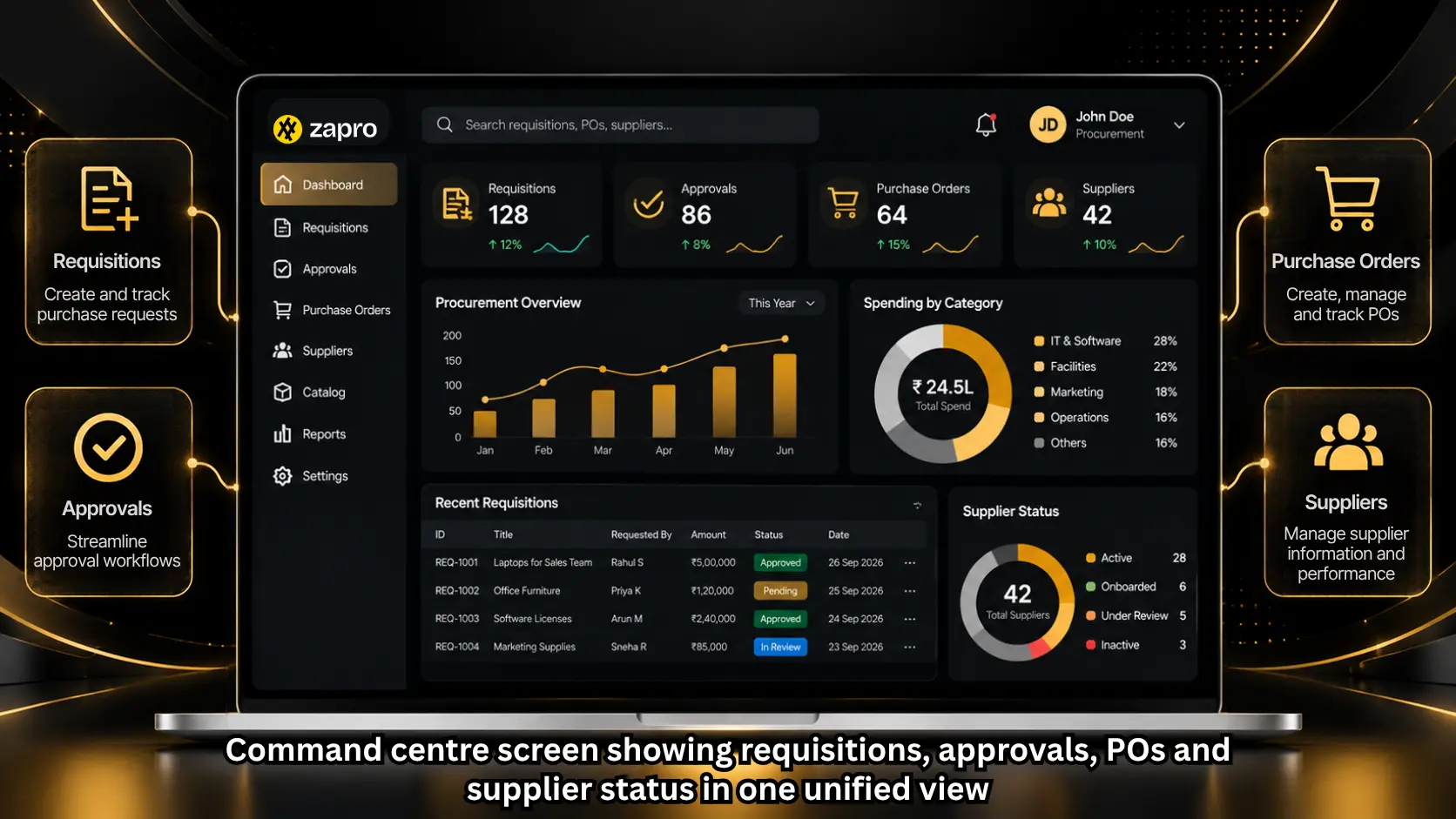
How Does a Procurement Management System Work?
A procurement management system is software that automates and controls the buying process end to end: purchase requests, approvals, supplier selection, purchase orders, receiving, invoice matching and payment, all in one connected workflow. It enforces spending policy, gives finance real-time visibility into committed spend, and replaces spreadsheets and email approvals.
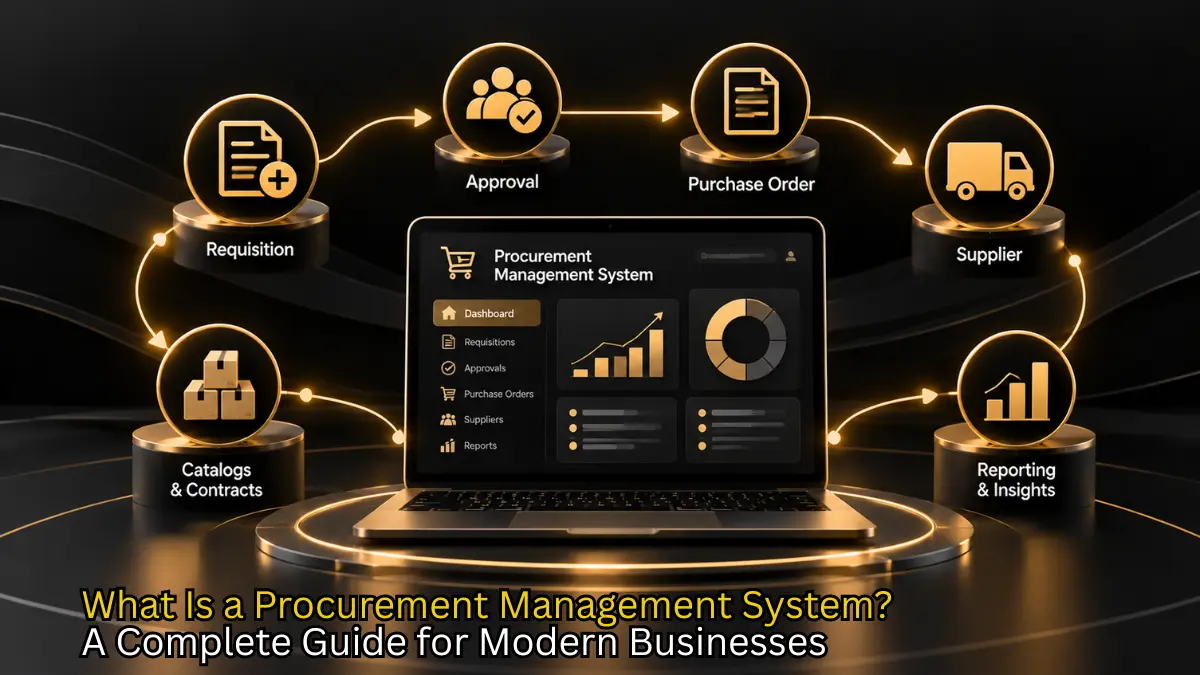
A procurement management system manages a connected sequence of purchasing activities. The exact workflow varies by organization, but a typical procure-to-pay process moves from a purchase request to approval, ordering, receipt, invoice verification, and payment.
1. Employees submit a purchase request
The process begins when someone identifies a need for a product or service.
Instead of sending a request through email or chat, the employee creates a purchase requisition in the system. The requisition can capture information such as the item or service required, quantity, estimated cost, department, project, and supporting documents.
A purchase requisition is an internal request to acquire goods or services. It is different from a purchase order, which is the formal order sent to the vendor after the required approvals.
2. The request moves through approval
The system routes the requisition according to predefined business rules.
For example, a low-value software purchase might require a department manager’s approval, while a larger purchase could require additional review from Finance or Procurement.
Automated routing makes the approval path visible and creates a record of who approved or rejected the request. SAP’s current procurement documentation describes approval routing based on configured business rules as a standard capability.
3. An approved request becomes a purchase order
Once the requisition receives the required approvals, the purchasing team or system can create a purchase order.
A PO typically specifies what the organization intends to purchase, including quantities, prices, and other order details. It gives the vendor a formal record of the requested purchase.
Procurement management software can reduce manual re-entry by carrying information from the approved requisition into the purchase order.
4. The organization receives the goods or services
After the vendor fulfills the order, the organization records what it received.
For physical goods, this may involve recording a goods receipt. For services, the organization may use a service confirmation or service entry process.
Keeping the receipt connected to the original PO gives Finance and Procurement another record to use when checking the vendor’s invoice.
5. The invoice is checked before payment
The vendor submits an invoice for the goods or services provided.
Depending on the organization’s process, the system can compare the invoice with the purchase order and receipt. This is commonly known as three-way matching.
The purpose is clear. Confirm that the organization ordered what it was billed for and received what it ordered before payment is approved. SAP documents invoice reconciliation as part of its procure-to-pay workflow.
6. Payment is processed
Once the invoice passes the required checks and approvals, the payment process can proceed through the organization’s finance or ERP system.
At this point, the procurement process has created a connected record from the first request to the final payment. That record can support reporting, reconciliation, compliance reviews, and future purchasing decisions.

“We are not automating the old organisation. We are designing a new one where AI does the work and humans provide the judgement.”
– Mauricio Odovaine, Global Head of Strategic Sourcing, Meta
What Problems Does Procurement Management Software Solve?
The value of a procurement management system is not simply that it replaces paper or email. Its main purpose is to create more control and visibility around how an organization buys.
Disconnected purchase requests
When employees submit requests through email, chat, spreadsheets, and informal conversations, procurement teams can struggle to see what has been requested, who needs to approve it, and where it stands.
A centralized intake process gives every request a defined starting point and status.
Slow approval cycles
Manual approval workflows often depend on someone noticing an email and responding to it.
Procurement management tools can route requests automatically according to rules such as department, spend threshold, category, or project. This creates a more consistent approval process.
Limited spend visibility
Procurement data may become fragmented when purchase orders, invoices, vendor records, and expense information sit in separate systems.
A centralized procurement management solution can connect purchasing information and give teams a clearer view of spend by vendor, category, department, project, or other dimensions supported by the system.
Maverick or off-process spending
Maverick spending refers to purchases made outside approved procurement processes, contracts, or vendors.
A procurement system can reduce opportunities for off-process buying by directing employees through approved workflows, catalogs, vendors, budgets, and approval rules. Precoro and Procol both identify maverick buying reduction as a primary benefit of procurement management software.
A guided procurement system (guided buying) is a self-service purchasing interface that steers employees to the right channel based on what they’re buying: preferred-supplier catalogs, approved contracts or a request intake form. Purchases follow policy automatically, which raises on-contract spend and cuts maverick buying without procurement reviewing every request.
Difficulty maintaining vendor information
Vendor records often contain more than a company name and contact details.
Procurement teams may also need orientation documents, contracts, performance information, compliance records, and purchasing history. A centralized vendor record makes this information easier to access and maintain.
What Are the Key Features of a Procurement Management System?
The right feature set depends on the organization’s procurement process. However, several capabilities are common across modern procurement management software.
Purchase requisition management
Employees should be able to submit structured purchase requests and track their status.
The system should make it clear what is being requested, who needs to approve it, and what happens next.
Approval workflows
Approval workflows route requests to the appropriate people based on organizational rules.
Useful controls can include approval thresholds, departments, cost centers, categories, entities, and other conditions relevant to the organization’s procurement policy.
Purchase order management
Procurement software can help teams create, send, track, and manage purchase orders.
A useful system should also connect POs alongside the original request and subsequent receiving or invoice records rather than treating each document as a separate transaction.
Vendor management
Vendor management capabilities can centralize vendor information and support onboarding, documentation, performance tracking, and compliance activities.
The exact capabilities vary between procurement platforms, so buyers should check whether vendor management covers the processes their team actually needs.
Invoice processing and matching
Procurement systems may connect purchasing activity with accounts payable workflows.
Features can include invoice capture, approval routing, purchase order matching, receipt matching, and exception handling. Modern procurement platforms increasingly connect procurement and AP rather than treating them as entirely separate functions.
Budget and spend control
Procurement management software can help organizations monitor spending against budgets and purchasing rules.
For example, a system may route a request for additional approval when it crosses a defined threshold or give Finance visibility into committed and actual spend.
Reporting and analytics
Reporting turns procurement records into information teams can use.
Common reporting areas include spend by vendor, category, department, project, purchase order status, approval activity, and invoice exceptions.
APQC’s September 2026 procurement benchmark research groups procurement performance around areas including cost effectiveness, cycle time, process efficiency, and staff productivity. These are useful starting points for defining what a procurement management system should report on, alongside the organization’s own procurement metrics.
Integrations
Procurement rarely operates in isolation.
A procurement management system may need to exchange data with an ERP, accounting platform, expense system, inventory system, or other business applications.
Integration requirements should therefore be evaluated before implementation rather than after a procurement platform has already been selected.
What Are the Benefits of an Online Procurement Management System?
Moving procurement into an online system can create numerous operational benefits, but the results depend on how well the software fits the organization’s process.
Better visibility into purchasing
A centralized system gives procurement and Finance a shared view of requests, POs, vendors, invoices, and purchasing activity.
Instead of reconstructing the history of a purchase from several email threads and spreadsheets, teams can follow the transaction through its workflow.
More consistent purchasing controls
Approval rules, purchasing policies, vendor requirements, and documentation can be built into the workflow.
That means controls can happen before a purchase is completed rather than relying entirely on a review after the money has already been spent.
Less manual data entry
When information moves from requisition to PO to receipt and invoice, employees do not have to recreate the same information at every stage.
Automation is especially useful for repetitive activities such as routing approvals, creating documents, matching records, and updating statuses.
Stronger audit trails
A digital procurement workflow can record requests, approvals, purchase orders, receipts, invoices, and related actions.
That creates a more complete transaction history and can make it easier to investigate exceptions or prepare for an audit.
More useful procurement data
A procurement system does more than store transactions. It can provide the data needed to identify spending patterns, supplier concentration, price differences, approval bottlenecks, and other areas that deserve attention.
The value of the data depends on its quality. A system cannot produce reliable procurement insights if the underlying vendor, category, or transaction information is inconsistent.
Who Should Use a Procurement Management System?
A procurement management system can be useful for organizations where purchasing involves multiple people, approval steps, vendors, departments, locations, or financial controls.
It is especially relevant when teams start experiencing problems that spreadsheets and email cannot handle efficiently.
Growing companies
As a company grows, more employees can become involved in purchasing. Finance may need better visibility while procurement needs more consistent controls.
A centralized procurement workflow can provide structure without requiring every employee to understand the full procurement process.
Mid-market and enterprise organizations
Larger organizations often manage more vendors, categories, departments, entities, and approval rules.
A procurement management solution can help standardize processes while allowing different teams or business units to follow appropriate approval and purchasing rules.
Organizations with strict compliance requirements
Companies that need documented approvals, vendor records, purchasing controls, or audit trails may benefit from having these requirements built into the purchasing workflow.
The specific compliance requirements depend on the industry, geography, and organization, so the software should be evaluated against those requirements rather than assuming one feature set works for every business.
Procurement Management System vs. ERP: What’s the Difference?
An ERP is designed to manage a broad set of business processes, including financial management and other operational functions.
A procurement management system focuses more specifically on the purchasing process and can provide specialized workflows for requests, approvals, vendors, purchase orders, receiving, invoices, and spend reporting.
The two do not have to be competing systems.
In many organizations, procurement software works alongside an ERP. Procurement manages the purchasing workflow and related data, while the ERP remains part of the organization’s wider financial and operational system. Oracle, SAP, and Coupa all describe source-to-pay integration as a common deployment model.
The right question is therefore not always “procurement software or ERP?” It is often “what procurement capabilities should sit inside or alongside our ERP?”
| Procurement management system | ERP |
|---|---|
| Focuses primarily on procurement workflows | Covers multiple business functions |
| Handles purchase requests and approvals | Manages broader financial and operational processes |
| Provides specialized purchasing workflows | Provides a wider enterprise system of record |
| Centralizes procurement and vendor information | Connects procurement with finance and other business data |
| May integrate with an ERP | Can receive procurement and financial data from connected systems |
How Do You Choose the Right Procurement Management System?
Start with your existing procurement process rather than the software’s feature list. Rankings of the best procurement software are useful for building a shortlist, but your own workflow should decide the final choice.
1. Map your current procurement workflow
Document how a purchase moves from request to payment today.
Identify where requests enter the process, who approves them, how POs are created, how receipts are recorded, how invoices are checked, and where data moves into Finance.
This gives you a baseline for evaluating procurement management software.
2. Identify your biggest process gaps
Do not automate every problem at once.
Determine whether your biggest issue is slow approvals, poor spend visibility, vendor onboarding, purchase order management, invoice matching, reporting, or something else.
The software needs to address those specific gaps.
3. Define your approval and control requirements
Consider the rules the system needs to enforce.
These might include approval thresholds, departments, cost centers, categories, entities, budgets, preferred vendors, or compliance requirements.
A platform that cannot represent your actual approval structure may create more work instead of reducing it.
4. Check integration requirements
List the systems that procurement needs to exchange data with.
This could include your ERP, accounting software, inventory system, expense management platform, identity provider, or other business applications.
Ask how data moves between systems, what is synchronized, how frequently it is updated, and who owns the source data.
5. Evaluate reporting capabilities
Decide which procurement questions the system needs to answer.
For example:
- How much did we spend with each vendor?
- Which purchases are still awaiting approval?
- Where are we buying outside preferred vendors?
- Which categories have the highest spend?
- How much is committed versus invoiced?
- Where are invoices failing to match?
A good procurement management solution should make the answers easier to obtain from the underlying transaction data.
6. Test the employee experience
Procurement software only works if employees actually use the intended process.
During a demo, test the experience from the requester’s perspective, not just the procurement administrator’s.
Ask an employee to create a purchase request, attach supporting information, check its status, and respond to an approval or exception. If the workflow is difficult, employees may look for workarounds.
7. Consider implementation and total cost
The software subscription price is only one part of implementation.
Also consider configuration, integrations, data migration, training, change management, ongoing administration, and any additional modules or services required.
The implementation effort has to match the complexity of your procurement process.
How Can Zapro AI Support Procurement Management?
Zapro AI brings procurement, vendor management, spend analytics, AP automation, contract management, and integrations into one platform. Its procurement capabilities contain automated purchase request workflows, vendor management, purchase order management, invoice processing, spend analytics, and reporting.
The important distinction is that the platform is built around a connected procurement workflow rather than treating purchase requests, vendors, contracts, invoices, and spend reporting as completely separate modules.
For organizations evaluating procurement management software, that connected workflow is worth testing against the actual process your team follows from request to payment. To run that test, book a demo and walk one of your own purchases from request to payment.
Frequently Asked Questions
What does a procurement management system do?
A procurement management system organizes the process of buying goods and services. It can manage purchase requests, approvals, purchase orders, receiving, invoices, vendor information, and procurement reporting within a connected workflow. The exact scope varies by platform and configuration.
What is the difference between procurement software and procurement management software?
The terms are often used interchangeably. Both generally refer to software that supports and automates procurement activities. Some platforms focus on purchasing and procure-to-pay, while others also include sourcing, contract management, vendor management, spend analytics, or accounts payable.
What is an online procurement management system?
An online procurement management system is a web-based procurement platform that lets employees and procurement teams manage purchasing workflows digitally. Depending on the platform, users can submit requests, approve purchases, manage vendors, create POs, process invoices, and review procurement data through a centralized system.
Can procurement software integrate with an ERP?
Yes. Many procurement platforms have been designed to work alongside ERP systems. Integration can allow procurement data such as vendors, purchase orders, invoices, and payment information to move between systems. The specific integration method and data exchanged depend on the software and ERP involved.
What is the most important feature of procurement management software?
There is no single feature that has equal importance to every organization. For most teams, the starting point should be a reliable purchasing workflow that connects requests, approvals, orders, receipts, and invoices. From there, requirements such as vendor management, reporting, integrations, budget controls, and sourcing capabilities depend on the organization’s process.
Is procurement management software worth it for a small business?
It depends on the complexity of the business’s purchasing process. A small company with few vendors and simple approvals may not need a full procurement platform. As purchasing volume, departments, approval requirements, vendor relationships, or compliance needs grow, dedicated software can become more useful.
Don’t miss our weekly updates
We’ll email you 1-3 times per week—and never share your information.
Talk to Our Experts for Effortless PO Creation
Discover how Zapro can simplify your purchase order process no hassle, just speed.

About the Author

Md. Kafil


About the Reviewer

Zapro is dedicated to helping businesses of all sizes make informed decisions. We adhere to strict editorial guidelines to ensure that our content meets and maintains our high standards.
Our editorial standards help keep every article accurate, useful, and trustworthy.