Software applications that help businesses manage and automate purchasing activities are known as procurement tools. Each one supports part of the procurement function, which runs from identifying a need through to paying the supplier.
Procurement tools help replace broken procedures based on spreadsheets, emails, and manual data entry with streamlined workflows, approval controls, and real-time purchasing visibility.
Whether your business requires a complete source-to-pay platform or a dedicated tool for purchase orders, sourcing, supplier management, or accounts payable, the proper procurement tool can help make purchases organized and transparent.
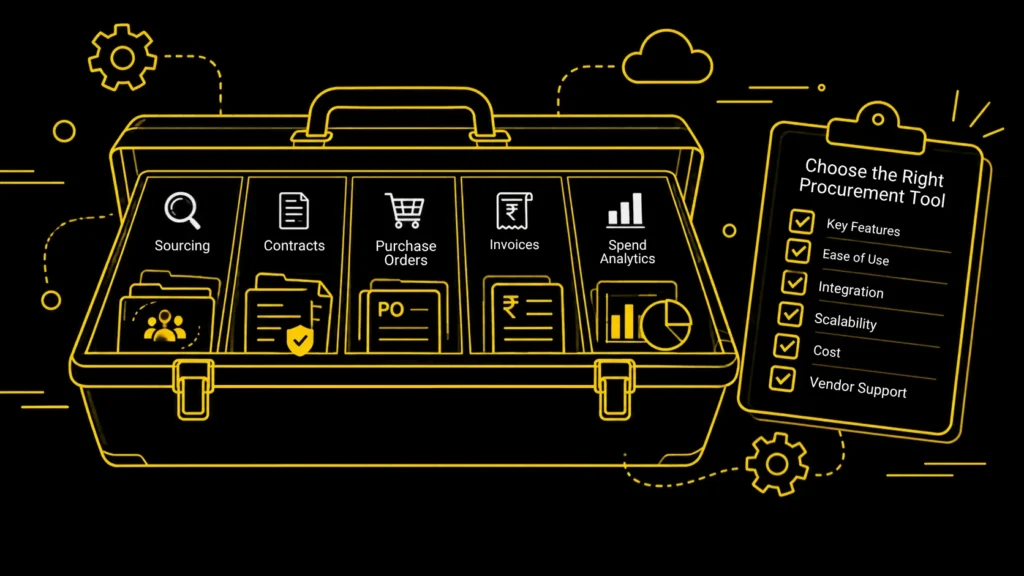
Key Takeaways:
- Procurement tools help organizations automate and manage the entire purchasing lifecycle.
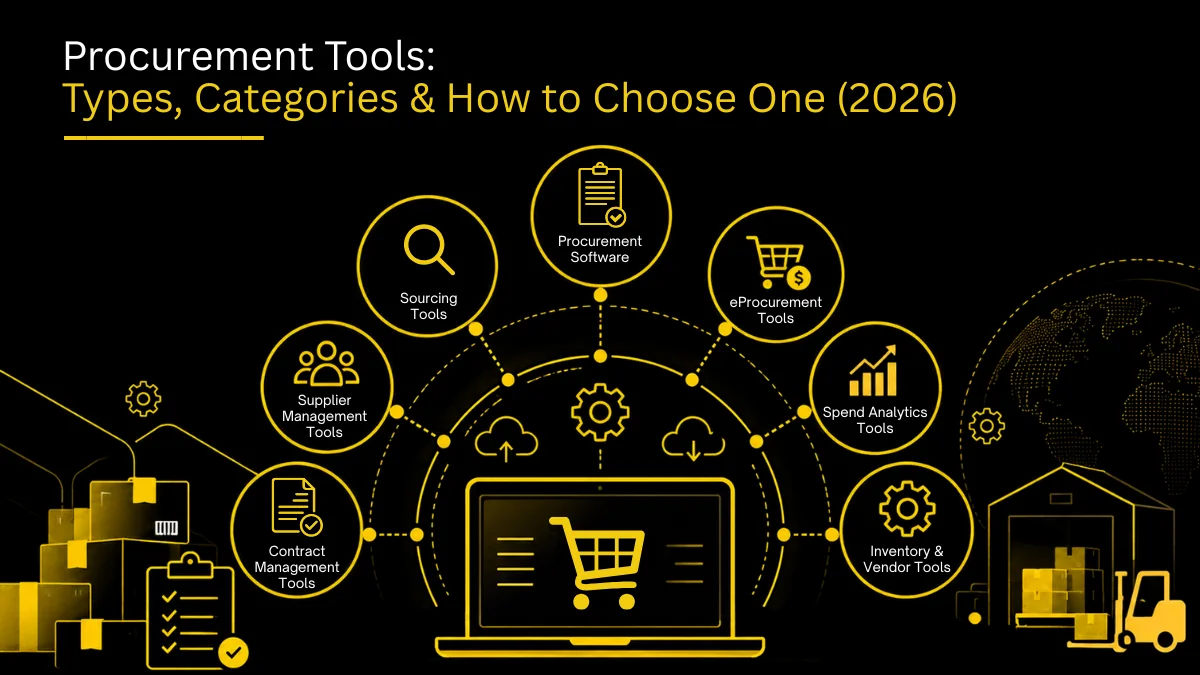
- Basic categories include source-to-pay, e-procurement, sourcing, spend analytics, supplier management, contract management, and AP automation tools.
- Most companies at a growing stage need a source-to-pay suite that combines a lot of these functions instead of five separate point solutions.
- Grade procurement tools on five criteria before purchasing, such as depth of automation, spend visibility, approval configuration, non-finance uses, and ERP integration.
Procurement Tools List
Procurement tools are software applications that automate and manage purchasing, such as e-procurement and purchase order software, e-sourcing and RFx tools, contract management, supplier management, spend analytics, invoice and AP automation, and procure-to-pay suites. They replace spreadsheets and email with workflows that improve control, visibility and savings.
| Procurement Tool Category | What It Does | Best Suited For |
|---|---|---|
| Source-To-Pay Software | Manages Sourcing Through Purchasing And Payment | Businesses Requiring An End-To-End Platform |
| E-Procurement Tools | Digitize Requisitions, Approvals, Catalogs, And POs | Teams Looking To Streamline Purchasing |
| Sourcing Tools | Support Supplier Discovery, RFQs, RFPs, And Bidding | Strategic Sourcing Teams |
| Spend Analytics Tools | Analyze Purchasing And Supplier Spending | Finance And Procurement Teams |
| Supplier Management Software | Manages Supplier Information, Onboarding, And Performance | Businesses With Large Supplier Networks |
| Contract Management Software | Manages Contracts, Renewals, Obligations, And Approvals | Procurement And Legal Teams |
| AP Automation Software | Automates Invoice Processing, Matching, And Payment Workflows | Finance Teams Handling High Invoice Volumes |
The Seven Categories of Procurement Tools
Procurement software tools are available in different types, each specifically designed to meet different purchasing needs.
Being familiar with these categories makes it easier to compare tools and find the one that suits your organization.
Source-to-pay Procurement Software
Source-to-pay platforms incorporate different stages of procurement in a single system.
Relying on the platform, this can cover sourcing, supplier management, requisitions, approvals, purchase orders, receiving, matching invoices, and releasing payments.
Some platforms that provide such specifications are Zapro, SAP Ariba, Coupa, and Oracle Procurement Cloud.
It works extremely well for businesses that want to connect more than one procurement process rather than handling separate systems.
Benefits of S2P
- streamlines procurement process
- automates the approval process
- manages purchase order
- supplier sourcing and management
- audit trail of spend
- matching invoices and procurement reporting
- ERP and accounting implementation
The main advantage of a source-to-pay platform is connecting all the processes through a shared network.
E-Procurement and Purchasing Tools
E-procurement tools focus mainly on the purchasing process.
They assist employees in finding relevant products and services, submitting requests for approval, and managing the entire procurement cycle.
These are usually lighter than full-scale S2P platforms.
Businesses that are already equipped with accounting or AP software but need better control over purchasing benefit more from such platforms.
Basic abilities are:
- purchase requisition and digital catalogs
- approval systems and purchase orders
- controls budgets and purchasing policies
- track orders and reports for basic procurement.
E-procurement tools can be used for uncontrolled or informal purchasing.
Sourcing Tools for Procurement
Sourcing tools for procurement help procurement teams identify, assist, and choose suppliers.
They are generally used at the beginning of the procurement cycle before creating a purchase order.
Advantages are:
- discovery of supplier
- RFPs and RFQs
- bidding management
- comparing and evaluating suppliers
- sourcing events and supporting negotiation
It works extremely well for procurement teams that need to manage rigorous sourcing events and regularly assess multiple suppliers.
Businesses with less complex purchasing requirements would not need dedicated procurement software.
But businesses with complicated categories, huge supplier bases, or frequent RFPs will benefit from specialized sourcing capability.
Spend Analytics Tools
Spend analytics software converts purchasing data into a dashboard and reports showing exactly where the money is being spent.
Organizations can utilize these tools to evaluate spending by supplier, category, department, business unit, location, time period, and purchase type, time period..
Finance and procurement teams that already have purchasing data but lack visibility into spending patterns need these.
Spend analytics help identify duplicate suppliers, irregular spending, unnecessary purchases, and consolidate suppliers.
If organizations are already equipped with procurement software, spend analytics can be integrated into that platform instead of a separate tool.
Supplier Management Tools
Supplier management software streamlines supplier data and assists procurement teams in managing the supplier lifecycle.
Based on the platform, it can have features like:
- Supplier profiles and onboarding
- Document collection and compliance tracking
- Assessment of risks and evaluation of supplier performance
- Supplier communications and renewal monitoring
It helps businesses manage a large and distributed supplier base as supplier volume and compliance requirements increase.
Contract Management Tools
Contract Management Tools facilitate managing contracts from the start of the contract to its expiration.
Procurement teams may use CLM tools to analyze
- terms of supplier contracts
- approval status and renewal dates
- expiration dates and contradictions
- compliance requirements and agreements
It works immensely well for businesses where there are multiple contracts that are difficult to track manually.
Contract management is directly connected to procurement because supplier terms affect spend and purchasing.
Accounts Payable Automation Tools
Accounts payable automation tools look after the economic side of purchasing.
They help in digitizing invoice capture, validation, matching, approval, and payment lifecycle.
They help in:
- extracting data from invoices
- matching purchase order
- two-way and three-way matching
- invoice approval systems
- detects duplicate invoices
- processing payments and AP reports.
It works extremely well for processing large numbers of invoices.
Accounts Payable Automation works as a centralized solution as a part of a bigger procurement or S2P platform.

Organizations that leverage digital procurement tools see a 30% reduction in procurement costs.
– Deloitte
Procurement Tools vs Purchasing Tools
People often use the terms procurement tools and purchasing tools as synonyms, but they mean different things.
Purchasing is the transactional act of buying goods/services, while procurement is the entire process that leads to the beginning and completion of the purchase.
If your organization’s goal is to control employee purchases, a purchasing tool would be enough, but if you need to handle the broader supplier and purchasing cycle, you should opt for large-scale procurement software.
Requisition, approval, PO, and invoice match — in one unbroken flow.
What Features To Look For in Procurement Tools and Software
Every procurement platform offers different functionalities. So, before choosing suppliers, identify the features your business needs.
Purchase Requisitions
Enables employees to submit purchase requests virtually with appropriate information.
Approval Workflows
You can search for configurable approval rules depending on factors like department, purchase amount, category, location, budget, requester, supplier, etc.
Purchase Order Management
The platform should make the process of creating, approving, sending, and tracking purchase orders with a clear record.
Supplier Management
Supplier management includes onboarding, documentation, performance tracking, compliance checks, and records.
Spend Visibility
Check for reports and dashboards that allow procurement and finance teams to understand spending records.
Invoice Processing
If accounts payable automation is significant to you, check whether the platform supports invoice capture, matching purchase orders, exception handling, and approval frameworks.
Integrations
Procurement software should connect with the systems already in use, such as accounting software, ERP platforms, Accounts Payable systems, Payment systems, HR systems, and supplier networks.
Refrain from depending on a supplier’s claims, but make sure to confirm the specific requirements.
Automation and AI
Modern procurement platforms use AI and automation for activities like extracting data, processing invoices, classifying suppliers, recommending purchases, routing approvals, detecting anomalies, categorizing spend, or assisting procurement.
However, one should evaluate AI features based on particular workflows that they automate and not just the “AI-powered” listing.
How to Choose the Right Procurement Tool
To choose the right procurement software, you need to start identifying what your business needs.
Identify Your Procurement Problems
Make a list of what your business is lacking and where the current system is affected.
These could include employees purchasing without approval, manual purchase orders, misinformation regarding the supplier, and so on.
The most significant problem is what will determine the kind of procurement tool you need.
Decide Between a Suite and a Point Solution
A point solution is focused on one area like sourcing, AP automation, or managing suppliers.
On the other hand, procurement suites combine many functions in one platform.
If you have a clearly defined problem and an existing system to handle the rest of the procurement, a point solution is your best bet.
A suite solution is beneficial for multiple disarrayed procedures.
Define Your Must-Have Features
Here is a sample checklist to help you determine your needs:
| Capability | Priority | Required |
|---|---|---|
| Purchase Requisitions | High | Yes |
| Approval Workflows | High | Yes |
| Purchase Orders | High | No |
| Supplier Onboarding | Medium | No |
| Spend Analytics | High | No |
| Contract Management | High | Yes |
| AP Automation | Low | Yes |
| ERP Integration | Medium | No |
| Mobile Access | Low | No |
This prevents impressive demo features from distracting you from the functionality your team actually needs.
Check Integration Requirements
One of the most important considerations is integration when choosing procurement software.
Evaluate whether the existing platform can connect with your existing ERP, accounting, HR, payment, and financial workflows.
Confirm whether there are native integrations, availability of APIs, synchronization of data, additional fees, and any questions that might help you with vendors.
Evaluate User Experience
Procurement software is not only meant for procurement professionals. It is supposed to help people from different departments such as finance operations, HR, marketing, and IT.
If everyday users struggle with navigating it daily, then even with advanced features, it cannot help.
Request a demo to test common workflows like submitting a purchase request, routing it for approval, creating a purchase order, receiving the order, matching the invoice, and reviewing the history.
Calculate Total Cost of Ownership
Subscription prices are not enough to compare vendors. One needs to consider additional prices such as software licenses, implementation, integrations, configuration, training, administration, future growth, etc.
If using a cheap tool requires heavy manual effort, then it should not be used.
Consider Scalability
The procurement software you get must match your growth requirements.
Take into consideration whether the platform can manage multiple users, entities, suppliers, locations, additional approval processes, international operations, and high transactional volumes.
Common Procurement Tools by Business Need
| Business need | Procurement tool to consider |
|---|---|
| Digitize Purchase Requests | E-Procurement Software |
| Control Employee Purchasing | Purchasing or PO Software |
| Manage Supplier Bids | Sourcing Software |
| Analyze Company Spending | Spend Analytics |
| Manage Supplier Onboarding | Supplier Management Software |
| Track Contracts | CLM Software |
| Automate Invoices | AP Automation |
| Manage The Entire Procurement Lifecycle | Source-To-Pay Software |
Procurement Tools for Small and Growing Businesses
Small and growing organizations do not require the same procurement infrastructure as large enterprises.
A small-scale company would initially need to handle:
- Purchase request management
- Approval workflows
- Purchase orders
- Supplier records
- Budget controls
- Basic reporting
- Accounting integration
As the business starts growing, it may need to integrate advanced functionalities like supplier risk management, contract management, sourcing, and spend analytics, etc.
That is why it is not essential to have every enterprise-level feature from the beginning, and the focus should be on scaling.
Procurement Tools for Enterprises
For enterprises, procurement environments need to be more detailed, as they can involve multiple locations, currencies, entities, approval structures, and supplier networks.
Enterprise procurement software may need to support several factors like
- Multiple levels of approval
- Procurement with several entities
- Managing suppliers across the globe
- Handling contracts and reviewing performances
- ERP integrations and risk assessment.
Common Mistakes When Choosing Procurement Software
Even with all the features, a platform can be unsuccessful if not chosen or implemented properly. Common mistakes include:
- Using pricing as the key factor, as the lowest subscription does not guarantee overall low cost.
- Buying more than you need, as it can create unnecessary costs for a business with simple requirements
- Daily users struggling to navigate it and continuing to use manual methods
- Overlooking integrations when it cannot run seamlessly with your existing system
- Focusing on features instead of workflows, as a feature-heavy list does not mean efficiency.
- Not considering future requirements and adapting to them.
The Five-Point Checklist for Choosing a Procurement Tool
Before choosing a procurement tool, compare each option based on these five factors:
- Organizational fit: Choose a tool that matches your current procurement processes and business needs.
- Features: Check whether it offers the features you need, such as sourcing, contract management, spend analysis, and AP automation.
- Integrations: Make sure it works with your existing ERP, accounting, and other business systems.
- Total cost: Consider the software price along with implementation, training, integrations, and ongoing maintenance costs.
- Support and scalability: Look for reliable customer support and a platform that can grow with your business.
Conclusion
Procurement tools help businesses automate purchasing by taking away email chains, spreadsheets, and interrupted processes.
There is something meant for every business, regardless of business size, from light purchasing tools to comprehensive S2P platforms.
If you’re comparing complete procurement software tools, talk to a zapro expert to see how you can automate purchasing, approvals, supplier management, and invoice workflows in one platform. You can also book a demo to walk one real purchase through requisition, approval, PO and invoice matching.
Frequently Asked Questions
What are procurement tools?
Procurement tools assist businesses in managing everything from purchasing and supplier management to invoices and spend tracking.
What is the difference between procurement software and procurement tools?
Procurement software usually covers multiple procurement processes, while procurement tools can also refer to specialized apps built for specific tasks.
What are the main types of procurement tools?
The main types include source-to-pay, e-procurement, sourcing, spend analytics, supplier management, contract management, and AP automation tools.
What are purchasing tools?
Purchasing tools help manage transactions like purchase requests, approvals, purchase orders, catalogs, and order tracking, but are usually narrower than full procurement platforms.
Can procurement tools integrate with ERP systems?
Many procurement platforms integrate with ERP and accounting systems, but support varies, so buyers should check compatibility, data flows, APIs, and implementation needs.
Don’t miss our weekly updates
We’ll email you 1-3 times per week—and never share your information.
Ready to Transform Your Procurement Process? Let’s Talk.
Get expert help to streamline and upgrade your procurement strategy.

About the Author

Md. Kafil


About the Reviewer

Zapro is dedicated to helping businesses of all sizes make informed decisions. We adhere to strict editorial guidelines to ensure that our content meets and maintains our high standards.
Our editorial standards help keep every article accurate, useful, and trustworthy.