Buying something for a business often involves more people than you expect. Even a new software subscription may need approval from a manager, a budget check from finance, and a review by procurement. When these steps happen over email and chat, requests can get delayed or lost.
Purchase requisition software helps bring these requests and approvals into one place. Let’s look at how it works, which tools are worth considering, and what to keep in mind when choosing one.
Key Takeaways
- Purchase requisition software helps businesses review and approve spending before placing an order.
- The software should match the company’s approval process, not force every purchase through the same set of steps.
- Request tracking, budget visibility, and the transition from requisition to purchase order are important areas to test.
- Small and mid-sized businesses may prefer simpler systems, while enterprises often need more complex workflows and integrations.
- A software demo should include a request that gets rejected, changed, or delayed, not just one that goes through successfully.
What Is Purchase Requisition Software?
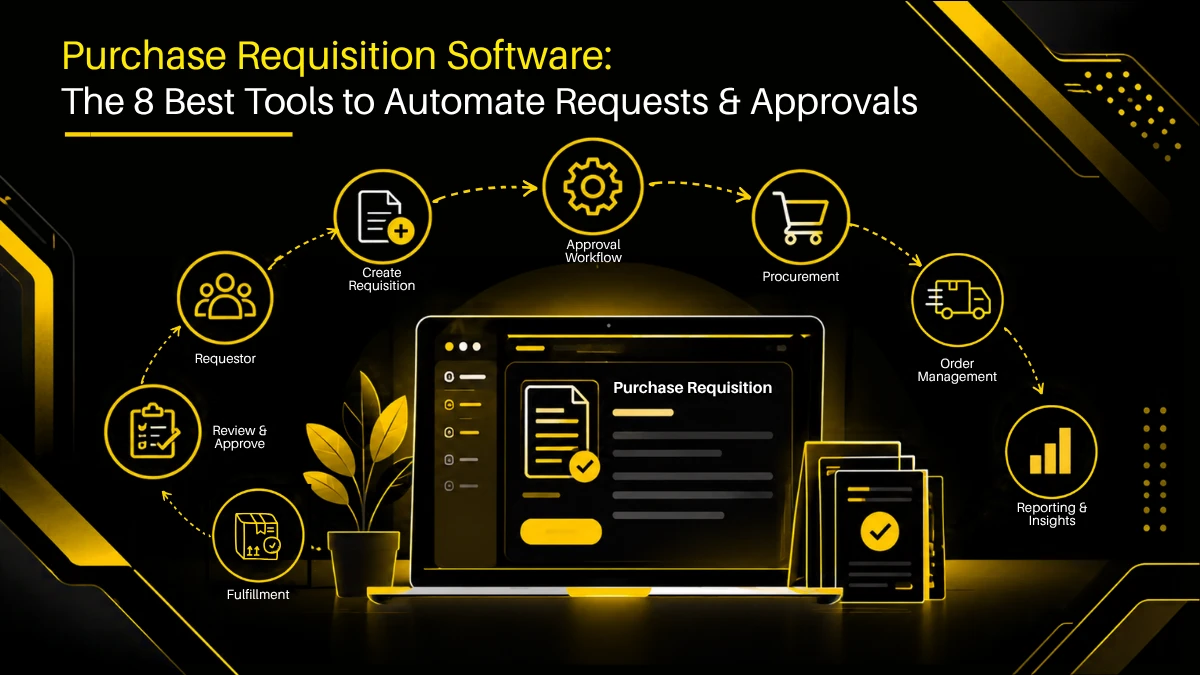
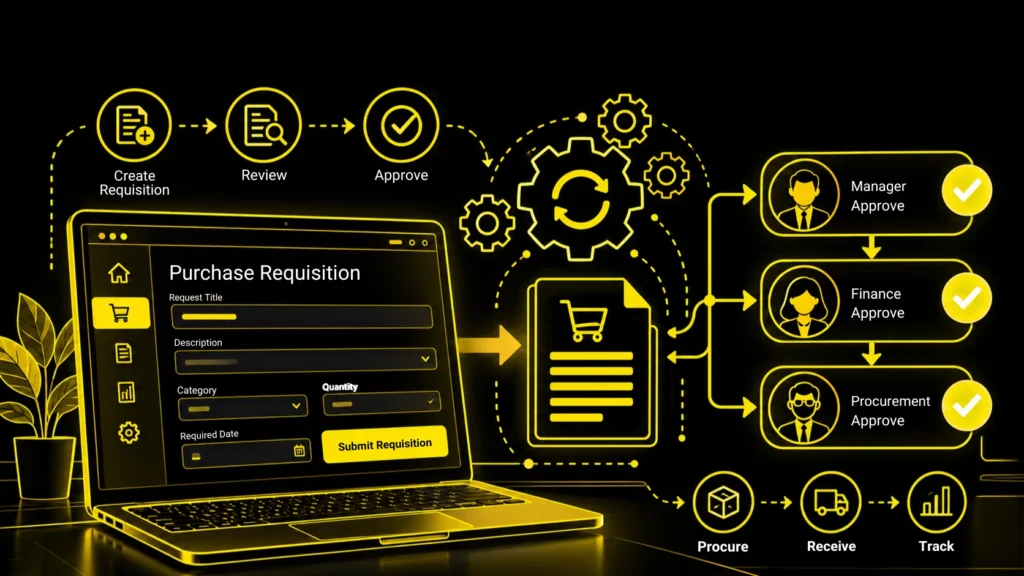
A purchase requisition is an internal request to buy goods or services. It tells the business what someone needs, why they need it, how much it is expected to cost, and who should approve the expense.
Purchase requisition software handles this process digitally.
The request might be for office supplies, a laptop, raw materials, a software subscription, or an outside service. Each purchase can require a different level of review. A routine order might need one manager’s approval, while new IT software could require checks from finance and the security team as well.
The system records these decisions so employees don’t have to keep asking where their requests stand.
Purchase requisition vs. purchase order
| Purchase requisition | Purchase order |
|---|---|
| An internal request to buy something | An order issued to a vendor |
| Explains what is needed and why | Specifies the items, quantities, prices, and applicable terms |
| Goes through internal review and approval | Communicates the approved purchase to the vendor |
| Usually comes before the order | Usually follows the required approvals |
For example, an employee may request five new laptops. Their manager approves the expense, IT confirms the specifications, and procurement selects the vendor. The purchase requisition records the request and its approval. The purchase order is then used to place the order.
Some systems connect these steps, allowing approved request details to carry into the purchase order instead of being entered again. This is one reason to evaluate requisition software as part of the wider procure-to-pay process.

Forrester expects global spending on order management system (OMS) software to reach $1.9 billion by 2026, up from $1.0 billion in 2021.
When Does a Business Need a Purchase Requisition System?
You might be in need of this right now. An employee buys a tool that another department already pays for. A manager approves a request over email, but finance never sees it until the invoice arrives. Procurement spends half its morning asking people for quotations, cost codes, or approval updates.
When this happens often enough, the problem is no longer a few missed emails. There is no reliable way to see what people want to buy, which purchases have been approved, and what still needs attention.
A purchase requisition system gives the team one place to handle those requests. Employees submit the details, the relevant people review them, and procurement can see which purchases are ready to move forward.
It becomes especially useful when several departments buy independently, spending limits vary by purchase, or finance needs a clearer picture of upcoming commitments. It can also help a growing business that has outgrown spreadsheets but isn’t ready to build a complicated procurement process.
10 Purchase Requisition Software Tools to Compare
Purchase Requisition Software Comparison
| Software | Starting price | User / vendor limits | Requisition & approvals | Beyond requisitions | Integrations |
|---|---|---|---|---|---|
| Zapro AI | $699/mo | Unlimited users; 50 vendors on Spark | • Request tracking • Approval workflows • Spend alerts | • Purchase orders • Vendor management • AP automation | ERP and accounting systems |
| Procurify | Custom quote | Plan-dependent | • Request tracking • Approval routing • Budget visibility | • Purchase orders • Receiving • AP and payments | QuickBooks, NetSuite, Sage Intacct |
| Precoro | $499/mo, annual billing | Plan-dependent | • Custom requests • Automated approvals • Budget controls | • Purchase orders • Receiving • Invoice matching | QuickBooks Online, Xero, Slack |
| Coupa | Custom quote | Contract-dependent | • Guided buying • Approval workflows • Spend controls | • Supplier management • Purchase orders • Invoicing | ERP and business systems |
| SAP Ariba | Custom quote | Product-dependent | • Guided buying • Requisition approvals • Catalog purchasing | • Sourcing • Supplier collaboration • Invoicing | SAP and enterprise systems |
| Kissflow | Contact vendor | Plan-dependent | • Custom request forms • Conditional approvals • Workflow automation | • Purchase orders • Goods receipts • Invoice matching | SAP, Oracle, NetSuite, Dynamics |
| ProcureDesk | $830/mo, annual billing | 10 users on Startup | • Request approvals • Budget tracking • Audit trail | • Purchase orders • Receiving • Invoice matching | QuickBooks, Xero, NetSuite |
| Pipefy | Contact vendor | Plan-dependent | • Custom forms • Approval routing • Status tracking | • Configurable purchasing workflows; confirm native features | Connectors and APIs |
| Zycus | Custom quote | Module-dependent | • Requisition management • Approval workflows • Procurement controls | • Sourcing • Contracts • Invoice management | ERP and enterprise systems |
| Tradogram | $99/mo, Essentials | Plan-dependent; requisitions in Premium and Scale | • Approval workflows • Budget tracking on higher plans | • Purchase orders • Supplier management • Receiving | Integrations and API options |
1. Zapro AI
Zapro AI connects purchase requests and approvals with other procurement activities, including purchase orders, vendor management, contracts, spend analytics, and accounts payable automation.
This can be useful for businesses that use separate tools for each stage. When employees have to enter the same information in different systems, mistakes and delays become more likely. A connected process makes it easier to track a purchase from the initial request to the invoice.
You can also explore the Zapro AI procurement software demo to learn more about its workflows.
2. Procurify
Procurify helps employees submit purchase requests and track their approval status. Its features include notifications and communication around requests, so employees can see where a request stands without repeatedly contacting the procurement team.
This can help businesses where requests often get delayed because employees don’t know who needs to approve them or whether more information is required.
3. Precoro
Precoro connects purchase requisitions with purchase orders and receiving. Employees can enter request details, attach documents, and submit requests for approval. Its help documentation explains how to create a requisition in the system.
One useful aspect of this setup is that approved requests can move into the next stage of purchasing. Teams may spend less time entering the same details again when creating purchase orders.
4. Coupa
Coupa is a business spend management platform that helps organizations manage purchasing and spending across departments.
It may be a good fit for larger businesses with different approval rules, spending limits, and purchasing policies. When comparing it with other tools, check whether it can handle your approval process without making everyday purchases difficult to manage.
5. SAP Ariba
SAP Ariba is worth considering if your company already uses SAP products or needs procurement software that works with a wider enterprise system.
Before choosing it, look at how purchase requests connect with your existing finance and purchasing processes. The products required, available integrations, and implementation work will depend on your company’s setup.
6. Kissflow Procurement Cloud
Kissflow offers configurable workflows for procurement and other business processes. This gives companies room to set up approval routes that match their internal policies.
The amount of flexibility you need is worth considering. If approval rules change often, check how easily your team can update them and whether changes require help from a technical team.
7. ProcureDesk
ProcureDesk helps businesses bring more structure to purchasing. It is worth exploring if your team wants to manage requests and approvals without relying on emails and spreadsheets.
For smaller teams, ease of use is important. Employees should be able to submit requests without needing help from procurement every time, and managers should be able to review and approve them without unnecessary steps.
8. Pipefy
Pipefy lets businesses build workflows around their internal processes. Companies can explore whether its configurable workflows suit the way they handle purchase requests and approvals.
If you need more than request tracking, check how the setup handles purchase orders, vendor records, budget controls, and purchasing reports. Some requirements may need additional configuration or other tools.
9. Zycus
Zycus offers procurement software for businesses looking to manage requisitions alongside other procurement activities.
Its broader range of solutions may suit larger organizations with more complex purchasing processes. Before choosing a product, confirm which features your team needs, how they will work with your existing systems, and what the implementation will involve.
10. Tradogram
Tradogram is a cloud-based procurement platform that businesses can consider when moving away from spreadsheets and informal purchasing records.
Check whether its features match your approval process and reporting needs. It is also worth reviewing the integrations and features included in each plan, particularly if finance needs clear records of approved purchases and expected spending.
Software features and pricing can change. Check each vendor’s current offering before making a decision.
Simplify requests, speed up approvals, and gain full control of procurement.

How to Choose the Right Purchase Requisition Software
The right software depends on where your current process falls short. Before comparing features, look at the problems your team deals with every day.
When purchase requests get stuck
Find out how the software handles approvals. Can employees see who needs to approve a request? Does it send reminders when something is pending? Can a manager delegate an approval when they’re away?
Also check what happens when a request is missing information. The employee should be able to make corrections without having to start over.
When finance can’t see upcoming expenses
Check what finance teams and approvers can see before a purchase is approved. The software should make it easy to review available budget information and identify requests that exceed spending limits.
It’s also worth checking how the system connects with your financial data and how often that information updates. Finance may need to account for approved purchases before the invoices arrive.
When employees enter the same details more than once
Look at what happens after a requisition is approved. Do the item details, quantities, vendor information, and accounting codes carry over to the purchase order, or does someone have to enter them again?
The same applies to the systems used later in the process. Zapro AI’s guide to integrating procurement with ERP and financial systems explains what to consider when connecting these tools.
When different departments follow different purchasing rules
A company with several departments or locations may need different approval limits, budgets, currencies, and reporting options. Check whether the software can support these differences without making the process difficult for employees.
Smaller businesses may not need all these controls, so there’s little reason to pay for complexity they won’t use. If you’re comparing broader procurement platforms too, see our guide to the best procurement software.
What Should You Ask During a Software Demo?
Ask the vendor to walk you through a purchase your team would actually make. Don’t stop at the standard approval process. See what happens when a request is incomplete, a manager rejects it, or something changes before the order is placed.
Here are a few situations to try:
- An employee submits a request without the required quotation.
- A manager sends a request back for changes.
- The purchase exceeds the available budget.
- The vendor changes the price before the order is placed.
- The person responsible for approval is unavailable.
- Information fails to transfer correctly to the accounting system.
Pay attention to how each issue gets resolved. Does the employee know what to do next? Can the approver make changes easily? Does someone have to update the same information in another system?
Ask about the total cost, too. The subscription price may not cover setup, data migration, training, integrations, or ongoing support. Get a breakdown of these costs from each vendor so you can compare their actual prices, not just their starting rates.
How Much Does Purchase Requisition Software Cost?
The price depends on the software you choose and what your business needs. Some tools offer standard subscriptions, while others charge more for advanced features, custom workflows, integrations, and implementation support.
A small business with a straightforward approval process may not need much customization. A larger company may need ERP integrations, data migration, and different approval rules across departments.
When you request quotes, give each vendor the same requirements, including the number of users, approval stages, reports, integrations, and features you need. This makes it easier to compare prices fairly.
Remember to account for ongoing costs, too. Your team may need to maintain user access, update approval rules, and resolve issues with requests. A cheaper subscription may end up costing more if the software requires a lot of manual work.

Stop Chasing Approvals. Start Automating Success.
Automate procurement from requisition to payment with Zapro’s AI platform. Cut processing time by 90%, eliminate errors, and replace 15+ tools with one intelligent solution.
Frequently Asked Questions
What is purchase requisition tracking software?
It lets employees, managers, and procurement teams see the status of a purchase request. Depending on the system, they may be able to see whether a request is awaiting approval, has been rejected, or has moved into the purchasing process.
Is purchase requisition software the same as purchasing requisition software?
The terms generally refer to the same type of software. Both describe tools used to submit, review, approve, and track internal purchase requests.
Can purchase requisition software create purchase orders automatically?
Some platforms can convert approved requisitions into purchase orders or carry their details into the ordering process. The exact capabilities depend on the software and how the business configures its workflow.
What is the best purchase requisition software for small to mid-sized businesses?
There isn’t one option that suits every small or mid-sized business. Look for straightforward request forms, manageable approval rules, useful tracking, and integrations with the accounting tools you already use. Avoid paying for enterprise features unless your process needs them.
What should enterprises look for in purchase requisition software?
Enterprises should assess approval workflows across departments and locations, budget controls, ERP integrations, access permissions, audit records, and reporting. Implementation requirements and ongoing administration should be part of the decision, too.
References
- Zapro procurement software
- https://zapro.ai/procurement/procurement-software-demo/
- https://zapro.ai/procurement/procure-to-pay-process/
- https://zapro.ai/procurement/integrating-procurement-erp-financial-systems/
- https://zapro.ai/procurement/best-procurement-software/
- https://www.procurify.com/procure-to-pay/procurement/purchase-requisition/
- https://precoro.com/blog/purchase-requisition/
- https://help.precoro.com/how-to-create-a-purchase-requisition
- https://www.coupa.com/
- https://www.sap.com/products/spend-management.html
- https://kissflow.com/procurement/
- https://www.procuredesk.com/
- https://www.pipefy.com/
- https://www.zycus.com/
- https://www.tradogram.com/
Don’t miss our weekly updates
We’ll email you 1-3 times per week—and never share your information.
Let’s Simplify Your Requisition Management
We’ll unify your requisition data and help your team move faster and smarter.

About the Author

Md. Kafil


About the Reviewer

Zapro is dedicated to helping businesses of all sizes make informed decisions. We adhere to strict editorial guidelines to ensure that our content meets and maintains our high standards.
Our editorial standards help keep every article accurate, useful, and trustworthy.