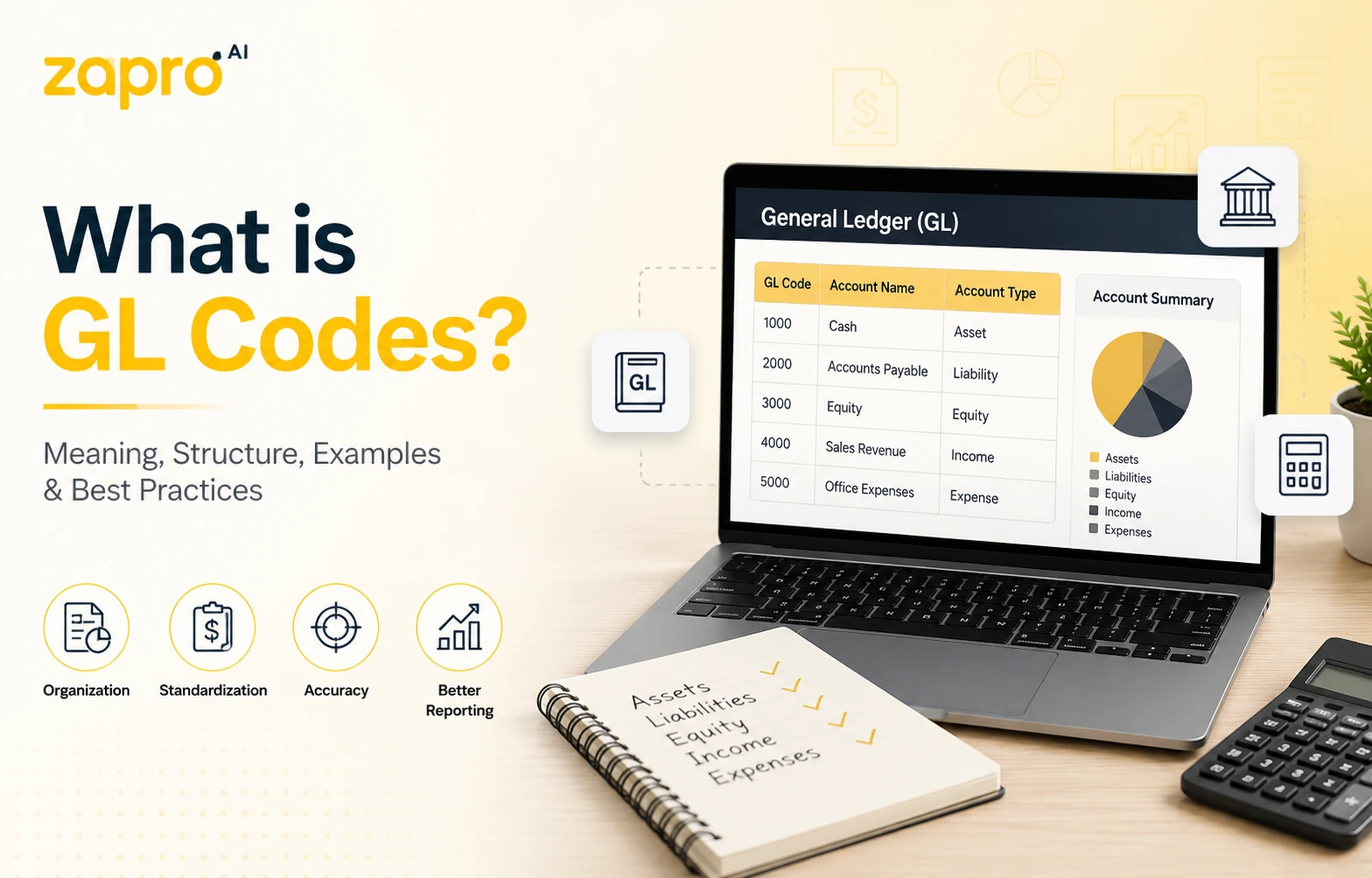
A GL, or a general ledger, is used by accountants to track every transaction of a company, and a GL code is a unique identifier that is implemented to ensure correct recording and categorisation of a transaction. Most codes combine an account number with segments for department, location and project. Coding every transaction consistently is what makes financial reporting, budget control and audit possible.
Key takeaways
- GL stands for general ledger. In accounting it has nothing to do with general liability, which is an insurance term.
- A GL code identifies the classification. A GL account number identifies the account. The two are often the same string, which is why they get confused.
- Most companies use a segmented structure: account, department, location, project. Segment order and count vary by ERP.
- There is no universal set of GL codes. Conventions exist, but every chart is built for its own business.
- Coding gets cheaper the earlier it happens. A code applied at requisition costs nothing to fix; the same code applied at invoice entry is already three approvals deep.
What is a GL code?
A GL code is an alphanumeric identifier an accounting system uses to classify a transaction. Every purchase, payment, receipt and journal entry is assigned a code, and based on that it is determined which line of which report the amount eventually lands on.
Without codes, a ledger is only a list of amounts. With them, it becomes something you can query — what marketing spent last quarter, what a project cost against budget, which expenses are deductible. The code is what turns a transaction into information.
What does GL stand for?
GL stands for general ledger. It is also written G/L, and the two are interchangeable.
The ambiguity worth clearing up early: in insurance, GL means general liability, a form of business cover with no connection to accounting. In some technical contexts it means graphics library. If you arrived here from a procurement or finance context, general ledger is the one you want, and it is the only meaning used on this page.
What is the general ledger?
The general ledger is the master record of every financial transaction a business has made. Sub-ledgers hold the detail for specific areas — accounts payable, accounts receivable, fixed assets — and post summarised entries up into the general ledger, which is the single source used to produce the balance sheet and income statement.
Every entry in the ledger has to be classified, and the GL code is the classification. That is the whole relationship between the two.
GL code vs. GL account number
Three terms that overlap enough to cause daily confusion.
| Term | What it is | Example |
| GL account number | The identifier for a single account in the ledger | 6400 |
| GL code | The full classification applied to a transaction, usually the account plus segments | 6400-200-01 |
| Chart of accounts | The complete structured list of every account available | All accounts from 1000 to 9999 |
In a single-segment system, the GL code and the account number are the same string, which is why the terms get used interchangeably. In a segmented system they are not: the account says what was bought, and the segments say who bought it and where. Whichever structure you use, the underlying entry is still a debit and a credit recorded as T-accounts — the code only decides which two accounts they land on.
Why GL coding matters in finance and procurement
Coding is administrative work with disproportionate consequences. Four of them matter most.
That link between GL coding and procurement is direct: a purchase order raised inside an AI procurement platform already carries a category and cost center, so the ledger entry it eventually creates is coded correctly before an AP clerk ever sees it.
Accurate financial reporting and faster month-end close
Financial statements are assembled by grouping coded transactions. If the coding is wrong, the statements are wrong, and the error surfaces during close when someone notices a variance nobody can explain. Most of the time lost at month-end is not spent producing reports. It is spent tracing miscoded transactions back to source and reclassifying them.
Spend visibility by department, project, and cost center
Segment coding is what lets you answer questions the account number alone cannot. Total spend on a code tells you what was bought. Spend broken down by department, location and project tells you whether a budget holder is on track, which project is running hot, and where a category is being bought twice by teams who do not know about each other.
Platforms such as Zapro AI are built around this idea, keeping GL coding tied to the department, project and cost center from the moment a purchase is requested rather than reconstructing that context later during reconciliation.
Audit readiness and tax compliance
Auditors sample transactions and check whether the classification supports the treatment. Consistent coding means the sample passes and the audit stays narrow. Inconsistent coding means the sample fails, the scope widens, and the fee rises.
Tax treatment depends on the same classification — deductibility, capitalisation and recoverable input tax all follow from how a transaction was coded. The records the IRS expects a business to keep are, in practice, the coded transaction history plus the documents behind it. A clean chart is what makes that history defensible without a reconstruction exercise.
Budget control and forecasting accuracy
Budgets are set against codes and consumed against codes. When coding drifts, a budget holder sees an underspend that is not real, because purchases landed on someone else’s line. Forecasts built from that history inherit the error, and the purchase price variance you calculate against them is measuring the wrong baseline. The problem compounds quietly, because nobody investigates a line that looks healthy.
GL account code structure explained
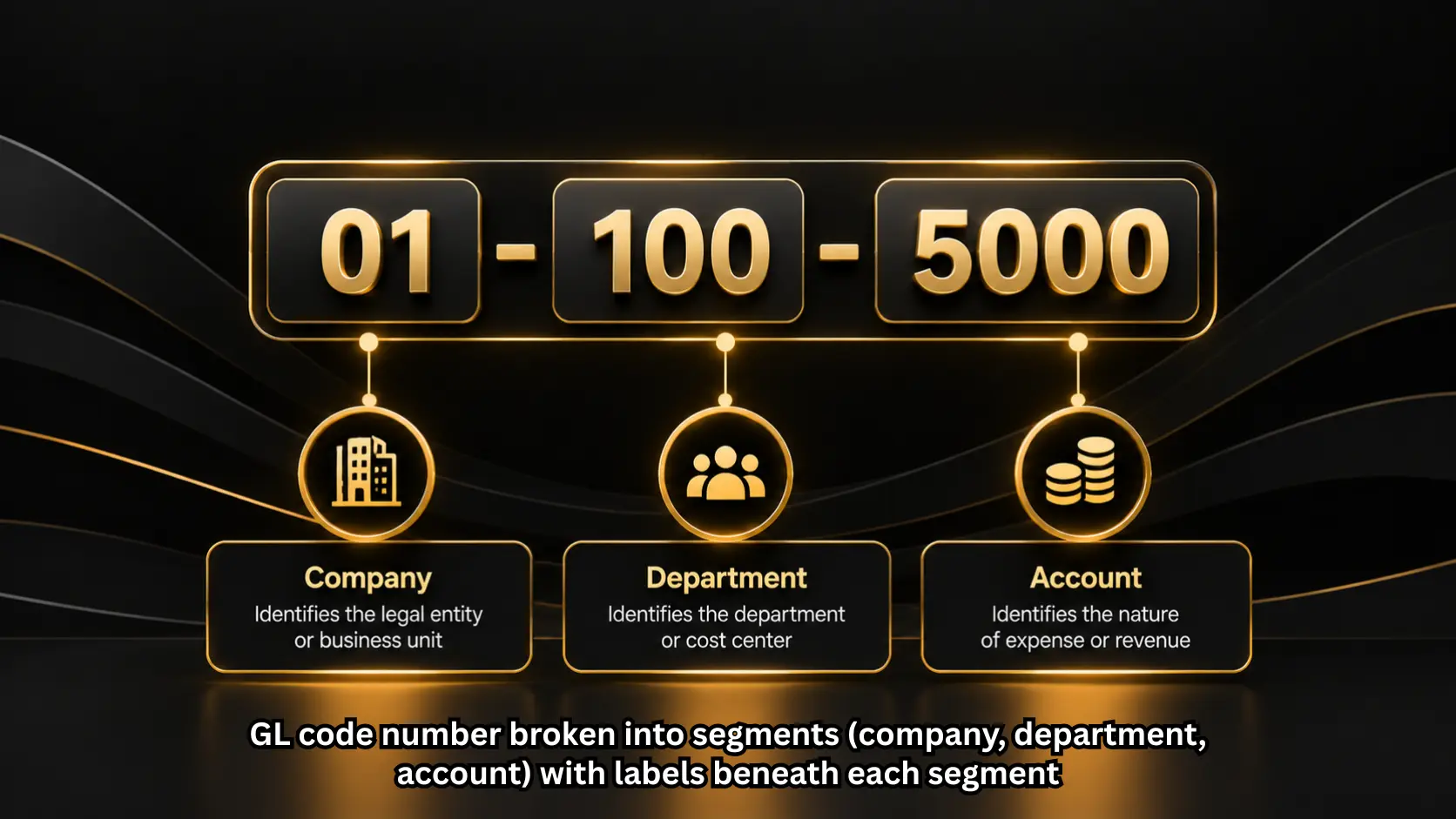
Most systems use a segmented code: a base account number followed by dimensions that add context. Segment count and order differ by organisation, but the logic is consistent.
Segment 1: Account type
The base account number, and the only mandatory segment. It places the transaction in one of five categories: assets, liabilities, equity, revenue, or expenses. This is the segment that determines which financial statement the amount appears on, and it is set by accounting rather than by the person spending the money.
Segment 2: Department or cost center
Identifies which part of the business owns the cost. Marketing, engineering, facilities, finance. This is the segment budget holders care about, because it determines whose budget a purchase consumes. It is also the segment most often coded wrong, since the person raising a requisition is not always buying for their own team.
Segment 3: Location or entity
Identifies the site, region, or legal entity. In a single-entity business this is often the office or site. In a group, it carries the legal entity, which makes it load-bearing for statutory reporting and intercompany elimination. Getting it wrong in a multi-entity structure is harder to unwind than any other segment error.
Segment 4: Project or product code
Attaches the transaction to a project, campaign, client engagement or product line. Usually optional, and populated only where project accounting is in use. It is what allows a total cost to be assembled for something that spans several departments and several months.
Custom segments
Beyond the four above, most systems allow additional dimensions: fund, grant, contract, channel, vehicle. Each adds precision and adds a field somebody has to complete correctly. The practical limit is not technical. It is how many fields a requisitioner will fill in accurately before they start guessing.
GL code examples
Standard GL code ranges
Most charts follow a numbering convention where the leading digit signals the account category. It is a convention rather than a standard, and it is not consistent across companies. The closest thing to a genuine published standard is the U.S. Standard General Ledger, which the Treasury maintains as a uniform chart of accounts for federal agencies — and it exists precisely because commercial charts are not uniform.
| Range | Category | Typical accounts |
| 1000–1999 | Assets | Cash, accounts receivable, inventory, equipment |
| 2000–2999 | Liabilities | Accounts payable, accrued expenses, loans |
| 3000–3999 | Equity | Share capital, retained earnings |
| 4000–4999 | Revenue | Product sales, service revenue, other income |
| 5000–5999 | Cost of goods sold | Direct materials, direct labour, freight in |
| 6000–6999 | Operating expenses | Salaries, rent, software, marketing, travel |
| 7000–7999 | Other income and expense | Interest, foreign exchange, disposals |
Composed GL code examples, decoded
Three codes read left to right.
6400-200-01
Account 6400 is software subscriptions, an operating expense. Segment 200 is marketing. Segment 01 is the UK entity. A marketing tool bought by the UK team, charged to the marketing budget, and reported as an operating expense.
5100-300-02-PRJ118
Account 5100 is direct materials, part of cost of goods sold. Segment 300 is manufacturing. Segment 02 is the second production site. PRJ118 attaches the cost to a specific build. The same materials bought without the project segment would still hit the right account but would be invisible in project reporting.
1500-000-01
Account 1500 is equipment, an asset rather than an expense. The department segment is zeroed because the asset belongs to the entity rather than a team. This code capitalises the purchase. The same laptop coded to 6500 would be expensed instead, which changes both the profit for the period and the tax position.
How GL code structures differ in NetSuite, SAP, and Dynamics 365
The concept is universal. The implementation is not, and the difference matters when you integrate procurement with finance.
NetSuite keeps the account number standalone and holds context in separate classification fields — subsidiary, department, class, location — plus custom segments. There is no single concatenated code string. An integration must map to several fields rather than parse one.
SAP uses a G/L account defined within a chart of accounts, with account groups controlling number ranges. Context sits in separate objects: company code, cost centre, profit centre. In S/4HANA the universal journal brought financial and management accounting into one table, so the same account carries both.
Dynamics 365 Finance combines a main account with financial dimensions into a segmented string, typically displayed with separators. Account structures define which dimension combinations are valid, so an invalid combination is rejected at entry rather than corrected later.
The practical consequence: a procurement system that assumes one concatenated code will need mapping logic for NetSuite and SAP, and validation logic for Dynamics. It is a useful question to ask when you compare procurement software options.
Who assigns GL codes, and when
Coding happens at one of two moments, and which one you pick determines how much of it gets corrected later.
GL coding at the requisition and PO stage
The earliest point a code can be applied is when someone requests a purchase. At that moment the requisitioner knows exactly what they are buying and why, and no approval has been given yet.
In practice they are rarely asked. Most requisition forms capture a description, a supplier and an amount, and leave classification to finance weeks later. That is a lost opportunity, because a code applied here can be defaulted from the catalogue item or the requisitioner’s department, checked by the approver as part of the approval they are already giving, and carried through to the purchase order automatically — attached to the PO number before the supplier ever sees it.
The requisitioner does not need to know accounting. They need a short, sensible list and a default that is right most of the time. Coding early also shortens everything downstream, which is the whole argument for treating the procure-to-pay process as one continuous chain rather than three handoffs.
GL coding at invoice entry
The alternative is coding when the invoice arrives, usually by an AP clerk reading a document from a supplier who has no idea how your chart is structured. The context that made the purchase obvious has gone, so the clerk infers from the line description or asks. That question and its answer are what makes invoice processing slow — and it is why invoice automation pays back fastest on the coding step rather than on data capture.
Common GL coding challenges
Inconsistent coding across departments
The same purchase gets coded differently by different teams, usually because the chart has two plausible accounts and no guidance on which applies. Software might sit under IT expense for one department and marketing expense for another. Nothing is technically wrong, and every report on that category is now unusable.
Manual data entry errors and misclassification
Codes are long strings of digits typed under time pressure. Transposition is common and hard to spot, because a wrong code is usually still a valid code — the transaction posts cleanly to the wrong place. These errors surface at close or at audit, long after the context needed to fix them has gone.
Spreadsheet-based GL management at scale
Charts maintained in spreadsheets drift. Someone adds an account without telling anyone, a retired code stays in circulation, and two versions of the file exist with different contents. Small teams get away with this. Once the chart passes a few hundred accounts across several entities, reconciling which version is authoritative becomes a monthly task in itself.
How to automate GL coding
Automation reduces how often a human types a code, and how often the code they type is wrong. It is the same principle the GAO puts at the centre of its internal control standards: preventive controls that stop an error being made are worth more than detective ones that find it afterwards. A wrong GL code found at close is a detective control doing expensive work.
Rule-based and AI-assisted coding
Rules map known inputs to known codes: this supplier and this category always post to this account. They are predictable and easy to audit, but they only cover what someone anticipated. AI invoice automation predicts from historical patterns instead, which extends coverage to transactions no rule was written for. The two work best together — rules for the traffic you can specify, prediction for the rest, and human review for anything low-confidence.
Those supplier-to-account rules only hold up if the underlying vendor data is accurate and current, which is why teams that manage their supplier records through an AI Vendor Management platform tend to see fewer coding exceptions land in the review queue.
Pre-coded catalogs and requisition defaults
The most effective automation is the least sophisticated. If a catalogue item carries its GL code, every purchase of that item is coded correctly without anyone deciding anything. Defaulting the department segment from the requisitioner and the location from their site handles most of the remainder. What is left is the genuinely ambiguous, which is the only part worth a human’s attention.
ERP and accounting system sync
Automation is only as good as the chart it references. If the procurement system holds a copy of the chart that was exported six months ago, it will confidently apply codes that no longer exist. A live sync keeps the list current and pushes coded transactions back without rekeying, which is what ERP and accounting integrations are for.
Frequently asked questions about GL codes
What is a GL code in accounting?
An identifier that classifies a transaction in the general ledger, determining which account it posts to and which line of the financial statements it appears on.
What is a GL code in finance?
The same thing. Finance teams tend to use the term for the full segmented string including department and location, where accounting may mean only the account number.
What does GL code stand for?
General ledger code. Also written G/L. In insurance, GL means general liability, which is unrelated.
What is a GL account number?
The identifier for one account in the chart, such as 6400 for software subscriptions. The GL code is the account number plus any segments applied to the transaction.
What does a GL code look like?
Usually four to six digits, sometimes followed by segments separated by hyphens or dots. A simple code is 6400. A segmented one is 6400-200-01.
Are there standard GL codes across companies?
No. Numbering conventions are widely shared, such as assets in the 1000s and expenses in the 6000s, but the accounts themselves are built for each business. Two companies in the same industry will have different charts.
What is the difference between a GL code and a cost center?
The GL code says what was bought. The cost center says which part of the business pays for it. In segmented structures the cost center is one segment within the full code.
Who is responsible for assigning GL codes?
Finance owns the chart and defines the codes. Who applies them to a transaction varies: a requisitioner at the point of request, an AP clerk at invoice entry, or a rule in the system.
Get GL coding right from the first click
Most coding problems are not accounting problems. They are timing problems. The code is applied weeks after the purchase, by someone who was not there, reading a supplier’s description of what they sold.
Zapro captures the requisition, the purchase order and the invoice in one place, so classification happens where the context is rather than where the paperwork ends up. If you are weighing the cost, Zapro pricing sets out what each plan includes. See how it works on your own chart.
Don’t miss our weekly updates
We’ll email you 1-3 times per week—and never share your information.
About the Author

Md. Kafil


About the Reviewer

Zapro is dedicated to helping businesses of all sizes make informed decisions. We adhere to strict editorial guidelines to ensure that our content meets and maintains our high standards.
Our editorial standards help keep every article accurate, useful, and trustworthy.