An automated purchase order (P.O.) system creates, routes, approves, and issues purchase orders via computer software rather than email and spreadsheets. The system checks each request against budgets, policies and contracts with vendors, and matching the P.O. with receipts and invoices. Most teams adopt one of these systems to reduce the cost and time it takes to process purchase orders, and increase the accuracy of the process.
Key Takeaways
- There are two types of purchase orders. The first type is simple and can be automatically processed within hours. The second type is more complex and can take days to process.
- It is difficult to determine the true cost of an automated purchasing system because the prices vary dramatically. Estimates range from about $17 to over $500 per P.O.
- Accurate and comprehensive data on vendors and items is more critical than any specific feature of the system.
- The ideal system would integrate the purchase order process with the invoice process to create a continuous, automated system to cover the entire “buy-to-pay” process.
- The best first use case is to automate the purchase order process for repetitive purchases.
What is an Automated Purchase Order System?
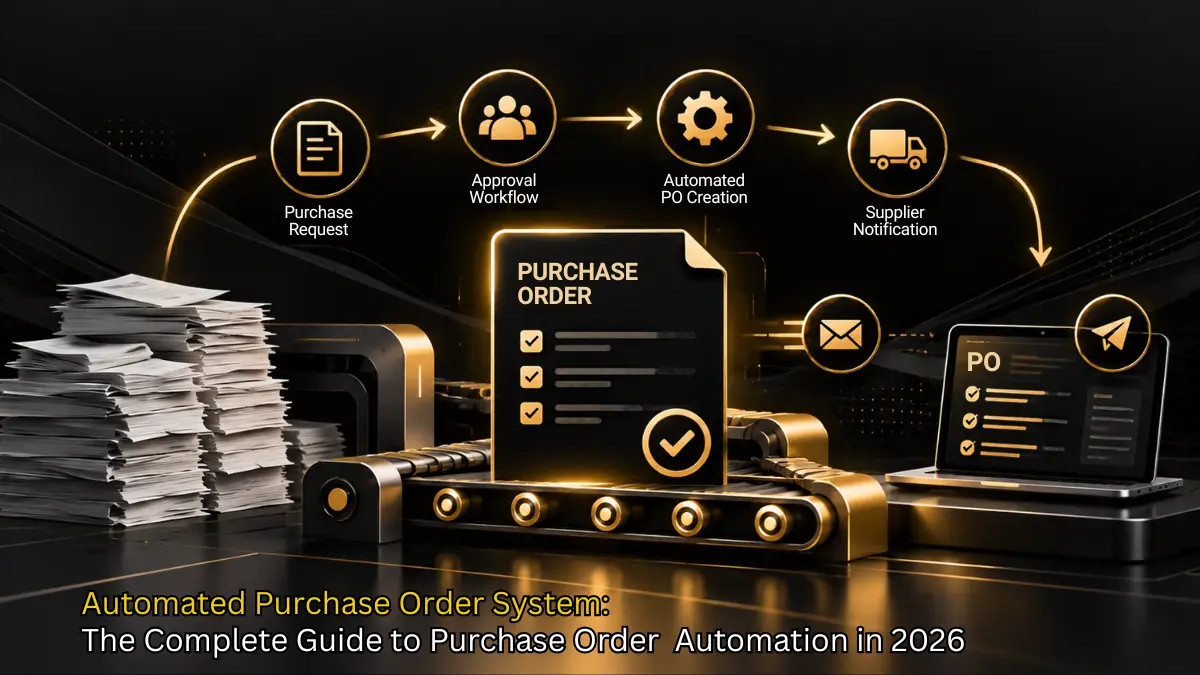
An automated purchase order system is software that automatically processes the purchase order lifecycle. It consists of a request module, an approval module, and a processing module. The system captures and sends purchase requests, purchase orders, and delivery receipts, and bills.
The terms purchase order automation, purchasing system automation and purchase order automation are often interchangeable. Purchase order automation can be described as the self-generation of purchase orders based on stock level.
Manual vs. Automated at a Glance
| Stage | Manual process | Automated process |
|---|---|---|
| Request | Email, chat, or paper form | Standard intake form with required fields |
| Approval | Forwarded by hand, chased by phone | Rule-based routing with reminders |
| PO creation | Typed into a template | Generated from approved data |
| Vendor delivery | Emailed as a PDF | Sent automatically, with status tracking |
| Matching | Staff compare documents by eye | System compares PO, receipt, and invoice |

By 2026, virtual assistants and chatbots will gain traction, as 20% of organizations use them to handle internal and vendor interactions.
– Gartner, Predicts 2024: CPOs Adjust to Technology’s Impact on Procurement
An automated purchasing system is software that handles routine buying with little manual effort. It turns approved requests or low-stock triggers into purchase orders, routes approvals by rule, sends POs to suppliers, records receipts and matches invoices automatically, which speeds up purchasing, enforces policy and reduces errors and maverick spend.
Core Features of Automated Purchase Orders
The most robust purchase order automation software is defined by powerful features that transform efficiency. Look for these essentials in any modern automated purchasing system:
- Auto generation from requisitions
- Digital approval workflows
- Vendor management integration
- Real time tracking and notifications
- Budget and policy compliance checks
- Three way matching automation
Stop Drowning in Manual Purchase Orders

How Automated Purchase Order Systems Work
The magic of an automated purchase order system lies in its simple, six step workflow that ensures compliance and speed:
Step 1: Requisition Creation
A user of the system personally submits a request for goods or services through the system. Vendor, budget code and quantity are selected by the user.
Step 2: Automated Approval Routing
The system immediately verifies the request against the local rules (e.g. amount, department, item type) and sends it to the appropriate manager or a chain of approvers.
Step 3: PO Generation
The system automatically creates a formal purchase order document once it has all the approval signatures.
Step 4: Vendor Communication
The purchase order expressing the agreement is sent electronically to the vendor by email or through a self service portal.
Automated vendor communication during the PO cycle works best when it’s backed by accurate supplier records — an AI Vendor Management software keeps contact details, performance history, and compliance documents current so automated notifications reach the right vendor contact.
Step 5: Receipt and Matching
On receiving the goods, the system performs a match of the original PO, the receiving report, and vendor invoice (three way matching).
Step 6: Payment Processing
Once the match is done, the invoice is automatically released for payment which is often done by a smooth integration with the accounting software. This final step is where dedicated AP Automation Software takes over, capturing the invoice, confirming the three-way match, and releasing it for payment without manual data entry.
Learn about procurement tools.
Implementing an Automated Purchasing System: Best Practices
Moving to an automated purchasing system requires a clear roadmap. Follow these six implementation best practices for guaranteed success:
This is the kind of workflow platforms like Zapro AI are built to automate end to end, from the initial requisition through vendor communication and final payment matching.
- Assess current process and map workflow
- Define requirements
- Choose solution (demos, references)
- Configure and integrate
- Train users and manage change
- Monitor KPIs and optimize
1. Assess Current Process and Map Workflow
It is wise to start with an examination of current purchasing operations. Identify those processes in which manual steps have been used and have caused the slow processing of purchasing operations. Several companies find that with the help of modern purchase order management software, they can quickly and efficiently close the discovered gaps. Visual representation of a full workflow opens up even more possibilities in understanding how different departments interact with an existing purchase order management system and selecting the right tools for automation.
2. Define Requirements
Write down the must-have features of the purchase order management software. Examples of this include automated approvals, vendor catalogs, integration support, or AI-based alerts. Defining clear requirements is a good starting point for procurement since it helps to identify the right solutions for purchase order management that support procurement strategies and eliminate inefficiencies simultaneously.
3. Choose Solution Using Demos and References
As a next step, you can check out the software solutions via demo and get first-hand experience with their functionalities. Then, talking to the vendor’s references will help you get reliable feedback of software performance and customer service. By hands-on trials, you can directly compare solutions and select the best purchase order system for your organization. A roundup of the best procurement software is a useful starting point for building that shortlist. Also, interaction with existing users exposes real-time issues and the overall support and long term value of the product.
4. Configure and Integrate
With your vendor, make sure you customize a chosen software solution to fit your department’s workflow. After you have set up approval paths, user roles, and budgets, connect the system with ERP, finance, and inventory management tools. A well-configured purchase order management system will result in work being done fast without involving data re-entry and creating a smooth, consistent, and automated environment.
5. Train Users and Manage Change
An effective change in behavior, that is, the users adopting the new system, depends largely on their preparedness. You can offer training, onboarding material, and here employees can see the support given and feel confident of working with the new purchase order management system. When groups are aware of the benefits that come along with an automated purchase order solution, their willingness towards change management gets higher.
6. Monitor KPIs and Optimize Continuously
After the system has been implemented, measurement of key performance indicators like cycle time, costs, policy compliance, and approval rate should be carried out. Up-to-the minute dashboards of the latest purchase order management resources enhance procurement software team efficiency by providing a quick overview of workflow changes and opportunities. Make use of these findings to adjust your criteria and extend automation so that your software for purchase order processes remains loyal over time.
The Future of Purchase Order Automation
The rapid pace of technological innovation means the future of purchase order process automation is incredibly exciting. We are moving beyond simple digital forms toward truly intelligent systems. One major trend is the integration of Artificial Intelligence and Machine Learning for predictive ordering. Imagine a system that knows you need to restock Item X next month and automatically creates a draft PO before the current inventory runs out. That is real power.
Besides this, Blockchain technology is to become the big winner in the future. This will deliver an unchangeable and clear register of all transactions, thus, greatly increasing the trust and security between buyers and sellers. Advanced analytics will evolve from simply reporting what happened to forecasting what will happen, thereby, helping to make more intelligent spending decisions. Even less complicated inventions, such as voice-activated approvals or integrated sustainability tracking to give the preference to eco-friendly suppliers, will turn into the standard functionalities. The ultimate goal is a buying cycle that is automatic and smart.
PO automation is one module of a larger category. See how e-procurement software platforms bundle it with catalogs, approvals and spend analytics.
Zapro: Your Partner in Purchase Order Automation
When you are ready to implement the benefits of an automated po system, you need a trusted technology partner, and that partner is Zapro. Zapro is a cutting edge platform designed from the ground up to excel at purchase order automation. What sets us apart is our AI powered automation engine. This is not just a digital workflow; it intelligently learns your spending patterns and risk factors, ensuring that the right requests are routed to the right people, every time.
The interface is so understandable that the teams can use the new automated purchase order system almost immediately, thus, the change management will be minimal. We implement our solution quickly and you don’t have to wait for six months to start saving money. Zapro is compatible with almost every major ERP and accounting platform in the world and so you can stop worrying about data silos.
Our real-time analytics provide you with the current status of your expenditure and budget consumption thus giving you the ability to make proactive decisions instead of reactive ones. Moreover, with our mobile-first design, your managers are able to approve an urgent purchase order from any location and thus a critical supply chain move will never be delayed. The transition with Zapro to a high efficient automated purchasing system is simple and you get the benefits immediately.
Automating PO creation pays back fastest when the platform also handles approvals and matching. See pricing and plans for the full automation suite.
Key Takeaways
The key takeaways for implementing automated purchase orders are:
- Automation eliminates errors and drastically reduces processing time.
- Digital workflows enforce budget compliance automatically.
- Features like three way matching prevent invoice fraud.
- The future involves AI for predictive and proactive ordering.
Conclusion
Ultimately, switching to an automated purchase order system is a far better way of doing business rather than just a new software adoption. How you operate will have a great effect on the efficiency, compliance, and profits of your business. Take a look at the different factors aside from the cost and decide which system will deliver you the perfect combination of the features, customer service, and longevity.
If chasing signatures is costing the team fifteen hours a week, schedule a procurement software demo and watch an automated approval clear in seconds.

Automate Purchase Orders in Minutes, Not Hours
From purchase orders to invoice matching—Zapro automates it all. Fewer errors, faster approvals, real-time insights. One unified platform.
FAQ
1. How does PO automation integrate with ERPs?
Most purchase order automation software achieve the connection with the ERP via APIs. This is a direct link with the ERP (such as SAP or Oracle) or accounting system (like QuickBooks or NetSuite). This interaction in both directions permits vendor information and monetary transactions to be the latests in both systems without any human intervention.
2. What happens if a PO is rejected or changed mid process?
When a rejection occurs, the automated po system, upon detecting it, immediately informs, via emails or messages, the person who made the request and the approvers who were involved previously, automatically returning the workflow to the submission stage. Should there be a need for a change, the system drafts a formal Change Order that has to undergo a new, specific approval process to keep a transparent audit trail.
3. Can I automate across regions and subsidiaries?
Yes, the best automated purchasing system platforms are designed to seamlessly handle situations involving more than one currency, tax regulations (like VAT and GST), and different regional approval hierarchies. They give you the freedom to set up different workflows and compliance rules for each subsidiary while keeping all data in one place.
4. How does PO automation support compliance?
Purchase order process automation is a system that enforces compliance by design, as it does not allow a step to be skipped. i.e. The system automatically verifies each submission against the budget and company policy before issuing an automated purchase order, thus ensuring that no one is able to make purchases outside of the approved channels. Furthermore, every action is recorded for easy auditing purposes.
5. Can AI improve purchase order automation?
Absolutely. Artificial Intelligence is moving beyond simple workflow routing. AI can improve purchase order automation by predicting ideal purchase times, suggesting the right vendor based on historical performance and price, identifying potential invoice fraud during the three way match, and continuously optimizing approval limits.
How Automated Purchasing Works Step by Step?
Automated purchasing follows the same path as a manual process, but software handles each handoff. The sequence below is typical for most platforms.
- Intake: The requester fills out a form to provide what is requested, the quantity, and the cost center.
- Policy check: The system checks the request against the budget, spend limits and preferred vendor list.
- Approval routing: Lower amount, in policy requests, automatically approve. Higher amounts and requests out of policy are sent to the appropriate manager.
- PO generation: A purchase order (PO) is created with terms and pricing and a unique number.
- Vendor delivery: The PO is sent to the vendor by email, portal or integration.
- Receipt and matching: The goods are received and the invoice is sent to the accounts payable department. A three way match is done between the invoice, purchase order and receiving report.
- Payment and reporting: Invoices are paid and spend data is reported to dashboards.
There are two triggers that start this process without a human request. A reorder point would create a purchase order when the quantity on hand is less than the reorder point. A scheduled purchase would be bought monthly and a purchase order would be created the month prior.
What the Numbers Say About Automated Purchase Orders?
Benchmarks agree on the general downward trend of costs and cycle time of purchase to pay process, but not on the actual numbers. Automation reduces the cost and time required to process a purchase order, but due to the various ways sources define “cost per PO”, the numbers reported vary widely.
Cost per Purchase Order
A 2026 research summary citing APQC’s 2025 benchmarks reports $17.29 per PO at the best-performing quartile, $42.61 at the median, and $73.83 at the bottom quartile. That is a 77% gap between leaders and laggards. The same summary cites Deloitte data putting fully manual workflows at $80 to $120 per PO, versus $10 to $15 for mature AI-based processing.
One of the reasons for the range is what is included in the cost of generating the purchase order. Is it just the labor to create the purchase order? Or is it the entire procure to pay process, which includes: planning, sourcing, negotiating, and post-award follow-up? Most of the highest numbers are reported by vendors who sell automation and should be considered upper bounds.
The cycle time benchmark for any company is its own internal baseline.
Cycle Time
Hackett Group’s 2025 study, cited in the same research summary, reports average times of 5.3 days from the request for the purchase order to the actual issuance of the purchase order, with top quartile teams at 1.4 days.
It reports APQC data segmented by complexity, with simple catalog purchase orders taking 0.8 days to automate versus 3.2 days to do manually, and complex non-catalog purchase orders taking 8.3 days to automate versus 14.7 days to do manually.
Focusing on the segmentation, if the rules are unclear and have to be determined, automation probably won’t reduce the time to zero, and may reduce the time to buy and to process by a few days. Automation is most helpful when the rules and policies are fixed.
Error Rates and Productivity Claims
Vendor sources state error rates drop from 15% to 25% to 1% to 2%. Another states 99.7% accuracy versus 77% for manual processes. These statements come from marketing material and do not include methodology. Be sure to test these in a pilot before using them to support a business case.
One of the statements comes from a different source. An efficient implementation of their system can reduce order handling time from 15 to 30 minutes to less than two minutes. This is a better number for budgeting, as you can easily multiply this by your order volume to get the potential savings for your organization.
A Simple Way to Estimate Your Savings
Use the following formula to calculate the potential labor savings for your organization.
Annual Labor Savings = (Minutes saved per PO ÷ 60) × POs Per Year × Hourly Loaded Labor Cost
For example, if a team of 10 saves 20 minutes per Purchase Order (PO), they would recover 2,000 minutes or 33.33 hours of staff time per year. At a loaded hourly rate of $40, this is an annual savings of $80,000.
Core Features of Purchase Order Automation Software
Strong purchase order automation software contains a short list of features, but covers these features well. The overall count of features is less important than the overall integration of the features.
Must Have Features
The automation software should provide features including approval workflows, budget checks, and vendor management. It should provide three-way matching of documents, and integrate with the ERP and accounting systems of the organization.
Audit trails showing user activity and spend analytics are the essential capabilities.
Other Capabilities
AI invoice and document capture, as well as other automated processes, improve the user experience for tasks such as expense report approvals, contract approvals, and procure-to-pay processes. These capabilities are mainly beneficial for high volume business processes.
How to Choose the Best Purchase Order Automation Tools?
The best purchase order automation tools differ by company size and existing systems, so no single winner fits everyone. Compare tools against the criteria below rather than relying on ranking lists, many of which are written by the vendors themselves.
| Criteria | What to ask | Why it matters |
|---|---|---|
| Fit with your ERP | Does it integrate natively or by custom work? | Poor integration brings back manual entry |
| Approval flexibility | Can finance edit rules without a developer? | Rules change often |
| Matching depth | Does it support two-way and three-way match? | Prevents overpayment |
| Pricing model | Per user, per PO, or flat? | Per-user pricing penalizes wide approver groups |
| Implementation time | Weeks or months? | Affects time to value |
| Support and reviews | Are reviews recent and independent? | Reveals real onboarding issues |
Where Zapro AI Fits?
We are focused on small to mid-sized teams for vendor onboarding and invoice processing. Our website shows prices starting from $699/month.
We integrate with several ERPs and spend analytics. Ensure your specific ERP is supported before purchasing.
Our strongest suite is procure-to-pay, and accounts payable automation. It may add less value to an organization that has a heavily customized ERP and procure-to-pay module.
How to Roll Out Purchase Order Process Automation?
Successful automation of purchase order processes occurs in stages and starts with small sets of data. Attempting to automate the entire system creates challenges in exception handling.
Phase 1: Map and Measure
Start by documenting your existing process. The four numbers are average number of days from the time a request is made to the time a purchase order is issued, cost to process a purchase order, percentage of purchase orders with errors, and the estimated percentage of spend that bypasses the purchase to order process. The last number often surprises and worries the CFO, since there is nothing that the finance system can control about off-P2O spend.
Phase 2: Clean Your Data
Prior to any migration, make sure your data is correct. This means no duplicate vendors, correct pricing, and cost centers are filled in. Automation will amplify mistakes.
Phase 3: Pilot One Category
Purchase order automation works best for common, repetitive, and low risk purchases such as office supplies, IT equipment, and other frequently ordered maintenance. Catalog purchases lend the greatest opportunity for process automation.
Phase 4: Define Approval Rules
Before setting rules in the process automation tool, write the rules in plain English. The rules could be “purchase orders under $500 from a preferred vendor are automatically approved.” Or, “purchase orders between $500 and $5,000 are approved by the purchasing managers.” The last rule could be “purchasing over $5,000 are approved by the purchasing manager and the finance business partner.”
Phase 5: Train and Expand
Show the workforce how the new automated system will help them eliminate follow up work. Adjust the rules after reviewing the results 60 to 90 days later and automate the next process.
APQC suggests measuring procure-to-pay in terms of cost, productivity, efficiency, quality, compliance, and cycle-time indicators. Then, they recommend improving the process by benchmarking and standardizing it and integrating the data. That said, improving speed at the expense of accuracy, rules, and control is not the best strategy and can be detrimental to the process in the long run.
Purchase Order Automation: Pitfalls, Scope, and Cost
The biggest process issues with automation come from breaking a bad process into several simple steps, skipping exception handling, and skipping change management.
Why Automation Projects Fail?
Automation does not serve the end-user. Users will continue to use the process they are comfortable with. If you are going to implement automation for purchasing and change management, you need to pilot it first and measure the results yourself. It is not wise to blindly trust a vendor’s benchmarks.
Metrics Beyond Cost and ROI
One of the major issues with automating purchasing processes is measuring cost and ROI only. There are many opportunities to measure how automation works, such as the compliance rate, how satisfied suppliers are, and how many early payment discounts are captured.
What an Automated Purchasing System Covers?
Automating a purchasing process covers creating and tracking purchase orders. Some systems can perform requirements or request creation and/or approvals. Furthermore, they can automate the receiving and/or invoice matching process. So, a purchasing process automation system can cover the entire process.
The cost of purchasing order automation varies based on the model. Some charge based on the number of users, while others charge a flat rate.
Zapro AI’s purchasing order automation system has plans starting at $699 a month. Make sure to get a quote that includes the cost of implementation and integration.
FAQ
How long does it take to automate purchase orders?
Purchase orders with one approval category and rollouts with standard approvals can be automated in 2-3 weeks. More complex rollouts with custom ERP integrations take longer. Data clean up usually takes the longest.
Does automation remove human approval?
Automation takes care of in-policy routine requests and sends out-of-policy exceptions to human approval. The studies cited earlier note that same-day automated approvals are typically for routine requisitions that meet policy, budget, and pre-approved contracts.
Can small businesses use purchase order automation?
Automating purchase orders is something small businesses can definitely do, as purchasing is usually done by a small number of people. Look for tools with low prices and quick implementation, not large enterprise tools.
References
- APQC: How Should Procure-to-Pay and Accounts-Payable Performance Be Measured and Improved
- APQC: Procurement Key Benchmarks
- Zapro: AI Procurement Software
- Zapro: Purchase Order Management Software
- Leverage AI: Manual vs. Automated Purchase Order Processing
- Stealth Agents: AI Purchase Order Automation Stats in 2026
- MakerStack: Zapro AI Review (2026)
- Procurement VMS: Zapro AI Demo Guide
- Cflow: Purchase Order Automation and How to Do It Right
- WizCommerce: Benefits of Purchase Order Automation
- Artsyl: Complete Guide to Automate Purchase Orders
Don’t miss our weekly updates
We’ll email you 1-3 times per week—and never share your information.
Ready to Revolutionize Your Purchase Order Management?
Zapro’s automated workflows save time, cut costs, and boost efficiency across every department.

About the Author

Md. Kafil


About the Reviewer

Zapro is dedicated to helping businesses of all sizes make informed decisions. We adhere to strict editorial guidelines to ensure that our content meets and maintains our high standards.
Our editorial standards help keep every article accurate, useful, and trustworthy.