Purchase order tracking is the process of monitoring a purchase order from creation through closure, covering approval, vendor acknowledgment, shipment, goods receipt, invoice matching and payment, so teams always know each PO’s status and the budget it still commits.
Most teams can easily track the first two or three stages, but fewer can see the remaining stages without emailing someone for guidance. The guide explains which items to track, where visibility usually fails, and what to look for in purchase order tracking software.
Key Takeaways
- Purchase order tracking monitors a PO from creation through closure, not just from creation through approval.
- Manual tracking breaks down at the exact stages that count most: vendor acknowledgment, shipment, and delivery, which no internal system can see on its own.
- APQC’s procurement benchmarking identifies requisition-to-PO cycle time as a core measure. Leading organizations complete it in under five days; many teams take far longer without realizing it.
- A purchase order tracking system should show PO status, not just PO existence. Knowing a PO was created is not the same as knowing where it is.
- AI and ML purchase order tracking systems add pattern recognition on top of basic status tracking, flagging stalled or aging POs before anyone has to go looking.
What Purchase Order Tracking Covers
A purchase order is a formal document a buyer sends to a vendor that specifies the items, quantities, and agreed prices; it becomes a binding commitment once accepted. The process of tracking a purchase order is the series of steps that the document goes through after it has been issued; that is, from its creation to its closure.
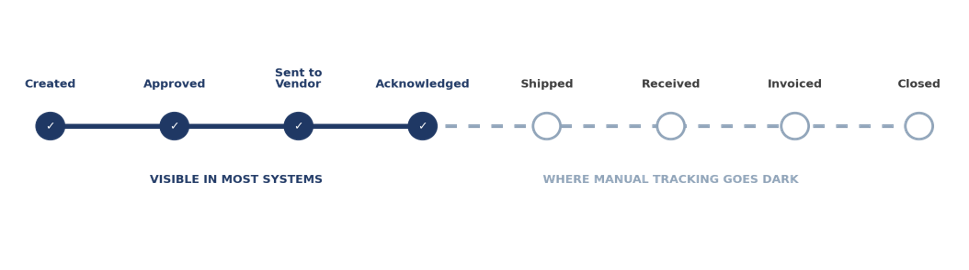
Creation and approval
When the PO is drafted, sent for approval, and signed off by the right people.
Vendor acknowledgment and dispatch
When the vendor confirms the order and begins fulfilling it.
Shipment and goods receipt
The process from dispatch to delivery, including whether it arrived on time.
Invoice match and payment
Comparing the invoice with the purchase order and the goods receipt before making the payment.
Closure
The vendor confirms that the PO has been fully fulfilled and has filed it for future reference.
Importance of Purchase Order Tracking
Tracking protects three things: the budget, the delivery schedule, and the paper trail. Each of the five benefits below traces back to a specific failure that untracked purchase orders allow.
Visibility into open commitments
A purchase order tracking system shows every open order in one list: what is waiting on approval, what is waiting on a vendor, and what is already on its way. Without that list, a department can approve a new purchase against budget that older open POs have already claimed. Available budget is the approved budget minus spend to date minus the value of open POs, and only a tracked list makes that last term visible. Our guide to procurement workflow shows where those approvals sit in the wider process.
Deliveries that arrive on time
A purchase order that has been at ‘sent’ without receiving acknowledgment from a vendor will show on the day it fails to progress. This gives the buyer the opportunity to ask the vendor before the delivery date, not after the production line has run out of materials. A simple rule should be followed: any purchase order that has not been acknowledged should be flagged two business days after it has been sent.
Spending inside approved prices
Since each purchase is linked to an approved purchase order and the agreed price, any purchase made outside of a purchase order or any invoice exceeding the agreed price becomes obvious. The same record is used for carrying out spend analysis by category and by vendor; it is in this analysis that cost-saving opportunities are identified.
Stronger vendor relationships
When both the buyer and the vendor observe the same order status, there are fewer instances of someone asking, ‘Did you receive my order?’ Moreover, the data identifies which vendors both confirm quickly and deliver on time and which do neither, enabling procurement to have specific points to make during a vendor review.
A reliable audit trail
From the time of approval through to delivery and then to payment, auditors proceed in this order. Each stage is timed when the purchase order is tracked, which means that the process of reconciliation takes only a few minutes and any payment disputes can be resolved by simply looking up the information. If an auditor wants to know who approved an order and when, the tracked purchase order gives the answer with a single search, whereas an untracked one would require the person to go through three inboxes. The purchase order management best practices guide explains how to keep those records consistent.
None of these benefits need a large team. They need one place where every purchase order’s status lives, which is the case for moving to purchase tracking software before order volume forces the issue. For budgeting, Zapro pricing starts at $699 per month with unlimited users, so every requester and approver can check PO status.
Where Manual Tracking Goes Dark
Spreadsheets handle the first stage or two reasonably well. They fall apart exactly where the infographic above shows the line turning gray.
Hours lost to status-chasing
The time that procurement teams spend updating spreadsheets and giving chase to vendors could have been better used on proper negotiation and planning.
Errors compound silently
Each time an entry is made, a typing error is possible, and one incorrect quantity or date can lead to faulty inventory records and inaccurate reports.
No one sees problems in real time
A spreadsheet offers a snapshot instead of real time; by the time someone notices a delay, it has usually already affected the delivery schedule.
Growth breaks the system
A process that can handle thirty POs per month breaks down at three hundred, precisely when the business can least afford the disruption. Moving POs into procurement software before that point lets the same team handle higher volume, since acknowledgments, receipts, and invoices update one record.
Vendor acknowledgment is generally the weakest point, and when purchase order tracking is combined with a connected vendor management system, it becomes easier to identify which vendors consistently fail to confirm orders on time or never respond at all before this turns into a recurring issue.
The Stale PO Problem Nobody Tracks
A failure mode that seldom appears in a tracking checklist is purchase orders that never officially close. A purchase order with a small balance still owing, a partial shipment, or a vendor that has simply stopped fulfilling it can remain open for months.
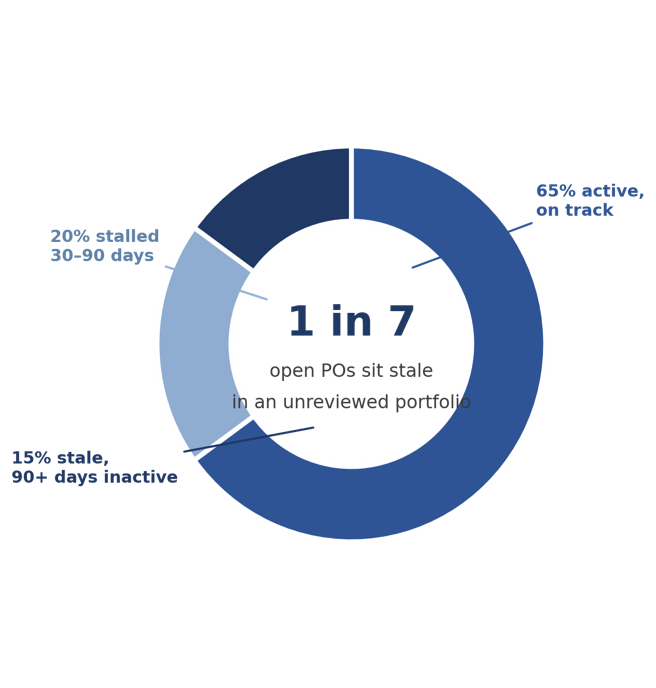
Illustrative figures, not sourced data.
All purchase orders have budget reserved for them. When an encumbrance should have been released months ago, it makes the department appear to have less available budget than it actually does and conceals a vendor relationship that needs attention.
APQC also monitors the proportion of purchases made outside the formal procurement process as a related measure of governance, since the two issues tend to occur together—poor discipline in using purchase orders at the beginning and a buildup of outdated purchase orders as they move through the system. A simple monthly review of all purchase orders with no activity for 60 or 90 days catches this before it affects a budget discussion.
The review doesn’t take as much effort as it appears. You should export the open purchase orders, sort them by their last activity date, and send any orders that have gone past the 90-day threshold to the person responsible for that vendor to have a quick look and decide whether the order is still in progress, needs to be closed, or needs to be canceled. Usually, about thirty minutes a month is all it takes to keep a medium volume of purchase orders from slowly slipping away.
What Changes with Purchase Order Tracking Software
Manual and automated tracking aren’t the same process, just at different speeds. One changes what is possible in the first place. A procurement software demo built around your own open POs makes that difference easier to judge than a feature list does.
| Capability | Manual (Spreadsheets and Email) | Automated Tracking Software |
|---|---|---|
| Where data lives | Scattered across emails, spreadsheets, and paper | One centralized, searchable record per PO |
| Creating and routing a PO | Typed by hand, routed by forwarding an email | Generated and routed automatically by preset rules |
| Status visibility | Only as current as the last manual update | Real-time, visible to anyone with access |
| Vendor communication | Email and phone, easy to lose track of | A vendor portal where vendors update status directly |
| Spotting problems | Discovered after the fact, often by complaint | Flagged automatically as POs stall or age |
What to Look for in Purchase Order Tracking Software
✓ Real-time visibility
A dashboard that displays the current status of each purchase order, not that of yesterday’s.
✓ Automated workflows
The creation, routing, and approval processes follow rules rather than someone remembering to forward an email.
✓ A vendor portal
A place for vendors to acknowledge orders and update status directly, instead of a reply-all email thread.
✓ Alerts on aging POs
A system that flags a stalled or inactive PO before it becomes a stale-PO problem.
✓ Integration with AP
A direct connection to invoice matching, so a PO’s status updates the moment its invoice clears.
Frequently Asked Questions
What is a purchase order tracker?
A purchase order tracker automates monitoring of purchase orders from creation through fulfillment. It improves visibility, supports timely delivery, improves communication between buyers and vendors, and reduces administrative errors with real-time updates and status reports for each order.
How do you make a PO tracker?
You can set up a simple PO tracker in a spreadsheet, but this approach isn’t recommended as purchase volume increases. With a spreadsheet-based tracker, you have to enter PO details and update statuses by hand, a process that is slow, error-prone, and lacks real-time visibility. A scalable purchase order tracking system should use dedicated software with automated workflows, real-time updates, and a vendor portal to eliminate manual work.
What is the difference between a PO tracking system and a PO management system?
A purchase order tracking system primarily focuses on monitoring status as each purchase order moves through its lifecycle. A purchase order management system, by contrast, includes order creation, approval routing, vendor management, and order tracking. Generally, complete procurement platforms incorporate tracking into a more comprehensive management system rather than offering it as a standalone tool.
How does AI purchase order tracking differ from basic status tracking?
Basic status tracking shows you where a PO is right now. An AI or ML purchase order tracking system goes further by learning typical timelines for a given vendor or category and flagging a PO that is running behind pattern before it becomes a missed delivery. It still depends on accurate, consistent status data to learn from.
What happens to purchase orders that never get closed?
An open PO keeps its full value reserved against the budget, even if only a small balance remains or the order will never be completed. Left unreviewed, these stale POs make department budgets look tighter than they are and hide vendors who have stopped delivering. Reviewing POs with no activity in 60 to 90 days and closing or canceling the inactive ones keeps budget reporting accurate.
How often should a team review open purchase orders?
A monthly review usually picks up most problems before they impact budget reporting or a vendor relationship; teams that have a high volume of purchase orders or that frequently make partial shipments tend to switch to conducting a weekly check on the oldest open orders specifically, as it is those orders which are most likely to have become stale without anyone realizing.
Stop Chasing Vendors
A purchase order is only useful if you know where it stands. Manual tracking falls apart when vendors go quiet, shipments run late, or orders should have closed ages ago. With Zapro AI, you get every PO detail in one place, so you always know where things stand—no more digging through emails.
Don’t miss our weekly updates
We’ll email you 1-3 times per week—and never share your information.
Stop Losing POs with Efficient Purchase Order Tracking
We’ll streamline PO tracking so your team stays organized and efficient.

About the Author

Md. Kafil


About the Reviewer

Zapro is dedicated to helping businesses of all sizes make informed decisions. We adhere to strict editorial guidelines to ensure that our content meets and maintains our high standards.
Our editorial standards help keep every article accurate, useful, and trustworthy.