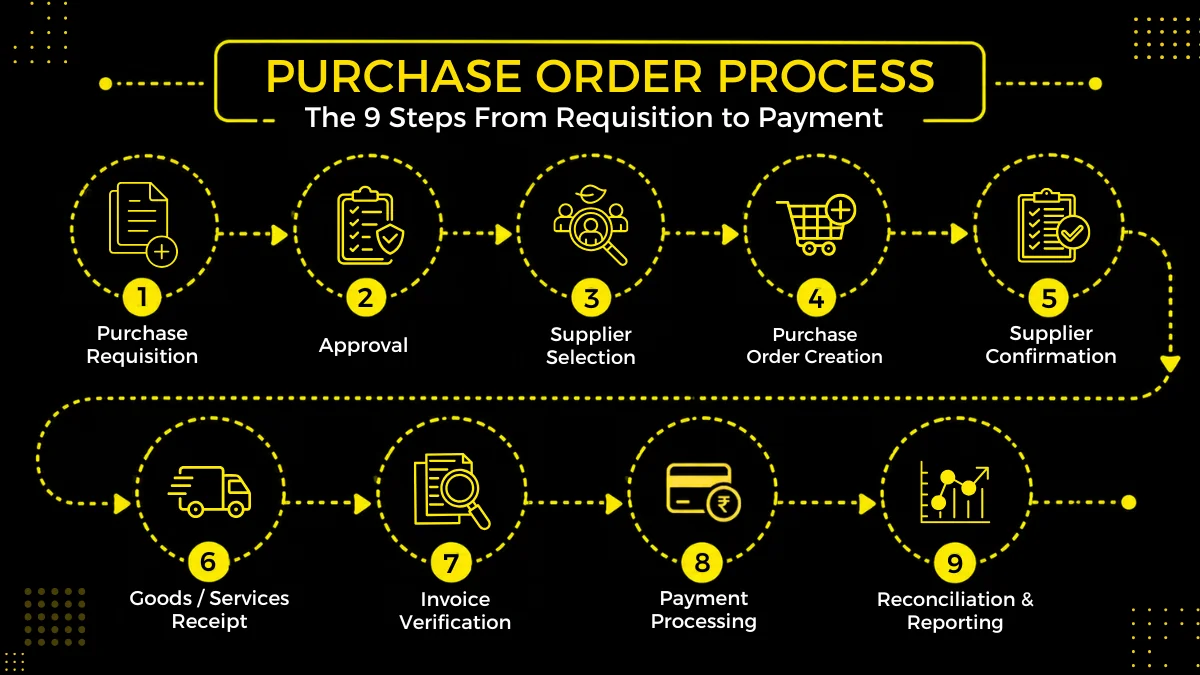
The purchase order process covers everything from requesting a purchase to paying the vendor and closing the order. It usually includes a purchase requisition, approval, vendor selection, PO creation, supplier confirmation, receiving, invoice matching, and payment.
A clear process gives procurement, finance, requesters, and vendors a common record of what was ordered, who approved it, what was received, and what still needs to be paid.
Key Takeaways
- The purchase order process starts with an internal need and ends when the order is completed, paid, and closed.
- A purchase requisition is an internal request. A purchase order is the formal order sent to the vendor.
- The PO should reflect the agreed quantity, price, delivery terms, payment terms, and other conditions before it is sent.
- Receiving and invoice matching are part of the process, not separate tasks that happen after purchasing is finished.
- Good purchase order processing depends on clear approval rules, accurate data, proper records, and quick handling of exceptions.
- Automation can connect requisitions, approvals, POs, receiving, invoices, and payment records instead of making teams manage each stage separately.
What Is the Purchase Order Process?
A purchase order is created after a business has decided what it needs to buy and who it will buy it from. The purchase order process takes that decision through approval, ordering, delivery, and payment.
For a routine purchase, this may be as simple as raising a request, getting approval, and sending a PO to an existing vendor. A new vendor or a larger purchase may involve quotes, negotiations, contract checks, and more approvals.
Once the PO is issued, the work continues. The vendor has to confirm the order, the business has to record what was delivered, and finance has to check the invoice before paying it.
That makes the PO more than an order document. It is the record that connects the purchase request with the final payment.
For a broader view, see this guide to the purchasing process.
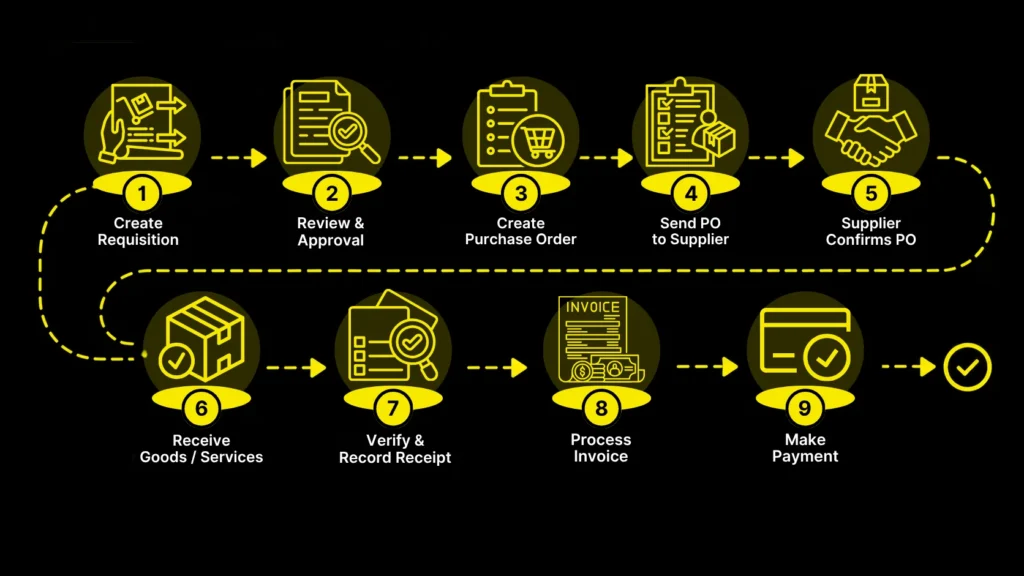
9 Steps in the Purchase Order Process
The exact purchase order procedures vary by company, but most organizations work through the following stages.
| Step | What happens | Main record |
|---|---|---|
| 1 | Need is identified and requested | Purchase requisition |
| 2 | Request is reviewed and approved | Approved requisition |
| 3 | Vendor and commercial terms are confirmed | Quote, contract, or sourcing record |
| 4 | PO is created | Purchase order |
| 5 | PO is approved and sent | Issued PO |
| 6 | Vendor confirms the order | Supplier acknowledgment |
| 7 | Goods or services are received | Receipt or service confirmation |
| 8 | Invoice is checked against the order and receipt | Match or exception record |
| 9 | Invoice is paid and PO is closed | Payment and closed PO |
1. Identify the Need and Create a Purchase Requisition
The process starts when someone in the business needs a product or service.
The requester should provide enough information for procurement to understand the requirement. Depending on the purchase, this can include the item or service description, quantity, required date, delivery location, budget or cost center, and business justification.
The request becomes a purchase requisition, which is an internal document. It does not tell the vendor to supply anything.
This is an important distinction in the purchase order creation process. A requisition asks the company for permission to buy. The PO is the order that goes to the vendor.
A well-designed purchase requisition process also reduces unnecessary back-and-forth later because procurement has the information it needs before creating the order.
2. Review and Approve the Request
The requisition is reviewed against the company’s purchasing policies, budget, and approval rules.
The level of approval can depend on factors such as purchase value, department, category, contract status, or the type of item being purchased. A low-value office purchase does not necessarily need the same approval as a large equipment order.
Approval should happen before the company makes a purchasing commitment.
This is also where procurement can check whether the requested item should be bought through an existing contract, catalog, or approved vendor instead of starting a new sourcing exercise.
3. Select the Vendor and Confirm the Terms
If the vendor is already approved and the price is agreed, this step may be straightforward. If not, procurement may request quotations, compare vendors, negotiate terms, or run a more formal sourcing process.
Price is only one part of the decision. The comparison may also include:
- Delivery time
- Payment terms
- Shipping and other charges
- Product specifications
- Warranty or service terms
- Contract conditions
- Vendor capacity and performance
For larger purchases, the procurement team may complete this work before the requisition is approved or alongside the approval process.
The important thing is that the commercial terms are settled before the PO is issued. Otherwise, the PO can become another round of negotiation instead of a clear order.
4. Create the Purchase Order
Once the purchase has been approved and the vendor and terms are confirmed, procurement creates the purchase order.
A PO normally includes:
- PO number
- Vendor details
- Buyer or business entity details
- Item or service description
- Quantity
- Unit price and total amount
- Delivery location and requested date
- Payment terms
- Applicable taxes, shipping, or other charges
- Contract or quotation reference
- Relevant terms and conditions
The PO should be clear enough that the vendor and internal teams can understand exactly what has been ordered.
This is where accurate data becomes particularly important. If procurement manually copies information from emails, quotations, and spreadsheets into the PO, errors can enter the transaction before it even reaches the vendor.
5. Approve and Send the PO
The completed PO may need another approval depending on company policy. Once approved, it is sent to the vendor through the company’s normal purchasing channel.
The PO number becomes the reference for the transaction.
At this stage, procurement should not assume that sending the PO means the vendor has accepted every detail. The vendor still needs to review the order.
For organizations managing many orders, purchase order approval can be routed automatically based on predefined rules instead of relying on email follow-ups.
6. Get Supplier Confirmation
The vendor reviews the PO and confirms whether it can fulfil the order as requested.
The vendor may accept the order as-is or identify a problem. For example, an item may be out of stock, the delivery date may not be possible, or the quoted price may no longer apply.
Any material change should be recorded rather than handled informally over email or a phone call.
If the quantity, price, delivery date, or other important term changes, the buyer should update the PO through the company’s approval process and make sure the vendor has the revised version.
This step is often overlooked in descriptions of the purchase order process, but supplier confirmation is where an approved internal request becomes a confirmed external order.
7. Receive the Goods or Services
The next stage is receiving what was ordered.
For physical goods, the receiving team checks the delivery against the PO and records what actually arrived. This can include quantity, condition, item details, and delivery date.
For services, there may not be a physical receipt. The business may instead record a completed milestone, approved timesheet, service confirmation, or another form of acceptance.
The record should reflect what was actually received, not what was originally ordered.
For example, if a PO is for 100 units and the vendor delivers 80, the receipt should show 80. The remaining 20 units should stay open until they are delivered, cancelled, or otherwise resolved.
This information becomes important during invoice processing.
8. Match the Invoice With the PO and Receipt
Once the vendor sends an invoice, accounts payable checks it against the purchase records.
A common control is three-way matching, which compares:
- The purchase order
- The receipt or proof of delivery
- The supplier invoice
If the PO says 100 units were ordered, the receipt says 100 were received, and the invoice charges for 100 at the agreed price, the transaction can normally move forward.
If the invoice charges for 100 but only 80 were received, there is an exception that needs to be resolved.
Invoice matching is part of the broader procure-to-pay process. APQC describes invoice processing as including invoice capture, validation against purchase orders and vendor records, exception resolution, approval, payment, and record retention.
Businesses can also connect their purchase order invoice process with the rest of their procurement and finance workflows instead of handling invoice checks separately.
9. Pay the Vendor and Close the PO
After the invoice has been approved and any exceptions have been resolved, finance can release payment according to the agreed payment terms.
The final step is closing the PO.
A PO should not remain open indefinitely after the order has been completed. Open POs can affect reporting, commitments, accruals, and visibility into outstanding purchases.
Closing the order also gives the business a clean record of what was ordered, received, invoiced, and paid.
This is one reason purchase order tracking should continue until the transaction is actually complete, rather than stopping once the PO has been sent to the vendor.
Common Problems With Purchase Order Processing
A purchase order process usually starts to break down when information gets lost between teams. The requester knows what they need, procurement knows which vendor was selected, the receiving team knows what arrived, and finance is working from the invoice. If those records do not line up, even a routine purchase can take much longer than it should.
Some of the most common problems are straightforward:
- Incomplete purchase requests: Procurement has to chase the requester for a quantity, specification, delivery date, cost center, or other missing detail.
- Slow approvals: A request sits in someone’s inbox because nobody can easily see who needs to approve it.
- Incorrect POs: The price, quantity, delivery date, or payment terms on the PO do not match the final agreement with the vendor.
- Unrecorded changes: The vendor changes a quantity or delivery date, but the PO is never updated.
- Partial deliveries: The vendor delivers part of an order, but the receiving record does not clearly show what is still outstanding.
- Invoice mismatches: The invoice does not agree with the PO or the goods received, so finance has to stop and investigate.
- Old POs staying open: The order has already been completed, but the PO is still shown as active.
These problems are easier to prevent when the process is set up around the way purchases actually happen. A request should capture the information procurement needs from the start. Approval should go to the right person without relying on manual reminders. Once a PO is issued, changes should be recorded against that order rather than left in email threads.
Receiving also needs to record what arrived, not simply mark the full PO as received. That information then gives accounts payable something reliable to check against the invoice.
What Should You Measure?
Speed is useful to track, but it is not the only measure that tells you whether the process is working.
A procurement team can look at:
- Time from request to approval
- Time from approval to PO creation
- PO approval time
- Supplier confirmation time
- Invoice exception rate
- Late or partial deliveries
- Open POs by age
- Purchases made outside approved processes
- Cost of processing a purchase order
APQC’s procurement benchmarks include measures such as purchase order cycle time, purchasing cost, supplier lead time, manual PO transmission, and maverick buying. These give procurement teams a way to compare process performance instead of relying only on how many POs were processed.
Where Automation Helps
Automation is most useful for the repetitive parts of the process.
A procurement system can route requests for approval, create a PO from approved information, keep the PO and supplier record together, track order status, and flag differences between the PO, receipt, and invoice. It can also give procurement and finance a shared view of outstanding orders instead of making them check separate spreadsheets and email threads.
That does not mean every purchasing decision should be automated. Exceptions still need people to review them. The benefit is that routine orders can move through the process without someone having to manually push each one forward.
The OECD’s 2025 research on digital procurement also points to greater integration of procurement processes and data rather than treating individual activities as isolated systems.
Manual vs. Automated Purchase Order Processing
A manual purchase order process can work for a small number of straightforward purchases. The problems become more visible as order volume, departments, vendors, and approval requirements increase.
| Activity | Manual process | Automated process |
|---|---|---|
| Purchase request | Email or spreadsheet | Structured digital request |
| Approval | Manual follow-ups | Rule-based routing |
| PO creation | Re-enter information | Create from approved data |
| Supplier communication | Email attachments | Centralized order record |
| PO tracking | Spreadsheet updates | Current status in one system |
| Receiving | Separate records | Linked to the PO |
| Invoice matching | Manual comparison | Automated matching and exceptions |
| Reporting | Data collected manually | Centralized transaction data |
The goal is not to automate every decision. A good automated purchase order system should handle repetitive administrative work while making exceptions visible to the people who need to resolve them.
That can include routing approvals, creating POs from approved requests, tracking order status, matching invoices, and maintaining an audit trail.
What Is a PO in Supply Chain?
A PO in supply chain is the formal record of a buyer’s order with a vendor. It connects the purchasing decision to the physical or service delivery that follows.
The PO can provide information about what is required, how much is required, when it is required, where it should be delivered, and what commercial terms apply.
It also gives procurement, receiving, finance, and other teams a common reference for the same transaction.
This becomes particularly important when a purchase affects inventory. The PO can be connected with receiving and inventory records so that the business can see what has been ordered, what has arrived, and what is still outstanding.
What Is a Purchase Order Program?
A purchase order program is software or a structured system used to manage purchase orders and the activities around them.
Depending on the system, it can support purchase requests, approval workflows, PO creation, supplier communication, receiving, invoice matching, reporting, and integrations with ERP or accounting systems.
For companies evaluating software, the important question is not simply whether a platform can create a PO. It is whether it can manage the process around the PO without creating another disconnected system.
How Zapro AI Supports the Purchase Order Process
Zapro AI connects purchase requests, approvals, purchase orders, vendor management, invoice processing, inventory, spend visibility, and related procurement activities in one workflow.
Teams can use procurement workflows to move a request through approval and PO creation, while keeping purchasing information connected to the wider procurement process.
Zapro AI also supports AP automation and AI-assisted invoice reading, matching, classification, analytics, sourcing, and workflow support. ERP and accounting integrations can connect procurement activity with existing business systems.
For organizations looking beyond individual POs, procurement automation tools can help connect purchasing with the wider procure-to-pay process.
Purchase Order Process FAQs
What are the 9 steps in the purchase order process?
The nine steps are identifying the need, creating a requisition, approving the request, selecting the vendor and terms, creating the PO, approving and sending it, getting supplier confirmation, receiving the goods or services, matching the invoice, and completing payment and closure. Some organizations combine or split these stages differently.
What is the difference between a purchase requisition and a purchase order?
A purchase requisition is an internal request to buy something. A purchase order is the formal order sent to the vendor after the purchase has been approved and the terms have been confirmed.
What is purchase order processing?
Purchase order processing is the work involved in creating, approving, issuing, tracking, receiving, and completing purchase orders. It can also include supplier confirmation, invoice matching, exception handling, and PO closure.
What is the purchase order creation process?
The purchase order creation process starts after the purchasing requirement and commercial terms have been approved. Procurement creates the PO using the agreed vendor, items, quantities, prices, delivery details, payment terms, and other applicable conditions. The PO is then approved and sent to the vendor.
Is a purchase order part of the procurement process?
Yes. A purchase order is part of the purchasing and procure-to-pay stages of the wider procurement process. Procurement can also include activities that happen before and after the PO, such as sourcing, contract management, supplier management, and spend analysis.
What happens when an invoice does not match the purchase order?
The invoice is usually placed on hold or flagged as an exception until the difference is investigated. The issue may be caused by an incorrect price, quantity, tax, delivery, or receiving record. The relevant procurement, receiving, vendor, or finance team then resolves the difference before payment.
Why should companies close completed purchase orders?
Closing completed POs keeps purchasing records accurate and prevents old orders from appearing as outstanding commitments. It also improves reporting and makes it easier to identify genuinely open orders.
Don’t miss our weekly updates
We’ll email you 1-3 times per week—and never share your information.
Let’s Perfect Your Purchase Order Process
Streamline Every Purchase, Start Optimizing Your PO Process Today

About the Author

Md. Kafil


About the Reviewer

Zapro is dedicated to helping businesses of all sizes make informed decisions. We adhere to strict editorial guidelines to ensure that our content meets and maintains our high standards.
Our editorial standards help keep every article accurate, useful, and trustworthy.