

Accounts payable (AP) is the money a business owes to its suppliers for goods and services it has already received but not yet paid for, recorded as a short-term liability on the balance sheet. The accounts payable process covers invoice receipt, matching, approval, and payment.
To scale successfully while protecting operating margins, businesses must track and manage where their corporate capital goes. Allowing supplier bills to pile up on messy desks or letting invoices slip through disjointed email chains introduces major financial leaks. At the center of corporate cash flow management sits accounts payable, the department and accounting process responsible for handling short-term liabilities.
Establishing a highly secure, visible workflow to track these short-term obligations ensures your operations scale smoothly while protecting your business cash reserves.
What Is Accounts Payable (AP)?
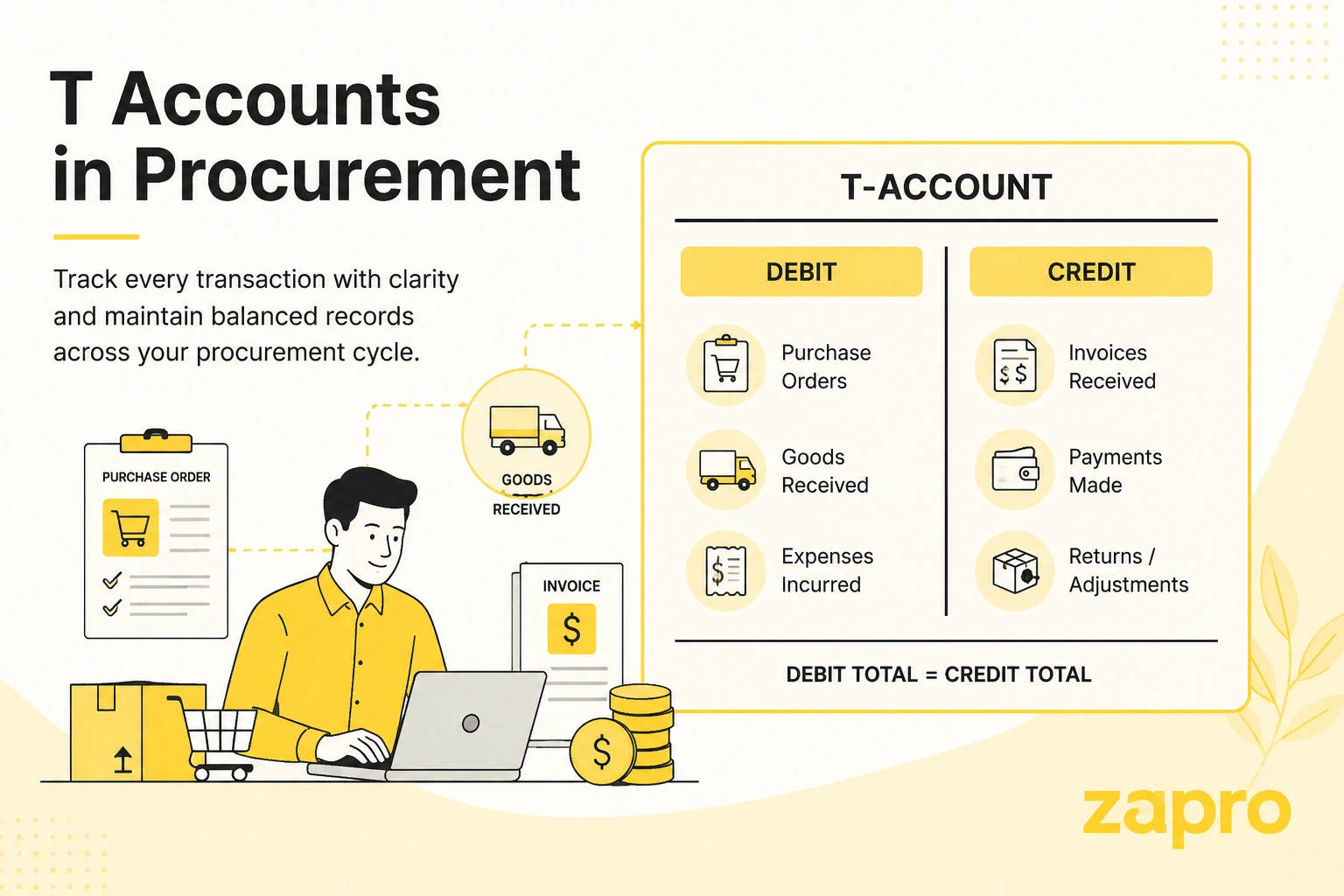
The standard ap meaning in business refers to an accounting department and a short-term liability ledger account that records the obligations a company owes to its vendors, suppliers, or service providers for goods and services purchased on credit. On a corporate balance sheet, accounts payable sits under the current liabilities section, representing clear financial commitments that must be settled within a year, often under terms like Net-30 or Net-60. Because AP is a liability, it increases on the credit side — the clearest way to see that is to draw it as a T-account.
AP treats them as one payee ledger, but vendors and suppliers are not the same commercially, and the distinction matters when you set payment terms.
Accounts payable also isn’t the only liability owed to a supplier. If a balance goes unpaid long enough that the supplier demands a signed IOU with interest instead of another invoice, it moves off the AP ledger entirely and becomes a note payable — a distinct liability with its own accounting treatment. Knowing the difference between notes payable and accounts payable matters because one is a routine cost of doing business and the other is usually a sign the payment relationship has broken down.
Key Components of Accounts Payable
An elite accounting setup relies on three primary variables to manage short-term business obligations:
- The AP Ledger Account: The centralized ledger folder where all active vendor liabilities are tracked, added, and adjusted in real time.
- The Accounts Payable Invoice: The official billing document sent by a supplier outlining the exact quantities, item costs, and payment due dates for work performed.
- Payment Terms: Pre-negotiated commercial agreements (such as a 2% discount if paid within 10 days, otherwise full payment due in 30 days) that dictate when cash must be sent.
Diverse Accounts Payable Examples
The practical transactions managed within this accounting silo change depending on your operational needs. Common real-world examples include:
- Raw Manufacturing Inputs: Sourcing steel sheets, raw timber, or specialized electronic microchips on credit from a primary distributor.
- Enterprise Software Subscriptions: Managing the recurring billing cycles for cloud software infrastructure or specialized SaaS platforms.
- Professional Retainer Fees: Processing monthly bills from third-party corporate legal counsel, external marketing agencies, or contract engineering firms.
- Operational Facility Utilities: Handling high-volume corporate utility bills, warehouse facility rentals, or office internet access lines.
How to Process Accounts Payable
Fulfilling your short-term business obligations accurately requires your accounting team to complete four systematic operational stages:
Step 1: Record Invoices
The cycle opens when an accounts payable invoice lands in your system from an external business partner. Modern teams deploy specialized OCR platforms to read, capture, and extract the line-item figures, taxes, and dates automatically, matching the data lines against specific general ledger expense codes.
Step 2: Verify Expenses and Get Approval
Before any cash leaves the bank, the document must undergo strict internal verification. Accountants execute a three-way match, cross-referencing the incoming invoice details against the original internal purchase order and the physical warehouse goods received note. This validates that the pricing and quantities are accurate before the request routes to a manager for approval.
Step 3: Execute Payment
Once an invoice clears your approval checkpoints, it enters the payment queue. The finance manager schedules the payment based on pre-negotiated terms, selecting a secure, traceable electronic tool like an ACH transfer, wire routing, or virtual credit card to settle the bill.
Step 4: Reconcile Inconsistencies
As the cash clears your banking infrastructure, the transaction data must be matched against the open entry in your general ledger. If any anomalies appear, such as random processing fees or price adjustments, the AP team logs adjustments to close out the transaction files cleanly.
Learn about ap invoice processing
How to Calculate AP Turnover Ratio
Understanding AP Turnover Ratio
The accounts payable turnover ratio is a critical liquidity metric that monitors how rapidly your organization pays off its third-party suppliers over a specific fiscal window. A high ratio reveals that your business settles its debts quickly, proving high short-term creditworthiness. Conversely, a low ratio can signal that a company is conserving cash or struggling with liquidity bottlenecks.
To calculate this metric, use the following standard accounting formula:
Accounts Payable Turnover Ratio = Net Credit Purchases is divided by Average Accounts Payable
Where Average Accounts Payable is calculated as:
Average Accounts Payable} = Beginning AP Balance + Ending AP Balance divided by 2
Monitoring this ratio regularly allows corporate treasury leaders to evaluate working capital efficiency and structure better commercial agreements with suppliers.
AP Workflow Best Practices
Implement Compliance and Internal Controls
To protect your cash reserves from corporate fraud, your workflow must feature clear internal safeguards. Enforce a strict segregation of duties, ensuring that the accountant who creates and approves a new vendor profile is never the same team member who authorizes the final cash payment.
Conduct Regular Audits
Schedule systematic internal reviews of your active vendor databases. Run quarterly checks to identify duplicate supplier listings, locate open unlinked purchase orders, update expired tax documentation, and clear out old entries to minimize data risks.
Benefits of AP Automation
Relying on manual data entry, paper checks, and long email chains to track corporate cash flow introduces major business risks. Introducing a digital account payable system yields direct operational advantages:
- Elimination of Typos: Intelligent OCR software captures invoice text and figures with high accuracy, eliminating manual keying mistakes.
- Accelerated Cycle Speeds: Automated routing matrices clear internal bottlenecks, moving approval requests to managers’ mobile devices instantly.
- Complete Spend Visibility: Finance leaders can view active liabilities in real time, long before cash leaves the bank.
- Early Payment Discounts: Streamlining validations allows your business to pay early and secure lucrative price reductions from vendors.
Calculating ROI for AP Automation
To understand the financial return on investment (ROI) of upgrading your workflows, compare your manual baseline metrics against automated targets:
Automation ROI = Manual Processing Cost minus Automated Processing Cost divided by Investment Cost
Most scaling organizations achieve a full return on their software investment within the first few months by eliminating invoice processing labor hours, stopping duplicate payments, and wiping out late-payment fees. To estimate that payback period for your own team, compare current processing costs against the plans listed on the Zapro AI pricing page.
Learn about automated invoice processing

Organizations that automate their accounts payable process reduce invoice processing costs by up to 70% and cut processing times by 60%.
— Gartner, Accounts Payable Automation Insights
How to Transition from Manual to Automated AP
Step 1: Assess Your Current AP Processes and Define Your Goals
Map out your existing processing bottlenecks. Trace how long it takes an invoice to travel from receipt to payment, calculate your current manual processing cost per invoice, and set explicit optimization targets.
Step 2: Evaluate and Select AP Automation Software
Look for a specialized source-to-pay platform that offers advanced OCR scanning, flexible approval routing tools, robust fraud detection filters, and seamless compatibility with your current infrastructure. It also helps when AP sits inside broader procurement software, so purchase orders, receipts, and invoices are matched in one system rather than reconciled across tools.
Step 3: Prepare Your Vendor Data for Importing
Clean up your existing master supplier database before importing it into a new platform. Remove outdated supplier records, consolidate duplicate files, verify active banking credentials, and organize your tax forms.
Step 4: Configure and Test Your AP System
Build your custom, conditional approval pathways inside the platform based on your company’s dollar thresholds and department rules. Run test invoices through the system to ensure the validation logic triggers correctly.
Step 5: Train Your AP Staff
Hold hands-on training sessions with your accounting team. Ensure your staff understands how to review automated match alerts, manage system exceptions, and utilize real-time analytics dashboards.
Step 6: Roll Out in Phases and Monitor Performance
Launch the automated platform with a small, manageable pilot group of primary suppliers. Once the workflows run smoothly, scale the platform across your entire vendor portfolio, tracking key efficiency metrics to optimize performance. Before choosing a pilot group, a procurement software demo can help you test approval routing and invoice matching against a sample of real supplier invoices.
Learn about best accounts payable software
Overcoming AP Challenges: Solutions for AP Teams
- The Challenge of Shadow IT & Maverick Spend: Employees frequently buy software or tools independently on corporate cards without approval. The Solution: Integrate your platform with strict intake controls, mandating an approved purchase order for every single incoming invoice.
- The Friction of Vendor Sprawl: Managing hundreds of scattered supplier relationships dilutes your corporate volume leverage. The Solution: Use centralized dashboards to track supplier performance, allowing you to consolidate spend with top-performing partners.
- The Threat of Payment Fraud: Phishing schemes and altered invoice files put corporate capital at risk. The Solution: Deploy automated platforms that instantly flag banking changes, check for duplicate invoices, and verify tax compliance markers.
How Zapro Streamlines Accounts Payable
Managing high-volume corporate spending across manual tools exposes your organization to financial leaks. Zapro provides an intelligent, automated source-to-pay platform designed to remove all the administrative complexity from accounts payable and procurement workflows.
[Inbound Supplier Invoice]
👇
[AI OCR Engine Instantly Extracts Line-Item Data]
👇
[Automated 3-Way Match Validates PO & Warehouse GRN]
👇
[Dynamic, No-Code Matrices Route for Manager Approval]
👇
[Secure Electronic Settlement Syncs Directly with ERP]
Zapro optimizes your daily accounting operations through advanced automation capabilities:
- AI-Powered Invoice Data Extraction: Stop manual data entry. Zapro’s elite OCR engine reads, codes, and maps incoming bills instantly, eliminating human transcription errors.
- Automated Three-Way Matching: Protect your margins. The system automatically cross-references incoming bills against original purchase orders and warehouse receiving records, flagging pricing or quantity discrepancies immediately.
- No-Code, Flexible Approval Routing: Construct custom, multi-stage approval pathways based on project budgets, departments, or cost thresholds, removing internal email bottlenecks.
- Self-Service Supplier Collaboration Portal: Improve transparency. Zapro’s secure portal allows business partners to manage their own billing setup, upload tax documentation, and trace active payment milestones in real time.
- Native ERP and Financial Sync: Maintain absolute data integrity. Zapro integrates directly with leading mid-market and enterprise platforms like NetSuite and QuickBooks Online, ensuring actual spending updates of your general ledgers in real time.
Ready to eliminate manual accounting errors, protect your cash flow, and build a scalable accounts payable department? Schedule a custom Zapro demo today.
FAQ Questions
1. What is accounts payable (AP)?
Accounts payable (AP) is a financial document that shows how much money an organization owes to its suppliers for the goods and services that were delivered on credit. In accounting terminology, accounts payable could be considered the current liability against an organization’s balance sheet.
Being a critical downstream component of the procure-to-pay process, accounts payable are usually expected to be paid off within a stipulated time period mentioned in the invoice. The key elements of accounts payable are: the amount of money owed, credit terms (Net 30, Net 90, etc), and its relationship with invoices.
More often than not, accounts payable also refers to the team responsible for making outgoing payments to meet these short-term obligations. This team is responsible for receiving and processing supplier invoices, performing three-way matching to verify invoice accuracy, obtaining necessary internal approvals for payment processing, and scheduling payments.
2. What are common examples of accounts payable?
Common accounts payable transactions include supplier invoices for raw materials, office supplies, equipment, professional services, software subscriptions, utilities, maintenance, and other business expenses purchased on credit. These obligations are recorded as liabilities until the company settles the corresponding invoices.
3. What is the difference between accounts payable and accounts receivable?
Accounts payable represents money a business owes to its suppliers, making it a current liability. Accounts receivable represents money owed to the business by its customers, making it a current asset. In simple terms, AP manages outgoing payments to suppliers, while AR manages incoming payments from customers.
4. How is the accounts payable turnover ratio calculated?
The accounts payable turnover ratio is generally calculated by dividing net credit purchases by the average accounts payable balance during a specific accounting period. The resulting ratio helps businesses understand how frequently they settle supplier obligations. Tracking this metric over time can provide useful insight into payment practices and working capital management.
5. What are the main benefits of managing accounts payable efficiently?
Efficient accounts payable management can improve cash flow visibility, reduce payment errors, support stronger supplier relationships, and help businesses avoid unnecessary late-payment fees. A well-organized AP process also makes it easier to track outstanding obligations, maintain accurate financial records, and ensure invoices are processed according to established payment terms.
6. What does an accounts payable process typically include?
An accounts payable process generally includes receiving invoices, validating supplier and invoice information, matching invoices with purchase orders and receipt records when applicable, obtaining the required approvals, recording the payable, scheduling payments, and maintaining supporting documentation. Businesses may use AP automation software to streamline these activities and improve visibility across the invoice-to-payment lifecycle.
7. How can businesses improve accounts payable accuracy?
Businesses can improve AP accuracy by standardizing invoice processing procedures, validating supplier information, matching invoices against purchase orders and receipts, establishing clear approval controls, and regularly reconciling supplier accounts. Digital workflows and automated validation can further reduce repetitive manual work and help identify discrepancies before payments are released.
8. What is the role of accounts payable in cash flow management?
Accounts payable plays an important role in managing working capital because the timing of supplier payments directly affects a company’s cash position. By maintaining accurate records of upcoming obligations and payment due dates, businesses can better plan cash requirements, prioritize payments, and make informed decisions about available working capital.
9. How does PO software connect with accounts payable?
Purchase order (PO) software connects with accounts payable by providing the purchasing information AP teams need to verify supplier invoices before payment. When an invoice is received, the system can compare key details such as the supplier, purchase order, quantities, and prices against the original PO and, where applicable, goods receipt records. This matching process helps identify discrepancies, streamline invoice approvals, and give AP teams greater confidence that invoices are accurate before payments are scheduled.
10. What is accounts payable and how does the AP process work?
The standard cycle begins with receiving the supplier invoice and registering it. The invoice is then verified against the purchase order and evidence of receipt, coded to the correct account and cost centre, and routed for approval according to value and department. Approved invoices are scheduled for payment on agreed terms, paid, and recorded against the supplier account. Reconciliation and supplier statement checks close the loop. Each step exists as a control, which is why removing one to save time usually creates a larger problem elsewhere.
Don’t miss our weekly updates
We’ll email you 1-3 times per week—and never share your information.
Let’s Simplify Your Accounts Payable Automation
We’ll streamline your AP process and help your team work smarter.

About the Author

Md. Kafil


About the Reviewer

Zapro is dedicated to helping businesses of all sizes make informed decisions. We adhere to strict editorial guidelines to ensure that our content meets and maintains our high standards.
Our editorial standards help keep every article accurate, useful, and trustworthy.