Procurement gets complicated quickly. A purchase request starts with one person, approval sits with another, the PO is created somewhere else, and the invoice arrives in a different system.
Cloud procurement solutions bring these steps into one connected workflow. Instead of managing procurement through emails, spreadsheets, and disconnected tools, teams can manage requests, approvals, suppliers, purchase orders, invoices, and spend from a central procurement platform.
Key takeaways
- Cloud procurement connects purchasing activities across the procure-to-pay process.
- Centralized data gives procurement and finance teams a clearer view of spending.
- Automation can reduce repetitive work around approvals, POs, invoices, and reporting.
- Cloud platforms can reduce the infrastructure and maintenance work associated with traditional software.
- Integrations matter. A new procurement platform should work with your ERP, accounting, AP, and other business systems.
- Security, data ownership, portability, vendor dependency, and user adoption deserve as much attention as features.
- The right platform should fit the way your organization buys, rather than forcing every team into a complicated new process.
What are cloud procurement solutions?
Cloud procurement solutions are internet-based software platforms used to manage procurement activities.
Depending on the platform, that can include everything from a simple purchase request to supplier onboarding, sourcing, purchase orders, invoice matching, and spend analysis.
Most are delivered through the Software as a Service (SaaS) model. NIST defines SaaS as a model where users access applications running on a cloud infrastructure, without managing the underlying servers, storage, operating systems, and network infrastructure themselves.
In practical terms, your procurement team logs into the application through a browser or supported interface. The provider manages the underlying infrastructure and software environment, while your organization manages things such as users, permissions, procurement rules, data, and configuration.
That is different from simply putting an old procurement application on a remote server and calling it cloud software.
How does cloud procurement work?
Think about a typical purchase.
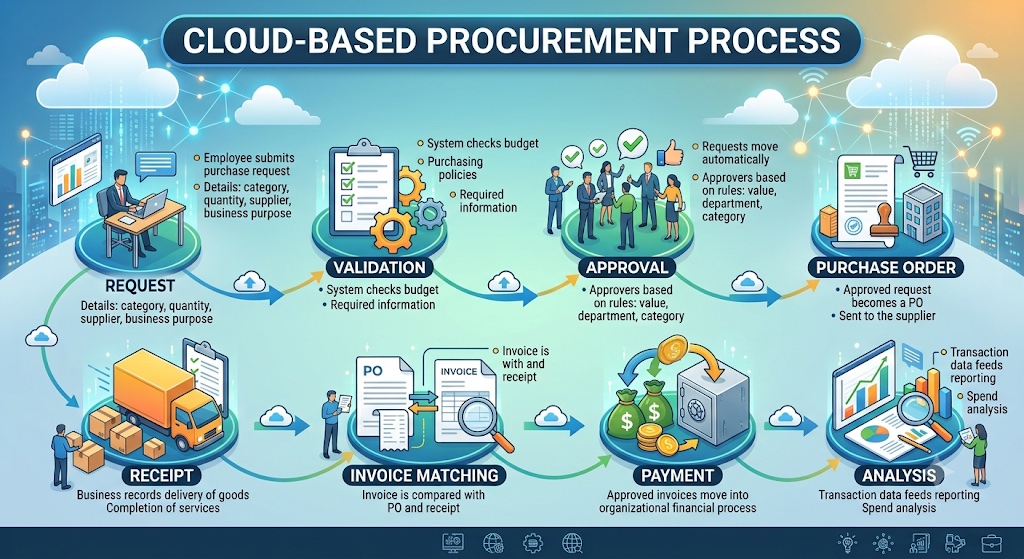
An employee needs a piece of equipment. They submit a request. Their manager approves it. Procurement checks the supplier or sourcing requirements. A purchase order is created. The supplier delivers the goods. The invoice arrives. Finance checks the invoice against the purchase records before payment.
In a disconnected process, every step can happen in a different place.
A cloud procurement platform can bring that journey together:
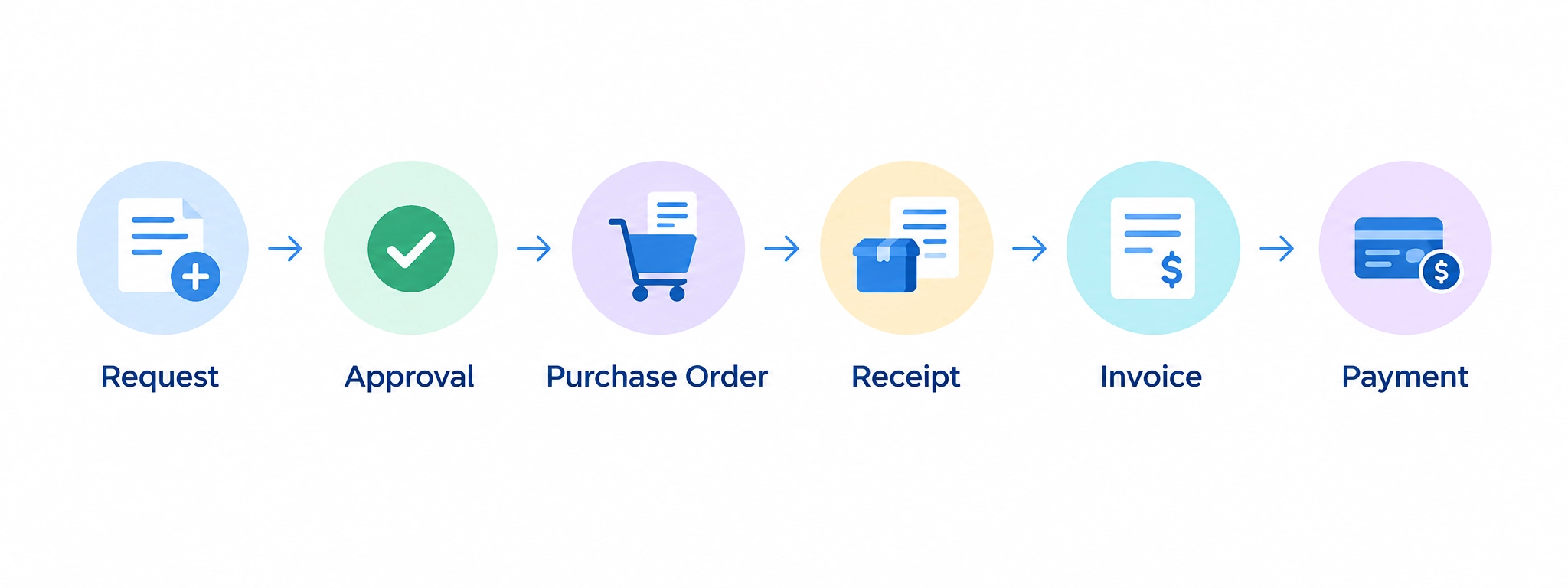
The exact workflow varies between organizations, but the principle is the same: information should move with the transaction instead of being manually recreated at every stage.
This also makes the status of a purchase easier to understand.
Instead of searching through an inbox for an approval or asking procurement whether a PO has been raised, the relevant people can check the system.
That sounds like a small change. Across hundreds or thousands of purchases, it is not.

The cloud frees procurement to focus on strategy, not on maintaining servers—modern teams use that time to innovate and add value.
[Chief Procurement Officer, Flex; profile in Forbes]
Cloud procurement vs. traditional procurement software
| Area | Traditional or on-premise software | Cloud procurement solution |
|---|---|---|
| Access | Often dependent on configured infrastructure or network access | Usually available through an internet connection |
| Infrastructure | Managed largely by the organization | Primarily managed by the provider |
| Software updates | Planned and managed internally | Generally managed by the provider |
| Scaling | May require additional infrastructure or capacity planning | Usually easier to scale with users and usage |
| Maintenance | Internal IT responsibility | Largely handled by the provider |
| Integrations | May require significant internal development | APIs and connectors are commonly available |
| Pricing | Often includes licenses and infrastructure costs | Usually subscription-based |
| Control | Greater control over the underlying environment | More responsibility sits with the provider |
There is no rule that says cloud is the right choice for every organization.
The decision depends on factors such as security requirements, existing infrastructure, integration needs, internal IT capabilities, budget, and procurement complexity.
Cloud simply changes the operating model.
What are the benefits of cloud procurement?
1. Procurement data stays organized
Procurement information tends to spread quickly.
Supplier details might be documented in one system. Purchase orders sit in another. Invoices arrive by email. Budget information comes from finance. Someone maintains a spreadsheet to keep track of everything else.
That makes simple questions surprisingly difficult to answer.
- How much have we spent with this supplier?
- Which requests are still waiting for approval?
- How much has a department already committed?
- Are we buying the same category from multiple suppliers?
A connected cloud procurement platform can bring more of this information into one place.
CIPS highlights transparency, access to real-time information, collaboration, and responsiveness as benefits associated with digital technologies in procurement.
The benefit is not having another dashboard.
It is having fewer gaps between the information people need and the decisions they have to make.
2. Approvals do not have to depend on email
Approval delays are easy to underestimate.
A request gets sent to a manager. The manager misses it. Someone follows up. The request is forwarded. Procurement receives it several days later.
A cloud based procurement platform can route requests according to rules such as:
- Purchase value
- Department
- Category
- Location
- Cost centre
- Approval hierarchy
The workflow can then move the request to the appropriate person automatically.
This is particularly useful when approval structures become complicated as a business grows. It has been reported that procurement automation can accelerate approvals and reduce the manual effort involved in activities such as purchase-order creation, invoice processing, and reporting.
The important part is not that an approval becomes “automated.”
It is that the request has a defined path instead of relying on someone remembering what to do next.
3. Enhanced spend visibility
Spend analysis is much more useful when procurement teams can act on it before a purchase is complete.
Suppose three departments are independently buying similar software subscriptions.
A report showing that duplication after the fact is useful.
A procurement system that makes existing suppliers, contracts, budgets, and purchasing history visible while a new request is being raised is more useful.
That is where cloud procurement software can contribute to spend control.
Depending on the platform, teams can track:
- Spend by supplier
- Spend by category
- Departmental purchasing
- Purchase commitments
- Contract-linked spend
- Off-contract purchases
- Purchase-order activity
- Invoice values
CIPS describes digital procurement as providing access to real-time information and a more holistic view that can support decision-making and responsiveness.
The goal is not simply better reporting.
It is making procurement information available while there is still time to do something with it.
4. Eliminate repetitive tasks
Procurement involves plenty of repetitive tasks.
Creating purchase orders. Entering invoice information. Checking whether an invoice matches a PO. Updating records. Sending approval reminders. Preparing recurring reports.
These jobs are necessary, but they do not all need to be manual.
Procurement automation can take some of this work out of people’s hands.
CIPS notes that automation can save time and resources spent on repetitive procurement activities while reducing errors and supporting more strategic work.
That does not mean every procurement activity should be automated.
Some purchases need human judgment. Supplier negotiations need context. Category strategy requires experience.
The sensible approach is to automate the predictable parts and leave people to handle the decisions that actually need them.
5. Teams can work from the same process
Procurement often involves more people than the procurement department itself.
- An employee raises the request.
- A manager approves it.
- Procurement checks the purchase.
- Finance handles the financial side.
- A supplier fulfils the order.
- Accounts payable processes the invoice.
When each team works from a different source of information, small discrepancies become everyone’s problem.
A cloud procurement application can give different users access to the same transaction while showing each person the information relevant to their role.
This is particularly useful for organizations with multiple offices, locations, or distributed teams.
6. IT has less infrastructure to maintain
With traditional software, the organization may need to manage servers, infrastructure, upgrades, patches, backups, and other technical requirements. With SaaS, much of that responsibility sits with the provider.
That can make cloud procurement attractive to organizations that do not want to maintain a large internal infrastructure for procurement software.
There is a trade-off, though.
You are also depending more heavily on the provider. That makes the vendor’s reliability, security practices, service-level agreement, support, and roadmap important parts of the buying decision.
7. The system can scale with the organization
Procurement rarely stays the same as a company grows.
More employees mean more requests, more locations mean more approval rules, more suppliers mean more supplier records, more transactions mean more data.
Cloud infrastructure is designed around flexible access to computing resources and rapid provisioning, which is one reason cloud applications can be easier to scale than systems tied to fixed infrastructure.
But scalability should not be confused with unlimited complexity.
A platform should be able to support growth without making a relatively simple procurement process unnecessarily difficult today.
What should a cloud procurement platform include?
A long feature list does not necessarily make a good procurement platform.
Look at whether the capabilities work together.
| Capability | What it should help with |
|---|---|
| Purchase requisitions | Capture and standardize purchase requests |
| Approval workflows | Route requests according to defined rules |
| Supplier management | Maintain supplier information and onboarding workflows |
| Sourcing | Support supplier discovery, RFQs, and comparison where required |
| Purchase orders | Create and track approved POs |
| Contract management | Keep agreements, terms, and renewal information accessible |
| Invoice processing | Capture and process supplier invoices |
| Invoice matching | Compare invoices with relevant purchase records |
| Spend analytics | Understand spending across suppliers, categories, and departments |
| Integrations | Exchange data with ERP, accounting, AP, and other systems |
| Reporting | Turn procurement activity into usable information |
| Audit trails | Maintain a record of requests, approvals, and transactions |
There is one test worth applying to the entire list:
Does the information from one stage make the next stage easier?
If an approved requisition still has to be manually entered into a purchase-order system, you have digitized the steps without really connecting them.
Is cloud procurement secure?
Cloud security is often one of the first concerns when procurement data moves outside the organization’s own infrastructure.
And it should be.
Procurement systems may contain supplier information, pricing, contracts, invoices, employee information, and other commercially sensitive data.
But cloud security is not simply a question of whether the system is “in the cloud.”
Security responsibilities are shared between the provider and customer. Microsoft, for example, notes that SaaS providers manage parts of the underlying infrastructure, while customers still retain responsibility for areas such as data, identities, configurations, and access management.
When evaluating a cloud procurement platform, ask:
- Where is the data stored?
- How is data encrypted?
- How are users authenticated?
- Is role-based access available?
- Is multi-factor authentication supported?
- What audit logs are maintained?
- What security certifications or assessments does the provider have?
- How are backups handled?
- What happens during an outage?
- How can the organization retrieve its data?
Security should be evaluated as part of procurement software selection, not after the contract is signed.
What are the risks of cloud procurement?
Cloud procurement has clear advantages, but it also changes where certain risks sit.
Vendor dependency
Once critical procurement processes run through a SaaS provider, availability and support become partly dependent on that provider.
Look closely at the SLA, support arrangements, uptime commitments, and incident procedures.
Data portability
What happens if you decide to leave?
AWS guidance for evaluating SaaS recommends understanding who owns the data, how it can be accessed, and how it can be backed up or exported.
Before signing, ask the vendor to explain the exit process rather than assuming your data will be easy to retrieve later.
Integration problems
A procurement platform that cannot communicate reliably with your ERP or finance systems may create another data silo.
Integration should be tested before implementation, not discovered during it.
User adoption
A sophisticated system is not useful if employees avoid it.
If submitting a purchase request takes five minutes through the platform but one minute through an email, people will find ways around the process.
Ease of use is therefore a procurement control, not just a UX preference.
Subscription and implementation costs
Cloud software may reduce infrastructure costs, but it is not free from implementation costs.
Consider:
Subscription + implementation + integrations + migration + training + support + additional modules
A fair comparison should look at the total cost over the expected life of the system.
Cloud based procurement solutions vs. cloud-native procurement software
These terms are often used as though they mean exactly the same thing.
They do not necessarily.
A cloud based procurement platform describes where and how the software is delivered.
Cloud-native procurement software generally refers to software designed specifically around cloud technologies and architecture rather than simply moving an older application into a hosted environment.
For buyers, the label matters less than the architecture’s practical implications.
Ask:
- How often is the platform updated?
- Can it scale without major infrastructure changes?
- How does it integrate with other applications?
- How resilient is the service?
- What security controls are available?
- How portable is your data?
- What happens when the platform needs to evolve?
Cloud portability and interoperability have become important enough to have their own standards and policy discussions. The European Commission, for example, identifies interoperability and reducing vendor lock-in as important considerations in the cloud market.
In other words, do not choose software because “cloud-native” sounds modern.
Choose it because the underlying technology supports what your procurement function needs.
How to choose the right cloud procurement solution
Start with your procurement process, not a vendor shortlist.
1. Map what happens today
Follow one purchase from beginning to end, ask the following questions and document the answers.
- Where does the request start?
- Who approves it?
- Where is the supplier selected?
- How is the PO created?
- Where does the invoice go?
- How does finance know what was ordered?
You will quickly find the points where people are doing manual work simply because the systems do not connect.
2. Find the expensive problems
Do not try to automate everything at once.
Look for problems that have a real business cost:
- Slow approvals
- Maverick spending
- Duplicate suppliers
- Manual invoice processing
- Poor contract visibility
- Off-contract purchases
- Repeated data entry
- Lack of spend visibility
- Difficult reporting
Those should drive your requirements.
3. Separate must-haves from nice-to-haves
A procurement team may want 30 features.
That does not mean all 30 belong in the first implementation.
Identify the workflows that must work from day one, then evaluate additional functionality separately.
4. Test the integrations
Ask vendors to demonstrate your actual workflow using your existing systems where possible.
A generic “yes, we integrate” answer is not enough.
Look at the API, data mapping, sync frequency, error handling, implementation effort, and ongoing ownership.
5. Put security questions on the shortlist
Review access controls, encryption, audit trails, data location, certifications, backup arrangements, incident response, and contractual commitments.
Also clarify which security responsibilities remain with your organization.
6. Calculate the real cost
Do not compare an annual subscription price against the license fee of an old system and stop there.
Include implementation, integration, migration, training, support, additional users, and modules.
Then compare the cost with measurable outcomes.
7. Give actual users a say
Procurement leaders, finance teams, IT, approvers, and employees may all use the system differently.
Let each group test the workflows that matter to them.
The person who raises 20 purchase requests a month will notice problems that may never appear in a two-hour executive demo.
How Zapro fits into the cloud procurement model
Zapro brings procurement activities into a centralized cloud environment, covering workflows such as purchase requests, approvals, supplier management, purchase orders, invoice processing, and spend visibility.
The important part is how these pieces connect.
A request can move through approval before a purchase order is created. Purchasing information can then provide context for invoice processing and spend analysis. Instead of treating each activity as a separate task, the platform is built around the wider procurement workflow.
For teams looking to move away from email-driven purchasing and disconnected spreadsheets, that connected approach can provide a more practical starting point for procurement automation.
The aim is straightforward: less time spent chasing information and more visibility into how the organization actually buys. To see how these connected workflows look in practice, you can book a demo of Zapro.
Experience the Power of Cloud Procurement with Zapro

Frequently asked questions
What are the benefits of cloud procurement?
The main benefits include centralized procurement information, easier access, workflow automation, better spend visibility, reduced manual work, easier collaboration, and less infrastructure to maintain. The actual benefits depend on the platform and how well it fits the organization’s processes.
Is cloud procurement the same as e-procurement?
Not exactly. E-procurement refers broadly to using electronic systems to manage purchasing. Cloud procurement describes the delivery model in which the procurement software is hosted and accessed through cloud infrastructure.
Is cloud-native procurement software different from cloud-based software?
Yes. Cloud-based describes how software is delivered, while cloud-native generally refers to software designed specifically around cloud technologies and architectures. Buyers should focus on the practical differences in scalability, integration, security, resilience, and portability.
How does cloud procurement reduce costs?
It can reduce infrastructure and maintenance requirements and automate repetitive procurement work. Better visibility can also help organizations identify unnecessary or off-contract spending. However, subscription, implementation, integration, and support costs should all be included when calculating the total cost.
What should you check before buying cloud procurement software?
Look at the procurement workflows covered, integrations, security controls, data ownership, data export, user experience, implementation requirements, scalability, support, SLA terms, and total cost of ownership.
References
- National Institute of Standards and Technology (NIST) — The NIST Definition of Cloud Computing
- NIST Computer Security Resource Center — Software as a Service (SaaS)
- NIST — Cloud Computing Program
- CIPS — Procurement Automation
- CIPS — Procurement Technology
- CIPS — Industry 4.0 / Procurement 4.0
- CIPS Download — Digital Acceleration: How Businesses Are Embracing Cloud-Based Procurement
- IBM Think — What Is SaaS Integration?
- Microsoft Learn — Shared Responsibility in the Cloud
- European Commission Interoperable Europe — Interoperability and Portability
Don’t miss our weekly updates
We’ll email you 1-3 times per week—and never share your information.
Your Procurement Goals, Our Shared Mission
Partner with us to simplify, safeguard, and succeed.

About the Author

Md. Kafil


About the Reviewer

Zapro is dedicated to helping businesses of all sizes make informed decisions. We adhere to strict editorial guidelines to ensure that our content meets and maintains our high standards.
Our editorial standards help keep every article accurate, useful, and trustworthy.