Most purchasing problems do not begin with someone buying the wrong product. They begin much earlier, when the information around a purchase gets scattered.
An employee might send a request over email, get the approval in a chat, and then wait for Procurement to raise the purchase order. The supplier sends the invoice directly to Accounts Payable. When Finance finally gets to it, the information they need is sitting in different places. They have to go back and figure out what was ordered, who approved it, what was actually received, and whether the invoice matches the original purchase.
This is the gap procurement software for enterprise is designed to address.
For organizations operating across multiple departments, locations, or legal entities, that connected workflow also needs to support different approval rules, purchasing policies, suppliers, and reporting requirements without losing centralized visibility.
Key takeaways
- Procurement software for enterprise connects purchasing from the initial request and approval through purchase orders, receiving, invoicing, and payment.
- Enterprise spend control starts before money is committed, with approval rules, purchasing policies, and visibility built into the process.
- E-procurement, procure-to-pay, source-to-pay, and related platforms deal with different parts of the procurement lifecycle.
- Small businesses tend to focus on simplicity, while larger organizations often need more extensive controls, integrations, and governance.
- AI can take on document-heavy procurement work, but people still need to handle decisions and exceptions.
- The right platform is best tested against actual purchasing situations rather than selected from a list of features.
What is procurement software?
Procurement software for enterprise is used to manage the purchasing of goods and services across complex organizational structures. Depending on the system, that can begin with an employee raising a request and continue through approval, ordering, receiving, invoicing, and payment. For larger organizations, the workflow may also need to accommodate multiple entities, locations, currencies, approval hierarchies, suppliers, and purchasing policies.
Some platforms go further. They may also include sourcing, vendor onboarding, contracts, spend analysis, inventory, or accounts payable automation.
The distinction is less about the individual functions and more about how they connect.
Consider a purchase request. The information entered there can carry forward into the purchase order. Once the goods arrive, the receipt can be tied back to that order. When the invoice comes in, Finance has the information needed to check it. There is less need to hunt through old emails or reconcile separate spreadsheets simply to understand one transaction.
APQC also treats purchasing as a connected process, covering activities such as requisition, authorization, supplier and PO activities, reconciliation, and exception resolution.
In practical terms, procurement software gives those separate purchasing activities a defined workflow.
Why do companies need procurement software?
Manual procurement becomes particularly difficult for enterprises when purchasing activity is spread across departments, locations, entities, and supplier networks.
Spend becomes visible too late
By the time an invoice reaches Finance, the spending decision has already happened.
That puts Finance in a reactive position. It can record and reconcile the purchase, but it is too late to control whether the spend should have happened in the first place.
A request and approval workflow moves that visibility earlier. The business can see the purchase while the decision is still being made.
Controls depend on manual follow-up
Procurement policies usually come with conditions. A high-value purchase might need another approval. A new supplier might require additional checks.
Those rules are much harder to enforce when the process depends on someone remembering to send an email, chase an approver, or check whether the right documentation was attached.
A procurement system can build those requirements into the workflow itself.
Teams spend time finding information
The problem gets worse when one transaction lives partly in email, partly in a spreadsheet, partly in an ERP, and partly in a supplier portal.
Someone then has to connect the dots.
Procurement may need to locate an approval or check the PO. Finance may need to confirm that the goods were received before matching an invoice. Reporting teams may have to consolidate information from several sources before they can even start analyzing spend.
That is administrative work that a connected process can reduce.
An enterprise may have different purchasing policies, approval thresholds, budgets, and supplier requirements across business units. Managing those differences manually can make it difficult to enforce consistent controls without creating unnecessary bottlenecks.
Procurement software for enterprise can centralize those rules while still allowing workflows to vary where the business requires them. That balance matters when an organization needs local flexibility without losing company-wide visibility.
How does procurement software work?
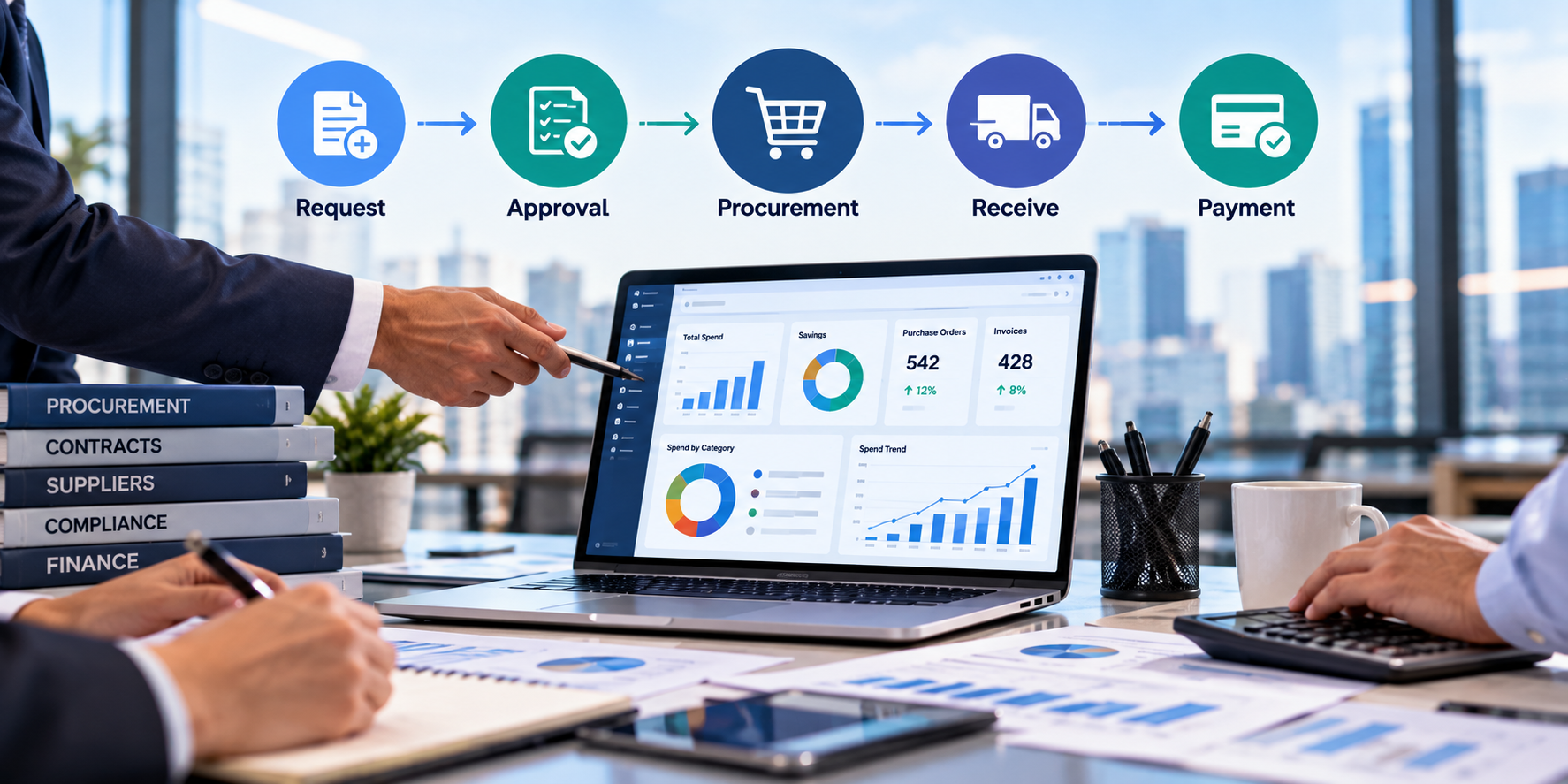
A typical enterprise procure-to-pay workflow follows this sequence:
Request → Approval → Purchase Order → Receipt → Invoice → Payment
Enterprise Procurement software: manual process vs. connected workflow
| Stage | Without procurement software | With procurement software |
|---|---|---|
| Request | Email, chat, or spreadsheet | Standardized digital request |
| Approval | Manual follow-ups | Rules-based routing |
| Purchase order | Created manually | Generated from approved information |
| Receiving | Recorded separately | Linked to the order |
| Invoice | AP searches for supporting records | Matched against purchasing data |
| Payment | Finance reconciles multiple records | Follows a connected transaction record |
| Reporting | Compiled after the fact | Spend data available throughout the process |
1. Request
The process starts when an employee records what they need. A structured request can capture details such as the item, quantity, estimated cost, department, required date, supplier, and supporting documents.
The exact fields depend on how the organization has configured its purchasing process.
2. Approval
Once submitted, the request is sent to the appropriate approver. The routing can be based on factors such as purchase value, department, category, entity, or budget.
That means a $500 routine purchase does not necessarily have to follow the same path as a high-value purchase requiring additional review.
In an enterprise environment, these rules may also vary by legal entity, location, business unit, category, or cost center.
3. Purchase order
After approval, the information can be used to create a PO rather than being entered all over again.
The purchase order records what the business has agreed to buy and provides a reference point for the steps that follow.
4. Receipt
When the goods arrive, the organization records what was actually received.
For services, there may not be a physical delivery to record. Instead, the relevant step can be confirming that the agreed work has been completed.
5. Invoice
The invoice can then be checked against both the purchase order and the receipt.
This is known as three-way matching:
Purchase Order + Receipt + Invoice
If the information does not line up, the transaction can be sent for review rather than being processed automatically.
6. Payment
Once the required checks have been completed, the invoice moves through the organization’s payment process.
The important part is that the payment does not have to stand alone. The organization retains the connected record of the purchase that led to it.
What does procurement software automate?
Automation is particularly valuable in enterprise procurement, where repetitive purchasing activity can span thousands of requests, suppliers, invoices, and approval decisions.
Depending on the platform, procurement software may automate:
- Purchase request intake
- Approval routing
- PO creation
- Vendor onboarding
- Invoice data extraction
- Invoice matching
- Spend classification
- Contract reminders
- Exception routing
- Reporting
For a routine purchase, the system can follow the predefined workflow without someone manually moving every step ahead.
An unusual price, a quantity mismatch, or missing documentation is different. Instead of forcing the same automation through, the system can flag the issue and send it to someone for review.
That distinction matters more as AI becomes part of procurement software.
What are the types of procurement software?
There is no single category that covers every procurement system. Several related types are commonly used.
| Type | What it covers | Typical use |
|---|---|---|
| E-procurement | Requisitions, approvals, catalogs, and POs | Digitizing routine purchasing |
| Procure-to-pay (P2P) | Requisition through invoicing and payment | Connecting Procurement with AP |
| Source-to-pay (S2P) | Sourcing, suppliers, contracts, purchasing, and payment | Strategic and complex procurement |
| Vendor management | Onboarding, documentation, qualification, performance, and risk | Managing supplier relationships |
| Contract lifecycle management (CLM) | Contract creation, approvals, renewals, and compliance | Managing vendor agreements |
These categories are not completely separate.
An enterprise might want one system that handles most of its source-to-pay process while integrating with its existing ERP and financial systems.
For a closer look at procurement applications, see Zapro AI’s guide to procurement applications.
Procurement software vs. purchasing software vs. ERP
The terms are sometimes used interchangeably, but they do not necessarily describe the same scope.
| Purchasing software | Procurement software | ERP procurement module | |
|---|---|---|---|
| Primary focus | Transactional buying | Broader procurement lifecycle | Procurement within a wider business system |
| Purchase requests | Usually | Yes | Usually |
| Purchase orders | Yes | Yes | Yes |
| Vendor management | Limited | Often | Varies |
| Sourcing | Usually limited | Often | Varies |
| Contracts | Limited | Often | Varies |
| Spend analytics | Limited | Common | Varies |
| Finance/accounting | Limited | Integrates with finance systems | Core ERP capability |
Purchasing software generally deals with the transaction itself: purchase orders, invoices, and related activities.
Procurement software can cover a wider part of the purchasing lifecycle, including sourcing, supplier management, contracts, approvals, and spend analysis.
An ERP has a different function again. It supports a larger set of business functions, with procurement sitting alongside areas such as finance and operations.
For enterprises, the question is often less about choosing between an ERP and procurement software and more about deciding which procurement activities should sit within the ERP, which require a dedicated platform, and how the systems should exchange data.
For that reason, adding procurement software does not automatically mean replacing an ERP. In many organizations, the procurement system and ERP work together.
Deloitte’s 2025 Global CPO Survey similarly draws attention to the growing attention on digital transformation and technology within procurement.
What should you look for in procurement software for enterprise?
The feature list on a vendor’s website is a useful starting point, but enterprise procurement software needs to be evaluated against the complexity of the organization behind it. Start with the purchasing process your organization actually follows.
Enterprise procurement rarely happens in one place or under one set of rules. A platform may need to support multiple legal entities, business units, locations, currencies, catalogs, and approval structures while still providing centralized oversight.
Check whether the system can maintain those differences without requiring separate processes for every part of the organization. Also look at whether reporting can consolidate activity across entities while preserving the detail needed at the local level.
Purchase intake
Can employees submit a request themselves, or does Procurement still have to turn emails into transactions?
Look for configurable forms, catalogs, required fields, and the ability to include supporting documents.
Approval controls
Do not test approval routing only with an easy example. Try the situations that create work in the real process:
- A purchase crosses a spending threshold
- A new supplier is requested
- Several departments share the cost
- Legal or IT review is required
The workflow should handle these situations without pushing employees back into email.
Purchase order management
Once a request is approved, how easily does it become a PO?
There should not be unnecessary re-entry of information.
Also check whether the platform can distinguish between open, partially received, completed, and cancelled orders.
Vendor management
Supplier management can mean different things depending on the organization.
It may involve onboarding, documentation, qualification, risk, contracts, performance, and renewals. Check which of these the platform actually supports and which require another system.
Invoice matching
Three-way matching is helpful, but it is easy to judge a system when everything goes as planned. The more useful test is what happens when there is a mismatch.
For example, find out how the system handles situations where:
- The invoice price is different from the PO
- The delivered quantity is lower than what was ordered
- Only part of the order has been delivered
- An invoice comes in without a PO
- The same invoice is submitted twice
These exceptions are a normal part of procurement. How the system handles them can tell you much more about its everyday usefulness than a clean invoice match ever will.
Spend visibility
A useful dashboard should make it possible to answer questions such as:
- How much has been committed?
- Which vendors receive the most spend?
- Which POs remain open?
- Where are invoice exceptions occurring?
- Which purchases happened outside approved channels?
Integrations
“ERP integration” on a feature page does not tell you everything you need to know.
Ask which system remains the source of truth for vendor data. Find out what information is synchronized, how often the synchronization occurs, and what occurs when something goes wrong.
Zapro, for example, describes ERP and accounting integrations along with two-way synchronization for vendor and master data.
User experience
The Procurement team might work in the platform every day. Someone in Marketing or Engineering may open it once a month.
That difference matters.
If raising a request takes more effort than sending an email, employees have a practical reason to work around the system.
Adoption is therefore not separate from procurement control. It is part of it.
What should different businesses look for?
Employee count can give you a rough idea of scale, but it does not tell the whole story. A smaller company with complicated purchasing requirements may need more controls than a larger company with a simple buying process.
| Business size | Common priorities | What to evaluate |
|---|---|---|
| Small business | Simple purchasing, approvals, visibility | Ease of setup, usability, accounting integrations, scalable pricing |
| Mid-market | Budget control, centralized intake, AP integration | Approval rules, spend visibility, invoice workflows, integrations |
| Enterprise | Multi-entity control, governance, sourcing, auditability | Complex workflows, S2P capabilities, SSO, security, ERP integrations, consolidated reporting |
For a small business, the immediate problem might simply be requests disappearing into email.
A mid-market company may be dealing with budget control, centralized intake, and stronger AP workflows.
An enterprise may need different approval rules for different entities while still bringing the resulting information together for consolidated reporting.
The appropriate level of complexity depends on how the organization buys, rather than its headcount alone.
What does AI procurement software do?
Procurement involves a lot of structured information and a lot of documents. That makes it an obvious area for AI applications.
Current use cases include:
- Invoice data extraction
- Invoice and PO matching
- Spend classification
- Duplicate or unusual transaction detection
- Contract analysis
- Supplier information summaries
- Sourcing research
- Procurement analytics
Zapro AI describes applications across invoice reading and matching, classification, analytics, sourcing, and workflow support.
Still, the words “AI-powered” do not tell you what the software actually does.
When comparing AI procurement systems, four questions are more useful:
What data can it access?
What can it recommend?
What can it execute?
Where does human approval stay necessary?
There is an important difference between an AI system that prepares information for someone and one that can take action within a controlled workflow.
When should you move beyond manual procurement?
Manual procurement usually starts becoming a problem when the same gaps keep showing up in day-to-day work. You might notice that:
- Approvals are spread across email and chat
- POs are often created only after a purchase has already been made
- Finance only gets visibility into spending when invoices come in
- Procurement teams have to pull information together from multiple spreadsheets
- Employees regularly work around purchasing procedures
- Staff keep entering or copying the same information between systems
These signs do not tell you which procurement software is right for your business. They simply show where the current process is breaking down.
Before comparing platforms, it is worth understanding those gaps first. Otherwise, you may end up choosing software based on features rather than the problems you actually need it to solve. Once those gaps are mapped, a side-by-side look at the best procurement software becomes a far more focused exercise.
How do you choose the right procurement software?
1. Map one real purchase
Start with a recent purchase and trace what happened from the initial request to the final payment.
Who raised the request? Who approved it? How was the supplier chosen? Where was the PO created? How was the delivery recorded? Where did the invoice come in? And how was the payment tracked?
Going through one actual transaction step by step usually makes the gaps in the current process much easier to spot.
2. Separate pre-purchase and post-purchase problems
| Before money is committed | After the purchase |
|---|---|
| Poor request intake | Missing POs |
| Slow approvals | Invoice exceptions |
| Unapproved purchases | Manual matching |
| Weak budget controls | Payment delays |
| Limited committed-spend visibility | Reconciliation work |
This distinction matters because a business can easily end up buying software to solve a post-purchase problem when the bigger issue actually occurs before the purchase is approved.
3. Test real scenarios
Instead of asking a vendor whether its platform has a particular feature, give the vendor a transaction that resembles something your team would actually buy.
An employee needs to purchase $12,000 of software from a new supplier.
Then ask the vendor to show what happens from the initial request through approval, supplier onboarding, PO creation, invoicing, and AP.
That gives you a much clearer picture than a standard product demo.
4. Test exceptions
A normal transaction will show you what the software does when everything goes according to plan. That is only part of the picture.
It is just as important to see how it handles situations where:
- The invoice price does not match the PO
- The quantity received is different from what was ordered
- The budget has been exceeded
- An approver is unavailable
- Supplier documents are missing
- Someone submits the same request twice
- A legal review is needed
The standard workflow shows you what the software can automate. The exceptions show you where human intervention is still needed.
5. Calculate total cost
The subscription is only one part of the cost.
Total cost = Software + Implementation + Integrations + Migration + Training + Administration + Change management
6. Run a pilot
Before rolling the system out across the organization, test it with real users and transactions.
Useful measures include request completion time, approval cycle time, manual handoffs, exception volume, adoption, AP rework, and reporting effort.
Where does Zapro AI fit?
Zapro AI brings procurement activities into a connected platform covering purchase requests, approval workflows, purchase orders, vendor management, contracts, spend analytics, strategic sourcing, AP automation, inventory, and ERP integrations.
Its current pricing lists Spark at $699/month for up to 50 vendors and Growth at $1,999/month for up to 500 vendors, with custom pricing for Scale. All plans list unlimited users.
Zapro also publishes customer-reported results.
Repromed, for example, reports a 90% reduction in manual follow-ups and twice the procurement request processing speed after implementing Zapro AI. These figures come from the customer and should therefore be considered in the context of that particular implementation.
The same evaluation questions still apply here as they would to any procurement platform:
Can employees submit purchases easily?
Can the business enforce approvals before money is committed?
Can Procurement and Finance follow the transaction without reconstructing it?
Can exceptions be handled without creating another manual process?
Frequently asked questions
What is procurement software used for?
Procurement software manages activities such as purchase requests, approvals, purchase orders, receiving, invoice matching, vendor management, and spend visibility. Broader platforms could also include sourcing, contracts, inventory, and accounts payable.
What are the main types of procurement software?
Common categories include e-procurement, procure-to-pay, source-to-pay, vendor management, and contract lifecycle management software.
Is procurement software useful for a small business?
It can be useful when purchases are difficult to track through email, spreadsheets, or informal approvals. For smaller organizations, ease of implementation, adoption, integrations, and scalable pricing can be important considerations.
What is the difference between procurement software and purchasing software?
Purchasing software generally concentrates on transactions such as purchase orders and invoices. Procurement software can cover a wider lifecycle, including sourcing, supplier management, contracts, approvals, and spend analysis.
Does procurement software replace an ERP?
Usually not. Procurement software can sit alongside an ERP and manage purchasing workflows, while the ERP continues to serve as the wider financial and operational system of record.
What should I test in a procurement software demo?
Use a realistic purchasing scenario and follow it from request through payment. Test approval routing, PO creation, receiving, invoice matching, integrations, and exception handling rather than looking only at the standard workflow.
What does AI procurement software automate?
AI procurement software can assist with invoice extraction, matching, spend classification, anomaly detection, contract analysis, sourcing research, and other data-heavy tasks. How much of the process it can perform autonomously depends on the platform.
References
- APQC: What are the key steps involved in the purchasing process?
- CIPS: Procure to pay process (P2P): definition and guide
- Deloitte: 2025 Global Chief Procurement Officer Survey
Don’t miss our weekly updates
We’ll email you 1-3 times per week—and never share your information.
About the Author
Oishani Bhattacharya


About the Reviewer

Zapro is dedicated to helping businesses of all sizes make informed decisions. We adhere to strict editorial guidelines to ensure that our content meets and maintains our high standards.
Our editorial standards help keep every article accurate, useful, and trustworthy.