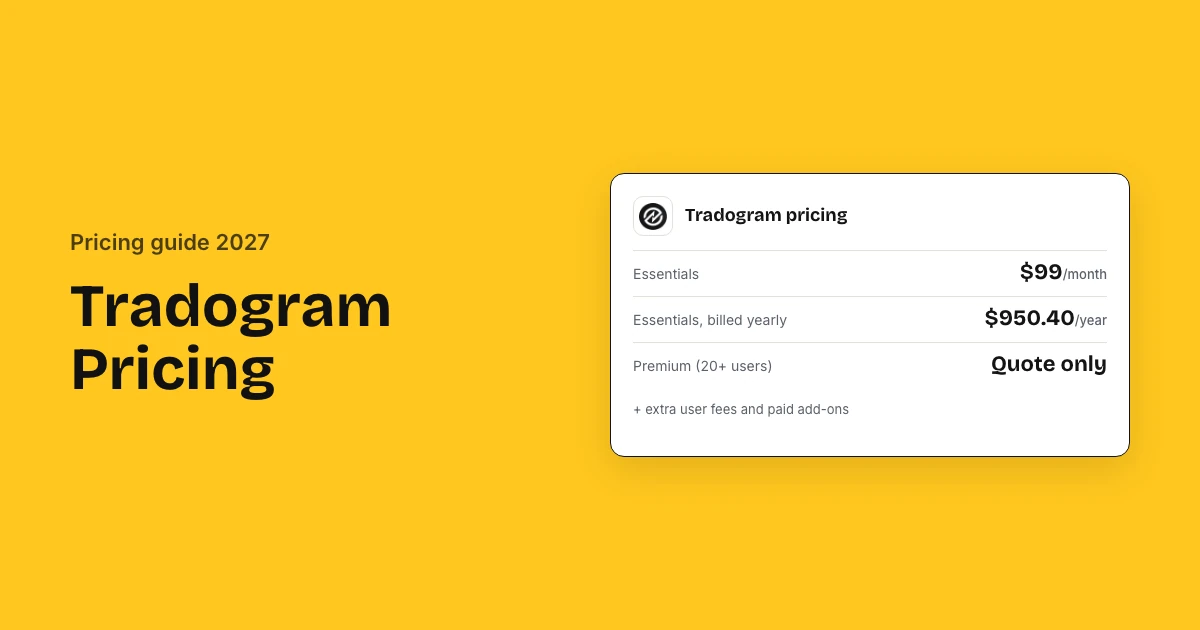
Tradogram Essentials costs $99 a month, or $950.40 a year billed annually, for one or more users plus a fee for each extra user. Premium, for 20 or more users, and Scale are quoted. Reviewers rate Tradogram 4.3 of 5 on G2 and 4.5 on Capterra, and setup and ERP connectors are paid add-ons.
Tradogram pricing and reviews: key takeaways
- Essentials: Tradogram lists Essentials at $99 a month, or $950.40 a year billed annually, with a fee for each extra user.
- Premium and Scale: Premium starts at 20 users and Scale includes unlimited users; both are priced by custom quote only.
- Ratings: Tradogram scores 4.3 of 5 from 38 G2 reviews and 4.5 of 5 from the 110 reviews Capterra and Software Advice share.
- What reviewers like: Small teams pick Tradogram because it undercuts the suites they compared, and rate value for money 4.6 of 5.
- The cost complaint: One mid-market buyer pays for the whole package because Tradogram sells no tailored set of modules.
- Add-ons: Implementation and setup, ERP integrations, SSO, API access, PunchOut and multi-region hosting are add-ons with no published price.
- Setup time: Tradogram plans go-live within 1 to 4 months, with fuller adoption across the business from month 4 to month 9.
Tradogram reviews and ratings at a glance
Tradogram is rated 4.3 out of 5 by 38 reviewers on G2 and 4.5 out of 5 by 110 reviewers on Capterra and Software Advice. Value for money, at 4.6 of 5, is its highest score, and the one complaint that costs money is paying for a package that carries modules the team never opens.
| Source | Rating | Reviews | What reviewers say |
|---|---|---|---|
| G2 | 4.3 of 5 | 38 | Quick to raise and track orders; the system is rigid when you want your own fields |
| Capterra | 4.5 of 5 | 110 | Cheap enough for a small company, and support answers fast |
| Software Advice | 4.5 of 5 | 110 | Value for money is the highest score; finding a past purchase by vendor is awkward |
| TrustRadius | 6 of 10 | 1 | The purchasing basics work, but non-PO invoices do not fit the system |
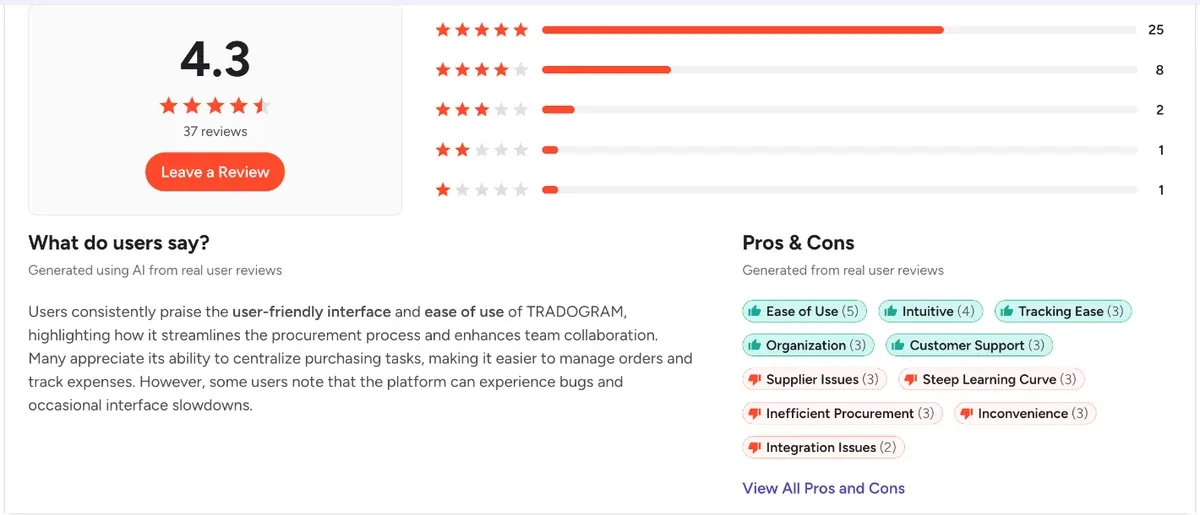
Capterra and Software Advice share one review pool, so those 110 reviews are the same set. TrustRadius holds a single review and Gartner Peer Insights lists Tradogram but carries no ratings for it.
How much does Tradogram cost?
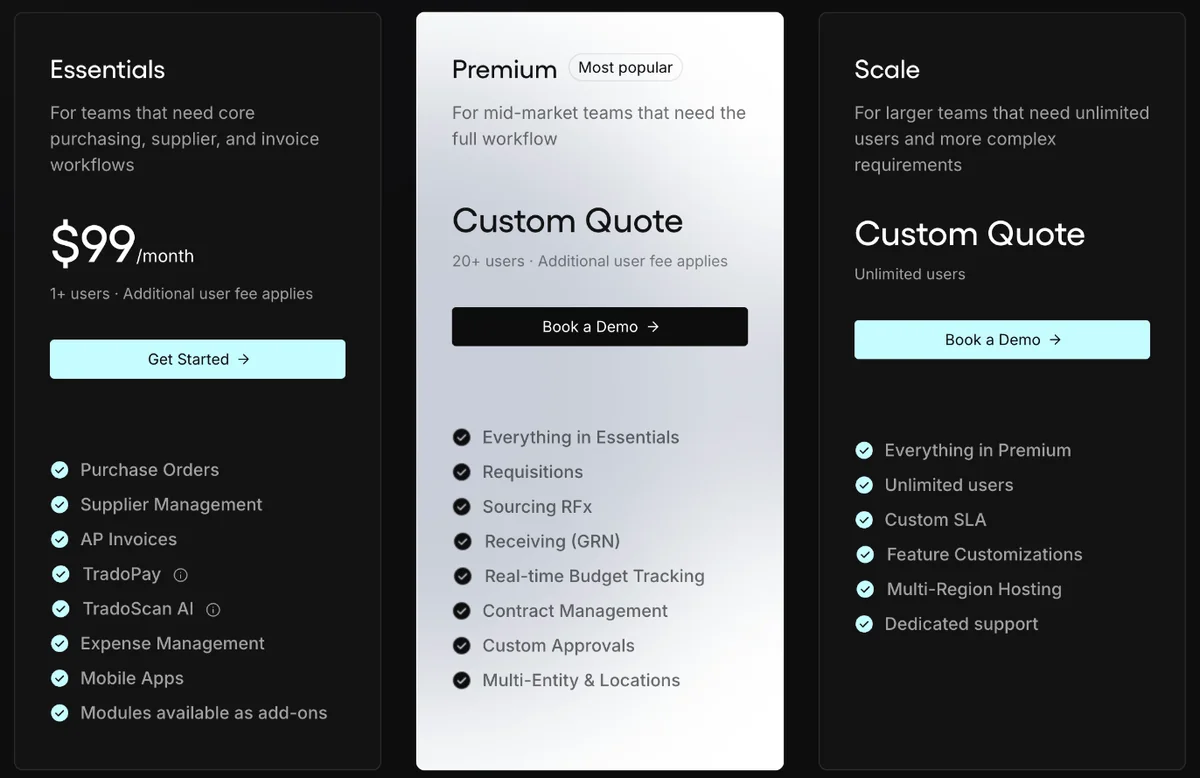
Tradogram costs $99 a month on Essentials, or $950.40 a year billed annually, for one or more users plus a fee for each extra user. Premium, for 20 or more users, and Scale are quoted. Every add-on on this procurement software is charged on top, from setup to the ERP connector.
| Plan | Users | What it adds | Price |
|---|---|---|---|
| Essentials | 1+, extra user fee | POs, supplier management, AP invoices, TradoPay, TradoScan AI, expenses, mobile apps | $99/month or $950.40/year |
| Premium | 20+, extra user fee | Requisitions, sourcing RFx, receiving, budgets, contracts, custom approvals, multi-entity | Custom quote |
| Scale | Unlimited | Custom SLA, feature customisations, multi-region hosting, dedicated support | Custom quote |
Monthly vs annual billing
Tradogram charges $99 a month on monthly billing and $79.20 a month billed yearly, so paying a year upfront costs $950.40 and saves $237.60, a 20% discount.
| Billing | Essentials price | Per year |
|---|---|---|
| Monthly | $99 a month | $1,188 |
| Annual (save 20%) | $79.20 a month | $950.40 |
Why some sites show $225 and $425
Until mid-2026 Tradogram listed a free Basic plan, Pro at $225 a month and Premium at $425 a month, billed annually. Some directories and Google's AI Overview still repeat that ladder, but Tradogram's own page now starts at Essentials and quotes Premium and Scale.
What will Tradogram cost for your business?
Tradogram costs one buyer $950.40 a year on Essentials billed yearly, plus an unpublished fee for every extra user. A team of 20 to 50 users lands on Premium, which Tradogram quotes; the nearest sourced figure is its former $425 a month billed annually, $5,100 a year, before setup and ERP add-ons.
Three example companies
| Monthly cost | 1 buyer, yearly | 1 buyer, monthly | 5 buyers, yearly |
|---|---|---|---|
| Essentials plan | $79 | $99 | $79 |
| Extra users | – | – | $0–$396 |
| Billed per year | $950 | $1,188 | $950–$5,702 |
| Setup, one-time | Quoted add-on | Quoted add-on | Quoted add-on |
- 1 buyer, yearly: Essentials for one buyer, billed annually, no add-ons
- 1 buyer, monthly: Essentials for one buyer billed monthly, with a QuickBooks connector add-on (quoted)
- 5 buyers, yearly: Essentials for five buyers billed yearly, with an ERP connector and SSO (quoted)
The extra user fee is unpublished, so its range runs from nothing to Capterra's $99 per user. The ERP connector, SSO, API access and implementation are add-ons with no published price and are not included. Premium, for 20+ users, is quoted and not modelled.
Estimate your own Tradogram cost
What Tradogram charges on top: add-ons, volume and contract terms
Tradogram charges for six add-ons on every plan and publishes no price for any of them: implementation and setup, TradoCart PunchOut, ERP and accounting integrations, single sign-on, API access and multi-region hosting. Extra users carry a fee on Essentials and Premium, so ask for each line in the quote.

| Cost item | Plans | Price |
|---|---|---|
| Extra users | Essentials, Premium | Additional user fee, not published |
| Implementation and setup | All | Add-on, quoted |
| ERP and accounting integrations | All | Add-on, quoted |
| Single sign-on, API access | All | Add-ons, quoted |
| TradoCart PunchOut | All | Add-on, quoted |
| Advanced modules on Essentials | Essentials | Add-on each (requisitions, receiving, budgets, contracts) |
Users, billing and plan upgrades
Tradogram bills monthly or yearly, and yearly saves 20%. You can start on Essentials and upgrade later with your data and workflows carried over, but extra users cost more on Essentials and Premium.
Renewal terms to check before you sign
Tradogram publishes no renewal policy, so the extra user fee, the annual discount and the add-on prices can all move at renewal unless the contract fixes them.
- The extra user fee and whether it rises at renewal
- Whether the annual-billing discount holds in year two
- The price to move from Essentials to Premium mid-term
- Whether add-on prices are fixed for the term
- Notice period and any minimum commitment on Premium and Scale
Support by plan
Essentials gets the knowledge base only. Chat support starts on Premium, and a custom SLA is on Scale alone, so an entry-plan team carries its own first-line support.
| Support | Essentials | Premium | Scale |
|---|---|---|---|
| Knowledge base | Included | Included | Included |
| Chat support | Not included | Included | Included |
| Custom SLA | Not included | Not included | Included |
How much does Tradogram ERP integration cost?
Tradogram publishes no price for ERP integration: it is a paid add-on on every plan, quoted with your deal. Its integrations page lists QuickBooks Online and Desktop, Sage 50, 300 and Intacct, Xero, NetSuite, Microsoft Dynamics 365 Business Central, SAP and Oracle, and some connectors carry extra fees.
| Your ERP | How it connects | What syncs |
|---|---|---|
| QuickBooks Online or Desktop | Listed connector, two-way (ERP Research) | Purchase orders, invoices |
| NetSuite | Listed connector, two-way (ERP Research) | Purchase orders, invoices |
| Xero, Sage 50, Sage 300, Sage Intacct | Listed connector | Purchase orders, invoices |
| Microsoft Dynamics 365 Business Central | Listed connector, two-way (ERP Research) | Purchase orders, invoices |
| SAP, Oracle, MYOB | Listed on Tradogram's integrations page | Ask what syncs |
| Other systems | Open API (paid add-on) | Scoped by you |
What to confirm about your ERP
Ask for the connector price and its scope before you sign, because the add-on fee and what actually syncs are both set in the quote, not on the pricing page.
- The add-on price for your specific connector, one-time and yearly
- Whether vendor, item and GL data sync both ways or only POs and invoices
- Whether API access is needed on top of the connector
- Who fixes sync errors and how fast on Essentials, which has no chat support
- How multi-currency is handled; a G2 reviewer with a GBP account and USD suppliers found approval thresholds hard to set
Tradogram implementation cost and setup time
Tradogram takes 1 to 4 months to go live on its own timeline, and publishes no implementation fee: setup is a paid add-on quoted with your deal. Onboarding and training sit inside that work, and simple setups with few approval rules have gone live within a day of signing up.
| Phase | Time | Who pays |
|---|---|---|
| Sign up and pay | Day 1 | Plan price |
| Go live: workflows, approval rules, onboarding and training | 1 to 4 months | Implementation add-on |
| Streamline: suppliers and purchasing in one system | 4 to 6 months | Your team |
| Savings and control: spend visibility | 6 to 9 months | Your team |
| Scale to new departments and entities | 9+ months | Extra users or a higher plan |
What makes setup cost more
The add-on fee scales with the work: data migration, approval rules, entities, an ERP connector and the number of people who need training.
- Moving supplier and item data off spreadsheets
- Multi-level approval rules and several entities
- An ERP connector and API work
- Training many requesters and approvers
What users say about Tradogram and what they actually pay
Tradogram users rate it 4.3 of 5 on G2 and pay $950.40 a year for one buyer on Essentials, with Premium quoted from 20 users. Reviewers praise the price against the suites they compared; the complaint that costs money is paying for a full package when only part of it is used.
What reviewers praise
- Small teams pick it because it undercuts the suites they shortlisted, and it scores 4.6 of 5 for value for money (110 Capterra and Software Advice reviews)
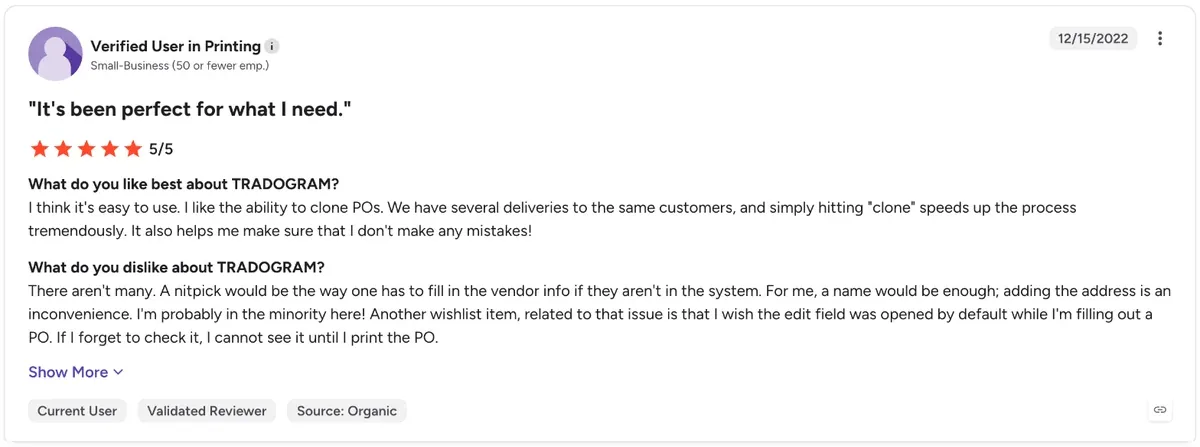
- Purchase orders, bookkeeping and tracking get faster once suppliers sit in one place, and orders from years ago are still searchable (G2, 5 of 5)
- Once an approval finishes, the order goes out to the supplier on its own, which is why one procurement team moved across (G2, 2 reviews)
- Support answers quickly and has built changes for free, and one buyer has just renewed for a second five years (G2, 5 of 5)
What reviewers complain about
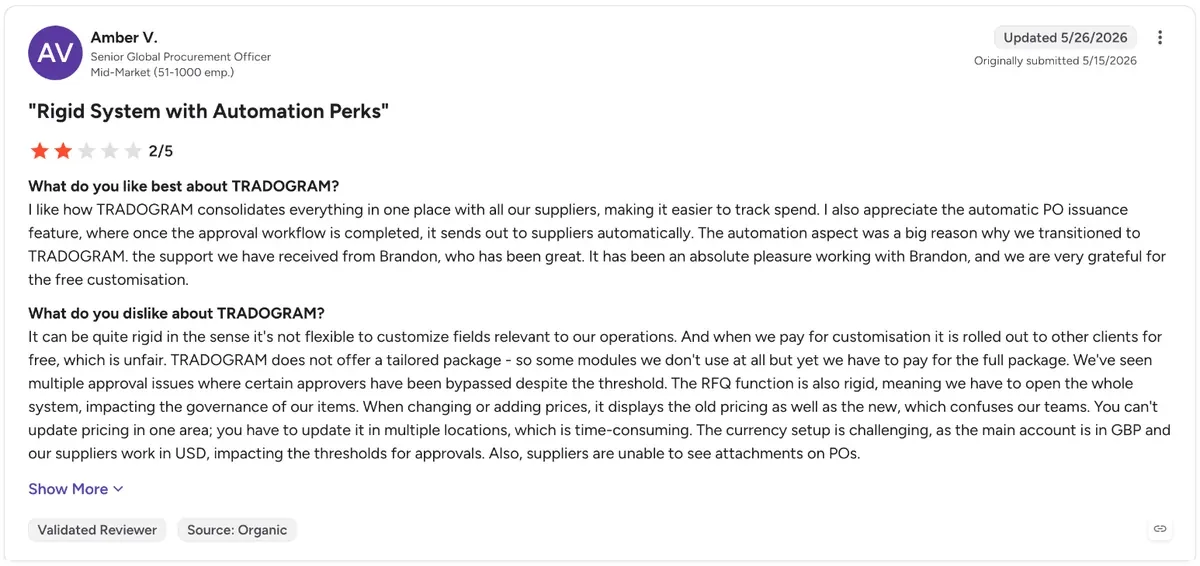
- You buy the whole package: one mid-market buyer pays for modules the team never uses, because there is no tailored bundle (G2, 2 of 5)
- Change an item price and the old and new price both show, and the price has to be updated in several places (G2, 2 of 5)
- A GBP account with USD suppliers throws the approval thresholds off, and suppliers cannot see attachments on orders (G2, 2 of 5)
- Custom fields and the RFQ screen are rigid, and finding a past purchase by vendor from a requisition is awkward (G2 and Software Advice, 2 reviews)
What buyers report paying
No buyer benchmark such as Vendr covers Tradogram, so the guides are its own list price, the directories and the plan prices it published before mid-2026.
| Source | What it reports |
|---|---|
| Tradogram pricing page | Essentials $99 a month, or $950.40 a year billed annually, for 1+ users |
| G2 | Essentials $99.00 for 1+ users; Premium and Enterprise by custom quote; free trial |
| Capterra, Software Advice | Starts at $99 per user; value for money 4.6 of 5 from 110 reviews |
| Former published prices | Pro $225 a month and Premium $425 a month billed annually, before the current plans |
Is Tradogram worth the price?
Tradogram is worth it for small teams that need purchase orders, supplier records and invoices for $950 to $1,188 a year. Once you need requisitions, budgets and receiving for 20 or more people, you move to a quoted plan, which is when Tradogram alternatives with flat pricing are worth comparing.
Worth it if
- A few buyers raise POs and match invoices
- You run QuickBooks, Xero, NetSuite or Dynamics 365
- You can pay a year upfront
- You want to start small and upgrade later
Look elsewhere if
- You need requisitions and budgets without add-ons
- You have 20+ users and want a published price
- You need chat support on the entry plan
- You pay many suppliers in other currencies
How to get a better Tradogram price
Pay yearly rather than monthly, and get the extra user fee in writing before you add people. For Premium, ask for the 20-user quote with every add-on itemised, especially implementation and the ERP connector, and ask whether those one-time fees can be waived on a longer term.
Get in writing
- Extra user fee
- Premium price for 20 users
- Implementation add-on fee
- ERP connector fee
- SSO, API and PunchOut prices
- Renewal terms
Ways to pay less
- Start on Essentials and upgrade later
- Buy only the add-on modules you use
- Keep occasional users off paid seats
- Use a listed ERP connector, not API work
- Ask for setup fees waived on a multi-year term
Tradogram pricing vs alternatives
Tradogram Essentials is $99 a month and Premium is quoted. Precoro starts at $499 a month. ProcureDesk publishes $830 to $1,250 a month billed annually. Procurify is quoted, with a $15,000 median. Zapro pricing is Spark at $699 a month, Growth at $1,999 a month and Scale on custom pricing, all with unlimited users; your ERP or bank pays suppliers.
| Tool | Pricing model | Typical cost | Users priced |
|---|---|---|---|
| Tradogram | Plans + extra user fees | $99/month; Premium quoted | Per user |
| Precoro | Published plans | From $499/month | See plan |
| ProcureDesk | Published plans | $830–$1,250/month, billed annually | See plan |
| Procurify | Quote: products + Pro users | Median $15,000/yr | Pro users; Basic free |
| Zapro | Flat plans, unlimited users | Spark $699 / Growth $1,999 a month; Scale custom | No per-user fee |
Tradogram pricing FAQs
How much does Tradogram cost?
Tradogram Essentials costs $99 a month, or $950.40 a year when billed annually, plus a fee for each extra user. Premium needs 20 or more users and Scale includes unlimited users; both are custom quotes, and add-ons such as implementation are extra.
Is Tradogram good procurement software?
Yes for small buying teams. Tradogram reviews rate it 4.3 of 5 on G2 from 38 reviewers and 4.5 of 5 on Capterra from 110, with value for money its best score at 4.6. Buyers who need flexible fields and tailored modules rate it lower.
What is the most common complaint in Tradogram reviews?
Rigidity, and paying for parts you do not use. A mid-market reviewer says Tradogram sells no tailored package, so the team pays for the full set of modules, and that custom fields, the RFQ screen and multi-currency approval thresholds are hard to bend.
Is there a free version of Tradogram?
Not any more. Tradogram used to offer a free single-user Basic plan, but its pricing page now starts at Essentials, a paid plan. G2 and Capterra list a free trial, so you can test it before you pay.
Is Tradogram priced per user?
Partly. Essentials covers one or more users, and each additional user carries a fee that Tradogram does not publish. Premium starts at 20 users with extra user fees, while Scale includes unlimited users.
What is Tradogram?
Tradogram is cloud procurement software for growing teams. It covers purchase orders, supplier management, invoices, payments through TradoPay and expenses, with requisitions, sourcing, receiving, budgets and contracts on Premium or as add-ons.
Sources: Tradogram pricing page; Tradogram integrations; ERP Research; G2 Tradogram pricing; Capterra; G2 Tradogram reviews; Software Advice; TrustRadius. Prices come from Tradogram's own pages where published and from the third-party sources listed, labelled as such. Estimates are not quotes.