


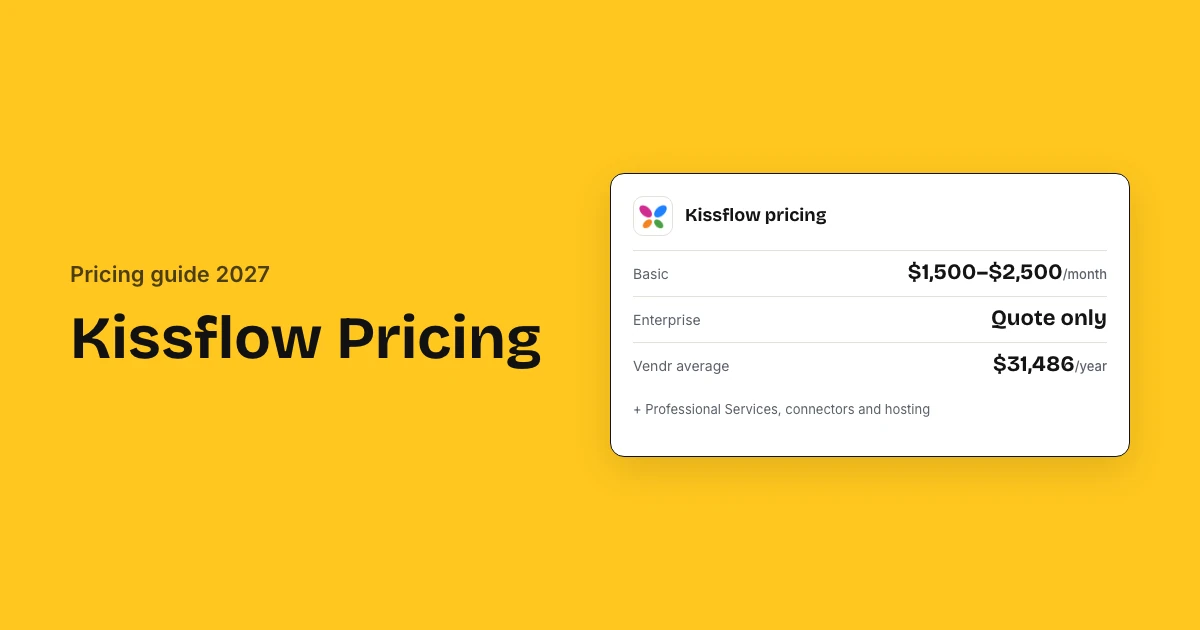
Kissflow costs $2,500 a month for Basic, its own current list price, and quotes Enterprise custom. That is about $30,000 a year, while older Kissflow pages still show $1,500 a month and Vendr's buyers average $31,486 a year. Budget $19,000 to $35,000 for year one on Basic, including third-party setup estimates.
Kissflow pricing: key takeaways
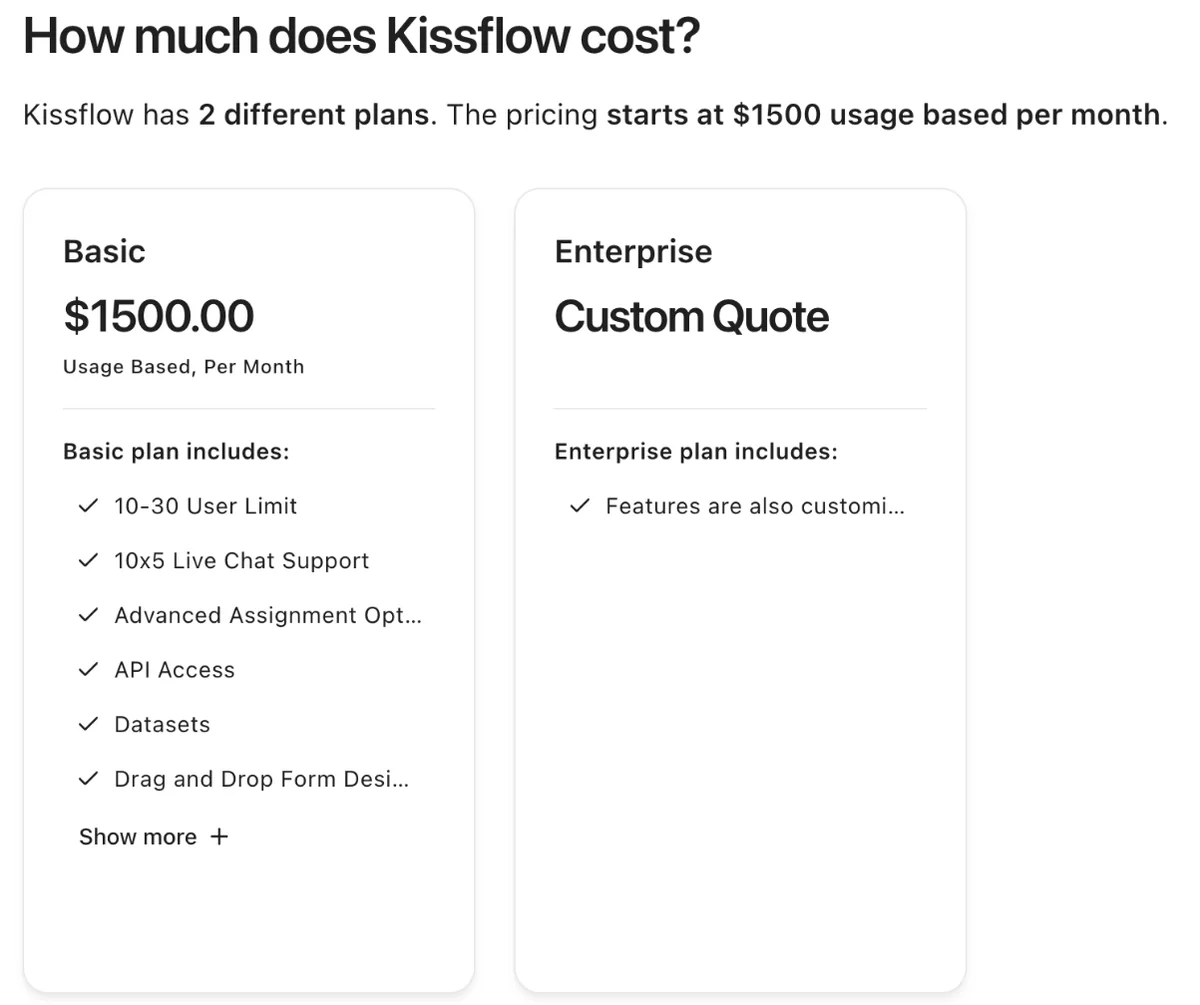
- Basic plan: Kissflow's current French pricing page lists Basic at $2,500 a month, while its no-code page and Capterra still show $1,500.
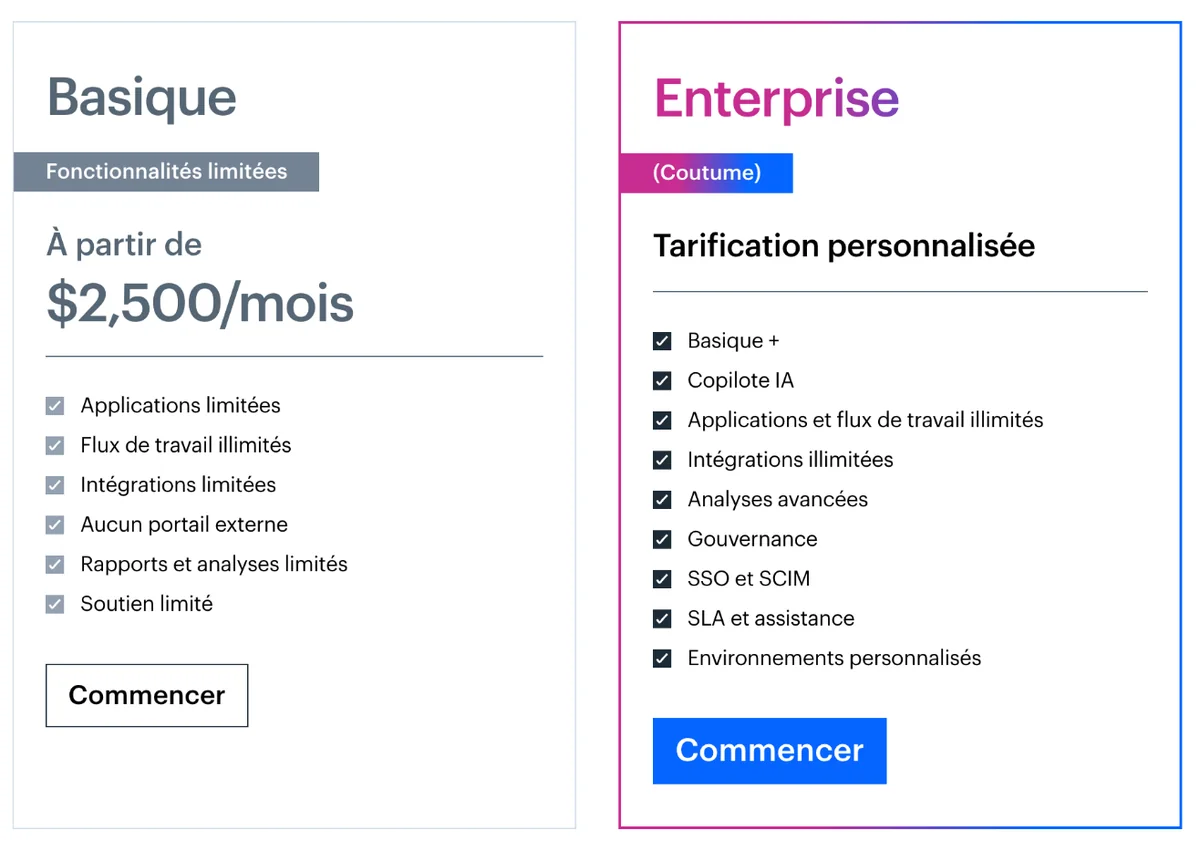
- Enterprise: Custom pricing that adds AI Copilot, unlimited apps and integrations, SSO and SCIM, governance and SLA support.
- Usage tiers: Kissflow prices by usage tier rather than by role, so heavy users can move you into a higher tier.
- What buyers pay: Buyers pay an average of $31,486 a year for Kissflow, from about $8,000 to $74,000, across 9 Vendr deals.
- Setup: Professional Services are quoted on top; ITQlick estimates implementation at $1,000 to $5,000 for a straightforward rollout.
- Extras: A private cloud cluster carries a managed service fee, and 24×5 support is a paid add-on on Enterprise.
How much does Kissflow cost?
Kissflow costs from $2,500 a month for Basic on its French pricing page, or $1,500 on its no-code page, and Enterprise is custom priced. Teams use this low-code platform as procurement software for purchase requests and approvals; Enterprise adds governance, SSO and unlimited integrations.
| Plan | What it includes | Price |
|---|---|---|
| Basic | Limited apps and integrations, unlimited workflows, no external portals, limited reports, Silver support | $1,500 (no-code page) to $2,500 (French page) a month |
| Enterprise | Basic plus AI Copilot, unlimited apps and integrations, advanced analytics, governance, SSO and SCIM, SLA support, custom environments | Custom quote |
Why you see both $1,500 and $2,500
Kissflow's no-code page, Capterra, TrustRadius and The Digital Project Manager show the lower figure. Kissflow's current French pricing page and the Lark review show the higher one. The English pricing page shows no number, so treat the higher figure as the current list price.
How Kissflow counts users
Kissflow counts anyone who can access the platform as a user and prices by usage tier, not by role, so heavy users can push you into a higher tier.
- A user is anyone who can access the platform
- Roles such as admins do not change the price
- Heavier users sit in a higher usage tier than occasional users
- Apps and workflows you build are unlimited
- Capterra lists a 10 to 30 user limit on Basic, so larger teams usually land on Enterprise
What will Kissflow cost for your business?
Kissflow costs a procurement team of 10 to 30 users $18,000 to $30,000 a year on Basic at list price, or $19,000 to $35,000 in year one with setup. Capterra lists Basic for that size. Teams of 30 to 50 users usually need Enterprise, where Vendr's buyers average $31,486 a year before setup.
Three example companies
| Monthly cost | Basic, one team | Enterprise, one dept | Enterprise, wide |
|---|---|---|---|
| Licence | $1,500–$2,500 | $2,500–$2,624 | $2,624–$6,167 |
| Billed per year | $18,000–$30,000 | $30,000–$31,486 | $31,486–$74,000 |
| Setup, one-time | $1,000–$5,000 | $3,000–$15,000 | $3,000–$15,000 |
- Basic, one team: Basic plan, internal users only, ready ERP connector, public cloud, Silver support
- Enterprise, one dept: Enterprise for SSO and governance in one department, ready connectors, public cloud, Gold support
- Enterprise, wide: Enterprise across several departments with a custom ERP connector, private cluster and 24×5 support
Enterprise ranges use Vendr's buyer data (9 deals), not a Kissflow list price. The private cluster fee and 24×5 support are quoted and not included. Setup uses ITQlick's third-party estimates.
Estimate your own Kissflow cost
What Kissflow charges on top of the licence
Kissflow charges no fee for AI or API usage, but bills Professional Services, custom connectors, private hosting and 24×5 support on top of the licence. Its pricing FAQ details each: services for implementation and customer success, connectors priced by scope, and a managed service fee for a private cluster.
| Extra | Available on | How it is priced |
|---|---|---|
| Implementation and customer success | Both plans | Professional Services fee on top of licences |
| Custom connectors | Both plans | Quoted on integration scope |
| Private cluster (Google Cloud, AWS or Azure) | Enterprise | Additional managed service fee |
| 24×5 support | Enterprise | Additional fee over Gold support |
| AI and API usage | Both plans | No surcharge |
Costs review sites flag
Review sites flag advanced features, custom integrations, premium support, and extra storage and user licences on Enterprise as costs on top of the licence.
- Advanced features, custom integrations and premium support (The Digital Project Manager)
- Extra storage and user licences on Enterprise (The Digital Project Manager)
None of these extras has a published price. Ask for each as a separate line in the order form.
How much does Kissflow ERP integration cost?
Kissflow ERP integration is included in both plans, limited on Basic and unlimited on Enterprise, so connecting an ERP is mostly a plan question. If no ready connector fits your ERP, Kissflow's Professional Services team builds a custom connector, priced on the scope of the integration you ask for.
| Your setup | How it connects | Effect on cost |
|---|---|---|
| One ERP with a ready connector | Standard integration | Within Basic's integration limit |
| Several systems (ERP, HRIS, CRM) | Standard integrations | Usually needs Enterprise for unlimited integrations |
| ERP with no ready connector | Custom connector by Professional Services | Quoted on scope |
What to confirm about your ERP
Confirm a ready connector exists for your ERP and version, how many integrations Basic allows, and who maintains a custom connector after go-live.
- Whether a ready connector exists for your ERP and version
- How many integrations Basic allows before you need Enterprise
- Who maintains a custom connector after go-live, and at what cost
- Whether API calls from the connector are free, as Kissflow's no-surcharge promise says
- Whether purchase orders and approved bills sync back to your ERP or only vendor and budget data
Kissflow implementation cost and setup time
Kissflow implementation takes about 2 months on G2 reviewer averages and costs $1,000 to $5,000 by ITQlick's estimate, billed as Professional Services on top of the licence. Kissflow publishes no implementation price, and ITQlick adds $2,000 to $10,000 for customisation, training and migration on bigger rollouts.
| Phase | Who does it | Cost |
|---|---|---|
| Scoping with a Solution Consultant | Kissflow | Part of the sales process |
| Solution design and configuration | Kissflow solution architects or your own builders | $1,000–$5,000 (ITQlick estimate) |
| Custom connectors | Kissflow Professional Services | Quoted on scope |
| Training, customisation and migration | Kissflow or a partner | $2,000–$10,000 for small firms (ITQlick estimate) |
| Center of Excellence and optimisation | Kissflow with your team | Ongoing services, quoted |
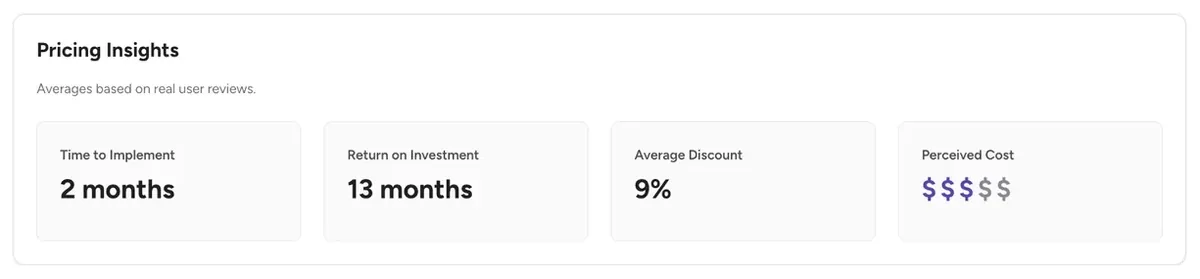
| Total time | Both | About 2 months on average (G2 reviewers) |
ITQlick's figures are third-party estimates, not Kissflow prices. Ask Kissflow for the Professional Services scope as a fixed fee before you sign.
What implementation covers
Kissflow implementation covers solution architects and configuration, team training and Center-of-Excellence planning, all billed as Professional Services.
- Industry-specific solution architects and hands-on configuration
- Training and enablement for your teams
- Center-of-Excellence creation and ongoing optimisation planning
Year-one budget
Add setup to the licence for year one. Basic comes to $19,000 to $35,000. Enterprise across several departments, with a custom connector, comes to about $34,500 to $89,000 before private hosting and 24×5 support, which Kissflow quotes.
Support, hosting and contract terms
Kissflow sells fixed annual agreements with Silver support on Basic and Gold on Enterprise, and charges extra for 24×5 support and private cluster hosting. Silver runs 9 hours a day, 5 days a week, with no upgrade; Gold runs 12 hours a day. A free trial needs a Solution Consultant's review first.
Renewal terms to check before you sign
Kissflow agreements are fixed and annual, so before renewal confirm your usage tier, a cap on the yearly increase and the notice period to change plans.
- The usage tier at renewal and what moves you up a tier
- A cap on the yearly increase
- Whether annual prepayment keeps the discount The Digital Project Manager mentions
- Whether non-profit or education pricing applies to you
- Notice period to change plans; Kissflow offers no money-back guarantee
Plan limits to check
Kissflow Basic cannot add single Enterprise features such as SSO or external portals, so supplier-facing forms or SSO mean moving to Enterprise.
- An Enterprise feature such as SSO cannot be added to Basic on its own
- Basic has no external portals, so supplier-facing forms need Enterprise
- A private cluster hosts only your data, for an extra managed service fee
- Agreements are annual and fixed, so price year-two growth before you sign
What companies actually pay for Kissflow
Companies pay an average of $31,486 a year for Kissflow, from about $8,000 to $74,000 across 9 deals and 5 buyers, per Vendr transaction data. That sample is small and mixes older plans, so read it next to the current $2,500-a-month Basic list price and the quoted services you will add on top.
| Source | What it reports |
|---|---|
| Vendr buyer data | Average $31,486 a year; about $8,000 to $74,000; 9 deals, 5 buyers |
| Capterra | Basic from $1,500 a month, usage based, for 10 to 30 users |
| G2 reviewers | Average discount 9%, about 2 months to implement, ROI in 13 months |
| ITQlick | Implementation estimate $1,000 to $5,000 |
What reviewers say about the cost
G2 reviewers say Kissflow pricing feels steep as usage grows, but that the low-code builder speeds implementation and replaces several tools.
- Pricing can feel steep once you need advanced features or scale usage across more teams (G2)
- The low-code builder speeds implementation and cuts how much IT time setup needs (G2)
- Consolidating several tools into Kissflow reduces maintenance and overhead costs (G2)
- Small-business reviewers rate Kissflow 21% less expensive than the average BPM product (G2)
Is Kissflow worth the price?
Kissflow is worth it if you want one low-code platform for purchase requests and many other workflows. For procurement alone, up to $30,000 a year buys a general app builder you still have to configure, which is when Kissflow alternatives built for purchasing are worth comparing.
Worth it if
- You will build many workflows beyond procurement
- Your IT team wants low-code control over forms and approvals
- You need private cloud hosting for data rules
- You want fixed annual pricing with no AI or API surcharges
Look elsewhere if
- You only need purchase requests, POs and approvals
- You want a published price for every plan
- You need supplier portals on a Basic budget
- You lack time to configure apps yourself
How to get a better Kissflow price
Ask which usage tier your user count and activity put you in, and get the Basic and Enterprise prices side by side. Then ask for Professional Services as a fixed fee, connectors and private hosting priced as separate lines, and a cap on renewal increases before you sign a multi-year deal.
Get in writing
- Your usage tier and how it is measured
- Basic and Enterprise prices
- Professional Services scope and fee
- Custom connector quotes
- Private cluster fee
- Renewal cap
Ways to pay less
- Treat G2's average discount as a floor
- Start on Basic if you need no SSO
- Keep occasional users in a low tier
- Use ready connectors before custom ones
- Stay on public cloud hosting
- Ask for a multi-year rate lock
Kissflow pricing vs alternatives
Kissflow Basic lists at up to $30,000 a year and Enterprise is quoted. Procurify is quoted, with a $15,000 median. ProcureDesk lists $830 to $1,250 a month billed annually. Coupa's median is $94,519. Zapro pricing is Spark at $699 a month, Growth at $1,999 and Scale custom, all with unlimited users; your ERP or bank pays suppliers.
| Tool | Pricing model | Typical cost | Users priced |
|---|---|---|---|
| Kissflow | Plan + usage tier | Basic $1,500–$2,500/month | Usage tier, not role |
| Procurify | Quote: products + Pro users | Median $15,000/yr | Pro users; Basic free |
| ProcureDesk | Published plans | $830–$1,250/month, billed annually | See plan |
| Coupa | Quote by module | Median $94,519/yr | Active users |
| Zapro | Flat plans, unlimited users | Spark $699 / Growth $1,999 a month; Scale custom | No per-user fee |
Other workflow and low-code tools
Per-user workflow tools cost $20 to $26 per user a month, such as Power Apps Premium and Monday Service, while Nintex starts from $480.
| Tool | Listed price |
|---|---|
| Microsoft Power Apps Premium | $20 per user a month |
| Monday Service Standard | $26 per seat a month |
| Nintex | From $480 (TrustRadius) |
Per-user tools look cheaper for small teams. At $20 a user, Power Apps reaches Kissflow's current $2,500 Basic price only at 125 users, while Capterra lists Basic for 10 to 30 users, so a 20-person team pays $400 a month on Power Apps against $2,500 on Kissflow.
Kissflow pricing FAQs
Is Kissflow free?
No. Kissflow has no free plan; Basic is its entry plan, billed on a fixed annual agreement. A limited free trial is possible only after a Kissflow Solution Consultant reviews your needs and agrees your case fits.
How much does Kissflow cost per month?
Kissflow Basic starts at $2,500 a month on its current French pricing page and $1,500 a month on its no-code page and Capterra, billed on a fixed annual agreement. Enterprise is custom priced, and Kissflow quotes it after a Solution Consultant reviews your needs.
Does Kissflow charge per user?
Not by role. Kissflow says roles such as admins do not change the price; it prices by usage tier, so people who use the platform heavily sit in a higher tier than occasional users. Anyone who can access the platform counts as a user.
How much does workflow software cost?
Workflow software costs $20 to $26 per user a month for per-user tools such as Power Apps Premium and Monday Service, and free plans exist at the low end. Kissflow charges a flat Basic fee by usage tier instead, which only costs less per head once about 125 people use it.
What is Kissflow used for?
Kissflow is a low-code and no-code platform for building business apps and workflows such as purchase requests, approvals, vendor onboarding and HR processes. Procurement teams use it to route requests, but it is a general platform rather than a procurement suite.
How much does Kissflow implementation cost?
Kissflow does not publish it: its Professional Services team quotes implementation on top of the licence. ITQlick's third-party estimate is $1,000 to $5,000 for a simple rollout, with more for custom connectors, training and data migration.
Sources: Kissflow pricing (French); Kissflow pricing page; Kissflow pricing plan FAQ; Capterra; G2 Kissflow pricing; Vendr Kissflow buyer guide; ITQlick Kissflow review. Prices come from Kissflow's own pages where published and from the third-party sources listed, labelled as such. Estimates are not quotes.