


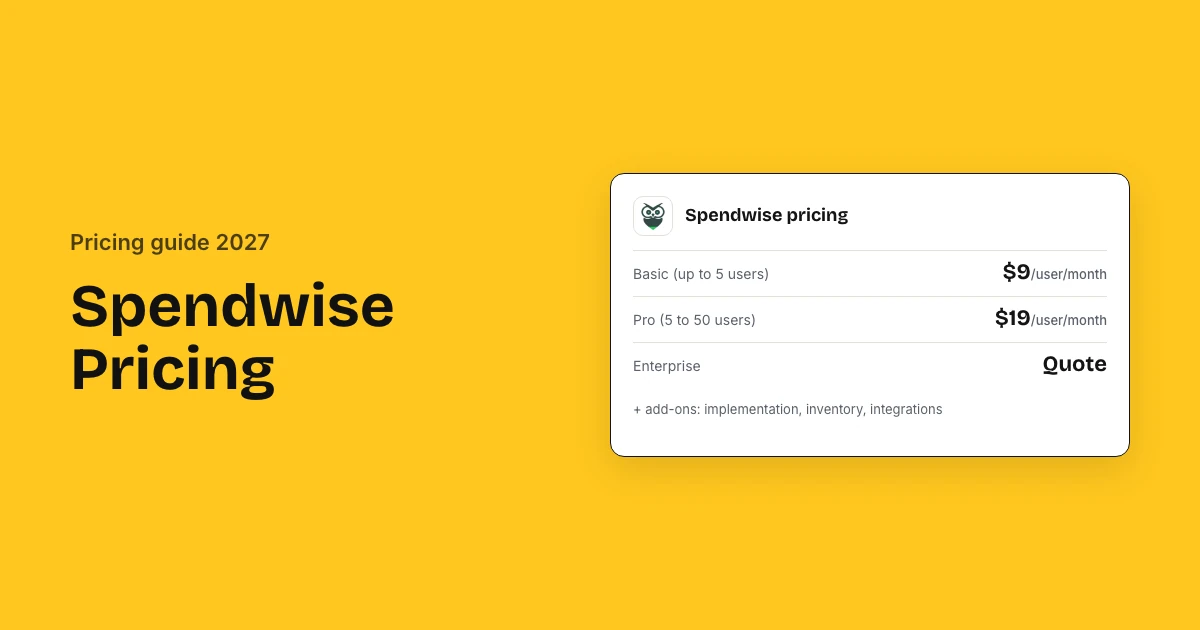
Spendwise costs $9 per user a month on Basic and $19 per user a month on Pro, and Enterprise is quoted. Basic covers up to 5 users and 10 transactions; Pro covers 5 to 50 users with unlimited transactions. Implementation, inventory and accounting integrations are add-ons with unpublished prices.
Spendwise pricing: key takeaways
- Basic: Basic costs $9 per user a month, covers up to 5 users and allows only 10 transactions a month.
- Pro: Pro costs $19 per user a month with a 5-user minimum and 50-user cap, and adds approvals, budgets and roles.
- Enterprise: Enterprise is quoted, needs at least 5 users, and includes unlimited users, an implementation package and priority support.
- Add-ons: Implementation, inventory management, Amazon integration and accounting integrations cost extra, and Spendwise does not publish their prices.
- Real cost: A 25-user team on Pro pays $475 a month, or $5,700 a year, before any add-ons.
- Setup: Spendwise says most customers are up and running within a few weeks, and offers monthly or annual plans.
How much does Spendwise cost?
Spendwise costs $9 per user a month on Basic for up to 5 users and $19 per user a month on Pro for 5 to 50 users. Enterprise, for larger or unlimited teams, is quoted. This procure-to-pay procurement software bills every user with a login, so headcount, not spend or transactions, sets the price.
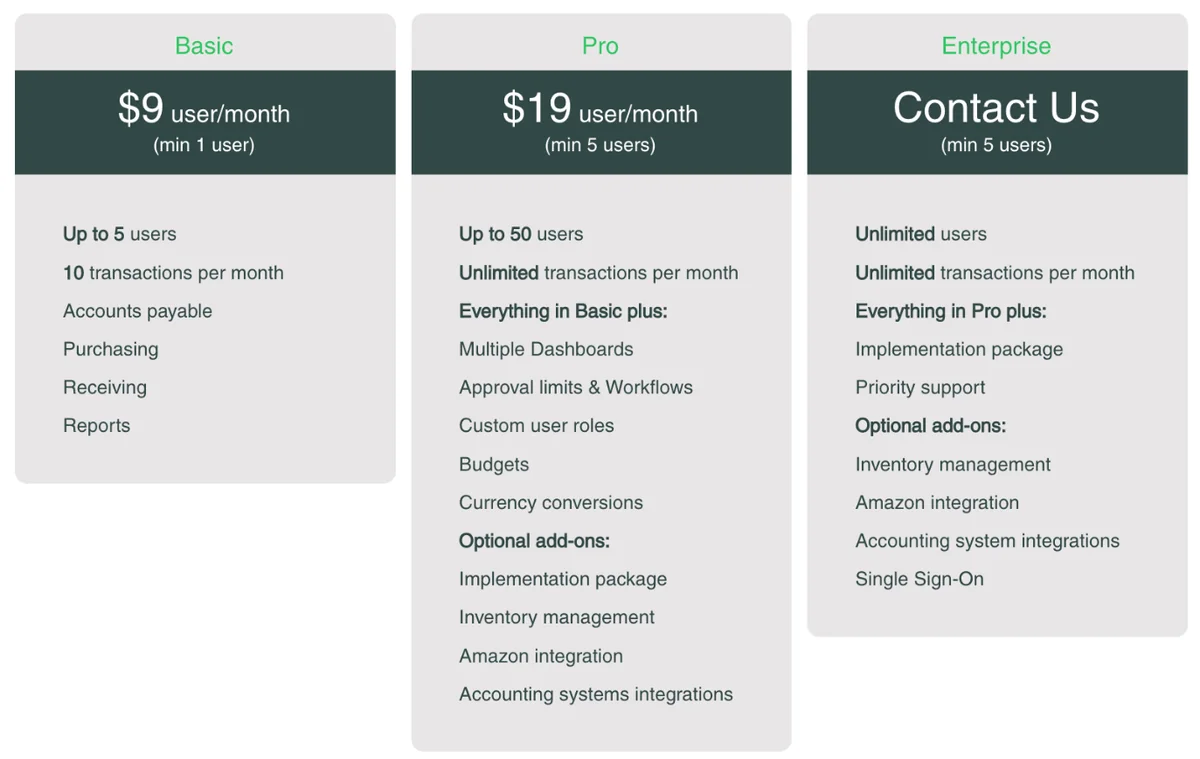
| Plan | Price | Users | Transactions | Adds |
|---|---|---|---|---|
| Basic | $9/user/month | 1 to 5 | 10 a month | AP, purchasing, receiving, reports |
| Pro | $19/user/month | 5 to 50 | Unlimited | Dashboards, approval limits and workflows, roles, budgets, currencies |
| Enterprise | Quote | 5+, unlimited | Unlimited | Implementation package, priority support |
What a team pays on Pro
Spendwise Pro costs $1,140 a year at the 5-user minimum, $2,280 for 10 users, $5,700 for 25 and $11,400 at the 50-user maximum.
| Pro users | Monthly | Yearly |
|---|---|---|
| 5 (minimum) | $95 | $1,140 |
| 10 | $190 | $2,280 |
| 25 | $475 | $5,700 |
| 50 (maximum) | $950 | $11,400 |
When to move from Basic to Pro
Move from Basic to Pro once you pass 5 users or 10 transactions a month, or need approval limits, workflows, budgets, custom roles or currency conversions.
- You raise more than 10 transactions a month
- You need approval limits, workflows or budgets
- You have more than 5 users
- You want custom roles or currency conversions
What will Spendwise cost for your business?
Spendwise costs a 50-200 employee company $2,280 to $11,400 a year on Pro for 10 to 50 buyers and approvers, or about $5,700 for 25 users. Implementation is an optional paid package with no published price, so year one adds that package and any accounting integration quote. Past 50 users you need Enterprise.
Pro bills a 5-user minimum, so a 3-person team on Pro still pays $95 a month. Basic is cheaper at $9 per user, but its 10-transaction monthly cap rules it out for most teams that buy every week.
Three example companies
| Monthly cost | Pro, 25 users | Basic, 5 users | Pro, 50 users |
|---|---|---|---|
| Subscription | $475 | $45 | $950 |
| Billed per year | $5,700 | $540 | $11,400 |
| Setup, one-time | Optional paid package | Optional paid package | Optional paid package |
- Pro, 25 users: A mid-size team with 25 Spendwise users on Pro
- Basic, 5 users: A small team with 5 users on Basic, under 10 transactions a month
- Pro, 50 users: A growing team at Pro's 50-user maximum
Figures exclude add-ons (implementation, inventory, Amazon and accounting integrations), which Spendwise prices on request.
Estimate your own Spendwise cost
What Spendwise charges on top of the subscription
Spendwise publishes no price for its four paid add-ons on Pro: an implementation package, inventory management, Amazon integration and accounting system integrations. Enterprise includes implementation but still charges for inventory, Amazon, accounting integrations and single sign-on, so ask for each price in writing.
Add-ons by plan
Spendwise publishes no add-on prices; Enterprise includes implementation and priority support, while inventory, Amazon and accounting integrations cost extra on both Pro and Enterprise.
| Add-on | Pro | Enterprise | Price |
|---|---|---|---|
| Implementation package | Optional add-on | Included | Not published |
| Inventory management | Optional add-on | Optional add-on | Not published |
| Amazon integration | Optional add-on | Optional add-on | Not published |
| Accounting system integrations | Optional add-on | Optional add-on | Not published |
| Single sign-on | Not offered | Optional add-on | Not published |
| Priority support | Not offered | Included | – |
Basic lists no add-ons at all, and its 10-transaction monthly cap means most growing teams move to Pro quickly. Ask for every add-on you need as a fixed price in the same quote.
Spendwise says its pricing depends on the number of users, features and subscription term, so the add-on quote and your billing cycle together set the real annual cost.
How much does Spendwise ERP integration cost?
Spendwise charges for accounting system integration as a paid add-on on Pro and Enterprise, but publishes no price or full list of supported systems. Third-party listings name QuickBooks as a Spendwise integration, and Spendwise says integrations keep purchasing and AP in sync to cut duplicate entry.
| Integration | Plan | Effect on cost |
|---|---|---|
| QuickBooks (per ProcureDesk) | Pro, Enterprise | Paid add-on, price not published |
| Other accounting systems | Pro, Enterprise | Paid add-on; confirm support |
| Amazon (purchasing) | Pro, Enterprise | Paid add-on |
| Single sign-on | Enterprise | Paid add-on |
What to confirm about your ERP
Confirm that your accounting system and edition are supported, what the integration add-on costs, which records sync and who fixes sync errors.
- That your accounting system and edition are supported
- The integration add-on price, one-time or monthly
- Which records sync: vendors, bills, POs, GL codes
- Whether Basic can connect at all, since it lists no add-ons
- Who fixes sync errors; G2 reviewers mention integration issues
Spendwise implementation cost and setup time
Spendwise publishes no implementation fee, and most customers are up and running within a few weeks, per Spendwise. The setup package is a paid add-on on Pro and is included on Enterprise, and third-party listings note in-person or online training for new buyer teams, so ask what your plan includes.
| Phase | Time | Cost |
|---|---|---|
| Free trial | One month (per ProcureDesk) | Free |
| Self-setup on Basic or Pro | A few weeks, per Spendwise | Included in subscription |
| Implementation package (Pro) | By scope | Paid add-on, not published |
| Implementation package (Enterprise) | By scope | Included |
| Accounting integration | Part of setup | Paid add-on, not published |
- Use the trial to test approvals and receiving with real requests
- Write down approval limits by amount and department before you configure Pro's approval workflows
- Ask for the implementation package as a fixed fee; its size depends on users, approval rules, inventory and your accounting connection
- Confirm training is included
Third-party listings show in-person and online training plus chat, phone and live rep support for Spendwise. Ask which of these come with your plan and which sit inside the paid implementation package.
Users, plan limits and contract terms
Spendwise's plan limits drive upgrades: Basic stops at 5 users and 10 transactions a month, Pro needs at least 5 users and stops at 50, and Enterprise takes over beyond that. Spendwise offers monthly and annual plans, and says price depends on users, features and subscription term.
- Pro bills at least 5 users, so a 3-person team pays for 5
- A 51st user means moving to quoted Enterprise
- Approvals and budgets are Pro features, not Basic
Renewal terms to check before you sign
Spendwise offers monthly and annual plans, so confirm any annual discount, whether the $19 Pro rate is locked at renewal and how mid-term users and add-ons are billed.
- Any discount for annual instead of monthly billing
- Whether the $19 Pro rate is locked at renewal
- How users added mid-term are billed
- Cancellation notice on monthly plans
- Whether add-on prices can rise at renewal
What companies actually pay for Spendwise
Companies pay Spendwise its list rate for their headcount, since prices are published: $2,280 a year for 10 Pro users and $11,400 for 50, plus add-ons. Procurer.io puts 20 Pro users at about $4,560 a year. G2 users rate it 4.7 of 5, and Capterra users rate value for money 4.5.
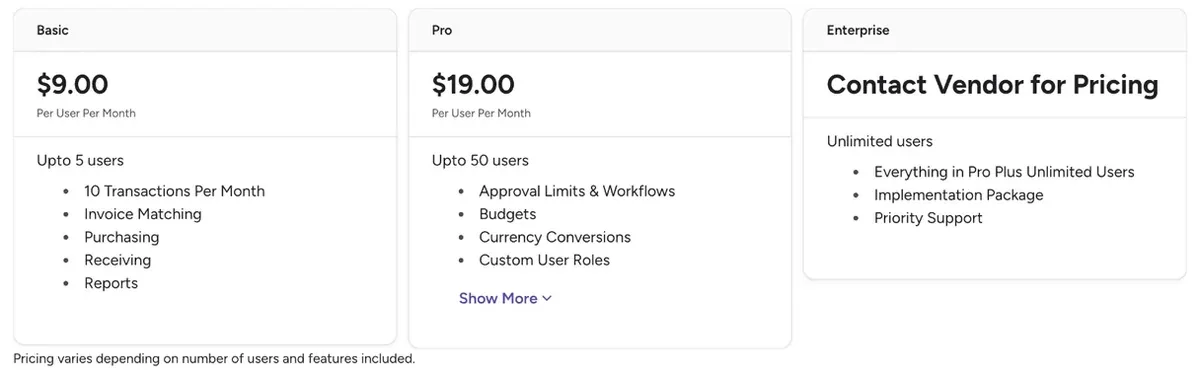
What buyers and reviewers report
Buyers and reviewers report list prices of $9 and $19 per user a month, about $4,560 a year for 20 Pro users, and G2 and Capterra ratings of 4.7 and 4.6.
| Source | What it reports |
|---|---|
| Spendwise pricing page | Basic $9, Pro $19 per user per month; Enterprise quoted |
| G2 (4.7 of 5, 75 reviews) | Same editions; cons include PO management and integration issues |
| Capterra (4.6, 236 reviews) | From $9 per user per month; value for money 4.5 |
| Procurer.io | 20 Pro users about $4,560 a year before add-ons |
| ITQlick | Lists different, higher figures; Spendwise's page is current |
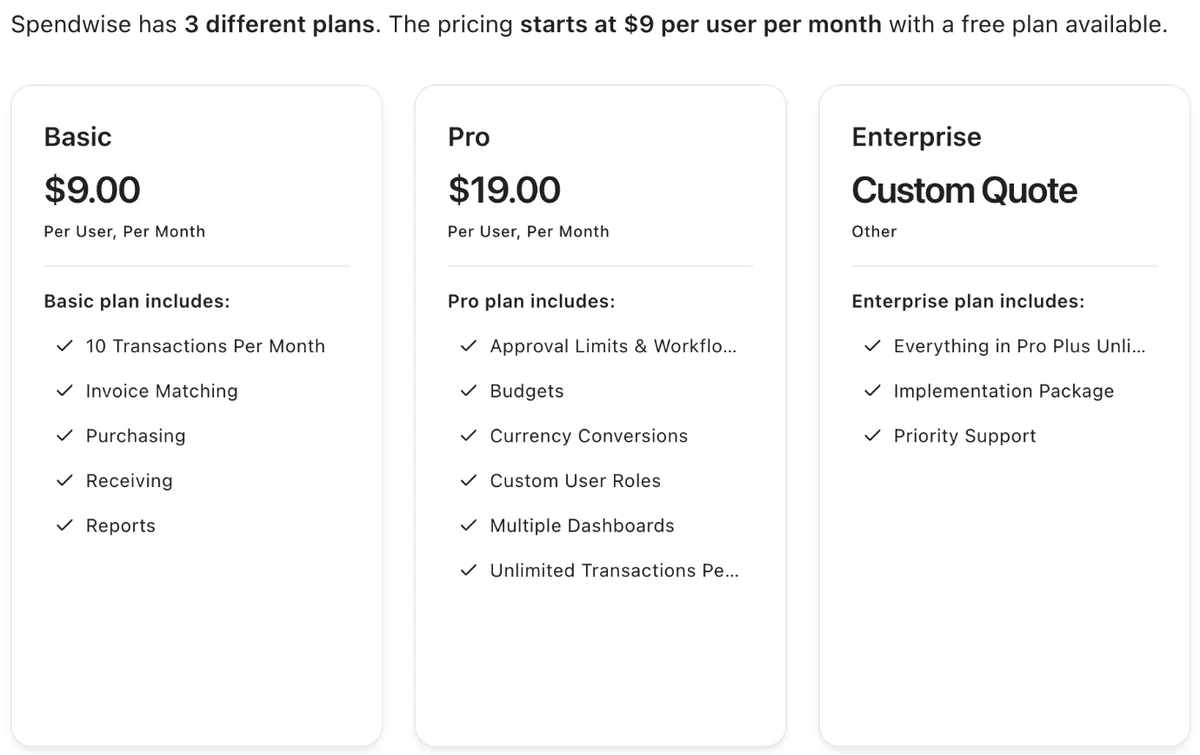
Is Spendwise worth the price?
Spendwise is worth its price for small and mid-size teams of up to 50 users that want published, low per-user pricing for purchasing, receiving and AP. Paid integrations, a 50-user Pro cap and per-user billing weigh against it as you grow, which is when Spendwise alternatives are worth comparing.
Worth it if
- Your team is under 50 users
- You want a published price and a free trial
- You need approvals, budgets and receiving on Pro
- You can live with a paid accounting integration
Look elsewhere if
- Many employees only request and you do not want to pay per head
- You will pass 50 users soon
- You need SSO without Enterprise
- You need the integration price before you start
G2 reviewers most often praise ease of use, simplicity and customer support. The most common complaints are purchase order management issues, integration issues and some inflexibility, so test your PO workflow and accounting sync during the trial.
How to get a better Spendwise price
Spendwise publishes list prices, so savings come from user count, billing term and add-ons. Count only the people who need a login, ask whether annual billing earns a lower rate than monthly, and get the implementation and accounting integration add-ons priced as fixed fees before you sign.
Get in writing
- Annual vs monthly rate
- Each add-on price
- Integration support for your system
- Rate lock at renewal
- Mid-term user billing
- Cancellation notice
Ways to pay less
- License only active purchasers
- Pay annually if discounted
- Self-implement instead of the package
- Start on Basic if under 10 transactions
- Trial before adding paid add-ons
Spendwise pricing vs alternatives
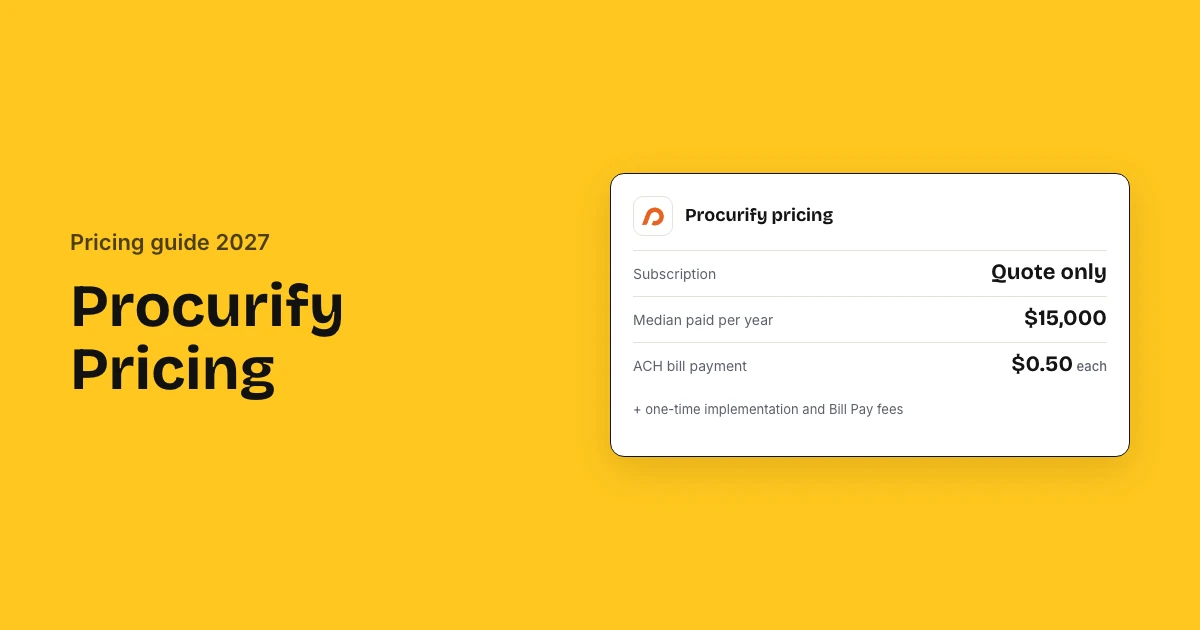
Spendwise costs $9 or $19 per user a month. ProcureDesk publishes $830 to $1,250 a month billed annually with 10 users included, SpendMap charges $15 per user per module and Procurify has a $15,000 median. Zapro pricing has Spark at $699 a month, Growth at $1,999 and Scale on custom terms, all with unlimited users; your ERP or bank pays suppliers.
| Tool | Pricing model | Typical cost (basis) | Users priced |
|---|---|---|---|
| Spendwise | Per user | $9–$19/user/month (list) | Yes, every user |
| ProcureDesk | Published plans | $830–$1,250/month, billed annually (list) | 10 users included |
| SpendMap | Per user, per module | $15–$20/user/module/month (list) | Yes, by module |
| Procurify | Quote: products + Pro users | Median $15,000/yr (Vendr) | Pro users; Basic free |
| Zapro | Flat plans, unlimited users | Spark $699 / Growth $1,999 a month; Scale custom | No per-user fee |
For small teams Spendwise is usually cheaper than flat-fee tools: 10 Pro users cost $190 a month, while ProcureDesk's Startup plan costs $830 a month billed annually with 10 users included and $20 for each extra user.
Spendwise pricing FAQs
How much does Spendwise cost?
Spendwise costs $9 per user a month on Basic, for up to 5 users and 10 transactions, and $19 per user a month on Pro, for 5 to 50 users. Enterprise is quoted. A 25-user Pro team pays $5,700 a year before add-ons.
What is Spendwise?
Spendwise is procure-to-pay software that helps organizations manage purchasing and accounts payable in one place, covering requisitions, purchase orders, receiving, invoice matching, budgets and reports, with optional inventory management.
Does Spendwise have a free trial?
Yes. Spendwise offers a free trial from its website, and third-party listings describe it as one month. G2 and Capterra also list a free trial, which lets you test approvals and receiving before you pay.
Does Spendwise integrate with QuickBooks?
Yes, by third-party listings, but accounting integration is a paid add-on on Spendwise's Pro and Enterprise plans and its price is not published. Ask for the QuickBooks integration price in writing before you sign.
What happens when you pass 50 users on Spendwise?
Pro is capped at 50 users, so a larger team moves to Enterprise, which Spendwise quotes. Enterprise adds unlimited users, an implementation package and priority support, with inventory, integrations and SSO still sold as add-ons.
Is Spendwise cheaper than Procurify?
For small teams, usually yes. Spendwise charges $19 a user a month on Pro, so 20 users cost about $4,560 a year, while Procurify is quoted, with a $15,000 median in buyer benchmarks. Above 50 users, Spendwise moves to quoted Enterprise pricing.
Does Spendwise charge per transaction?
Only Basic is limited by transactions, to 10 a month. Pro and Enterprise include unlimited transactions, so on those plans you pay per user, not per purchase order, plus any add-ons such as integrations or inventory management.
Sources: Spendwise pricing; Spendwise; G2 Spendwise pricing; Capterra Spendwise pricing; Procurer.io. Prices come from Spendwise's own pages where published and from the third-party sources listed, labelled as such. Estimates are not quotes.