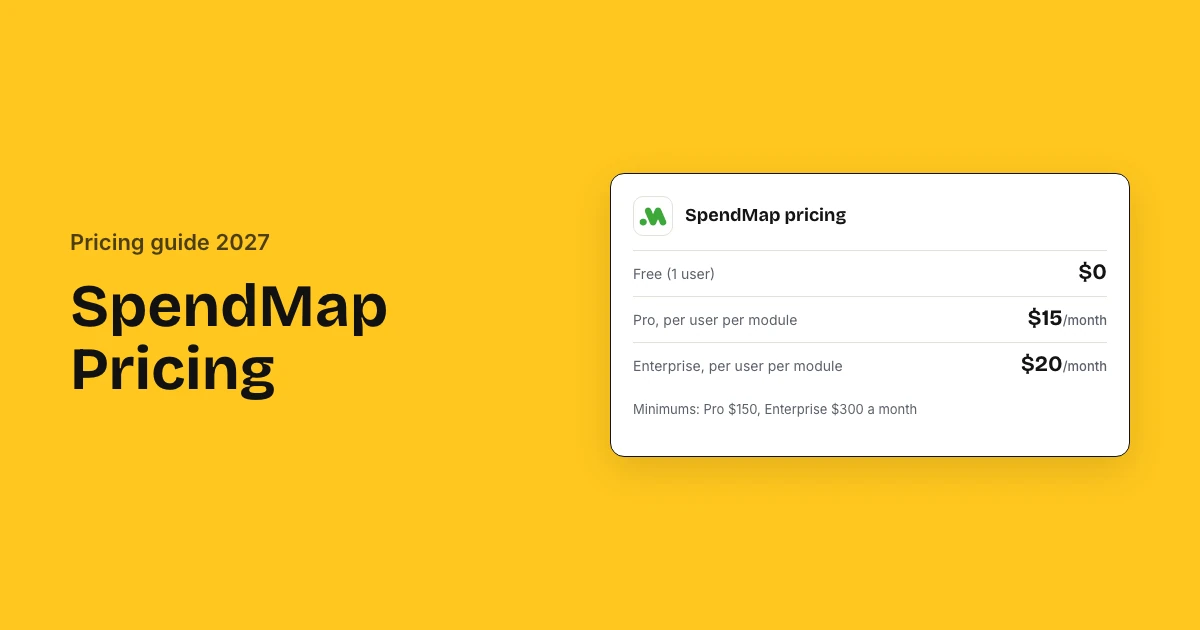
SpendMap costs $15 per user per module a month on Pro, with a $150 monthly minimum, and $20 per module with a $300 minimum on Enterprise; one user is free. Reviewers rate it 4.8 of 5 across 24 reviews, and hosting, updates, support, setup assistance and training are included in the cloud price.
SpendMap pricing and reviews: key takeaways
- Free plan: One user gets purchase orders and receiving free, with email support, updates and five PO form designs.
- Pro: Each Pro module costs $15 per user a month, so a buyer on three modules pays $45, with a $150 monthly minimum.
- Enterprise: Enterprise modules cost $20 per user a month with a $300 minimum and add inventory, assets, PunchOut and AI matching.
- Ratings: SpendMap scores 4.8 of 5 from 24 reviews on Capterra and Software Advice, and 5 of 5 from 3 on Software Connect.
- What reviewers like: Buyers say no rival does the same job at the price, and rate value for money 4.8 of 5 and support 4.9.
- What reviewers dislike: Learning the system takes time: ease of use is the lowest score at 4.3, and searching old orders is slow.
- Real cost: A 50-person team with 35 requesters, 10 buyers and 5 AP users pays $1,050 a month on Pro, $12,600 a year.
SpendMap reviews and ratings at a glance
SpendMap is rated 4.8 out of 5 by 24 reviewers on Capterra and Software Advice, and 5 out of 5 by 3 on Software Connect. Value for money scores 4.8 and support 4.9, the two highest marks; ease of use is the lowest at 4.3, and no reviewer in the 24 calls SpendMap expensive.
| Source | Rating | Reviews | What reviewers say |
|---|---|---|---|
| Capterra | 4.8 of 5 | 24 | Does the job for less than anything else they looked at; the system is not intuitive at first |
| Software Advice | 4.8 of 5 | 24 | Support answers and trains well; modifying or searching past purchases is slow |
| Software Connect | 5 of 5 | 3 | Free version and solid reports, but the initial setup is complex |
| G2 | 4.0 of 5 | 1 | Keeps orders accurate by cost centre; training and rollout were hard for some staff |
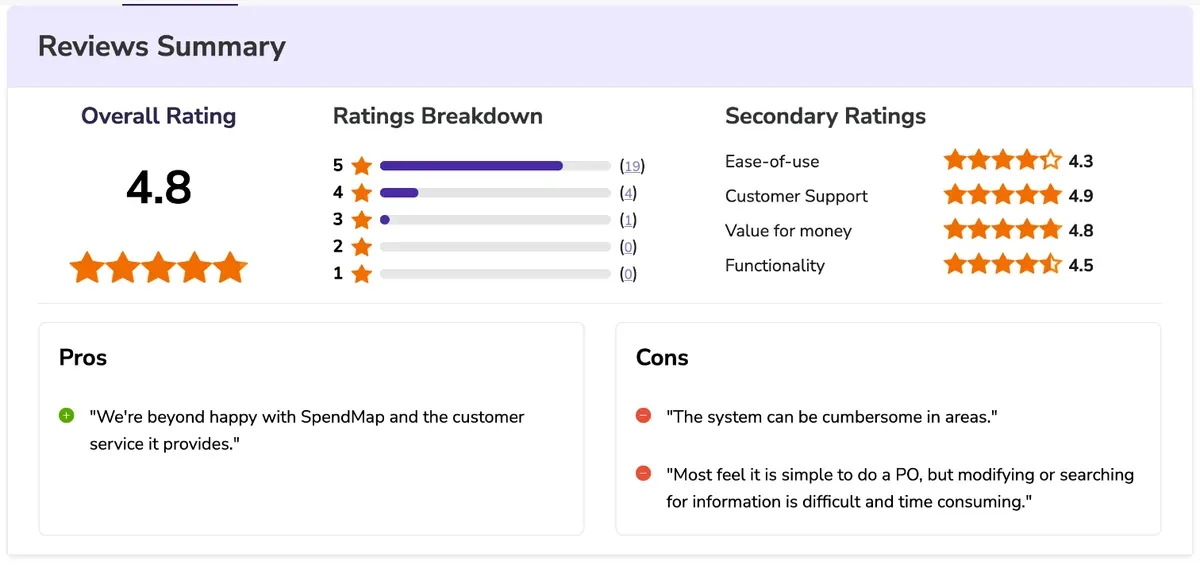
Capterra and Software Advice share one review pool, so those 24 reviews are the same set. G2 holds a single 2019 review, and TrustRadius and Gartner Peer Insights have no SpendMap listing.
How much does SpendMap cost?
SpendMap costs $15 per user per module a month on Pro and $20 on Enterprise, with monthly minimums of $150 and $300, and one user is free. This procurement software prices each module per user, so a requester needs one module while a buyer who also receives goods and approves invoices needs three.
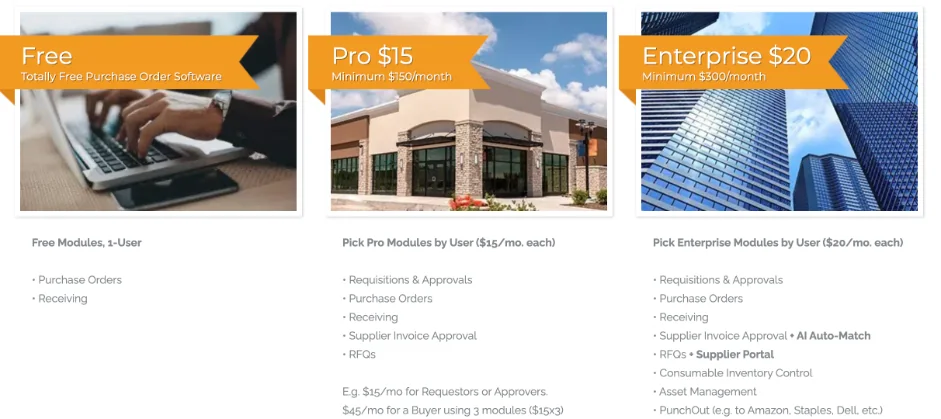
| Plan | Price per user per module | Monthly minimum | Modules |
|---|---|---|---|
| Free | $0, 1 user | None | Purchase Orders, Receiving |
| Pro | $15 | $150 ($1,800 a year) | Requisitions & Approvals, POs, Receiving, Supplier Invoice Approval, RFQs |
| Enterprise | $20 | $300 ($3,600 a year) | Pro modules + AI Auto-Match, Supplier Portal, Inventory, Asset Management, PunchOut |
| On-Premise | One-time perpetual license | Quote | Installed on your own servers |
How per-module pricing works
You assign modules role by role and pay for those alone, so the bill follows what each person does rather than how many people have a login.
- You assign modules to each employee and pay only for those
- SpendMap moved to this model in January 2025, replacing flat per-user fees
What the Free plan includes
The Free plan runs purchase orders and receiving for one user, with no time limit and no card, which is enough to test the workflow before you pay.
- Purchase Orders and Receiving modules for one user
- Five PO form designs
- Automatic updates and free email and web support
- An AI support agent, walkthrough tutorials and a setup wizard
What will SpendMap cost for your business?
SpendMap costs a 50-person team $12,600 a year on Pro: 35 requesters, 10 buyers on three modules and 5 AP users come to 70 module seats at the Pro rate. The same mix on Enterprise is $16,800. Setup help and training sit in the cloud price, so year one equals the subscription.
ChatGPT's planning figures charge every user for every module, for example 50 users on three modules at $27,000 a year on Pro. Role-based assignment, which SpendMap's pricing allows, usually costs far less, as the examples below show.
Three example companies
| Monthly cost | Pro, 50 people | Enterprise, 50 people | Enterprise, 130 people |
|---|---|---|---|
| Module seats | $1,050 | $1,400 | $4,200 |
| Billed per year | $12,600 | $16,800 | $50,400 |
| Setup, one-time | Included | Included | Included |
- Pro, 50 people: 35 requesters or approvers, 10 buyers on three modules and 5 AP users, on Pro
- Enterprise, 50 people: The same 35 requesters, 10 buyers on three modules and 5 AP users, on Enterprise
- Enterprise, 130 people: 100 requesters, 20 buyers on five modules and 10 AP users, on Enterprise
Figures exclude optional consulting, on-site training and custom programming, which SpendMap quotes.
Estimate your own SpendMap cost
What SpendMap charges on top: add-ons, volume and contract terms
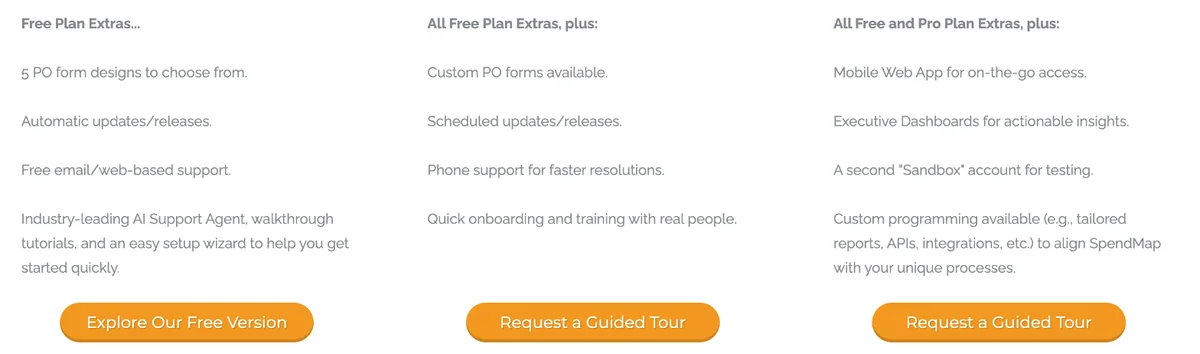
SpendMap charges nothing on top of the cloud subscription for Azure hosting, updates, technical support, setup assistance and training: all are included. What is quoted separately is services, namely implementation consulting, on-site training and custom programming for reports, APIs or integrations.
Included vs quoted
Everything that keeps the software running is in the subscription; everything that needs a SpendMap person on your project is quoted.
| Item | Cloud plans | Price |
|---|---|---|
| Azure hosting, updates, technical support | Included | $0 |
| Setup assistance and standard training | Included | $0 |
| Phone support, onboarding with real people | Pro and Enterprise | $0 |
| Sandbox account, dashboards, mobile web app | Enterprise | $0 |
| Implementation consulting, on-site training | Optional | Quoted |
| Custom programming: reports, APIs, integrations | Enterprise | Quoted |
What each role costs a month
Your bill grows with each module you assign, not with headcount, so role design decides the total: a requester costs one module, a buyer three or more.
| Role | Typical modules | Pro cost a month | Enterprise cost a month |
|---|---|---|---|
| Requester or approver | Requisitions & Approvals | $15 | $20 |
| Buyer | Requisitions, POs, Receiving | $45 | $60 |
| AP clerk | Supplier Invoice Approval | $15 | $20 |
| Warehouse or stores | Receiving, Inventory | Not on Pro | $40 |
Enterprise-only modules change the math: inventory control, asset management, PunchOut and the supplier portal are not on Pro, so needing any of them means buying Enterprise modules at $20 each. Ask whether Pro and Enterprise users can be mixed on one account.
Renewal terms to check before you sign
SpendMap publishes no contract term, renewal policy or cancellation notice, so ask for all three in writing before you commit, along with a price lock on the per-module rate.
- Monthly vs yearly billing and any discount for paying yearly
- Whether per-module prices are locked at renewal
- How fast you can remove modules when roles change
- Notice period to cancel a cloud plan
- Annual maintenance for an on-premise license
How much does SpendMap ERP integration cost?
SpendMap lists integration tools, email integration, barcode integration and PunchOut, and its Free plan includes data file import and export. Deeper links such as custom APIs or ERP integrations come under custom programming on Enterprise, which SpendMap quotes, so price your accounting connection before you choose a plan.
| Integration | Plan | Effect on cost |
|---|---|---|
| Data file import and export | All plans | Included |
| Email integration | All plans | Included |
| PunchOut to Amazon, Staples, Dell | Enterprise | Module at $20 per user |
| Barcode integration | Module | Per-module price |
| Custom APIs and ERP integrations | Enterprise | Custom programming, quoted |
What to confirm about your ERP
File import and export is included on every plan, so confirm early whether a file exchange is enough for your accounting system or you need quoted custom work.
- Whether your accounting system syncs by file export or a live connection
- Who builds and maintains a custom integration, and its one-time cost
- Which data moves: vendors, POs, GL codes, approved invoices
- Whether Pro can connect at all, or you need Enterprise for custom programming
- Testing time in the Enterprise sandbox account before go-live
SpendMap implementation cost and setup time
SpendMap charges no setup fee on cloud plans and most teams start the same day using its setup wizard, with setup assistance and training included and guided onboarding on Pro. Implementation consulting and on-site training are optional and quoted, and SpendMap uses its own staff rather than sub-contractors.
| Phase | Time | Cost |
|---|---|---|
| Start on Free with the setup wizard | Same day, per SpendMap | $0 |
| Upgrade to Pro with guided onboarding | Quick onboarding, per SpendMap | Included in Pro |
| Implementation consulting (optional) | By scope | Quoted |
| On-site training (optional) | By scope | Quoted |
| Custom programming (Enterprise) | By scope | Quoted |
- Settle your purchase order approval limits and approvers before onboarding, since they decide which modules each role needs
- Start free to test POs and receiving before paying
- Assign modules by role so light users stay on one module
- Ask whether data migration is in setup assistance or billed
What users say about SpendMap and what they actually pay
SpendMap users rate it 4.8 of 5 and pay from $1,800 a year on Pro and $3,600 on Enterprise, the plan minimums, with a 50-person team landing near $12,600. Reviewers say nothing else does the job at the price; the cost that surprises them is the time it takes to learn the system.
What reviewers praise
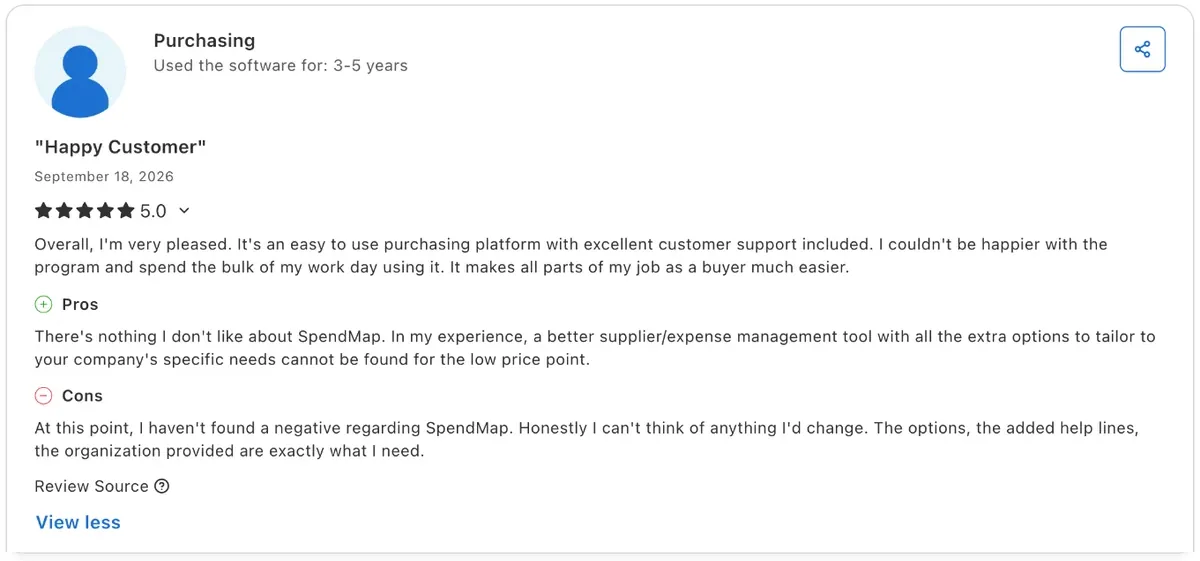
- Buyers say no other tool they tried does the same job at the price, and value for money scores 4.8 of 5 (24 Capterra and Software Advice reviews)
- One buyer negotiated a 9% cut with a single supplier and says that saving alone paid for the software (Software Connect)
- Support answers and trains people properly: it is the top-scoring attribute at 4.9 of 5 and the most quoted strength (24 reviews)
- Approval rules and buyer spend limits keep purchases in check, and punchout speeds up catalogue ordering (Capterra, 2 reviews)
What reviewers complain about
- People need training before they can work: ease of use is the lowest score at 4.3 of 5, and one reviewer calls the system cumbersome (24 reviews)
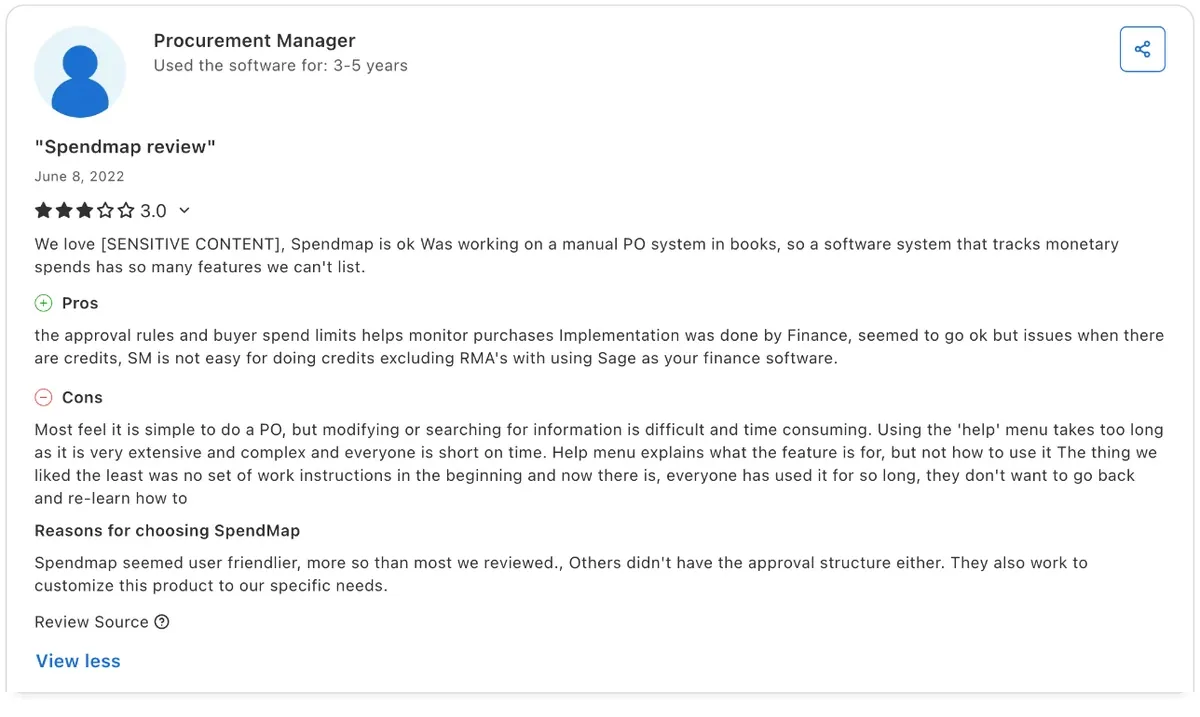
- Raising a purchase order is simple, but changing one or searching for an old one is slow, and the help menu is long (Capterra, 3 of 5)
- Getting the data and settings ready before go-live took a long time, and one team started with no written work instructions (Capterra, 2 reviews)
- Credits and RMAs are awkward when the accounting system is Sage, and upgrades take longer than teams expect (Capterra, 2 reviews)
What buyers report paying
No buyer benchmark such as Vendr covers SpendMap's current prices, so the guides are its own pricing page, the directories and what reviewers report.
| Source | What it reports |
|---|---|
| SpendMap pricing page | Pro $15 and Enterprise $20 per user per module, with $150 and $300 monthly minimums |
| Capterra, Software Advice | Lists the Pro rate per user a month and a free version; value for money 4.8 of 5 from 24 reviews |
| Software Connect | Pro $150 minimum, Enterprise $300 minimum, on-premise by quote; one buyer saved 9% on a supplier |
| Vendr (outdated) | The pre-2025 model: Pro $30 per named user, Enterprise $200 per concurrent user |
Is SpendMap worth the price?
SpendMap is worth its price for teams that want published, low per-seat costs and many light users who only request or approve. It suits companies that can work with file-based accounting links. If you need live ERP sync without custom programming, SpendMap alternatives are worth comparing.
Worth it if
- Most users only request or approve, on one module each
- You want to start free and upgrade later
- You need inventory or asset control alongside purchasing
- You prefer an on-premise option
Look elsewhere if
- Many users need several modules each
- You need a live ERP connection without custom programming
- You want a modern mobile experience on Pro
- You want AI invoice matching without paying Enterprise rates
A Capterra reviewer, a Director of Finance, calls the functionality for the price outstanding and the integration a smooth transition. The one G2 review notes that training and implementation were challenging for some employees, so plan time for onboarding.
How to get a better SpendMap price
SpendMap publishes list prices, so savings come from licensing design. Give requesters and approvers one module, give full modules only to buyers, and stay on Pro unless you need inventory, PunchOut or AI matching. Then ask about yearly billing and get any custom programming quoted as a fixed fee.
Get in writing
- Modules assigned per role
- Monthly vs yearly price
- What setup assistance covers
- Custom programming as a fixed fee
- On-premise license and maintenance
- Cancellation notice
Ways to pay less
- One module for light users
- Stay on Pro if you can
- Start on the Free plan
- Remove modules when roles change
- Use file export before custom APIs
SpendMap pricing vs alternatives
SpendMap lists $15 or $20 per user per module a month. ProcureDesk lists $830 to $1,250 a month billed annually, and Ramp is free or $15 per user a month on Plus plus a platform fee. Zapro pricing is Spark at $699 a month, Growth at $1,999 a month and Scale on custom pricing, all with unlimited users, and your ERP or bank pays suppliers.
| Tool | Pricing model | Price (basis) | Users priced |
|---|---|---|---|
| SpendMap | Per user, per module | List: $15–$20/user/module/month | Yes, by module |
| ProcureDesk | Published plans | List: $830–$1,250/month, billed annually | 10 users included |
| Procurify | Quote: products + Pro users | Vendr median $15,000/yr | Pro users; Basic free |
| Ramp | Free, then per user + platform fee | List: $0; Plus $15/user a month + platform fee | On Plus |
| Zapro | Flat plans, unlimited users | List: Spark $699 / Growth $1,999 a month; Scale custom | No per-user fee |
SpendMap pricing FAQs
Is SpendMap free?
Yes, for one user. SpendMap's Free plan covers purchase orders and receiving for a single user, with five PO form designs, automatic updates and email support. More users, or any other module, need a paid Pro or Enterprise seat for each module you assign.
How much does SpendMap cost per user?
SpendMap charges per user per module: $15 a month on Pro and $20 on Enterprise. A requester needs one module, while a buyer on three Pro modules pays $45 a month. Pro has a $150 monthly minimum and Enterprise a $300 minimum.
Is SpendMap any good?
Yes for teams that want control cheaply. SpendMap reviews rate it 4.8 of 5 from 24 reviewers on Capterra and Software Advice, with value for money at 4.8 and support at 4.9. Ease of use is the weak spot at 4.3, so budget time for training.
What is the best free purchase order software?
SpendMap's Free plan is one of the few fully free PO tools, covering purchase orders and receiving for one user. For teams, free tiers usually stop at one user or few features, so compare paid per-module costs before choosing.
Does SpendMap have an on-premise version?
Yes. SpendMap On-Premise is sold as a one-time perpetual license installed on your own servers, and SpendMap quotes it on request. Cloud plans run in Microsoft Azure and include hosting, updates, support and training.
Does SpendMap charge for implementation?
Basic setup is included: cloud plans come with setup assistance and training, and Pro adds onboarding with real people. Implementation consulting, on-site training and custom programming are optional services that SpendMap quotes separately.
Sources: SpendMap pricing; SpendMap modules and options; SpendMap 2025 pricing model; Capterra SpendMap pricing; Software Connect; G2 SpendMap; Software Advice; Capterra SpendMap reviews. Prices come from SpendMap's own pages where published and from the third-party sources listed, labelled as such. Estimates are not quotes.