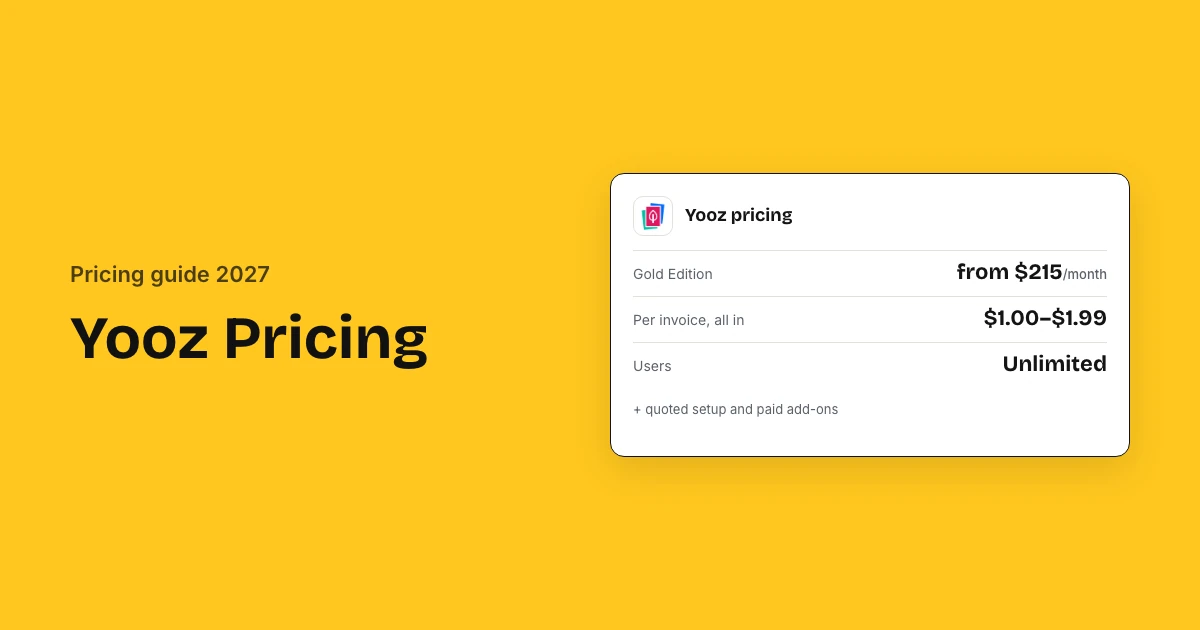
Yooz sells one plan, Gold Edition, from $215 a month, priced on the documents you process, with unlimited users. Its own calculator works out to about $1.99 per invoice at 100 a month and $1.48 at 2,000. Reviewers rate Yooz 4.4 out of 5 across 452 G2 reviews, and payments and budgets cost extra.
Yooz pricing and reviews: key takeaways
- One plan: Yooz sells one plan, Gold Edition, priced on the volume of documents you process, with unlimited users.
- Per invoice: Yooz's own savings calculator shows about $1.99 per invoice at 100 a month, falling to $1.00 at 100,000.
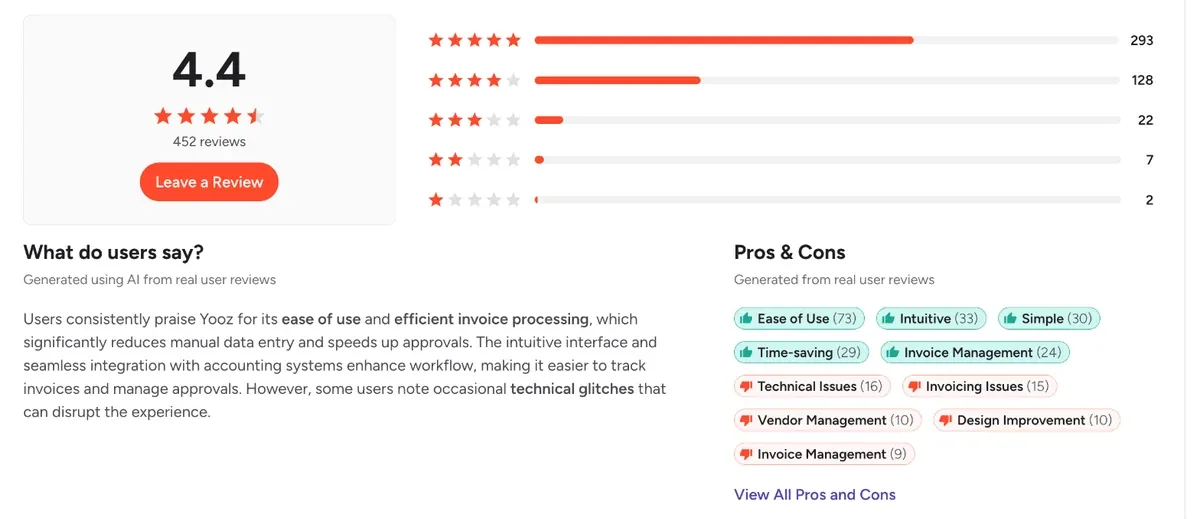
- Ratings: Yooz scores 4.4 of 5 on G2 from 452 reviews, 4.4 from 222 on Capterra and 8.8 of 10 from 97 on TrustRadius.
- What reviewers like: Ease of use is the most tagged strength on G2; the costly complaints are capture accuracy and the contract term.
- Add-ons: YoozPay payments, Vendor Statement Reconciliation, Attachments and Budget Management cost extra, and their prices are quoted.
- Setup: Yooz publishes no implementation fee; Gold includes 4 hours of service, and G2 buyers report about 3 months to implement.
- Discount: G2 reviewers report a 10% average discount and about 8 months to a return on investment.
Yooz ratings and reviews at a glance
Yooz is rated 4.4 out of 5 by 452 reviewers on G2, 4.4 by 222 on Capterra and 8.8 of 10 by 97 on TrustRadius. Value for money scores 4.3 of 5, and the two complaints that cost real money are capture accuracy, which leaves invoices to fix by hand, and the commitment term you sign up to.
| Source | Rating | Reviews | What reviewers say |
|---|---|---|---|
| G2 | 4.4 of 5 | 452 | Easy to learn and quick to approve invoices; some invoices still need manual correction |
| Capterra | 4.4 of 5 | 222 | Good value at volume, but the price feels high for a small invoice count |
| TrustRadius | 8.8 of 10 | 97 | Capture and invoice search are fast; reporting cannot be customised |
| Gartner Peer Insights | 4.1 of 5 | 5 | Setup needs fine-tuning before the data recognition is reliable |
| SoftwareReviews | 7.7 of 10 | 59 | Customers renew, but rate the contract and the cost lowest |
Gartner Peer Insights has only 5 ratings, so treat it as a signal; SoftwareReviews scores the buying side lowest on contract and cost.
How much does Yooz cost?
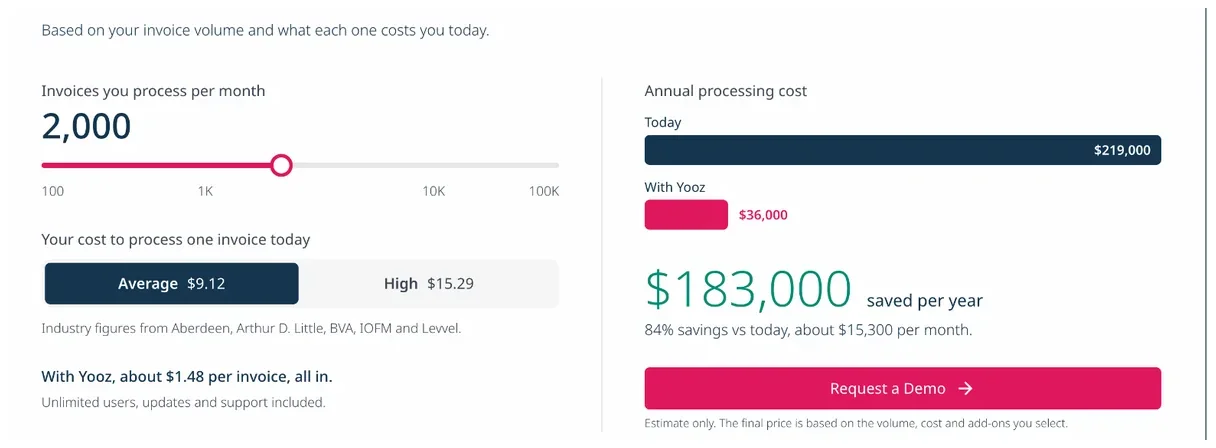
Yooz sells one plan, Gold Edition, from $215 a month, priced on the volume of invoices you process, not seats, with unlimited users. Its own calculator puts the all-in AP automation rate at about $1.99 per invoice at 100 a month, $1.70 at 500, $1.48 at 2,000 and $1.00 at 100,000.
Yooz cost by invoice volume
The rate per invoice falls as volume rises, so the bill grows more slowly than your invoice count. Yooz labels these calculator figures an estimate; below about 110 invoices a month the $215 minimum applies.
| Invoices a month | Per invoice, all in | Yooz calculator, a year (rounded) |
|---|---|---|
| 100 | $1.99 | $2,400 |
| 500 | $1.70 | $10,000 |
| 1,000 | $1.58 | $19,000 |
| 2,000 | $1.48 | $36,000 |
| 5,000 | $1.35 | $81,000 |
| 10,000 | $1.26 | $151,000 |
| 100,000 | $1.00 | $1,200,000 |
Why Capterra shows $199 and Yooz shows $215
G2, Capterra and Software Advice still list a $199 monthly start, while Yooz's own pricing page now says $215. Trust Yooz's page for budgeting: directory prices are supplied by the vendor and updated less often.
What will Yooz cost for your business?
Yooz costs a 50 to 200 person company about $10,200 a year at 500 invoices a month, rising to $35,520 at 2,000 invoices, using its own calculator rates. Setup beyond the 4 included hours and add-ons such as YoozPay are quoted on top, so year one starts from those figures.
Three example companies
| Monthly cost | 500 invoices/mo | 2,000 invoices/mo | 10,000 invoices/mo |
|---|---|---|---|
| Gold Edition subscription | $850 | $2,960 | $12,600 |
| Billed per year | $10,200 | $35,520 | $151,200 |
| Setup, one-time | Quoted | Quoted | Quoted |
- 500 invoices/mo: A mid-size AP team processing 500 invoices a month, no add-ons
- 2,000 invoices/mo: A multi-site company processing 2,000 invoices a month, adding YoozPay
- 10,000 invoices/mo: A high-volume AP operation processing 10,000 invoices a month, adding YoozPay
Figures exclude add-on prices and YoozPay payment fees, which Yooz quotes.
Estimate your own Yooz cost
What Yooz charges on top: add-ons, volume and contract terms
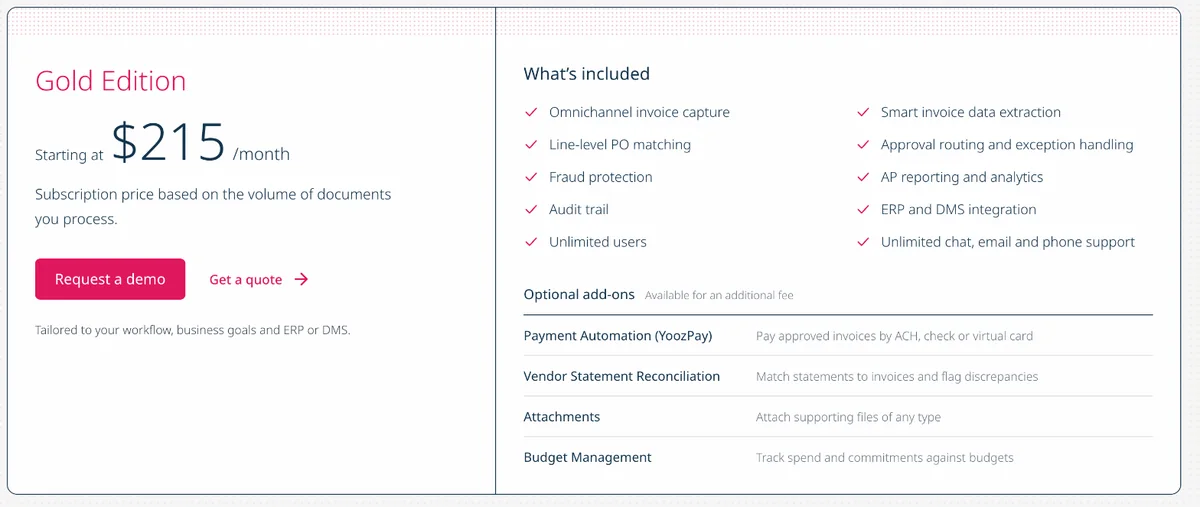
Yooz charges nothing extra for capture, matching, approvals, ERP integration or support, but four add-ons are quoted separately and Yooz publishes no price for any of them. The subscription itself is priced on document volume from $215 a month, and Yooz publishes no contract term or renewal policy.
Paid add-ons
Four add-ons sit outside Gold Edition, and Yooz publishes no price for any of them, so price each one you need in the same quote.
| Add-on | What it does | Price |
|---|---|---|
| Payment Automation (YoozPay) | Pays approved invoices by ACH, check or virtual card | Quoted; no published per-payment fees |
| Vendor Statement Reconciliation | Matches statements to invoices and flags gaps | Quoted |
| Attachments | Attach supporting files of any type | Quoted |
| Budget Management | Tracks spend and commitments against budgets | Quoted |
What is included at no extra cost
Everything below comes with a Gold Edition subscription, which is why adding approvers does not move the bill.
- Unlimited users and approvers
- Automatic platform updates
- Unlimited chat, email and phone support
- ERP and DMS integration
Renewal terms to check before you sign
Yooz publishes no renewal policy, and reviewers disagree on the commitment: G2's listing says you can stop anytime, while one Capterra reviewer reports a term they could not shorten.
- Yooz's G2 listing says there is no binding contract and you can stop anytime; confirm this in your order form
- What counts as a document: invoices only, or credit notes, POs and statements too
- The overage rate per extra document, and how volume tiers reset if your invoice count drops
- Whether the per-invoice rate is locked at renewal
- Notice period to cancel or change volume
How much does Yooz ERP integration cost?
Yooz charges no fee for ERP integration: it is part of Gold Edition, so there is no separate published integration price. Yooz lists more than 250 ERPs and document systems, including NetSuite, QuickBooks, Sage Intacct, Acumatica and Microsoft Dynamics. Your quote is still tailored to your ERP, so complex setups can change the setup price.
| Your ERP | How it connects | Effect on cost |
|---|---|---|
| NetSuite, QuickBooks, Sage Intacct | Listed integration | In Gold Edition |
| Microsoft Dynamics (Business Central, F&O, GP) | Listed integration | In Gold Edition |
| Acumatica, SAP Business One, Epicor Kinetic, P21 | Listed integration | In Gold Edition |
| Other ERP or DMS | One of 250+ connectors | Ask; setup is quoted |
What to confirm about your ERP
Confirm these five points in writing before you sign, because each one can turn into billed services after go-live.
- Your ERP version is on Yooz's connector list, not just the ERP name
- Whether connector setup uses your 4 complimentary service hours or is billed
- How vendors, GL codes and POs sync, and how often
- Who fixes sync errors after go-live: Yooz support or your ERP partner
- Whether a second entity or ERP changes the quote
Yooz implementation cost and setup time
Yooz publishes no implementation fee: Gold Edition includes 4 hours of setup service, and work beyond that is quoted with your ERP. With no fee above those hours, year one starts at the $2,580 annual minimum ($215 a month). G2 reviewers report about 3 months to go live, and a 15-day trial in production lets you test first.
| Phase | Time | Cost |
|---|---|---|
| Free trial in production | 15 days | Free, no commitment |
| First use | About an hour, per Yooz | In the subscription |
| Configuration and ERP setup | Varies with your ERP | 4 hours included, rest quoted |
| Full rollout | About 3 months on average (G2) | Quoted with the subscription |
- Run the free trial on your own invoices before you sign
- Ask whether ERP connector setup is in the quote or billed as services
- Write down your invoice approval workflow before go-live, so Yooz's approval steps match who signs off today
- Get training and any data import priced up front
What users say about Yooz and what they actually pay
Yooz users rate it 4.4 of 5 and pay roughly what its calculator shows: about $10,200 a year at 500 invoices a month and $35,520 at 2,000, before add-ons. G2 reviewers report a 10% average discount. Praise centres on ease of use; the complaints that cost money are capture accuracy and the contract term.
What reviewers praise
- Invoices are quick to upload, approve and find again later: ease of use is the most praised strength on G2 (73 of 452 reviews)
- Capture and approval routing remove most manual data entry, so invoices clear faster than the old email-and-paper process
- Yooz flags duplicate invoices and amount mismatches before they are paid, and remembers vendor details between invoices
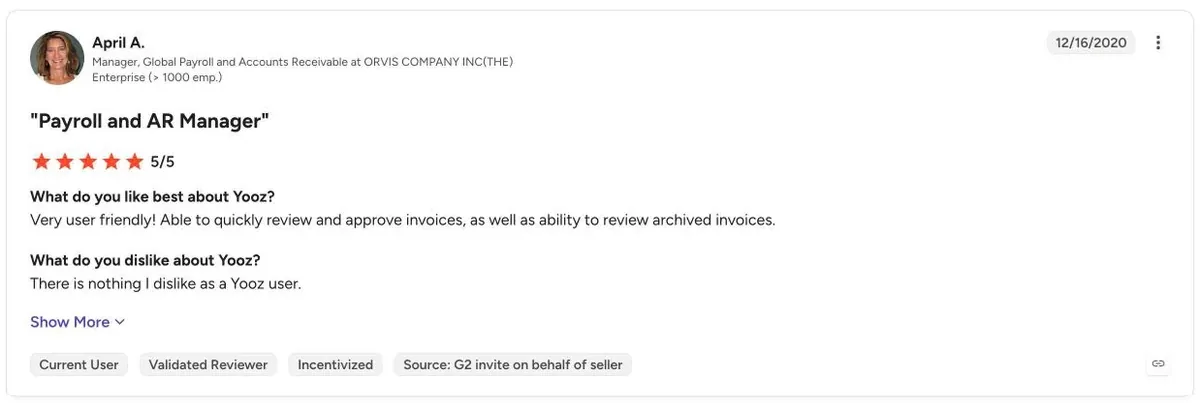
- Customers stay: SoftwareReviews scores plan to renew 100 out of 100, and support answers quickly, say Capterra reviewers
What reviewers complain about
- Small teams say the price is hard to justify: below about 110 invoices a month you still pay the $215 minimum (two Capterra reviewers)
- One mid-market buyer whose integration went badly says they now pay more than hiring someone would have cost (G2, 1.5 of 5)
- The AI misreads some invoices, so staff still correct lines by hand, and files holding several invoices are hard to split (G2's technical issues tag, on 16 reviews)
- A buyer who stopped after a failed rollout got no refund and no shorter commitment, though Yooz's G2 listing promises no binding contract
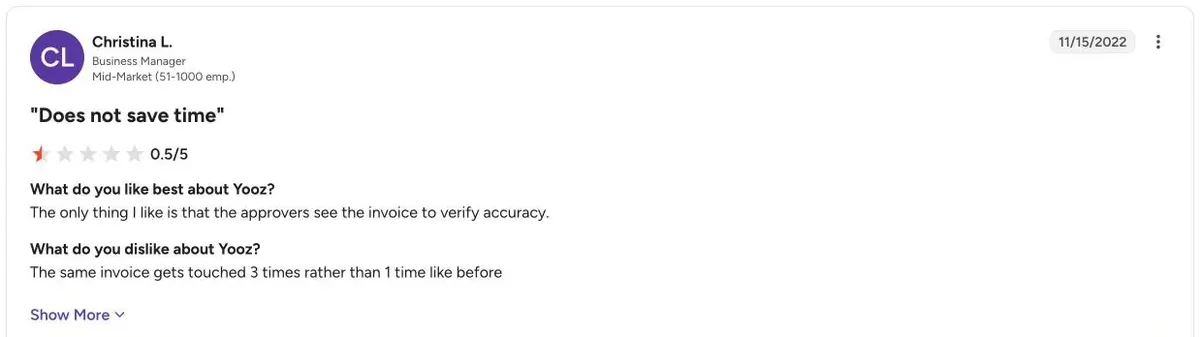
What buyers report paying
No buyer benchmark such as Vendr covers Yooz, so the guides are its own calculator, the directories and what reviewers report, and they agree on about $1.00 to $2.00 a document.
| Source | What it reports |
|---|---|
| Yooz pricing page | Gold Edition priced by invoice volume, from $215 a month |
| Yooz savings calculator | About $1.99 a document at 100 invoices a month, $1.48 at 2,000 |
| Capterra, Software Connect, Software Advice | Older $199 monthly start; value for money 4.27 of 5 (Software Advice) |
| G2 | A 10% average discount, 3 months to implement and 8 months to a return |
Is Yooz worth the price?
Yooz is worth its price for AP teams that want capture, matching and approvals with unlimited users and a published starting price, and SoftwareReviews puts its plan-to-renew score at 100. At high volume the per-invoice charge adds up, which is when Yooz alternatives with flat plans are worth comparing.
| Cost per invoice | Manual process | With Yooz |
|---|---|---|
| Processing cost | $9.00 to $14.00 | $1.00 to $2.50 |
| Processing time | 12 to 28 business days | Under 72 hours |
These are Yooz's own comparison figures, so treat them as the vendor's case. Test them against your current cost per invoice.
Worth it if
- Many approvers need access, since users are unlimited
- You process a few hundred to a few thousand invoices a month
- Your ERP is on Yooz's list of 250+ connectors
- You want to trial on real invoices before buying
Look elsewhere if
- You process tens of thousands of invoices and want a flat fee
- You need purchase requests and POs before the invoice
- You want payment fees published up front
- You need budgets but not another paid add-on
How to get a better Yooz price
Commit to a realistic document volume, not your peak, and ask for the per-invoice rate at the next tier up. Then get setup as a fixed fee, add-on prices for the full term, YoozPay payment fees in writing, and the overage rate per extra document before you sign the order form.
Get in writing
- Monthly document volume and rate
- Overage price per document
- Setup fee and what it covers
- Price of each add-on
- Term, notice period and renewal increase
Ways to pay less
- Commit to average, not peak, volume
- Start with Gold, add modules later
- Trial on real invoices first
- Ask for at least the 10% discount G2 buyers report
Yooz pricing vs alternatives
Yooz charges by invoice volume from $215 a month, where Tipalti AP starts at $99 a month plus fees and BILL charges $49 to $89 per user a month. Zapro pricing has Spark at $699 a month, Growth at $1,999 a month and Scale on custom pricing, all with unlimited users; your ERP or bank pays suppliers.
| Tool | Pricing model | Starts at | Users priced |
|---|---|---|---|
| Yooz | By invoice volume | $215/month | Unlimited users |
| Tipalti | Platform + per-invoice and payment fees | $99/month | No |
| BILL | Per user | $49/user/month | Yes |
| Ramp | Free, then per user | $0; Plus $15/user | On Plus |
| Zapro | Flat plans, unlimited users | Spark $699 / Growth $1,999 a month; Scale custom | No per-user fee |
Yooz pricing FAQs
How much does Yooz cost?
Yooz Gold Edition starts at $215 a month and is priced on invoice volume. Yooz's own calculator puts 500 invoices a month at about $10,000 a year and 2,000 at about $36,000, with setup and add-ons quoted separately.
Does Yooz charge per user?
No. Yooz prices on the volume of documents you process, and Gold Edition includes unlimited users, so adding approvers or AP staff does not change the subscription. Add-ons such as YoozPay and Budget Management do cost extra.
How does Yooz work?
Yooz captures invoices from email, scan or upload, extracts the data, matches it to purchase orders and routes it for approval before syncing to your ERP. Payments, statement reconciliation and budgets are optional paid add-ons.
Does Yooz offer a free trial?
Yes. Yooz's pricing page offers a 15-day free trial in a production environment with no commitment. Capterra and Software Connect also list a free trial, which lets you test capture and matching on your own invoices.
Where is Yooz located?
Yooz was founded in France in 2010 and runs its North American business from Coppell, Texas, near Dallas. The US office handles sales and support for American customers, and pricing on the US site is in dollars.
Is Yooz any good, and what do Yooz reviews say?
Yes, on the ratings: Yooz scores 4.4 out of 5 from 452 G2 reviews, 4.4 from 222 on Capterra and 8.8 out of 10 from 97 on TrustRadius. Reviewers praise ease of use and invoice tracking, and the common complaints are capture accuracy and occasional freezes.
Sources: Yooz pricing page; Capterra; Software Connect; ERP Research; G2 Yooz pricing; Software Advice; Yooz AP automation; G2 Yooz reviews; TrustRadius; Gartner Peer Insights; SoftwareReviews. Prices come from Yooz's own pages where published and from the third-party sources listed, labelled as such. Estimates are not quotes.