Free Purchase Order Template: Ready to Fill In and Download
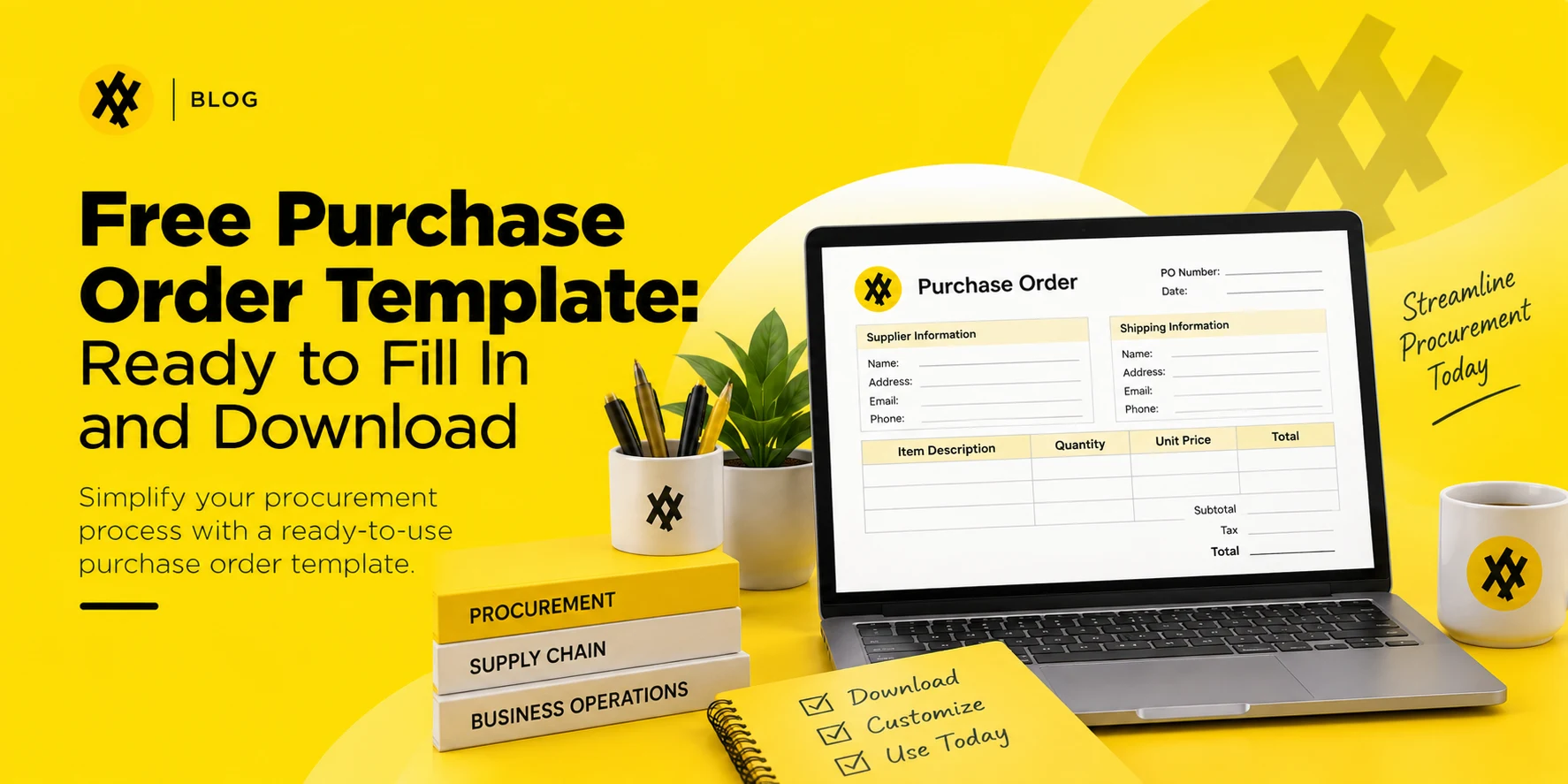
A purchase order only does its job if a vendor can read it in ten seconds and know exactly what you’re buying, how much you’re paying, and where it’s going. Most free templates floating around online fail that test — too many fields, unclear totals, or no PO number at all. The one below is built to be filled in, sent, and forgotten about, not fought with.
A purchase order (PO) template is a pre-built form that captures everything a vendor needs to fulfill an order: buyer and seller details, a unique PO number, line-item quantities and pricing, delivery terms, and a total. Fill in the blanks, send it to your vendor, and it becomes a binding record of what was ordered and agreed on. This template is provided free by Zapro, an AI-powered procure-to-pay platform.
What a purchase order actually is
A purchase order is the buyer’s half of a sales agreement. It states what you want, how many units, at what price, and by when — and once the vendor accepts it, both sides are working from the same document. That matters more than it sounds: without a written PO, a “verbal agreement” on price or quantity is the first thing that falls apart during a dispute.
A PO is not the same as an invoice. The PO comes from the buyer, before the goods ship. The invoice comes from the seller, after delivery, requesting payment. A clean paper trail runs PO → delivery → invoice → payment, and each document should match the one before it. Together, these documents form the transactional backbone of procurement, the wider function of sourcing and buying what a business needs.
What this free purchase order template includes
The template below covers the fields a vendor actually needs, and nothing they don’t:
Buyer information — company name, billing address, contact details
Vendor information — company name, address, contact details
Ship-to address — where the order should actually be delivered, if different from billing
Assign a PO number before you do anything else. Sequential numbering (PO-1001, PO-1002…) is what lets you match invoices back to the right order later. Skipping this step is the single most common reason small businesses lose track of what they’ve committed to spend.
Fill in buyer and vendor details exactly as they appear on the vendor’s invoice. A mismatched company name or address is a common reason invoices get flagged during reconciliation.
List every line item separately, even if two items are going to the same vendor on the same order. Bundling items into one line makes partial deliveries and returns much harder to track.
Add tax and shipping before you total the order, not after you’ve sent it. A PO that arrives with a total that doesn’t match the vendor’s quote creates back-and-forth that delays the order.
Get sign-off before sending. Even a one-person business benefits from a second look — it’s the cheapest error check available.
Send it to the vendor and keep a copy. The PO isn’t binding until the vendor accepts it, so treat their confirmation email or signed copy as part of the record, not the PO alone.
Purchase order vs. purchase requisition vs. invoice
These three documents get confused constantly, and the confusion is exactly where paper trails start to break.
Purchase requisition
Purchase order
Invoice
Who creates it
An employee, requesting to buy something
The buying company, once the request is approved
The vendor, after delivery
When it happens
Before a vendor is contacted
Before the order ships
After the order ships
What it does
Asks for internal approval to spend
Commits the company to a vendor
Requests payment
Legally binding?
No
Yes, once accepted
Yes, as a payment demand
A requisition is internal. A PO is external and binding. An invoice closes the loop. Skipping the requisition step is common in small teams and usually fine — skipping the PO step is where spend stops being traceable.
When a spreadsheet template stops being enough
A template like the one above works well for a handful of orders a month. It starts breaking down in predictable ways once volume grows:
PO numbers collide or repeat because two people are filling out copies of the same file without a shared counter.
Nobody can find last quarter’s POs without digging through email attachments or a shared drive folder that’s never organized the way you need it that day.
There’s no approval step, so a $50 order and a $5,000 order go out the same way — unreviewed.
Matching invoices back to POs is manual, which means the first sign of a duplicate payment or a price discrepancy is usually a vendor complaint, not your own records.
None of that means the free template is a bad choice to start with — it’s exactly the right tool for low volume. It just isn’t built to scale, because a document has no memory of the twenty POs that came before it. When you reach that point, our roundup of the best procurement software compares tools that automate PO numbering, approvals and matching.
Zapro picks up from there: PO numbering, vendor records, approval routing by dollar amount, and invoice matching all live in one system, so growing past a spreadsheet doesn’t mean losing the audit trail you built with it. To see that workflow on your own purchase orders, you can book a demo.
Common purchase order mistakes to avoid
Reusing PO numbers. Even accidentally, this breaks every downstream match against invoices and payments.
Leaving the ship-to address blank when it differs from billing. This is one of the most common reasons deliveries go to the wrong location.
Vague line-item descriptions. “Supplies” tells a vendor nothing. “50 x A4 printer paper, 20lb, white” tells them exactly what to pull.
No payment terms on the PO. If net 30 isn’t written down, don’t be surprised when the vendor invoices net 15, or expects payment on delivery.
Sending a PO without internal sign-off. A missing approval is invisible until the invoice arrives and nobody recognizes the charge.
Purchase order numbering best practices
Keep it simple and sequential: PO-2026-001, PO-2026-002, and so on. Resist the urge to encode department, vendor, or category into the number itself — that information belongs in the PO fields, not the ID, because encoding schemes always run out of characters or break the first time two departments need the same prefix. The only thing a PO number needs to do is be unique and easy to search for later.
Frequently asked questions
Is this purchase order template really free to use?
Yes. Copy the layout into Word, Excel, or Google Sheets and fill it in directly — no account or software required.
What file format should I use for a purchase order?
Word or PDF works well for one-off orders you’ll send by email. Excel or Google Sheets is better if you’re issuing more than a handful a month, since you can keep a running log and reuse the numbering column.
Do I need a signature on a purchase order for it to be valid?
A signature isn’t legally required in most cases, but it’s good practice internally — it shows someone with spending authority reviewed the order before it went out. The vendor’s acceptance, not your signature, is what makes the PO binding.
What’s the difference between a purchase order and a sales order?
A purchase order comes from the buyer requesting goods. A sales order is the seller’s internal confirmation that they’ll fulfill it. They usually mirror each other line for line.
How many purchase orders can a small business realistically manage with a spreadsheet?
Most teams start feeling friction somewhere between 20 and 50 POs a month, once one person can no longer track every open order from memory and numbering conflicts start showing up. Past that point, it is worth comparing procurement software pricing against the time spent reconciling orders by hand.
Blanket PO vs. Standard PO: Which Purchase Order Type Is Right for You?
A blanket purchase order is an agreement with a supplier to buy a specified item or service at an agreed price over a fixed period, with individual deliveries released against it as they are needed. It removes the need to raise a new purchase order for every order and suits repeat, predictable spend.
What Is a Blanket PO?
When to Use a Blanket PO
Repeat purchases of the same item across a quarter or year
Consumables, maintenance parts and office supplies
Ongoing services billed at an agreed rate
Spend where the total value is predictable but the timing is not
Blanket PO vs Standard PO
Blanket PO
Standard PO
Covers
Multiple releases over a period
A single purchase
Price
Agreed once for the term
Agreed per order
Quantity
Estimated total or a not-to-exceed value
Fixed
Delivery
Released as needed
One scheduled delivery
Best for
Repeat, predictable spend
One-off or variable purchases
In corporate procurement, matching your purchasing documents to your actual consumption patterns is one of the easiest ways to cut operational waste. Not every corporate purchase is a clean, one-time transaction. Sometimes you are buying a single bundle of laptops; other times, you are contracting a supplier for a steady, year-long flow of raw manufacturing ingredients or recurring monthly consultancy services.
To manage these different scenarios efficiently, procurement teams rely on two primary transactional documents: the Standard Purchase Order and the Blanket Purchase Order. Selecting the wrong one leads to an inflated administrative workload, missed bulk discounts, or severe contract compliance risks.
What Is a Standard Purchase Order?
A standard purchase order (Standard PO) is a localized, one-time transactional document issued by a buyer to a vendor for a specific, clearly defined procurement need. It is used when every single variable of the transaction is known upfront with absolute certainty.
The exact items or services being purchased (specified by SKUs or clear statements of work).
The exact quantity required.
The exact agreed-upon price per unit.
The exact delivery date and delivery location.
Once the vendor fulfills the specific order details and the buyer processes the corresponding invoice, that individual Standard PO is closed permanently.
One-Off Procurement: You are buying fixed assets or non-recurring items (e.g., purchasing 15 new office desks, a specific software server license, or hiring a contractor for a short-term facility repair).
Predictable, Isolated Demands: You know the exact volume you need and want it delivered in a single shipment.
Fluctuating Market Prices: The items being purchased are subject to rapid market price changes, making long-term price locks impossible or disadvantageous.
Avoid a Standard PO When:
Continuous Supply Needs: You require the same items or services week after week, which would force your procurement team to waste time drafting dozens of repetitive POs to the exact same vendor.
Unpredictable Delivery Timelines: You know you need a large volume over the course of a year, but you don’t want all the inventory sitting in your warehouse at once.
A blanket purchase order (BPO)—also frequently referred to as a standing order or open PO—is a long-term procurement agreement established between a buyer and a supplier. It is designed to cover repetitive purchases of goods or services over a specified timeframe (typically an entire fiscal year).
Instead of specifying a single delivery date and fixed quantities, a blanket purchase order locks in preferential contract terms, bulk discount pricing structures, and maximum spending limits upfront.
[Master Blanket PO Created] ── Includes: Price Lock, Terms, Max Budget (e.g., $100k)
Release #1 (Jan): Request 50 Units ───► Subtracted from Budget
Release #2 (Mar): Request 100 Units ───► Subtracted from Budget
Release #3 (Jun): Request 40 Units ───► Subtracted from Budget
Once the master BPO is approved, the buyer triggers individual deliveries as needed using a process called a “release” or “call-off.” Each release draws down the total pre-approved contract value or item quantity, removing the need to route a brand-new purchase order through management loops every single month.
When to Use a Blanket Purchase Order
Use a Blanket PO When:
Predictable Continuity, Unpredictable Timing: You know your factory will consume 12,000 supply boxes over the next 12 months, but you only want to order and store 1,000 boxes at a time based on live warehouse space.
Volume Leverage: You want to secure a high-volume bulk discount from a vendor without taking immediate delivery of the entire bulk volume.
Recurring Services: You are contracting for recurring operational support with variable monthly workloads, such as facilities maintenance, raw material supply lines, or legal counsel retainers.
Avoid a Blanket PO When:
Uncertain Vendor Reliability: The vendor’s financial stability or quality control is unproven. Locking into a long-term commitment creates severe supply chain vulnerability.
Small, Single Transactions: The purchase value is low and non-recurring, meaning the administrative effort to negotiate a master agreement outweighs the operational benefit.
Pros and Cons of a Standard Purchase Order
Benefits of Standard PO
Granular Budget Control: Financial managers know the exact cash outflow down to the penny before the order leaves the building.
Minimized Long-Term Liability: Your company does not commit to any future spending or volume targets beyond that specific shipment.
Simple Auditing: One purchase order directly maps to one shipping receipt and one vendor invoice, making basic accounting clean.
Disadvantages of Standard PO
Administrative Fatigue: Sourcing teams spend valuable time generating repetitive paperwork for everyday items.
Weaker Pricing Leverage: Missing out on long-term volume commitments means you generally pay higher short-term unit prices.
Pros and Cons of a Blanket Purchase Order
Benefits of Blanket PO
Drastic Cost Reductions: Committing to an annual volume targets secures significant bulk discount advantages.
Procurement Velocity: Warehouse or department heads can bypass weeks of internal corporate approval chains by executing an instant “release” against an active, pre-approved BPO.
Inventory Optimization: Lowers your internal warehouse carrying costs by letting suppliers hold the bulk inventory until you need it.
Disadvantages of Blanket PO
Risk of Over-Commitment: If internal business demands suddenly shift, your company could be legally bound to buy volumes it no longer requires.
Complex Tracking Tracking: Accounts payable must carefully track invoices against specific release numbers and monitor the remaining balance on the master agreement.
Every release still produces its own ordinary journal entry the moment its invoice is matched and approved — a debit to the expense account, a credit to accounts payable. Where blanket orders complicate the picture is volume, not mechanics: run twenty releases against one BPO and you get twenty near-identical T-account entries that all have to tie back to the same master commitment. Tracking that volume by hand is hard, and a comparison of the best procurement software shows which platforms handle blanket orders and releases.
Best Practices for Managing Blanket Purchase Orders
Because blanket purchase orders represent long-term financial commitments, they require diligent oversight to prevent contract leaks and tracking failures:
Set Clear Trigger Criteria: Clearly define exactly who inside your organization has the authority to trigger a “release” against the BPO, and establish mandatory lead times for the vendor.
Define Spending Limits and Volume Ranges: Always cap the master agreement with an absolute maximum financial ceiling or a strict volume ceiling to stop expenditures from scaling out of control.
Monitor Spend Against Commitments: Regularly check your actual drawdown rate against your initial projections to verify you will meet your contractual volume commitments by the end of the term.
Build in Market Adjustment Clauses: When dealing with volatile commodity goods, embed pricing review triggers within the master contract so you aren’t stuck paying inflated rates if market values crash mid-year.
How to Choose: A Quick Decision Framework
To decide which purchase order style matches your current business requirements, answer this quick three-question framework:
How Zapro Simplifies Both PO Types
Whether your organization relies on rapid Standard POs for day-to-day requirements or large-scale Blanket PO agreements for strategic supplier contracts, Zapro provides the specialized controls needed to eliminate errors.
Purchase order management is just one piece of the broader sourcing-to-payment picture. Zapro’s AI procurement platform extends the same automation and visibility from requisitioning and supplier selection through to the PO issuance covered above.
Create and Manage Both PO Types in One Place
Zapro offers an intuitive platform designed to process both standard, single-delivery items and multi-layered blanket agreements within a single cloud dashboard. You can compare Zapro pricing plans to see which fits your purchase order volume.
Automated Approval Workflows
Set up flexible, rule-based approval workflows. Standard POs can be fast-tracked based on department codes, while high-value Blanket PO master contracts are automatically routed through executive, legal, and finance sign-offs.
Real-Time Spend Tracking Against BPO Commitments
Eliminate manual calculations. Every time an employee executes a release against an open blanket order, Zapro automatically calculates the drawdown, updates the remaining contract value, and alerts your finance leaders before spending caps are breached.
Integrated Vendor Management
Track supplier compliance, lead times, and fulfillment accuracy directly against your original contract benchmarks, ensuring your long-term blanket partners are actually delivering on their service level agreements (SLAs).
That kind of ongoing supplier oversight works best when it draws on a dedicated system of record for vendors — Zapro’s AI Vendor Management platform centralizes onboarding, scorecards, and compliance tracking for every supplier tied to your blanket agreements.
1. What is the difference between a blanket PO and a standard PO?
A standard purchase order is a one-time document for a specific shipment with fixed quantities, prices, and delivery dates. A blanket purchase order is a long-term agreement for recurring purchases that locks in pricing and terms for a set period, leaving delivery dates and quantities flexible.
2. When should I use a blanket purchase order?
Use a blanket purchase order when you have a predictable, recurring need for goods or services from the same vendor over a long timeframe, but want to schedule flexible deliveries throughout the year to maximize bulk pricing discounts.
3. How long does a blanket purchase order typically last?
A standard blanket purchase order is typically valid for one full calendar or fiscal year, though terms can be custom-tailored to cover multi-year corporate procurement projects.
4. Can a blanket PO be modified after it’s issued?
Yes. If your internal production volumes scale up or down unexpectedly, a blanket purchase order can be modified via a formal contract amendment or digital PO revision to adjust total financial caps or item descriptions.
5. What are the risks of using a blanket purchase order?
The primary risks include overestimating your actual annual demand (leaving you legally liable for unused stock), poor tracking of balance drawdowns across manual systems, and getting locked into uncompetitive pricing if market rates decline.
Types of Purchase Orders: Standard, Blanket, Planned & Contract
There are four main types of purchase orders: standard (one-time, fully defined purchases), blanket (recurring purchases under a pre-negotiated agreement), planned (forecasted quantities released in stages), and contract (a long-term agreement referenced by later standard POs).
The four main types of purchase orders are standard POs (one-time, fully specified purchases), blanket POs (recurring purchases under one agreement), planned POs (forecasted quantities released over time), and contract POs (a master agreement referenced by future orders).
Key Takeaways:
– Standard POs suit one-time, fully defined purchases where items, price, and delivery date are known upfront. – Blanket POs suit recurring purchases from one supplier under a pre-negotiated price and term, avoiding repeat negotiation. – Planned POs commit to a total quantity and price with delivery released in stages (“releases”) over time. – Contract POs establish a long-term legal agreement on terms, with specific orders issued later under that contract. – Automated PO software applies the right type by category and supplier automatically, instead of requiring manual selection each time.
Prioritizing structured purchasing workflows is exactly what companies do when they want to protect their operating margins and control their liquidity. Leaving procurement team members to handle purchasing by informal emails or unverified credit card swipes will definitely lead to tracking errors and invoice backlog that will cost the company a lot of money. At the heart of an effective procurement pipeline is the purchase order (PO), which is a key document that converts internal spending requests into binding business commitments.
Nevertheless, the truth is that not all corporate transactions are similar. For instance, the plan that is used for buying a batch of replacement laptops for immediate office onboarding will be completely different from the one used for setting up a year-long contract for manufacturing raw materials. By learning about different types of purchase orders, finance and operations staff can properly identify the appropriate legal and tracking frameworks required for maximizing volume discounts, securing supply lines, and eliminating administrative friction.
What Is a Purchase Order?
A purchase order is a written, legally binding commercial document that a buyer sends to a seller. It lists in detail everything the parties have agreed upon in the transaction, such as the product descriptions, amounts, prices per unit, delivery schedules, and payment terms.
[Employee Request Internally] ➔ [Manager Approval] ➔ [PO Sent to Vendor] ➔ [Legally Binding Contract Activates]
When the supplier agrees to a purchase order, it converts the PO into a legally binding contract. This guarantees that in a situation where a supplier delivers the wrong product or tries to raise the price without authorization, the buyer will have indisputable evidence for resolving the disagreement.
To cover the ever-changing operational needs, procurement teams nowadays use four different types of purchase orders. Each type of PO works differently as per the level of information available at the time of request.
Standard Purchase Orders (SPO)
A standard purchase order is the most recognizable and simplest kind of PO that companies use for their everyday operations. It is used for single, fully defined transactions where each and every detail is agreed upon beforehand.
When to Use: When you have full knowledge about what you are purchasing, the price, the quantity, and the delivery time.
Purchase Order Example: A company’s IT department acquires 15 units of a particular monitor model for a new branch office and the monitors will be delivered on next Thursday; in addition, they have agreed that each monitor will cost them $250.
A planned purchase order represents a situation in which the delivery schedule may still be uncertain, but other business terms are agreed upon. This type of PO specifies the exact items, prices, and estimated total quantities; however, delivery dates will be specified through individual operational releases at later points.
When to Use: When you want to place a bulk order for a certain item within a temporary period to take advantage of volume pricing, but due to the limited space in your warehouse or ongoing production schedules, you are forced to divide the shipments.
Purchase Order Example: A company agrees to buy 5,000 cases of their branded printer paper over a period of 12 months at a fixed bulk rate, while they tell the supplier that they will be requesting individual shipments on the first day of each month based on their actual usage.
Blanket Purchase Orders (BPO)
Also called a standing arrangement, a blanket purchase order is appropriate when a company is aware of a repeated demand for a certain category of products or services from a particular vendor but the quantities and timings of deliveries are not known. A BPO instead of specifying the amounts, it sets the maximum spending limits and discount structures that have been pre-negotiated over a certain period.
When to Use: Streamlining recurring purchases from a verified vendor without overburdening your accounts payable department by creating several individual orders through the whole year.
Purchase Order Example: A chain of restaurants has a $50,000 blanket contract with a local food distribution company for kitchen cleaning supplies, and this gives individual branch managers the freedom to order from the list of items against the total amount whenever they need it.
A contract purchase order represents the biggest level of document among them all. Its focus is only on defining the broad legal terms, commercial compliance rules, and payment frameworks between the buyer and seller. A CPO will not mention any specific product numbers, quantities or locations of deliveries; rather, it sets a transactional template that has been authorized. The buyer will issue a standard PO later on when an item is actually required and it will explicitly make reference to the master CPO.
When to Use: To establish a relationship with a preferred supplier, to conduct thorough legal reviews well in advance, and to simplify the administrative process for all future purchasing requests.
Purchase Order Example: A large corporation enters into a contract purchase order agreement with a major cloud services vendor. This agreement lays down corporate liability caps, security protocols, and payment terms even before any department requests software seats.
Because blanket and contract POs commit you to a single supplier over months or years, it pays to vet and monitor that relationship as closely as the paperwork itself; a dedicated AI Vendor Management platform keeps supplier qualifications, performance history, and compliance documents current so procurement teams know a vendor still merits that long-term commitment.
Digital Purchase Orders
A digital purchase order refers to the medium through which the document is handled rather than the contents of the document itself. Any of the four main types of purchase orders can be fully digital to provide the advantages of instant routing of approval requests, enforcement of spending rules right at the point of request, and ability to maintain change histories without resorting to manual data entry. If you are choosing a tool, compare top procurement software on how well each one handles all four PO types.
Purchase Order vs. Contract
These two documents are often confused by professionals, even though the essence of their legal authority is different:
A Purchase Order is a buyer-initiated document that records a short- or medium-term transaction. It is itemized with product codes, quantities, etc., and only turns into a contract when it is formally accepted by the seller.
A Commercial Contract is a two-way agreement signed between the leaderships of the two parties. It is the broader and more formal document that covers commitments over time and the framework under which different purchase orders are issued and enforced.
A purchase order is also easy to confuse with a sales order, which the seller rather than the buyer issues — see Sales Order vs Purchase Order for how the two differ.
How the Purchase Order Process Works
There are six steps in total from receiving an employee purchase request to the final vendor payment:
The internal part of the process is opened when an employee submits a request form that describes a business need. This document serves as a means to generate requests internally and it is not dispatched to the vendor until existing company policies are respected.
2. Approve and Issue the Purchase Order
Company approval chains are used to route the internal requisition based on departments, projects, or cost limits. Upon getting the approvals, the system auto-generates a unique PO number and converts the document into an official purchase order.
3. Send the Purchase Order to the Vendor
The procurement team sends the final order to the supplier. After verifying the order, the vendor agrees to the delivery schedule and formally accepts the PO to fix the contract.
4. Receive Goods or Services
After the vendor has shipped the goods or services, the receiving team inspects the delivery and based on this, they record a Goods Received Note (GRN) that will serve as evidence of whether or not the delivery was complete and in good condition.
5. Match the Invoice and Process Payment
Once the final invoice has been received from the vendor, the accounts payable department performs a three-way match that involves comparing the invoice information with both the PO and the GRN in order to identify any discrepancies before dispatching the payment.
6. Close the Purchase Order
After verification is completed, payments are made and the transaction is recorded under the proper general ledger accounts.
That entry is identical regardless of which PO type opened the transaction — a debit to the expense or asset account, a credit to accounts payable. Drawn out as a T-account, a release against a twelve-month blanket order posts exactly like a one-off standard PO; only the GL code and cost centre differ.
The purchase order is then marked as closed, so that the financial encumbrance is no longer shown in active budget tracking models.
What to Include When You Create a Purchase Order
Every document your team generates should be complete and unambiguous. Missing parameters or vague line items cause delivery delays, costly invoice disputes, and unnecessary approval bottlenecks.
When formatting your corporate templates, ensure the following fields are clearly filled:
PO Number: A unique, sequential alphanumeric code for transaction tracking.
Buyer Details: Your company name, billing entity, contact email, and phone number.
Seller Details: The vendor’s official business name, primary point of contact, and office address.
Item Descriptions: Explicit descriptions, manufacturer part numbers, or stock-keeping units (SKUs).
Quantities & Unit Prices: The exact volume requested alongside pre-negotiated line-item costs.
Total Amount: The gross transaction sum, including estimated taxes and shipping fees.
Delivery Dates & Shipping Addresses: Clear timelines detailing where and when items must arrive.
Payment Terms: Pre-approved terms, such as Net-30 or Net-60, to optimize working capital.
Special Instructions: Handling rules, customized packaging specs, or delivery window limits.
Benefits of Automating Your Purchase Order Workflow
Relying on manual data entry, paper sign-offs, or confusing email loops to track your purchase order types leaves your business exposed to financial leaks. Transitioning to automated procurement software yields direct operational advantages:
Fewer Data Entry Errors: Automated tools eliminate human typing mistakes by syncing data lines across requisitions, orders, and invoices.
Real-Time Spend Visibility: Finance leaders can view active commitments instantly, catching budget overages before capital leaves the building.
Stronger Policy Enforcement: Automated systems prevent employees from buying off-contract, stopping rogue maverick spend before it occurs.
Built-In Audit Trails: Every document generation, approval timestamp, and message log is recorded permanently to support seamless corporate audits.
Shorter Procurement Cycles: Streamlining data verification cuts purchase cycle times from weeks to hours, boosting overall agility.
How Zapro Automates Purchase Order Processes
Managing multiple examples of purchase orders across disconnected spreadsheets risks your corporate margins. Zapro provides an intelligent, automated source-to-pay platform designed to remove all the manual overhead from corporate purchasing. You can review Zapro pricing to see which plan fits your purchase order volume.
[Custom Employee Request Intake] ➔ [Smart No-Code Approval Matrix Evaluates Thresholds] ➔ Zapro Auto-Generates the Exact PO Type Needed (SPO/BPO/PPO)] ➔ [Supplier Flexibly Closes the Loop Inside the Vendor Portal] ➔ [AI-Powered 3-Way OCR engine Automates Final ERP Reconciliations]
Zapro optimizes your daily purchasing pipelines through advanced features:
Adaptive Dynamic Generation: The second an internal requisition clears your customizable approval chain, Zapro generates the correct purchase order types instantly, pre-formatted with your specific department prefixes.
Self-Service Supplier Portal: Say goodbye to communication gaps. Zapro transmits orders directly to your suppliers inside a secure portal, allowing vendors to accept documents and convert them into clean invoices with a single click.
AI-Driven 3-Way Matching: When a vendor invoice arrives, Zapro’s elite OCR engine reads the line items and checks them against the original PO and receiving logs automatically, flagging price or volume discrepancies instantly.
Continuous ERP Synchronization: Zapro maintains a seamless, two-way data sync with major mid-market and enterprise platforms like NetSuite and QuickBooks Online, ensuring your general ledgers update without manual data handling.
Ready to transform your procurement operation from a manual cost center into an efficient competitive lever? Schedule a custom Zapro demo today.
Match Every Purchase to the Right PO Type
Automate PO generation, approvals, and three-way matching across SPOs, BPOs, PPOs, and CPOs — all on one platform.
There are four primary structural types of purchase orders: standard purchase orders (SPO), planned purchase orders (PPO), blanket purchase orders (BPO), and contract purchase orders (CPO).
2. What is the difference between a standard and a blanket purchase order?
A standard purchase order covers a single, isolated transaction where all details are fully finalized upfront. A blanket purchase order sets up a long-term framework for recurring transactions from the same supplier over time, establishing maximum spending limits and pre-negotiated pricing parameters.
3. When should you use a planned purchase order?
Deploy a planned purchase order when you can finalize the items, unit costs, and overall quantities needed for a business cycle, but your internal operations require delivery timing and individual shipment volumes to remain flexible.
4. What is a contract purchase order?
A contract purchase order (CPO) focuses entirely on establishing overarching commercial terms, liability rules, and payment guidelines with a vendor. It does not list individual items or specific delivery dates; rather, it acts as a template for future standard POs.
5. What are the 4 types of purchase orders in SAP?
SAP software uses the same industry-standard purchasing categories: standard purchase orders, planned agreements (scheduling frameworks), blanket/outline agreements, and master contract structures.
6. What is a digital purchase order?
A digital purchase order is any PO created, routed, approved, and stored securely inside dedicated procurement software rather than on paper or standalone spreadsheets. All four primary types of purchase orders can be managed digitally to boost speed and visibility.
PPV Meaning: What Is Purchase Price Variance in Procurement?
PPV (purchase price variance) is the difference between the price a company actually pays for an item and the standard or budgeted price it expected to pay, multiplied by the quantity purchased. In procurement and finance PPV always means purchase price variance, not pay-per-view. A favourable PPV means the buy came in under standard cost.
In a volatile commercial landscape, keeping corporate profit margins secure requires absolute control over your procurement outflows. When a finance team maps out its annual budget, they assign an expected or baseline cost to every material, component, and operational asset the company plans to buy. However, when the actual supplier invoices arrive at the accounts payable desk, the prices stated rarely line up perfectly with those initial expectations. AP Automation Software can surface this gap the moment the invoice is captured, flagging a variance against the PO before it is approved rather than waiting for a later PPV report to catch it.
This financial misalignment introduces a critical metrics concept: ppv meaning and oversight. Tracking this pricing delta allows corporate sourcing and finance teams to determine exactly where their cash flow is bleeding, evaluate their forecasting accuracy, and protect gross margins before cost overruns permanently damage the company’s financial bottom line.
What Does PPV Stand For?
PPV Meaning in Procurement
PPV means purchase price variance. It is a finance and procurement metric that shows whether an item was bought above or below its standard cost, and it is used to explain gross margin movement and to measure sourcing performance. If you’re still sorting out how a purchase order differs from a sales order, our Sales Order vs Purchase Order guide clears up the distinction before you dig into pricing variance.
The ppv full form stands for Purchase Price Variance. In an enterprise procurement context, it functions as a core performance metric used to measure the efficiency of the sourcing department and the financial predictability of the supply chain.
While procurement teams view PPV primarily as a strategic purchasing metric to evaluate vendor negotiation success and contract compliance, it also holds substantial weight in corporate finance. In ppv accounting, it serves as a critical tracking mechanism within a standard costing system to record discrepancies between estimated manufacturing costs and real-world supply market expenditures.
In procurement, PPV stands for Purchase Price Variance. It is a vital operational performance metric that measures the absolute financial difference between the budgeted, expected price of an asset and the actual price billed by the supplier.
2. What is the difference between favorable and unfavorable PPV?
A favorable PPV occurs when the actual price paid to a vendor is lower than the pre-set standard cost, indicating operational savings. An unfavorable PPV occurs when the real-world invoice price finishes higher than the standard baseline, representing an unbudgeted cost overrun.
3. How do you calculate purchase price variance?
To calculate the metric, subtract the standard baseline unit price from the actual invoice unit price, and multiply that resulting figure by the total actual quantity of units purchased: $\text{PPV} = (\text{Actual Price} – \text{Standard Price}) \times \text{Actual Quantity}$.
4. How is PPV recorded in accounting?
Under a standard costing accounting framework, inventory assets are logged strictly at their standard cost baseline. Any difference between that baseline and the actual supplier invoice is isolated and posted as a separate debit or credit entry inside a dedicated general ledger PPV variance account.
5. What is the difference between PPV and invoice price variance?
PPV measures the price variance at the point of receipt or initial purchase based on standard costs established during budgeting. Invoice Price Variance (IPV) isolates the delta between the agreed financial rate stated on the approved Purchase Order and the final price billed on the incoming supplier invoice.
What does PPV mean?
In procurement and finance, PPV means purchase price variance – the difference between the actual price paid for an item and the standard price budgeted for it, multiplied by the quantity bought.
By definition, what is purchase price variance? It is the mathematical difference between the standard (expected) price of a material or service and the actual price paid to the supplier, multiplied by the total volume of units purchased.
To properly analyze PPV, you must track three separate operational variables:
Actual Price (AP): The exact baseline dollar amount per unit billed by the supplier on the final invoice.
Standard Price (SP): The benchmark baseline cost assigned to an asset by the finance and procurement teams during budget setting or product design phases.
Actual Quantity (AQ): The total volume of units ordered, received, and processed during the specific transaction timeline.
Organizations typically track PPV across multiple reporting cadences. While automated procurement systems flag deviations on a per-purchase basis, executive teams review consolidated monthly, quarterly, and annual PPV statements to uncover macroeconomic spending trends.
How to Calculate Purchase Price Variance
The PPV Formula
To isolate your pricing variances cleanly, use the standard algebraic formula:
PPV = (Actual Unit Price – Standard Unit Price) x Actual Quantity Purchased
A positive result is an unfavourable variance: the item cost more than budgeted. A negative result is a favourable variance: it cost less. Always calculate PPV on the quantity actually purchased, not the quantity forecast, or the variance will not reconcile to the ledger.
Input
Value
Standard unit price
10.00
Actual unit price paid
10.75
Quantity purchased
4,000 units
Calculation
(10.75 – 10.00) x 4,000
PPV
3,000 unfavourable
PPV Calculation Examples
Example 1: An Unfavorable Outcome
An electronics manufacturer establishes a Standard Price of $50.00 per unit for a specialized micro-component. Due to a sudden global shipping bottleneck, the procurement team is forced to buy an Actual Quantity of 200 components at an Actual Price of $55.00 per unit.
PPV = ($55.00 – $50.00) x 200
PPV = $5.00 x 200 = +$1,000 \text{ (Unfavorable)
Because the resulting figure is positive, it represents an unbudgeted cost overrun of $1,000.
Example 2: A Favorable Outcome
The same manufacturer renegotiates a contract tier later in the year, sourcing an Actual Quantity of 500 components at an Actual Price of $46.00 per unit, while the budgeted Standard Price remains $50.00.
PPV = ($46.00 – $50.00) x 500
PPV = (-$4.00) x 500 = $2,000 (Favorable)}$$
The negative output indicates that the organization successfully generated a $2,000 cost savings windfall against its initial projections.
Favorable vs. Unfavorable PPV — What’s the Difference?
Favorable PPV (Negative Variance)
A favorable PPV occurs when the real-world price paid to a supplier lands below the pre-set standard budget baseline. This operational win directly translates into immediate cash conservation and expanded corporate gross margins.
Common internal and external drivers include:
Securing bulk volume discounts by consolidating corporate orders.
Capitalizing on temporary wholesale market price drops or commodity crashes.
Sourcing teams successfully negotiating superior long-term contract terms.
Suppliers extending promotional or early-payment discount windows.
Unfavorable PPV (Positive Variance)
An unfavorable PPV occurs when the invoice price finishes higher than the standard baseline budget. It represents a direct corporate cash drain that erodes product profitability.
Common causes include:
Macroeconomic spikes, vendor inflation, or sudden tariff implementations.
Global logistics failures forcing expensive emergency spot purchasing.
Maverick spend, where employees purchase items outside of pre-vetted corporate contract channels.
Why You Shouldn’t Chase Favorable PPV at All Costs
While a deeply negative, favorable PPV looks exceptional on a purchasing report, chasing it blindly can expose your enterprise to hidden downstream operational risks. For instance, a buyer might over-order thousands of unneeded units simply to hit a vendor’s bulk discount price tier. While the individual unit cost drops, the company’s warehouse carrying costs skyrocket, tying up critical operational capital in dead stock.
Similarly, buying from an unvetted, low-cost vendor might cut immediate procurement costs but introduce severe quality defects that cause your assembly lines to grind to a halt. Therefore, PPV must always be analyzed alongside quality metrics, inventory turns, and supplier on-time delivery KPIs.
Why Is Purchase Price Variance Important in Procurement?
Cost Control
PPV functions as an early-warning radar for your corporate treasury. Instead of waiting for quarterly financial audits to realize your operations are over budget, reviewing weekly PPV alerts lets sourcing managers identify pricing drift instantly and change course before minor overcharges compound into multi-million dollar losses.
Budgeting and Financial Planning
The reliability of an enterprise’s future financial roadmaps depends entirely on the accuracy of its standard costing models. If a company consistently logs massive purchase price variances, it signals that their baseline budgeting assumptions are disconnected from commercial realities. Tracking PPV allows financial analysts to recalibrate standard costs, ensuring future pricing models stay highly accurate.
Supplier Evaluation
When a specific vendor consistently generates unfavorable purchase price variances, it reveals that their real-world billing practices are drifting away from your master service agreements. Armed with granular, historical PPV reports, procurement professionals can enter vendor evaluation reviews with hard data, using it to enforce contract compliance or terminate relationships with non-compliant suppliers.
Bringing that PPV-by-vendor history together with the rest of a supplier’s scorecard—delivery performance, quality issues, contract terms—is exactly what an AI Vendor Management platform is built for, giving procurement teams one place to decide which relationships to renegotiate or exit.
How Is PPV Treated in Accounting?
PPV in Standard Costing Systems
In corporate accounting, inventory valuation models typically record incoming assets at their pre-determined standard cost to keep general ledger entries uniform. The variable delta—the actual purchase price variance—is systematically stripped out and posted to a dedicated, separate PPV variance account.
When an invoice arrives with an unbudgeted cost discrepancy, the balanced bookkeeping entry requires a debit or credit allocation to balance the general ledger:
Debit Inventory: Value logged strictly at the predetermined Standard Cost.
Debit/Credit PPV Account: Unfavorable variances are logged as a Debit (increasing corporate expense), while favorable variances are logged as a Credit (reducing overall corporate expenses).
Credit Accounts Payable: The actual financial liability owed to the vendor, recorded at the true Invoice Cost.
Purchase price variance is a real ledger account, and seeing it recorded in a T-account makes the favourable-versus-unfavourable sign convention much easier to hold onto.
Where PPV Appears on Financial Statements
The accumulated balance inside your PPV variance account flows directly into your corporate financial statements. If the underlying goods purchased are sold during the current reporting period, the associated purchase price variance shifts out of the inventory ledger and directly impacts the Cost of Goods Sold (COGS) line item on your Income Statement. If the materials remain unconsumed, they continue to sit as a variance adjustment on the Balance Sheet under current inventory assets.
Favorable vs. Unfavorable PPV Impact on Profit
A favorable PPV acts as a direct booster to net profitability because it reduces the absolute cost of running your business, widening your gross margin percentages. Conversely, unfavorable PPV line items act as an immediate drag on profitability by inflating operational expenses. Crucially, the true profit realization timing depends on sales velocity: the variance impact hits your bottom line the exact moment the related physical inventory is finalized and sold to the end customer.
What Causes Purchase Price Variance?
Purchase price variance is rarely caused by one factor alone. Separating price causes from standard-cost causes matters, because an outdated standard cost creates variance that no sourcing action can remove.
Shield your operational budget from sudden market swings by executing structured master purchase agreements that lock in fixed unit pricing for a set time window (e.g., 12 to 24 months). Ensure these agreements include predefined volume-discount tiers and clear price-adjustment boundaries linked to public commodity indexes. This kind of agreement is usually formalized as a blanket PO rather than a series of one-off standard POs, so pricing stays locked without renegotiating every release.
Consolidate Purchases Across Departments
Eliminate internal fragmentation. When separate geographic branches or corporate divisions place independent orders with the same supplier, they lose all bargaining power. By routing all department requests through a unified purchasing framework, you can aggregate order volumes to trigger top-tier enterprise bulk discounts.
Eliminate Maverick Spend with Approval Workflows
Rogue corporate spending outside of contracted vendor channels is a leading source of unfavorable variance. Implement strict digital procurement rules that require all purchase requests to be automatically checked against pre-negotiated supplier catalogs and vetted before any funds are approved.
Use Procurement Software to Monitor PPV in Real Time
Ditch retrospective spreadsheet auditing. Deploying dedicated, modern procurement systems lets you run automated checking processes, manage live spend tracking dashboards, and receive automated system alerts the moment an external vendor invoice deviates from your internal purchase order guidelines.
Because so many of these controls—three-way matching, catalog enforcement, spend dashboards—live in one place, most finance and procurement teams end up centralizing PPV monitoring inside an AI procurement platform rather than stitching it together across spreadsheets and email.
How Zapro Helps You Track and Manage PPV
Manually tracking purchase price variance across thousands of paper invoices and disparate email chains makes it virtually impossible to maintain margin control. Zapro gives your finance and procurement leaders the real-time visibility, automation, and structural guardrails needed to eliminate unfavorable pricing variances.
Real-Time Spend Visibility Across All Purchases:Zapro centralizes your end-to-end purchasing operations into a single cloud dashboard. Sourcing leaders can effortlessly monitor and compare standard vs. actual pricing models across all corporate categories, subsidiaries, and vendors from a single view.
Automated Three-Way Matching to Catch Price Discrepancies: Protect your cash margins before payment processing happens. Zapro automatically runs exhaustive compliance cross-checks by matching incoming supplier invoices against your original purchase orders and warehouse receiving logs, instantly flagging any price or quantity deviation before funds leave your account.
Approval Workflows That Prevent Maverick Spend: Build ironclad corporate spending boundaries. Zapro’s flexible, automated approval engine forces all purchase requests through custom-tailored management approval paths, ensuring your employees buy exclusively from authorized suppliers at pre-negotiated contract rates.
Supplier and Category Reporting for PPV Analysis: Leverage deep, data-driven insights. Zapro’s built-in analytics suites generate comprehensive reporting arrays, enabling financial teams to identify exactly which vendor relationships or purchasing categories are driving unfavorable variances so you can renegotiate terms before it impacts your fiscal close.
Stop Letting Price Variance Erode Your Margins
Track standard vs. actual pricing, automate three-way matching, and catch unfavorable PPV before it hits your bottom line.
In procurement, PPV stands for Purchase Price Variance. It is a vital operational performance metric that measures the absolute financial difference between the budgeted, expected price of an asset and the actual price billed by the supplier.
2. What is the difference between favorable and unfavorable PPV?
A favorable PPV occurs when the actual price paid to a vendor is lower than the pre-set standard cost, indicating operational savings. An unfavorable PPV occurs when the real-world invoice price finishes higher than the standard baseline, representing an unbudgeted cost overrun.
3. How do you calculate purchase price variance?
To calculate the metric, subtract the standard baseline unit price from the actual invoice unit price, and multiply that resulting figure by the total actual quantity of units purchased: $\text{PPV} = (\text{Actual Price} – \text{Standard Price}) \times \text{Actual Quantity}$.
4. How is PPV recorded in accounting?
Under a standard costing accounting framework, inventory assets are logged strictly at their standard cost baseline. Any difference between that baseline and the actual supplier invoice is isolated and posted as a separate debit or credit entry inside a dedicated general ledger PPV variance account.
5. What is the difference between PPV and invoice price variance?
PPV measures the price variance at the point of receipt or initial purchase based on standard costs established during budgeting. Invoice Price Variance (IPV) isolates the delta between the agreed financial rate stated on the approved Purchase Order and the final price billed on the incoming supplier invoice.
What does PPV mean?
In procurement and finance, PPV means purchase price variance – the difference between the actual price paid for an item and the standard price budgeted for it, multiplied by the quantity bought.
Sales Order vs Purchase Order: Key Differences Explained
A sales order is a document a seller issues to confirm a customer’s order and authorize fulfillment, while a purchase order is a document a buyer issues to authorize a purchase from a supplier. The two sit on opposite sides of the same transaction: one company’s purchase order becomes the counterpart’s sales order.
In the world of B2B transactions, keeping supply chain records straight is the difference between a smooth operation and an absolute logistics nightmare. Two documents sit right at the heart of this workflow: the purchase order and the sales order. The purchase order belongs to procurement, the function that buys goods and services for the company, while the sales order belongs to the seller.
While they often contain the exact same list of items, quantities, and financial totals, they serve completely opposite masters. Mistaking one for the other or failing to understand the operational difference between sales order and purchase order protocols leads directly to inventory errors, budget overruns, and fractured vendor relationships.
What Is a Purchase Order?
A purchase order (PO) is an official, formal document issued by a buyer to a supplier requesting specific goods or services. It acts as the external kick-off for a commercial transaction.
Key Components of a Purchase Order
PO Number & Dates: A unique tracking number, alongside the issue date and expected delivery deadline.
Counterparty Details: Full legal names, tax identifiers, and addresses for both the buyer and the supplier.
Line-Item Breakdown: Granular item descriptions, SKUs, precise quantities, agreed unit prices, and total calculated costs.
Terms & Conditions: Payment terms (e.g., Net 30), shipping responsibilities, and special handling instructions.
Legal & Financial Weight: Once a supplier receives and accepts a purchase order, it becomes a legally binding contract. It represents the buyer’s firm commitment to pay for the specified items upon satisfactory delivery.
A sales order (SO) is an internal document generated by the seller in response to a buyer’s purchase order or formal request. It serves as an official confirmation of the sale and acts as the internal green light that triggers the fulfillment, manufacturing, or shipping process.
Key Components of a Sales Order
Sales Order Number: A unique internal reference number used by the seller to track the order through production and logistics.
Customer Information: Shipping and billing profiles extracted from the buyer’s paperwork.
Inventory & Delivery Specs: Confirmed items, allocated quantities, fixed pricing, and the actual fulfillment timeline.
Payment Terms: Recapped financial terms aligned with the customer’s account configuration.
An SO is primarily an operational anchor for the seller. It moves the transaction out of the hands of the sales rep and into the hands of the inventory managers, warehouse packers, and billing teams, confirming that the seller can and will deliver exactly what the buyer requested.
While both documents outline the details of the same transaction, their core roles, tracking objectives, and operational impacts are entirely distinct:
Feature
Purchase Order (PO)
Sales Order (SO)
Who Creates It?
The Buyer (Procurement/Finance team)
The Seller (Sales/Fulfillment team)
Primary Purpose
Initiates the transaction; signals a formal intent to buy.
Confirms the transaction; signals an intent to fulfill and ship.
Recipient
Sent externally to the vendor.
Kept primarily internal; copy shared with the buyer as confirmation.
Internal Controls
Drives budget tracking, spend accountability, and cash flow forecasting.
Manages inventory allocation, manufacturing schedules, and logistics.
Downstream Match
Matched against the receiving slip and final invoice (Three-Way Matching).
Matched against the packing slip and transformed into a customer invoice.
In practice, AP Automation Software is usually what performs this three-way match, reconciling the PO, receipt, and invoice automatically ahead of the payment run.
How Sales Orders and Purchase Orders Work Together
To understand the relationship between a sales order purchase order workflow, let’s look at how they interact in a standard business transaction. Imagine an enterprise company ordering 100 units of high-end office ergonomic chairs:
[Buyer] Generates PO (100 Chairs) ─────► Sent to ─────► [Seller] Reviews Availability
│
[Buyer] Holds for Delivery ◄───── Sends Confirmation ◄───── Generates SO (Allocates Stock)
PO Issuance: The buyer’s procurement team creates PO #4401 for 100 chairs at $250 per unit. This goes through internal approvals to freeze $25,000 of the department budget before being emailed to the furniture manufacturer.
SO Generation: The manufacturer receives PO #4401. Their order desk verifies inventory availability, accepts the terms, and logs SO #9982 in their own system. This SO formally allocates 100 chairs from the warehouse stacks so they cannot be sold to anyone else.
Fulfillment: The warehouse uses SO #9982 as a picking and packing guide to load the delivery trucks.
Billing and Matching: Once the chairs arrive at the buyer’s loading dock, the manufacturer converts SO #9982 into an external Invoice. The buyer’s accounts payable team takes that invoice and runs a compliance check against the original PO #4401 to ensure the item counts and unit rates line up perfectly before releasing payment.
Sales Order vs. Purchase Order vs. Invoice vs. Quote
To see exactly where each document lives in the transactional lifecycle, look at this chronological breakdown:
Quote: A non-binding price estimate issued by the seller. It outlines potential costs and availability. Precedes the transaction.
Sales Order: The seller’s internal confirmation of the PO, which officially reserves inventory and schedules logistics. Triggers fulfillment.
Invoice: The seller’s formal request for payment issued during or after delivery. Closes the transaction.
Types of Sales Orders
Standard Sales Order
The most common variation. A one-time internal authorization issued to fulfill a single, straightforward delivery of standard products or services.
Rush Order
An expedited fulfillment document generated when a client requires an urgent shipment. It bypasses standard queues and triggers immediate warehouse packing.
Scheduling Agreement Order
Used for long-term customer relationships. It maps out recurring deliveries of set quantities over a predetermined timeline (e.g., shipping 10 crates of raw components on the first of every month for a year).
Third-Party Order
An order configuration where the seller does not fulfill the stock directly from their own warehouse. Instead, the SO routes the delivery instruction to a third-party manufacturer who ships the product directly to the end customer.
Types of Purchase Orders
Standard Purchase Order (SPO)
A one-time transactional document used for a clearly defined purchase. It states the exact items, prices, and single delivery dates upfront.
Blanket Purchase Order (BPO)
An enterprise agreement covering repetitive purchases over a set period (usually a year). The unit prices and maximum spend limits are locked in upfront, and the buyer issues periodic “releases” to call off deliveries as needed.
Contract Purchase Order (CPO)
A high-level corporate agreement that sets out overarching legal terms, guidelines, and pricing structures. Individual standard POs are then issued over time, referencing this master contract to speed up administrative approvals.
Common Mistakes to Avoid with Sales Orders and Purchase Orders
Mismatched Details Between PO and SO
Discrepancies in line-item quantities, freight terms, or unit costs between the buyer’s PO and the seller’s SO are the single greatest source of delivery delays and payment disputes. If these two documents don’t align perfectly on day one, your financial close will face downstream friction.
Using a PO or SO as an Invoice
Neither a purchase order nor a sales order is a valid request for payment. Treating them as such throws off tax reporting, ruins general ledger accuracy, and creates severe internal audit failure risks. Payment must only ever be issued against a true tax invoice.
No PO Before Purchasing
When employees buy goods directly from vendors without an approved PO, it leads to maverick spend. Bypassing internal procurement protocols leaves finance completely blind to incoming liabilities until an unexpected invoice lands on an accounts payable desk.
Manual Tracking Across Spreadsheets
Relying on scattered Excel files and messy email threads to monitor open POs and SOs inevitably causes missing data, double ordering, and late-payment interest fees. Teams moving off spreadsheets can compare the best procurement software for PO tracking.
How Zapro Simplifies Purchase Order Management
Effective supply chain optimization requires tight control over your outlays. Zapro streamlines the full purchase order lifecycle, eliminating rogue spending while bringing total visibility to your workflows.
Automated PO Creation and Approval Workflows
Convert approved purchase requisitions into compliant, formatted purchase orders automatically. Zapro routes documents through custom-tailored internal approval chains based on cost thresholds, department codes, or risk profiles, cutting processing times from weeks to minutes.
Real-Time PO Tracking
Monitor the live status of every single purchase order from initial draft to final delivery and payment. Zapro provides your finance and procurement leaders with a centralized, scannable dashboard, completely removing the need to chase down manual updates over email.
Automated Three-Way Matching
Protect your cash margins against overbilling and duplicate charges. Zapro automatically runs compliance checks by cross-referencing incoming supplier invoices against your original PO line items and warehouse goods receipts, flagging anomalies before any funds leave your account.
Proactive Budget Controls
Catch budget overruns before they happen. Zapro tests every new purchase request against your live, real-time departmental budget caps at the PO creation stage, giving decision-makers absolute visibility into operational spend before commitments are made. To size the investment, review Zapro pricing alongside your current PO volume.
1. What is the difference between a sales order and a purchase order?
The primary difference lies in who generates the document and why. A purchase order is created by a buyer to officially request goods from a vendor, driving budget control. A sales order is created by the seller to confirm that request, driving internal inventory allocation and warehouse fulfillment.
2. Who creates a purchase order and who creates a sales order?
A purchase order is always generated by the buying entity’s procurement or finance department. A sales order is always generated by the selling entity’s order management or sales operations team.
3. Can a purchase order be used as an invoice?
No. A purchase order is an initial request for goods, while an invoice is a subsequent demand for payment issued after those goods are prepared or delivered. They serve completely different accounting functions.
4. What are the main types of purchase orders?
The four standard variations used across commercial industries are Standard Purchase Orders (SPO), Blanket Purchase Orders (BPO), Contract Purchase Orders (CPO), and Planned Purchase Orders (PPO).
5. How do sales orders and purchase orders work together in procurement?
They act as mirror images of the same deal. The buyer issues a PO to state their requirements, and the seller ingests that PO to generate an SO, ensuring that both operational sides are completely aligned on quantities, pricing, and timelines before fulfillment begins. The same transaction is a payable for one party and a receivable for the other — the debit and credit rules explain why the mirror image works.
6. What is EOQ (Economic Order Quantity)?
EOQ assists companies in ordering the right amount of goods as to minimize the overall costs of ordering and storing goods. It achieves a balance where incurring costs of the storage of goods and costs of issuing of purchase orders are minimized. Businesses operating with this formula can be lean and at the same time have sufficient supplies.
What Is a Purchase Requisition? Meaning, Process, and Importance
A purchase requisition is an internal document an employee submits to request approval to buy goods or services, before any purchase order is raised or a supplier is contacted. It states what is needed, the estimated cost, and the reason for the purchase, and routes to a manager or procurement team for sign-off.A purchase requisition is an internal document an employee submits to request approval to buy goods or services, before any purchase order is raised or a supplier is contacted. It states what is needed, the estimated cost, and the reason for the purchase, and routes to a manager or procurement team for sign-off.
To maintain financial health and protect corporate margins, businesses must control how capital leaves their organization. Allowing individual departments to purchase software, inventory, or equipment without central oversight leads to unexpected budget overruns and operational silos.
Establishing a structured internal intake mechanism is the first line of defense against financial leaks. At the center of this protective framework is the purchase requisition, a document designed to validate corporate needs before any capital is committed to an external supplier.
What Is a Purchase Requisition?
A purchase requisition is an internal document an employee creates to formally request authorization to purchase goods or services. The purchase requisition meaning centers on its role as a preliminary internal screening mechanism. It is not an order for goods, and it is never sent to an external vendor. Instead, it serves as an official internal request that kicks off the corporate procurement process. A requisition produces no T-account entry at all — nothing hits the ledger until goods are received or an invoice arrives. In the wider cycle of procurement, the requisition is the first formal record of demand.
When an employee realizes a department requires a specific asset, they log into their company’s purchase requisition system and document the request. This intake form maps out exactly what items are needed, why they are necessary, and how much they are estimated to cost. The system then routes this digital file through appropriate corporate managers, finance teams, and procurement specialists to confirm the purchase is necessary and fits within the active budget. When you compare procurement software options, check how each one handles this intake and routing step.
Simplify requests, speed up approvals, and gain full control of procurement.
How Do Purchase Requisitions Differ from Purchase Orders?
Because both documents are foundational components of corporate sourcing, professionals frequently confuse what are purchase requisitions with purchase orders. However, they serve opposite internal and external roles across the purchasing pipeline:
Aspect
Purchase Requisition
Purchase Order
Purpose
Internal document to request authorization for a planned purchase
External document sent to a vendor to officially order goods or services
Initiation
Initiated by an employee when an operational need arises
Created by the purchasing department after a requisition is approved
Usage
Used internally to seek budget and manager approval
Used externally to communicate purchase details to the supplier
Must be approved internally before a PO can be issued
Represents an approved commitment; binding once vendor accepts
Impact on Inventory
No direct impact; no actual ordering of goods takes place
Directly affects inventory commitments when the order is fulfilled
Legal Status
Not a legally binding document
Becomes a legally binding contract once the vendor accepts it
What Is Included in a Purchase Requisition Form?
Every procurement requisition must be clear and complete to avoid internal communication gaps and processing delays. A standardized form tracks several critical metadata fields:
Requestor: The full name of the employee initiating the request. This person is responsible for the baseline accuracy of the data.
Department/Delivery Location: The specific internal team that will absorb the expense and the physical office address where items should be shipped.
Requisition Date and Requested Delivery Date: Chronological markers that help procurement teams plan, prioritize, and manage supplier lead times.
Description of Products or Services: Granular data detailing the required assets, including manufacturer part numbers, stock-keeping units (SKUs), model variations, and product names.
Quantity Requested: The exact number of units required, which is essential for accurate inventory tracking and volume pricing evaluations.
Unit Price and Total Price: The estimated cost per single item alongside the gross transaction sum to support budget verification.
Business Justification: A clear explanation detailing why the request is necessary (e.g., onboarding a new hire, replacing broken machinery, or sourcing components for a new client project). This verifies necessity and urgency.
Suggested Vendor/Supplier: The legal name and contact details of a recommended supplier. If the vendor is already a pre-approved corporate partner, it accelerates processing.
Forrester expects global spending on order management system (OMS) software to reach $1.9 billion by 2026, up from $1.0 billion in 2021.
Implementing a systematic process across your organization provides critical operational and financial safeguards:
Efficient Procurement Operations and Planning
Centralizing your intake allows your sourcing team to bundle separate departmental requests into single, high-volume orders. Aggregating demand gives your buyers the leverage needed to negotiate superior bulk discounts and favorable payment terms.
Financial Management and Control
Requisitions act as a critical control gate for corporate spending. Forcing requests through a formal verification loop ensures that departmental budgets are cross-referenced before an employee makes a financial commitment to a vendor, eliminating unapproved spending.
Compliance and Risk Management
A digitized requisition framework creates a permanent, unalterable audit trail for every transaction. It documents exactly who requested an item, who approved the budget, and why the expense was necessary, which keeps your organization audit-ready and prevents corporate fraud.
Supplier Relationship Optimization
Guiding internal teams toward pre-approved corporate vendors helps your company honor volume commitments with primary suppliers, strengthening key partnerships and protecting discount tiers.
Ensuring Need Fulfillment
The validation loop confirms that the technical specifications of a requested item match your company’s operational guidelines, preventing costly ordering errors and reducing supplier return logistics.
The cycle opens when an employee encounters an operational need and fills out a structured digital requisition form within their software platform.
Step 2: Approval from the Line Manager
The digital request routes automatically to the employee’s immediate supervisor. The manager reviews the request to verify the operational necessity and ensure the cost aligns with remaining team budgets.
Step 3: Inventory Verification
For physical materials and equipment, the request is routed to warehouse or asset management teams. This step checks whether the requested items are already available in corporate stock, preventing redundant spending.
Step 4: Review by the Purchasing Department
Once baseline approvals clear, the document lands with the procurement team. Sourcing specialists check the details, confirm the items match technical guidelines, and assign the order to an approved corporate supplier.
Step 5: Issuance of a Purchase Order
With the internal requisition fully validated and cleared, the procurement software automatically generates a unique purchase order (PO) number and transmits an official PO document to the external vendor.
Step 6: Order Delivery and Assessment
The vendor fulfills and delivers the order. Upon arrival, your operations team inspects the shipment against the original PO parameters to ensure the delivery is accurate and undamaged.
Step 7: Payment Processing
The supplier transmits their invoice. Accounts payable runs a three-way match, verifying the invoice against the original PO and the receiving records before releasing cash through your financial platform.
How to Tell If You Need a Purchase Requisition Process
If your organization is small and lean, verbal confirmations or basic emails may feel sufficient. However, as your headcount expands, an ad-hoc model breaks down. Your business needs a standardized process if you encounter these operational red flags:
Frequent Budget Overruns: Department heads routinely miss their quarterly budget targets because they lack visibility into active spending commitments.
Siloed Maverick Spend: Employees regularly purchase specialized software or tools independently on corporate credit cards without IT, legal, or procurement oversight.
Approval Bottlenecks: Important business orders get stuck for weeks in chaotic, manual email threads, delaying critical project rollouts.
Inconsistent Audit Trails: Your accounting team struggles to locate clear approval records or business justifications when tax seasons or corporate audits arrive.
How Zapro Streamlines the Purchase Requisition Process
Managing hundreds of internal requests, multi-layered approval rules, and complex vendor pipelines across manual spreadsheets creates massive financial risks. Zapro provides an intelligent, automated source-to-pay platform designed to remove all the administrative complexity from your procurement and intake workflows. See Zapro pricing to find the plan that matches your request volume.
Zapro optimizes your daily workflows through advanced automation features:
Intuitive “Front Door” Intake: Zapro provides a clean, user-friendly interface for employees to submit purchasing requests, making it simple for teams to follow corporate spending policies.
Dynamic, No-Code Approval Matrices: Build custom, conditional routing rules based on department, cost thresholds, or project risk. Requisitions route to appropriate managers automatically, eliminating email bottlenecks.
Real-Time Budget Validation: Protect your cash flow. Zapro cross-references active requests against real-time departmental balances instantly, alerting approvers to potential overages before sign-off.
Instant Purchase Order Conversion: The moment a requisition clears your internal approval loop, Zapro generates a unique, sequential purchase order and transmits it straight to your vendor.
Native ERP Integration: Maintain data integrity. Zapro integrates seamlessly with leading platforms like NetSuite and QuickBooks Online, ensuring your internal procurement data stays perfectly synced with your general ledger.
Ready to eliminate purchasing mistakes, accelerate your approval workflows, and implement a scalable procurement framework? Schedule a custom Zapro demo today.
Stop Chasing Approvals. Start Automating Success.
Automate procurement from requisition to payment with Zapro’s AI platform. Cut processing time by 90%, eliminate errors, and replace 15+ tools with one intelligent solution.
A purchase requisition is an internal document an employee creates to formally request authorization to buy goods or services. It functions as an internal review and approval mechanism before any financial commitment is made to an external vendor.
2. What is the difference between a purchase requisition and a purchase order?
A purchase requisition is an internal document used to seek budget and manager approval within a company. A purchase order is an external document issued by the procurement department to a vendor to officially order goods after the internal requisition clears.
3. What does a purchase requisition form include?
A standard form include the requestor’s name, department, date, detailed item descriptions, required quantities, estimated unit and total pricing, business justification, and suggested supplier details.
4. Why is a purchase requisition important?
It acts as a critical corporate control mechanism that stops maverick spend, prevents unexpected budget overruns, creates a reliable audit trail, and helps sourcing teams bundle orders to secure volume discounts.
5. When does a company need a purchase requisition process?
An organization requires a formal workflow when departments encounter recurring budget overages, struggle with unapproved maverick spend, experience long approval bottlenecks over email, or lack real-time visibility into active spending.
6. How does purchase requisition software help?
Software automates the entire intake workflow by capturing requests, running conditional approval paths, checking active budgets, and generating clean purchase orders automatically, which reduces errors and cuts cycle times from weeks to hours.
7. What is a purchase requisition and how is it different from a purchase order?
A purchase requisition is internal. It is the request an employee raises to ask for approval to buy something, and it has no legal effect outside the organisation. A purchase order is external. Once approved, it is issued to the supplier and forms a binding commitment to buy specified items at agreed prices and terms. The requisition is where budget and policy control belong; the purchase order is where commercial terms are fixed. Skipping the requisition step is what produces unauthorised commitments.
Purchase Order Management Tools: 9 Best Options for 2026
Purchase order management tools handle the full PO lifecycle: creation, approval routing, dispatch to suppliers, delivery tracking, amendments, and invoice matching. The top picks for 2026 are Zapro, SAP Ariba, Coupa, NetSuite Procurement, Procurify, Precoro, ProcureDesk, Order.co, and Spendwise.
Purchase order management tools are platforms that handle the full PO lifecycle — creating purchase orders, routing them for approval, dispatching them to suppliers, tracking delivery and goods receipt, managing amendments and partial shipments, and matching invoices against the PO and GRN. They give finance a real-time view of committed spend and eliminate the spreadsheet PO log. On high invoice volumes, this matching step is often handed off to dedicated AP Automation Software that applies the same PO-and-GRN rules automatically at scale.
Key Takeaways:
– PO management tools cover the full lifecycle: creation, approval, dispatch, delivery tracking, amendments, receipt, and matching. – Automated PO processes run 3-5x faster than manual workflows, and cut maverick spend by up to 40% (industry benchmark). – Open-PO reporting (committed but not yet invoiced) is the feature finance values most and is almost always missing from spreadsheets. – Approval routing needs to flex by value, category, and department; a single-approver rule breaks down as a company grows. – Pick a tool based on ERP integration and team size, not raw feature count. An enterprise tool nobody adopts delivers zero ROI.
If your business is still using spreadsheets and email chains to handle purchases, you are losing money and time. In 2026, efficient spending is the key to growth, and that starts with great Purchase Order (PO) management. Purchase order management software and tools are essential because they automate the buying process, give you clear financial visibility, and help you control costs before they spin out of control. These systems are the modern answer to messy procurement.
Key Procurement Benchmark Data
Manual Bottlenecks: Companies relying on manual PO processes take 3–5x longer per order compared to automated workflows.
Leakage Control: Deploying PO automation reduces maverick spend by up to 40%.
Market Expansion: The global procurement software market is growing at an 11%+ CAGR through 2030, reflecting rapid cross-industry adoption.
How We Select and Review Software for Purchase Order Management Software (2026)?
Choosing the right purchase order management software is a big decision. Our selection for the top tools in 2026 is based on several key criteria that define the best purchase order system available today:
• Automation: The extent to which the manual work is removed (approvals, matching, data entry).
• Usability: How simple the system is for employees and vendors to get familiar with and use.
• Integrations: The efficiency with which it links with main accounting and Enterprise Resource Planning (ERP) systems.
• Compliance: Capability to implement internal spending regulations and meet requirements of the law.
• AI Capabilities: Implementation of artificial intelligence for anticipatory budgeting or identifying fraudulent activities.
If you’re an SMB on QuickBooks: Procurify or ProcureDesk provides the tightest integration and fastest sync for your ledger.
If you need a free/freemium option: Tradogram offers core PO and requisition features at zero starting cost.
If you’re an enterprise with complex supply chains: SAP Ariba or Coupa delivers the global supplier network and cross-border architecture required for high-volume operations.
If you need full procure-to-pay with AI: Zapro automates the entire lifecycle while delivering predictive budget alerts before spend occurs.
If you manage SaaS spend: Spendflo consolidates software contracts, licenses, and renewals into a dedicated tracking interface.
PO Software vs. Procurement Software Explainer
A purchase order management system is software that creates, approves, sends and tracks purchase orders from requisition through delivery and invoice matching. It applies approval rules and budgets, gives suppliers a digital PO, records receipts, performs two- or three-way matching, and keeps an audit trail of every order and change.
Understanding the exact scope of your operational needs requires distinguishing between purchase order (PO) software and full procurement software:
Purchase Order Software is a point solution dedicated specifically to the transactional phase of buying. It handles the generation, routing, approval, and tracking of specific order documents sent to suppliers, ending typically at the three-way match or invoice verification.
Procurement Software represents an end-to-end suite that encompasses the entire lifecycle of corporate spend. This includes upstream operations like strategic sourcing, RFQ management, vendor onboarding, and contract lifecycle management (CLM), alongside downstream operations like inventory control, accounts payable automation, and comprehensive spend analytics.
Not sure whether you need a purchase order or a sales order for a given transaction? See our comparison, Sales Order vs Purchase Order.
For recurring purchases from the same supplier, see What Is a Blanket PO? to understand how it differs from a standard PO.
Purchase Order Features Compared Across Accounting Software in 2026
Zapro isn’t accounting software — it’s procurement software that connects to your existing accounting platform (QuickBooks, Xero, NetSuite, SAP) so purchase orders, approvals and 3-way matching happen before a bill reaches your books. If you’re comparing accounting platforms for built-in PO features, QuickBooks Online Advanced, Xero and NetSuite each offer native PO creation with limited approval-workflow depth; none match a dedicated procurement platform’s requisition routing, budget checks or vendor management. Teams outgrowing accounting-software PO limits typically pair their accounting system with a procurement layer like Zapro, and our guide to the best procurement software compares the options.
Top 10 Purchase Order Management Tools
1. Zapro
Zapro maximizes operational speed and intelligence. Its core engine utilizes AI capabilities to predict spending trends and flag potential budget variances before a purchase order is finalized, giving finance teams proactive control over cash flow. Plan tiers and what each one includes are listed on the Zapro pricing page.
SAP Ariba acts as an enterprise-grade ecosystem built for complex, global supply chains. It manages massive vendor databases and handles intricate regulatory compliance across multiple continents simultaneously.
G2 Rating: 4.1 / 5
Starting Price: Custom Quote
Real Pro: Grants immediate access to a vast, pre-vetted global supplier network for seamless enterprise sourcing.
Real Con: Implementation requires significant financial overhead and extended deployment timelines.
Best For: Large global enterprises requiring highly structured source-to-pay architectures.
3. Coupa
Coupa unifies business spending across procurement, expenses, and invoicing. The platform leverages community-driven data intelligence to help finance leaders optimize supplier choices and realize greater bottom-line savings.
G2 Rating: 4.2 / 5
Starting Price: Custom Quote
Real Pro: Exceptionally high internal user adoption rates due to a clean, user-friendly interface.
Real Con: The platform’s extensive configuration options make initial setup and administrative training complex.
Best For: Enterprises aiming to centralize all business spend within a single, unified system.
4. NetSuite Procurement
For organizations running their core financials on Oracle NetSuite, this module creates a unified operational data loop. It eliminates the need for third-party financial connectors by embedding purchasing workflows directly into the native ledger.
G2 Rating: 4.0 / 5
Starting Price: Custom Quote
Real Pro: Provides real-time data synchronization with your core balance sheet and general ledger without lag.
Real Con: Functionality is highly rigid and tailored almost exclusively to the NetSuite ecosystem.
Best For: Mid-market to enterprise companies already operating on NetSuite ERP.
5. ProcureDesk
ProcureDesk focuses on removing friction from the purchasing cycle for fast-growing companies. It coordinates employee purchase requests, converts approved requisitions to POs, and streamlines invoice matching to reduce processing cycles.
G2 Rating: 4.4 / 5
Starting Price: $415/mo
Real Pro: Fast deployment allows finance teams to establish controlled spending workflows in a matter of days.
Real Con: Lacks advanced multi-currency handling and global tax compliance structures required for complex international operations.
Best For: SMBs looking to transition away from manual email-and-spreadsheet workflows rapidly.
6. Procurify
Procurify centers on providing clear spending visibility and flexible approval workflows. The platform gives managers real-time budget status updates via desktop or mobile before they approve a purchase, preventing accidental overspending.
G2 Rating: 4.6 / 5
Starting Price: ~$1,000/mo
Real Pro: Intuitive mobile interface allows remote teams to log expenses and approve requisitions instantly.
Real Con: The approval routing matrix can become rigid, occasionally slowing down urgent, non-standard purchasing exceptions.
Best For: Mid-market organizations requiring fast user onboarding and reliable spend tracking.
7. Precoro
Precoro delivers clean, cloud-based purchasing automation that focuses on speed and cost control. It eliminates manual errors by centralizing catalogs, budgets, and vendor records into a highly scannable interface.
G2 Rating: 4.7 / 5
Starting Price: $499/mo
Real Pro: Rapid, straightforward system deployment with minimal configuration friction.
Real Con: Reporting customization options are baseline, requiring external tool exports for granular analytics.
Best For: Growing businesses looking for essential purchasing automation without excessive platform complexity.
8. Order.co
Order.co acts as a central hub for indirect spend management across multiple vendors. It consolidates diverse supplier catalogs into a single digital storefront, standardizing how your business buys recurring supplies.
G2 Rating: 4.4 / 5
Starting Price: Custom Quote
Real Pro: Automatically consolidates dozens of monthly vendor bills into one unified invoice, reducing accounts payable workloads.
Real Con: Line-item tracking becomes difficult if users buy highly customized or non-catalog items outside the main network.
Best For: Distributed businesses looking to centralize diverse vendor ordering and simplify invoice processing.
9. Spendwise
Spendwise provides an approachable, cost-effective interface for managing purchase orders and inventory tracking. It helps businesses set absolute spending boundaries, ensuring teams remain accountable to defined financial targets.
G2 Rating: 4.7 / 5
Starting Price: Custom Quote
Real Pro: Straightforward, unbloated user interface that requires zero formal procurement training.
Real Con: Lacks automated AI integrations and sophisticated accounting sync rules found in higher-tier platforms.
Best For: Small operations needing clear spending boundaries and basic inventory controls.
10. Spendflo
Spendflo is a specialized platform designed specifically to control recurring software and subscription expenses. It maps your complete SaaS inventory, tracking license usage and automated renewal dates to eliminate redundant software overhead.
Best For: Technology-heavy companies looking to optimize and negotiate their SaaS spend profile.
G2 Rating: 4.7 / 5
Starting Price: Custom Quote
Real Pro: Delivers deep visibility into software licensing data to prevent unapproved auto-renewals.
Real Con: Features are optimized exclusively for software, making it a poor fit for physical inventory or complex material supply chains.
Automation is Now Mandatory: Leading purchase order management software eliminates manual steps, accelerating the purchasing cycle from initial requisition to final vendor settlement.
AI Drives Proactive Savings: AI capabilities shift software from a passive record-keeper to an active assistant that identifies spending risks and anomalous lines before money leaves the account.
Integration Protects Data Integrity: A chosen PO management platform must sync directly with your ERP, accounting engine, and inventory databases to prevent damaging data silos.
Compliance Defends Margins: Tighter financial governance demands procurement systems that programmatically enforce corporate approval rules and preserve immaculate audit histories.
Scale Dictates Architecture: Enterprise operations lean naturally toward expansive suites like SAP Ariba or Coupa, whereas fast-growing mid-market companies maximize efficiency via agile solutions like Zapro, Procurify, or Precoro.
Map Outcomes Over Features: Ensure the chosen platform specifically solves your primary operational friction point, whether that is SaaS tracking, inventory validation, or rapid workflow creation.
Conclusion
As businesses continue to push for smarter spending and tighter financial control in 2026, modern purchase order management tools have become essential rather than optional. Companies can no longer rely on outdated spreadsheets or manual email approvals when powerful automation, deeper visibility, and AI-driven insights are readily available.
Each of the platforms reviewed in this list offers unique strengths, whether you need enterprise-scale sophistication or simple and fast purchase order solutions. The right purchase order management software simplifies the entire buying cycle, reduces errors, supports compliance, and helps your teams make more informed decisions every day.
Whether your business is growing fast or operating across global supply chains, choosing the best purchase order system can transform procurement software efficiency, reduce operational risk, and unlock cost savings at scale. With the right technology, your purchasing process becomes smarter, faster, and far more controlled with a strong purchase order management system or software for purchase order automation.
Kickstart Your Smarter Procurement Journey
Experience how AI-powered platforms like Zapro bring clarity and automation to your entire procure-to-pay cycle.
1. What is the difference between PO software and an ERP?
Essentially, ERP is a all-in-one system that manages a broad spectrum of company data such as HR, finance, manufacturing and operations, with purchasing being just one of the many modules that are connected to each other. On the other hand, PO software is a single-focused, specialized system designed solely to enhance the detailed purchasing workflow resulting in quicker employee adoption, independently customized approvals, and specific vendor collaboration features that are usually missing in standard ERPs unless heavily customized.
2. Does PO management software work for small businesses?
Certainly. Thanks to cloud technology, modern systems can be customized specifically for small teams. Getting automated controls in place at the start not only prevents your working with spreadsheets to be a total mess, but also limits unauthorized expenditures before they become a pattern and finally, it creates a financial structure that is ready for the future as the number of employees grows.
3. How long does implementation take?
Time for deployment depends on the complexity of the system architecture. Simple SaaS solutions can be completely integrated with regular accounting tools within a few weeks. On the other hand, big platforms with complicated global settings, ERP data migration, and custom vendor networks might take a few months before they are fully started.
4. How does PO management software prevent duplicate payments?
This software performs three-way matching automatically in order to compare the original purchase order, the goods receiving record, and the vendor invoice. If the quantities, item prices or unique identifiers are not matching the system will mark the transaction and block the payment execution until an administrator checks and resolves the discrepancy.
5. Can mobile workers use PO management tools?
Most recent systems, in fact, provide stand-alone mobile applications or a responsive web interface. Therefore, the staff at the sites or the managers working remotely are able to initiate purchasing requests submit delivery acknowledgment by taking a photo and approving urgent purchase requests in addition to desktops.
6. What is the best accounting software with built-in purchase orders?
Xero, QuickBooks Online Plus, and NetSuite all now bundle native purchase order creation, so “accounting software with purchase orders” is really a shortlist question: does the accounting tool’s built-in PO module cover approvals and 3-way matching, or do you need a dedicated PO layer like Zapro on top? For most teams past 20-30 POs a month, a connected PO tool that syncs to the accounting system (rather than relying on the accounting software’s basic PO screen) gives better approval control and audit trails.