Meet Zap 2: the AI agent that can handle your entire frontline support Learn more

AI Invoice Automation: How It Works, Key Benefits, and How to Choose the Right Software

AI Invoice Automation_ How It Works, Key Benefits, and How to Choose the Right Software

Manual accounts payable (AP) processes always hamper business growth. Besides the never-ending data entry, misplaced email attachments, and manual three-way matching, processing one invoice alone can take days and cost the business significantly more than it should.

AI invoice automation transforms the situation completely. By changing manual processes with intelligent, self-learning systems, businesses can not only process invoices in a few seconds but also cut down on operational expenses and totally get rid of making costly accounting mistakes.

What Is AI Invoice Automation?

AI invoice automation refers to the use of artificial intelligence and machine learning ($ML$) techniques in an automated manner that enables the system to capture, comprehend, and work with supplier bill information for payment processing with little or no manual intervention.

How Is It Different from Traditional Invoice Processing?

Traditional AP automation is based on the use of strict, template-based OCR (Optical Character Recognition). If the supplier changes their invoice layout, for instance by moving the total amount block by an inch, the traditional system will most probably fail and the AP specialist will have to manually create a new template rule for it.

AI-based invoice processing is template-free. It uses natural language processing ($NLP$) and deep learning techniques to interpret invoices just like human accountants do. So the system recognizes terms such as “Total Due,” “Amount,” or “Balance,” in any location on a page and in any font.

What Technologies Power AI Invoice Processing?

Today’s invoice processing automation systems are fundamentally dependent on the following three artificial intelligence technologies:

  • Advanced OCR and Computer Vision: Converts the raw pixels of scanned papers, image-based files, and native PDFs into searchable, digital text blocks.
  • Natural Language Processing (NLP): Understands linguistic context to accurately identify data fields that are similar, such as a vendor’s phone number and invoice number.
  • Machine Learning (ML): Uses confidence scores, detects repeating patterns in bills, and gradually updates its data extraction rules in response to human corrections.

Learn about AP Invoice Processing

Quote icon

By automating the processing of invoices based on purchase orders (POs)… AP clerks were enabled to process about 50% more invoices.

Forrester

How Does AI Invoice Processing Work — Step by Step?

Capture Across Channels──►AI Data Extraction ──► 3-Way Matching                                                               │

ERP Sync & Payment◄── Approval Routing ◄── GL Coding

Step 1 — Invoice Capture Across Any Channel

Invoices reach the system through one central digital inbox. The system keeps on “listening” to designated AP emails, supplier web portals, electronic data interchange ($EDI$) pipes, or document scanners so that new invoices can be pulled into the working pipeline immediately after their arrival.

Step 2 — OCR and AI-Powered Data Extraction

The AI looks through the document pattern in a flash. It zones in on and picks up essential invoice information pieces (vendor name, tax ID, itemized lists of products/services, unit prices, totals, due dates) without the assistance of pre-arranged layout templates.

Step 3 — Automated Validation and 3-Way Matching

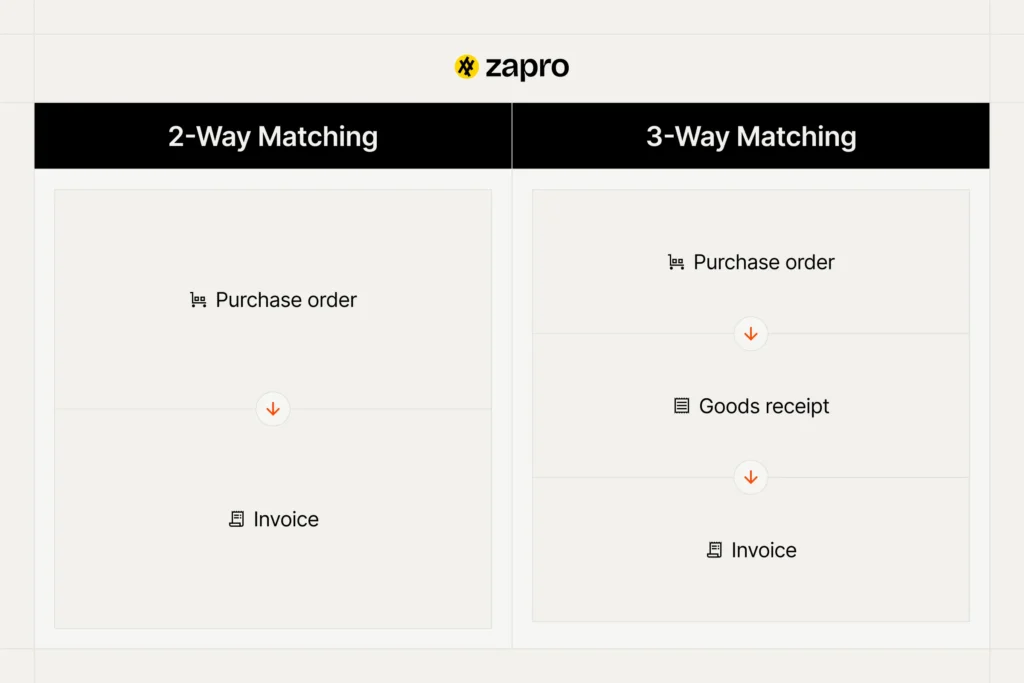
The extracted invoice information is immediately checked against the company records. The invoice is matched automatically with the corresponding Purchase Order (PO) and Goods Received Note (GRN) to ensure that payment will be made only for the goods that were ordered and received.

Step 4 — GL Coding and Cost Allocation

The AI system predicts the most appropriate general ledger ($GL$) codes, line-item cost centers, and department allocations by analyzing previous transactions. Since it learns how the past invoices from that one supplier have been accounted for, it essentially automates the major part of the operational accounting work.

Step 5 — Approval Routing

Once the invoice has been verified at all points, it will also be automatically routed through the set approval chains and the approved will be notified with alerts by email or chat messages or mobile app notifications.

Step 6 — Payment Scheduling and ERP Sync

After approval, the information is delivered to your main accounting system or enterprise resource planning ($ERP$) platform. Here the invoice is recognized as an outstanding accounts payable and a payment run is planned according to the vendor’s payment terms or discount schedule.

Step 7 — Continuous Learning

If a decision-maker in accounts payable corrects an erroneous data point or adjusts a split GL code, the system shall analyze the manual modification and the machine learning algorithms will revise their rules, therefore ensuring greater vendor billing accuracy for the next cycle.

Learn about Automate Accounts Payable software

Ready to Transform Your Invoice Tracking?

Optimize Your P2P Cycle

Key Benefits of AI Invoice Automation

Dramatic Reduction in Processing Time

Working with a human AP team, the processing of five to ten invoices per hour can be comfortably done due to the verification delays, but with an AI invoice processing system, hundreds of complex, multi-page invoices can be processed within a few minutes.

Lower Cost Per Invoice

Manual processing leads to labor costs, physical storage, printing fees, and entry error correction costs. Using an automated invoice processing solution can cut overall cost-per-invoice processing overhead by up to 80%.

Higher Accuracy and Fewer Errors

Data input by humans is prone to errors such as typos, number transpositions, and duplicate payments. Out of the box, AI systems run at a consistent accuracy rate of 95% to 99%, and they identify double billings and calculation mistakes before payments are made.

Better Cash Flow Visibility and Control

Invoices extracted in real time ensure that liabilities end up in your system that very day and not after weeks of delay until an accountant finally types them in. It is a jam-packed highly descriptive live data that finance leadership gets on upcoming capital requirements.

Stronger Supplier Relationships

Automated workflows shorten the entire cycle from receipt to settlement. Paying suppliers regularly and on time will prevent late fees, cut down vendor inquiries, and result in opening doors for strategic early-payment discount negotiations.

Scalability Without Headcount Growth

During certain times of the year or just overall business growth, transaction volume may increase significantly. Handling the additional workload is very easy for the AI engine so no additional hires are required. The accounting team can dedicate most of their time to high-value budgeting and financial analyses.

Learn about Purchase Order Invoice Software

How Machine Learning Improves Invoice Processing Over Time

Baseline AI Model (85-90%) ──► Human Corrections ──► Continuous Optimization (99%+)

Pattern Recognition Across Vendor Formats

Initially, the system runs on baseline machine learning algorithms that are exposed to millions of historical invoices of the system. Whenever it deals with the unique supplier layout, it grabs the specific visual markers and then in the next data extractions, use them first to speed up.

Confidence Scoring and Exception Routing

Every time the data is extracted, the AI assigns an internal confidence score ($0-100\%$) extraction to it. When a low confidence score occurs, the system generates an exception flag, safely routes that single invoice to a human queue for quick review.

Learning From Human Corrections

Human verification is essentially a feedback loop because when a user corrects an error, the machine learning system maps the fix back to the specific document layout. Thus, the distributed training workflow ensures that specific extraction error is rarely repeated.

Learn about PO Invoice vs Non-PO Invoice

What to Look for in AI Invoice Automation Software

You should take into account the following essential enterprise functionalities when selecting invoice automation software for your company:

  • Intelligent OCR and Template-Free Data Capture: Don’t choose legacy systems that will require your employees to spend many hours drawing bounding boxes or setting up custom rules for every new supplier.
  • Automated 3-Way Matching: The application should be able to automatically check the line items, quantities, and unit prices against your live POs and inventory receipts so as to prevent excessive billing.
  • Configurable Approval Workflows: Make sure you can easily build flexible routing pathways based on specific spend tiers, geographic entities, cost centers, or custom parameters.
  • ERP and Accounting System Integration: Go for the ones with deep, native integrations to platforms like NetSuite, SAP, QuickBooks, or Microsoft Dynamics so that you can achieve seamless data synchronization without custom API developments.
  • Multi-Currency and Multi-Language Support: Global supply chains need software that can read non-English invoices and process multi-currency transactions without making errors.
  • Real-Time Reporting and Audit Trail: The platform should track every single document modification, system extraction, and managerial approval to keep your accounts clean and fully audit-ready.
  • Security and Compliance Features: Ensure the vendor provides data protection measures such as encryption, SOC compliance, and access controls.

    Learn about Invoice Tracking

Manual vs. AI Invoice Processing — Side-by-Side Comparison

Operational FeatureManual Invoice ProcessingAI Invoice Automation
Data Intake Speed5 to 10 minutes per document1 to 3 seconds per document
Error VulnerabilityHigh risk of data entry typos and duplicate paymentsNegligible; automated system cross-checks
Validation MethodManual file searches across folders and emailsInstant, automated 3-way matching engine
GL CodingManual lookup and manual spreadsheet entryAI-predicted codes based on past patterns
Operational BottlenecksCommon; physical or email handoffs cause delaysNone; automated multi-tier approval routing
Scalability CostsLinearly expensive; requires additional hiringHighly scalable with zero incremental headcount

Common Challenges in AI Invoice Automation — and How to Overcome Them

Poor Master Data Quality

The AI would be unable to validate an invoice accurately if the data base of master vendor records or purchase orders in the ERP is wrong.

  • The Fix: You need to prepare a clean list of master vendors, a standardized list of master POs before you start your automated invoice matching.

Integration Complexity with Legacy Systems

Integrating modern cloud automation solutions with traditional, premises-based accounting platforms can sometimes create operational difficulties.

  • The Fix: Select the kind of product that has been architected for highly flexible use cases. For example, Zapro provides a series of native connectors and APIs that can be used to connect new AI technologies with traditional ERP systems.

Staff Resistance to Change

Accounts payable personnel are often concerned about automation replacing their jobs, so they may be hesitant when onboarding new systems.

  • The Fix: Explain it through a different lens. Demonstrate how the software actually removes burdensome data entry tasks allowing the employees to devote their time to cash flow management and vendor relations.

Transition Period Accuracy Concerns

Leadership usually has some doubts related to the accuracy of data that is totally parsed by AI during the initial implementation period.

  • The Fix: Adopt the confidence-score thresholds. The system can be configured to require a fast human sign-off on all invoices during the first weeks whilst gradually lessening the manual checks as accuracy levels go up.

Unrealistic Expectations About Touchless Processing

Assuming that an AI tool would be able to perform 100% human-free processing on the first day is impossible. Besides the main acknowledgment of the AI system capabilities, certain human interventions always exist because of damaged document scans, unreadable files, or completely new vendors.

  • The Fix: Set your eyes on the aim of continuous optimization. An SPP system that processes 85% to 90% of invoices on a straight-through basis is still a major financial and operational victory.

Which Industries Benefit Most from AI Invoice Automation?

Manufacturing

Material supply networks are massive, material costs are constantly changing, and components are being delivered on a continual basis. This inevitably results in a large volume of documents. AI keeps the matching issues to a minimum even when complex multi-line purchase orders are involved.

Retail and E-Commerce

The retail business processes thousands of drops, warehouse deliveries, and supplier invoices on a daily basis. Automation installation is the best measure keeping at bay the dangerous stockouts originated from processing lags.

Financial Services

Financial institutions operating under heavy regulatory and auditors’ watch use automation to maintain system-generated audit trails that are foolproof and trackable for every corporate expense.

Professional Services

Companies that offer professional services and entail client rebill expenses use AI solutions to parse, categorize and allocate costs to client accounts or project milestones directly, avoiding any delays.

How Zapro Delivers AI Invoice Automation

Managing accounts payable through scattered spreadsheets and manual workflows is a huge efficiency drain. Zapro delivers a single platform for spend management and AP automation that is intended to unravel the complexity of large global sourcing networks.

  • AI-Based OCR for Any Invoice Layout: No templates. Zapro’s neural-networks extraction engine quickly locates key headers and complex line items even from a completely unstructured source document.
  • 3-Way Matching is Automated for Each Invoice: Zapro aims to access your purchase system data, thereby getting live 3-way matching done across invoices, purchase orders, and receipt notes.
  • Machine Learning Gets Stronger After Each Invoice: Our system keeps track of all internal manual corrections and gradually learning the best practices of data extraction and GL-coding prediction.
  • Approvals with Flexibility for Diverse Structures: Build rule-based multi-level routing trees for various legal entities, departments, and spending limits of executives.
  • ERP and Accounting Sync: Without your core subcontracting system being disturbed, Zapro will natively recognize the transactions by your enterprise ERP and automate your cross-border ledger accounting entries, multi-currency conversion, and asset syncing.
  • Real-Time AP Dashboard and Audit Report On-Demand: Have a single dashboard of corporate spend. Always will have at your fingertips through system log history, payment statuses, and operational performance metrics.

[See how Zapro helps procurement teams remain in control of their spend and get PPV down — Book a Demo]

Optimize Your P2P Cycle

Start Mastering Your Invoice Process Today

Experience Effortless Invoice Management

Frequently Asked Questions About AI Invoice Automation

1. What is AI invoice automation?

AI invoice automation is a technology-driven workflow that uses artificial intelligence in combination with machine learning to manage invoice data without human data entry. The software reads the invoices, extracts the data, compares them with purchase orders for accuracy, and sends the documents to managers for approval.

2. How does machine learning improve invoice processing accuracy over time?

Machine learning algorithms improve through training. When an accounting manager intervenes by correcting a misinterpreted data field or updating a general ledger code, the software stores that specific document layout and changes. This feedback from humans is used by the ML system to avoid a similar processing error in the future. It can reach up to 99% accuracy with enough cycles of human engagement and remediation.

3. Can AI invoice processing handle non-PO invoices?

Yes, indeed. The system performs three-way matching for documents backed by purchase orders but also handles non-PO invoices such as utility bills or service contracts. The AI infers the vendor profile, automatically assigns predicted GL codes based on historical accounts, and sends the document directly to the department manager who needs to approve the purchase.

4. How long does it take to implement AI invoice automation?

Implementation of cloud-based AI invoice software can be done within a few weeks. It works on smart, template-free AI, as opposed to old-school systems that rely on custom layout configurations. Therefore, the only things needed for initial setup are connecting standard ingestion emails and linking with accounting software or ERP.

5. What is the ROI of AI invoice processing software?

Businesses can usually expect to add up the total benefits of this kind of solution within 3 to 6 months. By factoring out manual data entry, realizing duplicate payments early, and drastically reducing invoice processing times, companies typically cut their overall invoice processing operational costs by 70% to 80%.

Read More

Invoice Automation: What It Is, How It Works, and Why You Need It

For modern accounts payable (AP) teams, manual invoice management is a costly, time-consuming drag on productivity. Relying on staff to manually rip open paper envelopes, copy long lines of alphanumeric billing data into spreadsheets, and chase down department heads via email for approval signatures inevitably slows down business operations.

Transitioning your enterprise to invoice automation eliminates these manual bottlenecks. By passing tedious tracking, matching, and data-routing tasks over to intelligent software systems, finance departments can protect their cash margins, catch billing errors before they occur, and scale their transaction capacity without inflating departmental headcount.

What Is Invoice Automation?

Invoice automation is the practice of utilizing digital technology to ingest, extract, validate, and route supplier billing documents through their complete lifecycle without manual human data entry.

It forms the cornerstone of broader accounts payable automation initiatives. Instead of treating an invoice as an isolated piece of paper or unread email attachment, an automation platform transforms it into a structured, digital asset. The software tracks the document from the moment it enters the corporate ecosystem down to its final payment reconciliation inside your general ledger, replacing manual labor with secure, digital workflows.

Watch an Invoice Process Itself, Start to Finish

Book a Demo
Optimize Your P2P Cycle

How Does Automated Invoice Processing Work?

Transitioning from a manual, paper-driven setup to an automated invoice processing lifecycle involves a series of highly synchronized, digital steps:

[Invoice Intake] ──► AI OCR Capture ──► 3-Way Matching (PO & Receipt)

                                                  │

[ERP Ledger Sync] ◄── Auto-Payment ◄── Automated Approval Routing

Step 1 — Invoice Capture and Data Extraction

The software continuously monitors inbound digital channels—such as a dedicated ap@company.com email inbox, supplier portals, or digital scanning folders. When an invoice lands, an AI-powered Optical Character Recognition (OCR) engine reads the document, extracting key metadata like vendor names, itemized line rates, tax metrics, and total dues within seconds.

Step 2 — Automated Validation

Once the data is extracted, the platform runs a series of integrity checks. It flags potential duplicate invoices, checks for calculation errors, and verifies the active status of the supplier’s corporate tax ID and banking registration.

Step 3 — 3-Way Matching

The software executes a comprehensive check by initiating a 3-way matching invoice protocol. It automatically aligns the incoming invoice against two other files: the original approved purchase order (PO) and the warehouse goods receipt note (GRN). If the item quantities, SKUs, and unit prices match across all three documents within pre-approved thresholds, the invoice passes directly to the next stage.

Step 4 — Invoice Approval Workflow

If an invoice is a routine, recurring utility bill or passes the 3-way match perfectly, it can bypass human intervention entirely (known as straight-through processing). If it requires a human signature or contains a pricing variance, the platform automatically routes the file through a dynamic invoice approval workflow based on your internal rules (e.g., routing to specific department heads based on cost limits or line items).

Step 5 — Payment Processing and ERP Sync

Once fully authorized, the invoice data automatically syncs with your corporate Enterprise Resource Planning (ERP) or core accounting software (such as NetSuite, QuickBooks, or Xero). The platform marks the bill as a liability, sets the optimal payment date to capitalize on early-payment discounts, and queues up the funds for digital release.

Step 6 — Reporting and Audit Trail

Every single automated action—including data extractions, matching results, approval timestamps, and system notifications—is permanently stamped into a read-only digital ledger. This provides your finance team with a detailed, audit-ready paper trail for internal control tracking and year-end external reviews.

Learn about Purchase Order Invoice Software

Manual Invoice Processing Challenges — and How Automation Solves Them

Manual Data Entry Errors

  • The Pain: Accounts payable staff typing numbers all day inevitably transpose digits, assign expenses to the wrong general ledger codes, or miss hidden supplier overcharges.
  • The Solution: AI-powered extraction tools instantly parse invoice data with high accuracy, eliminating manual keystroke slip-ups.

Lost and Missing Invoices

  • The Pain: Physical paper invoices sit forgotten on managers’ desks, and digital PDFs get buried in crowded email inboxes, leading to missed vendor payments and late fees.
  • The Solution: A centralized cloud inbox automatically ingests and logs every inbound invoice immediately, ensuring no document is overlooked.

Slow Approval Cycles

  • The Pain: AP teams waste time chasing managers across different departments and time zones for simple signature sign-offs, causing lengthy processing delays.
  • The Solution: Automated routing sends instant system alerts and mobile push notifications directly to the right approvers, keeping the process moving.

Invoice-to-PO Mismatches

  • The Pain: Manually cross-checking line items on a vendor’s invoice against the original PO and delivery receipts is a tedious process that makes it easy to miss minor pricing discrepancies.
  • The Solution: Algorithmic 3-way matching cross-references all three documents instantly, flagging any price or quantity variances for review.

Limited Visibility Into AP Status

  • The Pain: Finance leaders struggle to accurately forecast short-term cash flow because they lack clear visibility into outstanding liabilities pending approval across different departments.
  • The Solution: Real-time financial dashboards provide instant clarity into your exact cash liabilities, pending bills, and overall processing times.

Learn about AP Invoice Processing

Benefits of Invoice Automation

  • Lower AP Processing Costs: Eliminating manual data entry, printing fees, and spreadsheet tracking can reduce your overall invoice processing costs by up to 80%.
  • Faster Invoice Cycle Times: Processing times drop from weeks to hours, allowing your finance team to secure early-payment discounts and avoid late fees.
  • Improved Accuracy and Reduced Fraud Risk: Automated validation checks instantly flag duplicate billing, unvetted suppliers, and unauthorized cost increases, preventing fraudulent payouts.
  • Stronger Supplier Relationships: Fast, reliable payments prevent project delays and build trust, giving your sourcing team more leverage to negotiate preferential pricing down the road.
  • Scalability Without Headcount Growth: Your business can double or triple its transaction volumes without needing to hire a massive team of AP clerks to keep up with the paperwork.
  • ERP and Accounting System Integration: Eliminates data silos by automatically keeping your general ledger synchronized with real-time accounts payable data.

Key Features to Look for in Invoice Automation Software

When evaluating potential invoice automation software, ensure the platform includes these essential features:

FeatureWhat It DoesWhy It Matters
AI-Powered OCRInstantly extracts header and line-level data without manual intervention.Eliminates human data entry and handles unpredictable invoice layouts.
Configurable WorkflowsTracks and routes bills to the right managers based on cost thresholds or departments.Prevents operational bottlenecks and enforces internal spending controls.
Automated 3-Way MatchingCross-checks invoices, purchase orders, and receiving slips automatically.Catches supplier overcharges and prevents fraudulent bill payouts.
Recurring Invoice ManagementAuto-approves fixed monthly expenses like software subscriptions or rent.Bypasses repetitive approval loops for predictable monthly overhead.
Native ERP IntegrationSyncs financial data with tools like NetSuite, QuickBooks, or Xero seamlessly.Eliminates manual data imports and keeps your general ledger current.
Audit Trails & AnalyticsLog every touchpoint and display process speeds and cash metrics.Provides instant visibility and simplifies regulatory compliance reviews.

How to Prepare Before Switching to Invoice Automation Software

To ensure a smooth transition to an automated accounts payable system, complete these foundational steps first:

Audit Your Current Invoicing Process

Map out exactly how invoices flow through your business today. Identify your primary intake channels, note who handles approvals for different spend categories, and isolate where your current process faces the most significant delays.

Standardize Invoice Intake

Instruct your suppliers to send all digital invoices to a single, dedicated email address (e.g., invoices@yourcompany.com). Eliminating scattered delivery channels makes it much easier for your automation software to capture every inbound document.

Define Approval Rules and Tolerances

Establish clear guidelines for your automated workflows. Decide exactly which cost thresholds require executive sign-offs, assign backup approvers to cover for out-of-office managers, and set acceptable price tolerances (such as allowing a 2% variance on shipping costs) to prevent routine bills from getting stuck.

Align Procurement and Finance Teams

Ensure your purchasing and accounts payable teams are closely aligned. 3-way matching relies heavily on consistent purchase order generation—your procurement team must consistently log POs and goods receipts so the automation software has the data it needs to validate incoming invoices.

Learn about Purchase Order vs Invoice

How Zapro Automates Your Entire Invoice Process

Zapro provides an enterprise-grade accounts payable and invoice automation platform designed to give mid-market finance teams total spend control, deep workflow visibility, and effortless automation.

  • AI-Powered Invoice Capture and OCR: Ditch manual data entry. Zapro’s intelligent extraction engine automatically reads and parses both header and line-item details from inbound supplier invoices with high accuracy, regardless of layout variations.
  • Automated 3-Way Matching Before Every Payment: Protect your bottom line from overbilling. Zapro automatically cross-references invoices against your open purchase orders and warehouse goods receipts, instantly flagging any price deviations before funds leave your account.
  • Flexible, Configurable Approval Workflows: Build ironclad spending controls. Easily configure multi-tier approval paths based on department codes, specific vendors, or cost thresholds, complete with streamlined mobile access for fast on-the-go approvals.
  • Recurring Invoices on Autopilot: Save time on predictable expenses. Set up automated approval tracks for fixed, recurring contracts like SaaS subscriptions or facility rent, allowing compliant bills to process through your pipeline without manual human touchpoints.
  • Seamless ERP and Accounting Integration: Keep your financial records uniform. Zapro connects directly with your existing ERP tools and core accounting suites, automating data reconciliation and eliminating the need for manual data syncing.
  • Real-Time AP Dashboards and Audit-Ready Reports: Gain instant financial clarity. Access live analytics dashboards to track outstanding liabilities and processing speeds, while comprehensive, system-generated logs provide absolute visibility for year-end corporate compliance audits.

Ready to transform your accounts payable operation? [See how Zapro works →]

Optimize Your P2P Cycle

Cut Invoice Processing Time From Weeks to Hours

Automate OCR capture, three-way matching, and approvals so your AP team can stop chasing paperwork and start scaling.

Get Started Today!

Frequently Asked Questions About Invoice Automation

1. What is invoice automation?

Invoice automation is the use of digital software to capture, extract, validate, and process vendor billing documents through their complete lifecycle without requiring manual data entry or paper-driven tracking from AP teams.

2. How does automated invoice processing work?

The software captures incoming invoices from a dedicated email or folder, uses AI-powered OCR to extract the text, runs a 3-way match against the corresponding PO and receipt, routes the document to the correct manager for approval, and automatically syncs the data with your ERP for payment.

3. What is 3-way matching in invoice processing?

It is a financial compliance check that cross-references three key procurement documents: the supplier’s invoice, your original purchase order, and the warehouse receiving note. This ensures you only pay for the exact items you ordered and actually received at the agreed-upon price tier.

4. What are the benefits of invoice automation for AP teams?

The primary benefits include a significant reduction in invoice processing costs, faster turnaround times, eliminated data entry errors, ironclad protection against duplicate or fraudulent billing, and the ability to scale processing volumes without increasing headcount.

5. How do I choose the right invoice automation software?

Look for a platform that offers high-accuracy AI data extraction, customizable multi-tier approval routing, automated 3-way matching capabilities, and native integration support for your existing ERP or core accounting system.

Read More

What Is Accounts Payable (AP)? Definition, Process, and Examples

To scale successfully while protecting operating margins, businesses must track and manage where their corporate capital goes. Allowing supplier bills to pile up on messy desks or letting invoices slip through disjointed email chains introduces major financial leaks. At the center of corporate cash flow management sits accounts payable, the department and accounting process responsible for handling short-term liabilities.

Establishing a highly secure, visible workflow to track these short-term obligations ensures your operations scale smoothly while protecting your business cash reserves.

What Is Accounts Payable (AP)?

The standard ap meaning in business refers to an accounting department and a short-term liability ledger account that records the obligations a company owes to its vendors, suppliers, or service providers for goods and services purchased on credit. On a corporate balance sheet, accounts payable sits under the current liabilities section, representing clear financial commitments that must be settled within a year, often under terms like Net-30 or Net-60.

Key Components of Accounts Payable

An elite accounting setup relies on three primary variables to manage short-term business obligations:

  • The AP Ledger Account: The centralized ledger folder where all active vendor liabilities are tracked, added, and adjusted in real time.
  • The Accounts Payable Invoice: The official billing document sent by a supplier outlining the exact quantities, item costs, and payment due dates for work performed.
  • Payment Terms: Pre-negotiated commercial agreements (such as a 2% discount if paid within 10 days, otherwise full payment due in 30 days) that dictate when cash must be sent.

Take the Manual Work Out of Accounts Payable

Book a Demo
Optimize Your P2P Cycle

Diverse Accounts Payable Examples

The practical transactions managed within this accounting silo change depending on your operational needs. Common real-world examples include:

  • Raw Manufacturing Inputs: Sourcing steel sheets, raw timber, or specialized electronic microchips on credit from a primary distributor.
  • Enterprise Software Subscriptions: Managing the recurring billing cycles for cloud software infrastructure or specialized SaaS platforms.
  • Professional Retainer Fees: Processing monthly bills from third-party corporate legal counsel, external marketing agencies, or contract engineering firms.
  • Operational Facility Utilities: Handling high-volume corporate utility bills, warehouse facility rentals, or office internet access lines.

How to Process Accounts Payable

Fulfilling your short-term business obligations accurately requires your accounting team to complete four systematic operational stages:

Step 1: Record Invoices

The cycle opens when an accounts payable invoice lands in your system from an external business partner. Modern teams deploy specialized OCR platforms to read, capture, and extract the line-item figures, taxes, and dates automatically, matching the data lines against specific general ledger expense codes.

Step 2: Verify Expenses and Get Approval

Before any cash leaves the bank, the document must undergo strict internal verification. Accountants execute a three-way match, cross-referencing the incoming invoice details against the original internal purchase order and the physical warehouse goods received note. This validates that the pricing and quantities are accurate before the request routes to a manager for approval.

Step 3: Execute Payment

Once an invoice clears your approval checkpoints, it enters the payment queue. The finance manager schedules the payment based on pre-negotiated terms, selecting a secure, traceable electronic tool like an ACH transfer, wire routing, or virtual credit card to settle the bill.

Step 4: Reconcile Inconsistencies

As the cash clears your banking infrastructure, the transaction data must be matched against the open entry in your general ledger. If any anomalies appear, such as random processing fees or price adjustments, the AP team logs adjustments to close out the transaction files cleanly.

Learn about ap invoice processing

How to Calculate AP Turnover Ratio

Understanding AP Turnover Ratio

The accounts payable turnover ratio is a critical liquidity metric that monitors how rapidly your organization pays off its third-party suppliers over a specific fiscal window. A high ratio reveals that your business settles its debts quickly, proving high short-term creditworthiness. Conversely, a low ratio can signal that a company is conserving cash or struggling with liquidity bottlenecks.

To calculate this metric, use the following standard accounting formula:

Accounts Payable Turnover Ratio = Net Credit Purchases is divided by Average Accounts Payable 

Where Average Accounts Payable is calculated as:

Average Accounts Payable} = Beginning AP Balance + Ending AP Balance divided by 2

Monitoring this ratio regularly allows corporate treasury leaders to evaluate working capital efficiency and structure better commercial agreements with suppliers.

AP Workflow Best Practices

Implement Compliance and Internal Controls

To protect your cash reserves from corporate fraud, your workflow must feature clear internal safeguards. Enforce a strict segregation of duties, ensuring that the accountant who creates and approves a new vendor profile is never the same team member who authorizes the final cash payment.

Conduct Regular Audits

Schedule systematic internal reviews of your active vendor databases. Run quarterly checks to identify duplicate supplier listings, locate open unlinked purchase orders, update expired tax documentation, and clear out old entries to minimize data risks.

Benefits of AP Automation

Relying on manual data entry, paper checks, and long email chains to track corporate cash flow introduces major business risks. Introducing a digital account payable system yields direct operational advantages:

  • Elimination of Typos: Intelligent OCR software captures invoice text and figures with high accuracy, eliminating manual keying mistakes.
  • Accelerated Cycle Speeds: Automated routing matrices clear internal bottlenecks, moving approval requests to managers’ mobile devices instantly.
  • Complete Spend Visibility: Finance leaders can view active liabilities in real time, long before cash leaves the bank.
  • Early Payment Discounts: Streamlining validations allows your business to pay early and secure lucrative price reductions from vendors.

Calculating ROI for AP Automation

To understand the financial return on investment (ROI) of upgrading your workflows, compare your manual baseline metrics against automated targets:

Automation ROI = Manual Processing Cost minus Automated Processing Cost divided by Investment Cost

Most scaling organizations achieve a full return on their software investment within the first few months by eliminating invoice processing labor hours, stopping duplicate payments, and wiping out late-payment fees.

Learn about automated invoice processing

Quote icon

Organizations that automate their accounts payable process reduce invoice processing costs by up to 70% and cut processing times by 60%.

— Gartner, Accounts Payable Automation Insights

How to Transition from Manual to Automated AP

Step 1: Assess Your Current AP Processes and Define Your Goals

Map out your existing processing bottlenecks. Trace how long it takes an invoice to travel from receipt to payment, calculate your current manual processing cost per invoice, and set explicit optimization targets.

Step 2: Evaluate and Select AP Automation Software

Look for a specialized source-to-pay platform that offers advanced OCR scanning, flexible approval routing tools, robust fraud detection filters, and seamless compatibility with your current infrastructure.

Step 3: Prepare Your Vendor Data for Importing

Clean up your existing master supplier database before importing it into a new platform. Remove outdated supplier records, consolidate duplicate files, verify active banking credentials, and organize your tax forms.

Step 4: Configure and Test Your AP System

Build your custom, conditional approval pathways inside the platform based on your company’s dollar thresholds and department rules. Run test invoices through the system to ensure the validation logic triggers correctly.

Step 5: Train Your AP Staff

Hold hands-on training sessions with your accounting team. Ensure your staff understands how to review automated match alerts, manage system exceptions, and utilize real-time analytics dashboards.

Step 6: Roll Out in Phases and Monitor Performance

Launch the automated platform with a small, manageable pilot group of primary suppliers. Once the workflows run smoothly, scale the platform across your entire vendor portfolio, tracking key efficiency metrics to optimize performance.

Learn about best accounts payable software

Overcoming AP Challenges: Solutions for AP Teams

  • The Challenge of Shadow IT & Maverick Spend: Employees frequently buy software or tools independently on corporate cards without approval. The Solution: Integrate your platform with strict intake controls, mandating an approved purchase order for every single incoming invoice.
  • The Friction of Vendor Sprawl: Managing hundreds of scattered supplier relationships dilutes your corporate volume leverage. The Solution: Use centralized dashboards to track supplier performance, allowing you to consolidate spend with top-performing partners.
  • The Threat of Payment Fraud: Phishing schemes and altered invoice files put corporate capital at risk. The Solution: Deploy automated platforms that instantly flag banking changes, check for duplicate invoices, and verify tax compliance markers.

How Zapro Streamlines Accounts Payable

Managing high-volume corporate spending across manual tools exposes your organization to financial leaks. Zapro provides an intelligent, automated source-to-pay platform designed to remove all the administrative complexity from accounts payable and procurement workflows.

[Inbound Supplier Invoice]

            👇

[AI OCR Engine Instantly Extracts Line-Item Data]

            👇

[Automated 3-Way Match Validates PO & Warehouse GRN]

            👇

[Dynamic, No-Code Matrices Route for Manager Approval]

            👇

[Secure Electronic Settlement Syncs Directly with ERP]

Zapro optimizes your daily accounting operations through advanced automation capabilities:

  • AI-Powered Invoice Data Extraction: Stop manual data entry. Zapro’s elite OCR engine reads, codes, and maps incoming bills instantly, eliminating human transcription errors.
  • Automated Three-Way Matching: Protect your margins. The system automatically cross-references incoming bills against original purchase orders and warehouse receiving records, flagging pricing or quantity discrepancies immediately.
  • No-Code, Flexible Approval Routing: Construct custom, multi-stage approval pathways based on project budgets, departments, or cost thresholds, removing internal email bottlenecks.
  • Self-Service Supplier Collaboration Portal: Improve transparency. Zapro’s secure portal allows business partners to manage their own billing setup, upload tax documentation, and trace active payment milestones in real time.
  • Native ERP and Financial Sync: Maintain absolute data integrity. Zapro integrates directly with leading mid-market and enterprise platforms like NetSuite and QuickBooks Online, ensuring actual spending updates of your general ledgers in real time.

Ready to eliminate manual accounting errors, protect your cash flow, and build a scalable accounts payable department? Schedule a custom Zapro demo today.

Optimize Your P2P Cycle

Simplify Your Accounts Payable — Start Saving Smarter Today!

Automate invoice processing, approvals, and payments while staying audit-ready — all in one place.

Get Started Now

FAQ Questions

1. What is accounts payable (AP)?

Accounts payable represents both an accounting department and a current liability ledger account that tracks the short-term debts an organization owes to its external vendors for products and services purchased on credit.

2. What are examples of accounts payable?

Common examples include purchasing raw manufacturing components on credit, managing recurring monthly corporate utility bills, paying software licensing fees, or settling invoices from third-party consulting firms.

3. What is the difference between accounts payable and accounts receivable?

Accounts payable reflects the short-term money your company owes to external suppliers (a liability). Accounts receivable reflects the money external clients owe to your company for products or services delivered to them (an asset).

4. How is the AP turnover ratio calculated?

The ratio is calculated by dividing your total Net Credit Purchases by your Average Accounts Payable balance over a specific timeframe. This metric monitors how rapidly your business pays off its supplier debts.

5. What are the benefits of AP automation?

Automation software dramatically cuts manual data entry typing errors, speeds up internal manager approval cycle times, blocks costly duplicate or fraudulent payments, and provides real-time visibility over corporate spending.

6. What does an AP automation system include?

An advanced system features intelligent AI-driven OCR data capture, automated three-way matching tools, dynamic approval routing, self-service supplier portals, and native real-time sync with major financial ERP platforms.

Read More

10 Best Accounts Payable Software Tools With Hidden AI Powers [New Updated List for 2026]

Best Accounts Payable Software

Top accounts payable (AP) automation software includes solutions like Zapro, Tipalti, Stampli, Oracle NetSuite, and BILL, which streamline financial operations by automating invoice capture, three-way matching, and approval workflows. These systems enhance efficiency and accuracy while offering seamless integration with popular ERP platforms such as QuickBooks and Sage Intacct. When selecting a provider, businesses should prioritize tools that provide real-time visibility into liabilities and support specific requirements like global payments or advanced fraud prevention.

Key Metrics at a Glance

  • Cost Reductions: Invoicing overhead drops from $12–$18 down to $2–$4 per invoice upon eliminating manual touches.
  • Velocity Benchmarks: Best-in-class, automated finance teams complete end-to-end invoice processing cycles in 3.1 days, compared to the 17.4 days required by manual workflows.
  • Capital Impact: Standard implementations unlock an ROI of 250–450% within 12–18 months of deployment.
  • Market Scale: Driven by modern enterprise modernization, the global AP automation market scale sits at $6.17B in 2026.

What is Accounts Payable Software?

Accounts payable software refers to a technology solution that helps businesses manage and automate their payables processes. It enables companies to streamline the entire accounts payable workflow, from invoice capture and data entry to approvals and payments. With accounts payable software, you can eliminate manual tasks, reduce errors, and improve the overall efficiency of your financial operations.

How Does Accounts Payable Software Work?

Accounts payable software works by automating the various steps involved in the payables process. Here is a breakdown of how it typically works:

  • Invoice Capture: Accounts payable software allows you to capture invoices electronically, either through OCR scanning, actionable email, or vendor portal upload. This eliminates the need for manual data entry and ensures accurate and efficient invoice processing.
  • Invoice Processing: The software automatically extracts relevant data from the invoices, such as vendor details, invoice number, and line item information. It categorizes and organizes the invoices for further processing.
  • Approval Workflow: Accounts payable software streamlines the approval process by automating routing and notifications. Approvers can review invoices, make comments, and approve or reject them directly within the software. This eliminates the need for manual follow-ups and ensures timely approvals.
  • Automated Matching: The software can perform automated matching, either two-way or three-way, comparing the invoice against the purchase order and receipt of goods/services. This ensures that the invoice aligns with the agreed-upon terms before proceeding further.
  • Payment Processing: Once invoices are approved, the software facilitates seamless payment processing. It integrates with your preferred payment methods, such as ACH transfers, wire transfers, or virtual credit cards, to enable quick and secure payments to vendors.
  • Reporting and Analytics: Accounts payable software provides real-time visibility into your payables data. You can generate reports, track payment status, monitor cash flow, and gain valuable insights into your financial operations. This helps you make informed decisions and optimize your payables processes.

Top Accounts Payable Automation Software Comparison

ToolBest ForG2 RatingStarting PriceTop Feature
ZaproMid-market & Enterprises seeking deep P2P automation & ERP synchronization4.8 / 5Free trial available / Quote-basedMulti-way PO/Contract matching engine & AI invoice generation
QuickBooks OnlineSmall and mid-sized businesses4.0 / 5$30 / moSimple built-in ledger accounting with basic AP add-ons
Sage IntacctMid-market teams requiring multi-dimensional GAAP compliance4.3 / 5$10,320 / yrMulti-dimensional reporting & core financial sub-ledgers
NetSuiteHigh-growth companies requiring full ERP centralization4.1 / 5$999 / mo (base platform)Unified inventory, CRM, and global subsidiary accounting modules
Microsoft Dynamics 365Microsoft-centric ecosystems seeking broad ERP capabilities3.9 / 5Quote-based via CSPDeep, native ecosystem compatibility with Microsoft workplace tools
EpicorManufacturing and industrial operational scaling4.0 / 5$349 / moCustom operational and material-tracking workflows
SAPLarge multinational enterprise architectures4.2 / 5Custom / Enterprise onlyAI-driven insights for highly complex, multi-entity global operations
StampliCommunication-heavy AP workflows with complex approval lines4.7 / 5Quote-based onlyContextual, invoice-level chat and document collaboration trails
TipaltiHigh-volume cross-border marketplace payouts & digital media networks4.5 / 5$149 / moGlobal remittance engine supporting 200+ local currencies
RampTech startups and small businesses combining corporate spend cards with AP4.8 / 5$0 / moUnified corporate credit cards with real-time merchant spend rules

Detailed Profiles of Top 10 Accounts Payable Solutions

When it comes to choosing the right accounts payable software for your business, you have a variety of options to consider. Here is a detailed list of the top 10 AP software solutions in 2026:

  1. Zapro
  2. QuickBooks Online
  3. Sage Intacct 
  4. NetSuite
  5. Microsoft Dynamics 365
  6. Epicor
  7. SAP
  8. Stampli
  9. Tipalti
  10. Ramp

1. Zapro

Zapro is an intelligent automation AI for business processes, and accounts payable automation is one of its most popular use cases. With Zapro, you can automate data capture, build workflows, streamline existing AP processes, and manage end-to-end AP management. It is suitable for small to medium businesses, large enterprises with legacy ERPs, accounting firms, and growing companies. Zapro utilizes advanced machine learning algorithms to continuously improve accuracy and efficiency in data capture and processing.

The platform offers customizable workflows to adapt to the unique needs and complexities of different businesses and industries. Zapro integrates seamlessly with existing ERP systems, accounting software, and other tools commonly used in finance and accounting departments. Its intuitive user interface makes it easy for non-technical users to configure and manage automation processes.

Zapro provides real-time insights and analytics to track performance, identify bottlenecks, and optimize AP processes for maximum efficiency and cost savings. With Zapro, businesses can reduce manual errors, eliminate paper-based processes, and accelerate invoice processing cycles, leading to faster payments and improved vendor relationships. The platform prioritizes data security and compliance, ensuring that sensitive financial information is protected and regulatory requirements are met.

  • Features:
    • Invoice Capture via OCR, Vendor Portal, PO Flip, Contract Based, Recurring Invoices.
    • Invoice processing, matching, and tolerance with 3-way & 2-way matching.
    • Touchless invoice generation for successful matches.
    • Exception and Dispute handling for invoices that fail matching.
    • Customized line taxation for different customer needs.
    • Handling non-PO items in PO-backed invoices and vice versa.
    • Customized & Automated Tax Codes and Tax Rates application at Invoice Header and Line Level.
    • Seamless integrations to ERPs.
  • Best For: Small to medium businesses, large enterprises with legacy ERPs, accounting firms, multinational businesses, and growing companies looking to formalize or automate their finance function.
  • Pricing Details: Zapro offers flexible pricing plans to cater to different business needs. Free Trial is available.

2. QuickBooks Online

QuickBooks Online is a cloud-based accounting software that includes accounts payable functionality. It offers seamless integrations with third-party add-ons for AP automation, making it a popular choice for small and mid-market companies. QuickBooks Online also supports various payment methods, such as credit cards, debit cards, PayPal, and ACH transfers.

  • Best For: Small and mid-sized businesses.
  • Pricing Details: Simple Start starts at $30/mo; Essentials starts at $60/mo; Plus starts at $90/mo; Advanced starts at $200/mo.

3. Sage Intacct

Sage Intacct is a cloud-based ERP accounting software system that includes accounts payable software with automated payables workflows. It offers real-time tracking and views of payments, approvals, and reports. Sage Intacct is known for its simple chart of accounts and multi-dimensional reporting capabilities.

  • Best For: Businesses interested in GAAP compliance and multi-dimensional report views.
  • Price Range: Annual subscription price starts at $10,320.

4. NetSuite

NetSuite is a cloud ERP system with a wide range of modules, including accounts payable. It allows for seamless integration with AP automation platforms to enhance its capabilities. NetSuite offers real-time insight into customer invoicing and payment details, reporting, and analytics.

  • Best For: Small business, mid-sized, and some enterprise companies.
  • Price Range: Base ERP Package cost is $999 per month. Full User Licenses cost $100–$200 per user/month, while Limited User Licenses cost $50–$100 per user/month.

5. Microsoft Dynamics 365

Dynamics 365 is a Microsoft product that combines ERP and CRM functionalities. It includes accounts payable solutions for Microsoft-friendly companies. Its automation capabilities enable quick and seamless integrations with other Microsoft products, reducing deployment risks.

  • Best For: Small business, mid-sized, and some enterprise companies.
  • Price Range: Pricing is based on custom Cloud Solution Provider (CSP) pricing structures.

6. Epicor

Epicor provides global on-premises and cloud ERP systems for various industries. Its ERP system includes accounts payable software that streamlines the AP workflow process. Epicor’s flexibility and customization options make it a popular choice for companies of all sizes.

  • Best For: Companies of all sizes looking to grow their business.
  • Price Range: Starts at $349.00 per month.

7. SAP

SAP offers a wide range of cloud ERP systems for different business processes. Its ERP system includes accounts payable software for large businesses. SAP also offers ERP solutions for small businesses and midsize companies. SAP’s finance capabilities include support for usage-based billing models and AI-driven financial insights.

  • Best For: Large enterprise companies with corresponding budgets for enterprise-level SAP deployments.
  • Price Range: Custom enterprise pricing only.

8. Stampli

Stampli is an AP automation platform that combines AP communication, documentation, and payments into one collaborative solution. Its templates make it easy for approvers, vendors, and other parties to understand what needs to be done, resulting in faster approvals and payments.

  • Best For: Small and midsize businesses.
  • Pricing Details: Stampli only offers custom, quote-based plans.

9. Tipalti

Tipalti caters to the emerging eCommerce landscape by enabling businesses to automate payments to digital-centric roles like affiliate marketers and freelancers. Its reach extends globally, supporting payments in over 200 local currencies, reflecting its commitment to cross-border transactions. It is distinguished by its compatibility with niche affiliate and influencer platforms overlooked by other AP automation tools.

  • Best For: Small to medium-sized businesses focusing on global payouts.
  • Pricing Details: Tipalti Express starts at $149 per month; Tipalti Advanced is quote-based.

10. Ramp

Ramp provides a diverse array of financial solutions tailored to businesses, primarily in the tech sector. What sets Ramp apart is its comprehensive suite of services, ranging from vendor management to corporate credit cards, aimed at empowering small companies and startups to prioritize business growth. Ramp offers payment management systems, such as virtual cards and recurring billing, enabling clients to automate payments.

Pricing Details: The Ramp plan starts at $0 per user/month; Ramp Plus starts at $15 per user/month; Ramp Enterprise requires a custom quote.

Best For: Large Enterprises, Mid Size Business, Non-Profit, Public Administrations, Small Business.

How to Choose the Right Accounts Payable Software?

Choosing the right accounts payable software for your business can be a daunting task. To help you make an informed decision, here are some key factors to consider:

Business Needs

Assess your business requirements and identify the specific pain points you want to address with accounts payable software. Consider factors such as invoice volume, payment methods, integration needs, and scalability.

Features and Functionality

Look for software that offers the features and functionality you need, such as invoice capture, approval workflows, payment processing, reporting, and analytics. Consider whether the software supports your preferred payment methods and integrates with your existing systems.

User-Friendliness

The software should be user-friendly and intuitive, with a clean and organized interface. Consider the ease of use for both AP staff and approvers, as well as the availability of training and support resources.

Security and Compliance

Ensure that the software provides robust security measures to protect sensitive financial data. Look for features such as data encryption, user access controls, and compliance with industry regulations such as GDPR or HIPAA.

Scalability and Flexibility

Choose software that can grow with your business. Consider whether the software can handle increasing invoice volume, support multiple entities or subsidiaries, and adapt to changing business needs.

Integration Capabilities

Assess the software’s integration capabilities with your existing systems, such as your ERP or accounting software. Seamless integration can streamline workflows and eliminate manual data entry.

Pricing and ROI Analysis

Evaluate the pricing models of different software solutions and consider the return on investment (ROI) they can deliver. Look for transparent pricing structures and consider the total cost of ownership, including implementation, training, and ongoing support.

Implementation and Support

Consider the implementation process and the level of support provided by the software vendor. Look for vendors that offer training resources, documentation, and responsive customer support.

By carefully considering these factors, you can choose the right accounts payable software that aligns with your business goals and helps you optimize your financial processes.

Learn about Automated Invoice Processing Best Practices for AP Teams 2026

Quote icon

The global accounts payable automation market was valued at US $5.4 billion in 2023 and is projected to reach US $17.1 billion by 2032, growing at a CAGR of 13.9%.

Akhila Mayabrahhma, Lead Analyst at Allied Market Research

Which Tool Is Right For You?

  • If you need global payments and cross-border digital marketplace distribution – Tipalti
  • If you need full, end-to-end procure-to-pay automation alongside legacy or modern ERP integration – Zapro
  • If you are managing books natively on QuickBooks – BILL
  • If you operate a heavy manufacturing enterprise requiring complex supply chain infrastructure – Epicor
  • If your team requires immediate visibility via unified corporate credit cards – Ramp

Mini Case Studies

Case Study 1: Scaling Without Added Headcount

  • Problem: A 300-person SaaS company saw their monthly invoice volumes double over a two-quarter span, stalling their lean corporate finance team with manual data validation backlogs.
  • Solution: The team deployed Zapro’s intelligent document processing workflow to read digital invoices natively and automatically route line items directly to line managers.
  • Result: The business successfully reduced invoice processing time by 65% within 60 days of system activation.

Case Study 2: Eradicating Financial Inaccuracies

  • Problem: A multi-entity retail distributor faced regular duplicate billing leakages and baseline price overcharges from vendors due to standard human tracking discrepancies across 15 warehouse nodes.
  • Solution: Implemented 3-way matching routines that cross-checked invoice line elements with physical goods receipts and core purchase orders.
  • Result: Eradicated manual variance validation errors completely, capturing $140,000 in unapplied tier-discounts within the first year of operation.

Agentic AP Automation

Static, rule-based execution paths are being replaced by adaptive agentic AP automation. Unlike older software iterations that break down when an invoice structural format alters, agentic tools deploy autonomous AI entities capable of interpreting structural shifts, identifying contextual nuances, and resolving exceptions independently before calling on human oversight.

AI Agents vs. Legacy RPA

Traditional Robotic Process Automation (RPA) requires rigid, predefined data fields and breaks whenever a vendor adjusts an invoice layout. Modern AI agents leverage sophisticated large language models to ingest unstructured document types dynamically, moving the finance team away from maintaining code scripts and toward true exceptions management.

Proactive Fraud & Risk Isolation

Sophisticated financial networks utilize behavioral tracking parameters to screen outgoing corporate disbursements. System protocols examine invoice meta-histories, cross-check structural modifications, flag systemic banking pattern variances, and identify anomalous supplier behavior to block threats like phishing or duplicate schemes prior to ledger confirmation.

Benefits of Using Accounts Payable Software

Implementing accounts payable software can bring numerous benefits to your business. Here are some key advantages:

Time and Cost Savings

By automating manual tasks, such as data entry and invoice processing, accounts payable software can save you valuable time and reduce operational costs. It eliminates the need for manual paperwork, reduces errors, and improves process efficiency.

Improved Accuracy and Compliance

Accounts payable software ensures accurate data capture, reduces the risk of errors, and enhances compliance with regulatory requirements. It helps you maintain accurate records, track payment terms, and stay on top of vendor relationships.

Streamlined Workflows and Faster Approvals

With automated approval workflows, accounts payable software streamlines the entire approval process. It eliminates bottlenecks, reduces approval cycle times, and improves collaboration between AP staff and approvers.

Real-Time Visibility and Reporting

Accounts payable software provides real-time visibility into your payables data. You can generate reports, track payment status, monitor cash flow, and gain valuable insights into your financial operations. This helps you make informed decisions and optimize your payables processes.

Enhanced Vendor and Supplier Relationships

By processing invoices and making payments in a timely manner, accounts payable software helps you build stronger relationships with your vendors and suppliers. It improves communication, reduces payment delays, and enhances your reputation as a reliable business partner.

Improved Cash Flow Management

Accounts payable software enables better cash flow management by providing visibility into upcoming payment obligations and allowing you to optimize payment timing. It helps you take advantage of early payment discounts and avoid late payment penalties.

Key Features to Look for in Accounts Payable Software

When evaluating accounts payable software, it’s important to consider the key features that can enhance your payables process. Here are some essential features to look for:

Invoice Capture

The software should offer automated invoice capture capabilities, allowing you to capture invoices electronically from various sources such as OCR scanning, email, or supplier portals.

Automated Matching

Look for software that supports automated matching, including two-way and three-way matching functionalities. This ensures that invoices align with corresponding purchase orders and receipts, minimizing errors and discrepancies.

Approval Workflows

Look for software that enables customizable approval workflows, routing invoices to the appropriate approvers based on predefined rules. The software should provide notifications and reminders to ensure timely approvals.

Payment Processing

Ensure that the software supports multiple payment methods, such as ACH transfers, wire transfers, or virtual credit cards. It should integrate with your preferred payment gateway or bank to facilitate seamless payments.

Data Extraction and Validation

The software should automatically extract relevant data from invoices and validate it for accuracy. This reduces manual data entry errors and ensures the integrity of your financial records.

Reporting and Analytics

Look for software that provides robust reporting and analytics capabilities. It should offer real-time visibility into your payables data, allowing you to generate customized reports, track key metrics, and gain valuable insights.

Integration with Other Systems

Consider whether the software integrates seamlessly with your existing systems, such as your ERP or accounting software. Integration enables data synchronization, eliminates manual data entry, and improves overall process efficiency.

Security and Compliance

Ensure that the software provides robust security measures to protect sensitive financial data. Look for features such as data encryption, user access controls, and compliance with industry regulations.

User-Friendly Interface

The software should have a user-friendly interface that is intuitive and easy to navigate. It should require minimal training for both AP staff and approvers, allowing them to quickly adapt to the new system.

By prioritizing these key features, you can choose accounts payable software that meets your specific business needs and helps you optimize your payables process.

Integration with Other Systems

Integration with other systems is a crucial consideration when choosing accounts payable software. Seamless integration can eliminate manual data entry, improve process efficiency, and ensure data consistency across systems. Here are some common integration points to consider:

ERP Integration

Accounts payable software should integrate seamlessly with your ERP system or accounting software. This allows for the synchronization of financial data, such as vendor information, general ledger codes, and payment details.

Payment Gateway Integration

If you use a specific payment gateway or bank for payment processing, ensure that the accounts payable software can integrate with it. This streamlines the payment process and ensures accurate and timely payments to vendors.

Vendor Portal Integration

If you have a vendor portal where vendors can submit invoices, look for accounts payable software that can integrate with it. This enables direct invoice submission, eliminates manual data entry, and improves collaboration with vendors.

Document Management System Integration

Integration with your document management system allows for seamless document storage, retrieval, and archival. This ensures that all relevant documents, such as invoices and supporting documents, are easily accessible within the accounts payable software.

Reporting and Analytics Integration

Accounts payable software should integrate with your reporting and analytics tools to provide real-time visibility into payables data. This enables you to generate customized reports, track key metrics, and gain valuable insights into your financial operations.

By ensuring smooth integration with your existing systems, accounts payable software becomes an integral part of your overall financial ecosystem, enhancing efficiency and accuracy in your payables process.

Pricing and ROI Analysis

Pricing is an important consideration when selecting accounts payable software. It’s essential to evaluate the pricing models of different software solutions and consider the return on investment (ROI) they can deliver. Here are some key aspects to consider:

Subscription-based Pricing

Most accounts payable software solutions offer subscription-based pricing, where you pay a monthly or annual fee based on the number of users or the volume of invoices processed. Consider whether the pricing structure aligns with your budget and the scalability of your business.

Implementation Costs

Some software solutions may charge additional fees for implementation, training, and customization. Evaluate these costs and consider whether they are reasonable compared to the value the software can deliver.

ROI Analysis

Perform a thorough ROI analysis to understand the potential cost savings and benefits of implementing accounts payable software. Consider factors such as time savings, reduction in manual errors, improved efficiency, and better vendor relationships. Compare the projected ROI with the software’s pricing to determine its value for your business.

Hidden Costs

Be aware of any hidden costs, such as fees for additional features or support services. Carefully review the terms and conditions, and ask the software vendor for clarification if needed.

By conducting a comprehensive pricing and ROI analysis, you can choose accounts payable software that aligns with your budget and delivers a strong return on investment for your business.

Implementation and Support

Implementation and ongoing support are critical factors to consider when selecting accounts payable software. Here are some key aspects to evaluate:

Implementation Process

Understand the implementation process and the level of support provided by the software vendor. Look for vendors that offer implementation assistance, training resources, and documentation to ensure a smooth transition.

Training and Onboarding

Consider the availability of training resources and onboarding support for your AP staff and approvers. Look for software vendors that offer comprehensive training materials, webinars, or dedicated support to help users get up to speed quickly.

Customer Support

Evaluate the quality and responsiveness of the software vendor’s customer support. Look for vendors that offer multiple support channels, such as phone, email, or live chat, and have a reputation for excellent customer service.

Software Updates and Maintenance

Inquire about the frequency of software updates and how maintenance and bug fixes are handled. Regular updates ensure that you have access to the latest features and security patches.

User Feedback and Reviews

Research user feedback and reviews to gain insights into the software vendor’s reputation for implementation and support. Consider joining user forums or communities to connect with other users and learn from their experiences.

By choosing a software vendor that provides robust implementation support and responsive customer support, you can ensure a successful implementation and have peace of mind knowing that help is available when needed.

Zapro: Your Ideal AP Software Solution

Zapro is an AI-driven automation software that offers a comprehensive solution for accounts payable. With Zapro, you can automate your AP processes, streamline workflows, and eliminate manual tasks. Zapro’s core offering includes automated data capture, end-to-end AP management, and seamless integration with your existing systems.

Zapro is suitable for small to medium businesses, large enterprises, accounting firms, and growing companies. It offers flexible pricing plans to cater to different business needs. Whether you’re looking to automate data capture, streamline approvals, or improve payment processing, Zapro has you covered.

Implementing the right accounts payable software can transform your financial processes, improve efficiency, and drive cost savings. By automating manual tasks, streamlining workflows, and enhancing visibility, you can gain better control over your payables and strengthen relationships with vendors and suppliers.

In this guide, we explored what accounts payable software is, how it works, and provided a detailed list of the top 10 AP software solutions in 2026. We also guided you on how to choose the right software for your business, considering factors such as features, integration capabilities, security, pricing, and implementation support.

Zapro is an ideal AP software solution that offers comprehensive automation and integration capabilities. With Zapro, you can streamline your payables process, reduce errors, and improve efficiency. It is suitable for businesses of all sizes, offering flexible pricing plans to cater to different needs.

By selecting the right accounts payable software and leveraging its features, you can optimize your financial operations, save time and costs, and gain a competitive edge in today’s fast-paced business landscape.

Ready to take your accounts payable process to the next level? Contact Zapro today for a demo and see how their AP software can transform your business!

Zapro simplifies AP — invoice to payment, all in one place.

Start Automating with Zapro!
Optimize Your P2P Cycle

Frequently Asked Questions

1. How much does accounts payable automation software cost?

Depending on the volume of transactions, the size of your team, and the complexity of your workflows, a system purchase for an AP solution may vary. For instance, card-related specialized ones (Ramp) come with an initial free tier entry point. Mid-market platform costs range from $150 to $1,000 per month. On the other hand, more fundamental systems such as Sage Intacct or NetSuite require a minimum annual commitment of $10,000. 

2. What ROI can I expect from AP automation?

Automated software will typically generate a return on investment (ROI) of around 250%-450% in the first 12-18 months after installation. This financial improvement is mainly attributable to the elimination of cost per invoice processing, avoidance of late penalties, unlocking of early payment discount, and better utilization of internal resources. 

3. How long does AP automation implementation take?

On the basis that the existing ledger configurations such as QuickBooks are straightforward, simple unboxing integration can be done in a matter of days. However, complex customizations such as linking to legacy ERP systems across multi-country subsidiaries may require 4 to 8 weeks just for the planning stage. 

4. What is the best AP automation software for small businesses?

From the very beginning, Ramp is a great option for simple card workflow requirements on a limited budget. Those mid-sized companies that are looking to get the transactional processes up and running with minimal hassles will be well served by specialized suppliers such as BILL or mid-market automation software like Zapro. 

5. Does AP automation software integrate with QuickBooks / NetSuite / SAP?

Yes. That is why modern apps come with dedicated integration adaptors that keep the general ledger categories, entities, purchase orders, and invoice status registers in both systems in sync dynamically. 

6. How does AP automation prevent duplicate payments and fraud?

AP automation software often integrates a ‘three-way match’ process. It ensures that the digital invoice amount corresponds to the purchase order and goods receipt records. Secondly, AI-based fraud detection is capable of identifying vendor bank profile anomalies. Moreover, it can also detect the structural duplicates that, if unchecked, may lead to duplicate ​‍​‌‍​‍‌​‍​‌‍​‍‌payments. 

Read More

Everything You Need to Know About Accounts Payable Automation

Accounts Payable Automation

Manual AP is holding finance teams back.

Businesses are moving super fast in 2025. And, processing invoices by hand leads to delays, errors, and unnecessary costs. It’s slow, risky, and hard to scale especially when finance teams are under pressure to move faster, stay compliant, and keep everything audit-ready.

That’s where accounts payable automation comes in.

It replaces manual workflows with smart, streamlined processes that:

  • Cut down on paperwork and data entry
  • Speed up approvals and payments
  • Reduce fraud risk
  • Give real-time visibility into cash flow and vendor spend

This guide will cover what AP automation is, why it matters in 2025, and how it can help your team work smarter and certainly, not harder. 

Whether you’re just exploring the topic or ready to make a move, you’ll find the clarity you need here.

Let’s start with the basics.

What is AP automation and why it matters now

AP automation uses technology to take the manual work out of processing invoices and making payments. Instead of keying in invoice data by hand, printing checks, or chasing down approvals, finance teams can use smart tools to handle it all, quickly and accurately.

A modern AP automation system typically includes:

  • Digital invoice capture (via email, portals, or e-invoicing)
  • Automatic data extraction using AI and OCR
  • Three-way matching with POs and receipts
  • Custom approval workflows
  • Secure, scheduled payments
  • Real-time dashboards and audit trails

Why AP Automation matters in 2025:

AP automation isn’t just about speed anymore; it’s about visibility, control, and staying ahead in a more regulated, super fast-moving business environment.

Benefit AreaManual APAP Automation
Invoice Processing Time8–10 days avg.Under 24 hours
Cost Per Invoice$8.00 – $12.00As low as $1.50
Fraud RiskHigh (paper/email susceptible)Reduced with controls & logs
Approval DelaysFrequent bottlenecksSmart routing, instant visibility
Remote AccessibilityLimitedFully cloud-enabled
Audit ReadinessManual trail, error-proneReal-time, traceable workflows

Here’s what’s driving adoption right now:

  • Many teams are going remote and workloads are growing
  • Finance needs clean, auditable data
  • Fraud risks (like invoice scams) are increasing
  • AI and machine learning are improving automation accuracy
  • Finance pros want to work smarter, not get buried in admin

And it’s not just a trend.
Gartner predicts that by 2026, 90% of finance teams will have fully automated AP processes to reduce risk and improve performance.

Bottom line: AP automation has become a must-have for finance teams that want to scale, stay compliant, and lead with data and not just keep up.

Manual vs Automated AP Processes: What is the Cost, Time and Risk Associated?

For many finance teams, accounts payable still relies on email threads, spreadsheets, paper invoices, and approval chains scattered across departments. While these manual methods may have worked in the past, they are now a major liability in terms of cost, time, and risk exposure.

Manual vs Automated AP Processes
Paper invoices, manual data entry, late approvals

Digital invoices, instant routing, automated paymentsUse a clean split layout with icons only, no complex text.

Let’s break down the key differences:

1. Time Consumption

Manual AP processes are notoriously slow. Invoices must be entered by hand, verified against POs, routed for approval via email or printouts, and tracked manually for payment.
According to APQC Finance Benchmarking, an average AP clerk spends 23% of their time just resolving invoice exceptions often caused by missing data, duplicates, or mismatches.

Automated systems, on the other hand, use AI and pre-configured rules to:

  • Capture invoices instantly through OCR or e-invoicing
  • Match with POs and receipts in seconds
  • Automatically flag and route exceptions with full context

This results in dramatically faster processing cycles, freeing teams to focus on higher-value tasks like cash flow forecasting or vendor negotiations.

2. Processing Costs

Manual invoice handling is expensive. Costs quickly add up through:

  • Labor hours for data entry and validation
  • Delayed approvals leading to missed early-payment discounts
  • Late fees due to lost or stalled invoices

Industry estimates place the cost per invoice at $8–$12 for manual systems. 

But with automation, it drops to $1.50–$2.00 per invoice by eliminating repetitive labor and minimizing errors.

3. Risk and Compliance Exposure

Manual processes create more room for:

  • Duplicate payments
  • Fraud (e.g., invoice tampering, phishing)
  • Lack of audit trails
  • Missed regulatory requirements

Automation significantly reduces these risks by:

  • Flagging duplicates and suspicious activity in real time
  • Enforcing approval rules and segregation of duties
  • Maintaining a secure, searchable log of every invoice and action

4. Scalability and Visibility

Manual AP teams struggle during high-volume periods like quarter-end or during growth phases. It becomes harder to track liabilities, forecast payments, or report on performance.

Automation gives real-time visibility into:

  • Invoice status
  • Spend by vendor, category, or department
  • Bottlenecks in approval flows
  • Key metrics like days payable outstanding (DPO) and exception rates

Manual vs Automated AP: A Quick Comparison

AspectManual APAutomated AP
Processing Time8–10 days per invoiceUnder 1 day
Labor EffortHigh (data entry, exception handling)Minimal (automated workflows)
Invoice Exceptions23% of AP clerk time spent manuallyHandled with AI rules and alerts
Cost per Invoice$8–$12$1.50–$2.00
RiskHigh (fraud, duplicate payments)Low (audit trails, real-time checks)
ScalabilityDifficult to scaleEasily handles volume spikes
VisibilityFragmentedCentralized dashboard with insights

Step-by-Step: The Modern Accounts Payable Workflow

Accounts payable automation isn’t a black box, it’s a well-orchestrated digital workflow that replaces every manual step with intelligent, streamlined processes. 

The Modern Accounts Payable Workflow 1024x413

Here’s how a modern AP workflow typically works, from invoice receipt to reconciliation:

Step 1: Invoice Ingestion

Invoices can arrive through multiple channels—email, supplier portals, or e-invoicing networks. Instead of manually collecting and organizing them, AP automation platforms centralize this step.
Invoices are automatically captured and stored in a unified system, ready for processing.

Sources can include:

  • PDF or scanned invoices via email
  • Electronic invoices (EDI, XML)
  • Direct uploads from suppliers

Step 2: Intelligent Data Capture (OCR + AI)

Once ingested, the system uses Optical Character Recognition (OCR) and machine learning to extract key data points:

  • Vendor name
  • Invoice number and date
  • Line-item details
  • PO numbers
  • Tax and payment terms

AI-driven tools go beyond basic OCR by learning to recognize patterns and correct common errors, improving accuracy over time.

Step 3: Automated Matching & Validation

The extracted data is matched against:

  • Purchase Orders (2-way or 3-way match)
  • Goods Received Notes (GRNs)
  • Master vendor records

Discrepancies trigger alerts or exception workflows. If everything checks out, the invoice moves automatically to the approval stage; no manual intervention needed.

Step 4: Smart Approval Routing

Invoices are routed to the right approvers based on pre-defined rules, such as:

  • Invoice amount
  • Department or cost center
  • Type of expense

Notifications are triggered via email or in-app alerts, and reminders help eliminate approval delays. Approvers can approve or reject invoices from any device, keeping the process agile.

Step 5: Payment Execution

Once approved, invoices are queued for payment within the platform or pushed to integrated ERP/payment systems. Finance teams can schedule payments based on:

  • Due dates
  • Cash flow forecasts
  • Early payment discount opportunities

Supported payment modes often include:

  • ACH
  • Virtual cards
  • Wire transfers
  • Paper checks (optional)

Step 6: Reconciliation & Reporting

As payments are made, the system automatically reconciles bank statements with cleared invoices. It also logs every action, creating a complete audit trail for compliance and reporting.

Dashboards and reports provide real-time insights into:

  • Cash flow status
  • Outstanding liabilities
  • Payment performance by vendor
  • Exceptions and bottlenecks

Top 6 Challenges in Manual AP Processing

Despite best efforts, manual accounts payable processes remain error-prone, time-consuming, and costly. In 2025, organizations still relying on paper invoices, spreadsheets, and email approvals face risks that go far beyond inefficiency.

As the Forbes Finance Council puts it:

“Manual AP systems are ripe for fraud and inefficiency. Automation isn’t optional—it’s essential.”

Let’s break down the six biggest challenges that manual AP teams encounter daily:

1. Invoice Matching Errors

Manual matching between invoices, purchase orders, and receipts often leads to mismatches, delays, or payment of incorrect amounts. These errors increase exception rates, frustrate suppliers, and put finance teams in constant firefighting mode.

2. Missed Early Payment Discounts

Without real-time visibility or automated reminders, finance teams frequently miss early payment discounts negotiated with suppliers. These lost savings can significantly impact working capital over time, especially in high-volume invoice environments.

3. Increased Risk of Fraud

Manual processes lack built-in controls. This makes them vulnerable to:

  • Duplicate invoice payments
  • Invoice manipulation
  • Business email compromise (BEC)
  • Fake vendors or unauthorized payments

Without role-based approvals, audit trails, or real-time validation, fraud can go undetected for months.

4. High Processing Costs

When invoices are entered, reviewed, and approved manually, the labor cost per invoice rises steeply. Add to that the cost of correcting errors, chasing approvals, and storing paper documents, and your overall AP spend balloons unnecessarily.

5. Limited Visibility and Control

Manual systems offer little visibility into where an invoice stands, who’s holding up approvals, or how spend is trending. This lack of control limits the ability to forecast liabilities, manage budgets, or prepare accurate reports for stakeholders.

6. Siloed Systems and Data Fragmentation

Without integration between procurement, finance, and ERP systems, AP teams often work in silos. 

Invoices may not sync with POs, vendor records may be inconsistent, and reconciling data across platforms becomes a manual, error-prone task.

💡 Key Takeaway: Manual AP isn’t just inefficient; it’s also risky. These challenges make a strong case for organizations to prioritize automation, not just as a process upgrade, but as a strategic safeguard for financial health.

What are the Benefits of AP Automation for Modern Finance Teams

Accounts payable automation is no longer just about operational efficiency. 

For today’s finance leaders, it delivers measurable business value across cost savings, speed, accuracy, and strategic cash flow management.

Here’s how:

1. Significantly Reduced Invoice Processing Time

Manual invoice handling often takes 8–10 days per invoice, especially when approvals stall or data needs to be rechecked. Automation reduces that cycle dramatically.

According to Levvel Research, companies using AP automation report a 60% to 80% reduction in invoice processing time — often cutting cycle times down to a single day or less.

2. Lower Cost per Invoice

AP automation eliminates manual data entry, reduces exception handling, and streamlines approvals. As a result, the cost per invoice drops from $8–12 to as low as $1.50–2.00.

That means:

  • More invoices processed with fewer team members
  • Lower overheads
  • Better allocation of time toward strategic tasks

3. Faster and Smarter Approvals

Smart workflows route invoices to the right approvers instantly, based on logic such as department, amount, or vendor. Built-in reminders and mobile access help eliminate delays.

This faster approval cycle improves vendor satisfaction and helps businesses qualify for early payment discounts more consistently.

4. Improved Accuracy and Fewer Errors

With AI-powered data extraction and automated matching, the chances of human error drop dramatically. No more duplicate payments, miskeyed amounts, or lost invoices.

This directly reduces the exception rate and is one of the most common sources of delay and rework in AP teams.

5. Enhanced Cash Flow Control

With real-time dashboards and payment scheduling tools, finance leaders can:

  • Forecast outgoing cash more accurately
  • Prioritize payments based on due dates or available discounts
  • Avoid late fees and interest charges

Cash flow becomes a tool for optimization rather than a monthly scramble.

6. Stronger Compliance and Audit Readiness

Automation platforms provide full audit trails, role-based controls, and digital logs for every step from invoice receipt to payment release. This helps finance teams stay compliant with internal policies and external regulations like SOX or tax audits.

7. Better Team Productivity and Morale

By removing repetitive, manual work, AP automation allows finance teams to focus on more meaningful, high-impact tasks like spend analysis, vendor negotiations, and financial planning. This shift boosts productivity, improves job satisfaction, and reduces burnout.

What are the Must-Have Features in AP Automation Tools?

We need to understand that not all AP automation solutions are created equal. 

The best tools go beyond simple invoice scanning and approval routing. They leverage intelligent technology to minimize errors, accelerate processing, and connect seamlessly with your existing financial systems.

Here are the must-have features modern finance teams should expect from a robust AP automation platform:

1. Optical Character Recognition (OCR)

OCR technology extracts data from paper or digital invoices—turning unstructured formats into structured, searchable information. Advanced OCR tools support multi-language documents, line-item level capture, and continuous learning for improved accuracy over time.

2. Machine Learning and AI

AI-driven AP systems improve with use. They learn how to handle invoice formats, recognize vendor patterns, and flag anomalies or potential fraud. Over time, this reduces exceptions and automates more of the invoice lifecycle.

Bonus: Some tools now include predictive approvals recommending the right approvers based on historical patterns.

3. Smart Approval Workflows

A good AP solution allows you to define dynamic workflows:

  • Based on invoice amount, department, vendor, or cost center
  • With conditional rules (e.g., split approvals, escalation paths)
  • Accessible from any device for remote approvals

This ensures speed without compromising internal controls.

4. Duplicate Detection and Exception Handling

Look for tools that automatically detect:

  • Duplicate invoices
  • Duplicate vendors
  • Mismatched PO numbers or line items

Exception handling workflows should be prebuilt but customizable, helping teams resolve issues quickly without switching between systems.

5. ERP Integration Capabilities

Native or API-based integration with ERP systems like NetSuite, SAP, Oracle, QuickBooks, or Microsoft Dynamics is essential. It enables:

  • Real-time syncing of vendor records, POs, and payments
  • Seamless GL coding
  • Faster reconciliation and fewer data silos

(We will dive deeper into ERP integration in the next section.)

6. Fraud Detection and Role-Based Access Controls

Advanced AP tools include fraud prevention capabilities such as:

  • Change-of-bank account verification
  • Flagging suspicious invoice amounts
  • Blocking duplicate payments
  • Enforcing approval hierarchies and access restrictions

Combined with audit trails and secure authentication, this ensures compliance and financial control.

Pro Tip: Make sure the tool you choose offers scalability, multi-entity support, and intuitive dashboards so that your AP team can grow without switching systems later.

Why AP Automation + ERP Integration is a Game-Changer?

AP automation delivers real impact when it doesn’t operate in a silo. The real value emerges when it’s tightly integrated with your company’s ERP system where purchase orders, vendor records, GL codes, and payment data already live.

And this is exactly where modern tools like Zapro stand out. Zapro offers seamless, bi-directional integration with leading ERP platforms such as NetSuite, SAP, Oracle, QuickBooks, and Microsoft Dynamics.

Here are top reasons why this matters:

1. Real-Time Data Syncing

When your AP system and ERP are connected, data flows automatically:

  • Vendor invoices are matched to existing POs and receipts in the ERP
  • Approved invoices are pushed directly into the ERP for payment
  • Payments and reconciliation data update both systems instantly

This removes the need for duplicate data entry and eliminates inconsistencies between systems.

2. Faster, Error-Free Reconciliation

Manual syncing often leads to mismatches, mispostings, or delays in financial close. With ERP integration, every invoice and payment is traceable, categorized correctly, and reflected in your financial reports in real time.

It also enables smoother month-end and year-end closes—a huge win for finance teams under pressure.

3. Centralized Vendor and PO Management

When your AP automation tool reads directly from your ERP’s vendor master and purchase order data:

  • You avoid duplicate or outdated vendor entries
  • Approvals are automatically tied to valid purchase orders
  • Exceptions are easier to catch and resolve with accurate reference data

4. Enhanced Financial Control and Audit Readiness

Integrated systems provide full visibility across the procure-to-pay process. Every invoice, approval, and payment is:

  • Timestamped
  • Linked to the correct GL account
  • Stored with an audit trail

This helps with internal audits, SOX compliance, and financial reporting accuracy.

5. Scalable for Growing Businesses

Whether you operate in one market or across multiple geographies, ERP integration ensures that your AP process can scale with you. Tools like Zapro support multi-entity structures and global tax logic, making it easier to manage AP across subsidiaries and currencies without duplicating workflows.

AP Fraud Prevention & Compliance with Automation

Accounts payable is one of the most targeted functions for internal fraud and payment manipulation. In a manual AP environment, it’s difficult to track who approved what, whether vendor bank details were changed legitimately, or if duplicate payments have slipped through the cracks.

As fraud tactics become more sophisticated, finance leaders are doubling down on preventative controls—and AP automation plays a central role in that strategy.

A study by McKinsey & Company estimated that implementing AI-driven fraud detection systems could reduce fraud-related costs by 30% to 50%.

1. Role-Based Access and Approval Controls

Modern AP systems allow teams to assign user roles with specific permissions. This ensures:

  • Invoices above a certain threshold require multi-level approvals
  • Sensitive tasks (like changing vendor bank details) are restricted
  • Approvers can’t approve and process the same payment

This segregation of duties is a core requirement for internal control frameworks and reduces the risk of insider fraud.

2. Real-Time Duplicate Detection

Automation platforms flag potential duplicates using criteria like:

  • Invoice number
  • Vendor name
  • Amount and date
  • Purchase order references

This prevents the same invoice from being paid twice—a common issue in high-volume, fast-paced environments.

3. Bank Account Validation and Change Monitoring

Fraudsters often attempt to reroute payments by submitting fake bank updates. Leading AP tools track every change request and can:

  • Verify vendor bank accounts with third-party validation services
  • Require dual approvals for updates
  • Log all changes in the audit trail

4. Complete Audit Trails and Logs

Every action in the AP automation system is logged—invoice edits, approvals, payment scheduling, bank account updates, and user access. These logs:

  • Ensure accountability
  • Simplify audits (internal and external)
  • Reduce time spent gathering documentation

5. SOX Compliance and Regulatory Alignment

For public companies and those preparing for IPO, compliance with Sarbanes-Oxley (SOX) is non-negotiable. AP automation platforms support SOX compliance by:

  • Enforcing approval workflows
  • Preventing unauthorized system access
  • Providing reliable, timestamped logs for review

6. Real-Time Alerts and AI-Powered Fraud Detection

Some advanced tools—including platforms like Zapro—are starting to include AI-driven anomaly detection. This means the system can flag unusual patterns such as:

  • Invoices from new vendors outside normal timing
  • Payments that deviate from historic averages
  • Unusual approval routes

These real-time insights allow teams to act before the damage is done.

AP Automation KPIs: What are the KPIs to Track and Why?

To manage accounts payable strategically, finance teams need more than just visibility; they need the right key performance indicators (KPIs) to measure efficiency, accuracy, and cost-effectiveness.

The shift from manual to automated AP doesn’t just streamline workflows. It unlocks real-time reporting on metrics that drive smarter decisions, tighter controls, and better cash management.

A sample dashboard UI mockup showing:

  • Invoice cycle time
  • Exception rate
  • DPO and early payment discounts

So here are the most important KPIs every modern AP team should track:

KPIWhat It MeasuresWhy It MattersHow Automation Helps
Days Payable Outstanding (DPO)Avg. days taken to pay suppliersHelps balance liquidity and supplier trustReal-time control over payment timing through scheduling and insights
Invoice Cycle TimeTime from invoice receipt to approvalDelays hurt cash flow, lead to missed discounts, and slow operationsOCR and smart routing reduce cycle time from days to hours
Early Payment Discounts Captured% of eligible discounts successfully claimedMissed discounts are lost savingsTimely approvals and visibility help capture more discounts automatically
Exception Rate% of invoices requiring manual interventionHigh exception rates increase labor costs and delay paymentsAI-powered matching and validations reduce mismatches and missing data
Cost per Invoice ProcessedTotal cost (labor + tools + errors) per invoiceKey metric for evaluating process efficiency and automation ROIReduces manual effort, driving costs down by 60–80%
Payment Accuracy Rate% of payments made correctly the first timePayment errors damage supplier relationships and cause reconciliation issuesBuilt-in validations and ERP sync prevent duplicate or erroneous payments

On-Premise vs Cloud-Based AP Automation: Which One Should You Opt?

Choosing the right deployment model is a critical decision in your AP automation journey. It affects everything from implementation time and cost to scalability and IT involvement.

Here’s how on-premise and cloud-based AP automation platforms compare across the key dimensions:

Quick Comparison: Cloud vs On-Premise AP Deployment

CriteriaCloud-Based AP AutomationOn-Premise AP Automation
Deployment SpeedFast (weeks), minimal IT setupSlower (months), heavy IT lift
Cost StructureSubscription-based (OpEx)Upfront license + ongoing maintenance (CapEx)
ScalabilityEasy to scale across users, entities, and geographiesScaling often requires additional infrastructure
UpgradesAutomatic updates, new features roll out regularlyManual upgrades, often delayed
IT InvolvementLow—vendor-managed infrastructure and uptimeHigh—requires internal server, patching, backups
Security & AccessEncrypted, role-based access from anywhere (with compliance)Local network security, more control over data storage
CustomizationLimited to vendor-provided configurationsMore customizable for highly specific business logic
Disaster RecoveryVendor handles backups, DR, uptimeRequires internal disaster recovery planning

Why Cloud Is Becoming the Default in 2025

According to the IDC 2024 Report, cloud-based AP automation adoption is growing at 34% year-over-year among mid-market businesses.

Here’s why:

  • Remote and hybrid teams need anytime-anywhere access
  • IT teams prefer less infrastructure overhead
  • CFOs want predictable, pay-as-you-go costs
  • Real-time updates, security patches, and compliance features come standard

Platforms like Zapro are built cloud-first, with pre-integrated security, native ERP sync, and the flexibility to support everything from startups to multi-entity enterprises.

When On-Premise Still Makes Sense

There are a few cases where on-premise may be preferred:

  • Highly regulated industries with strict data localization laws
  • Organizations with a fully locked-down IT environment
  • Legacy systems with custom architecture not compatible with APIs

But for most businesses aiming for agility, speed, and scale, cloud-based AP automation delivers faster ROI and easier management.

Quote icon

Organizations that automate their accounts payable process reduce invoice processing costs by up to 70% and cut processing times by 60%.

— Gartner, Accounts Payable Automation Insights

As finance teams mature digitally, AP automation is evolving from a back-office function to a strategic lever for efficiency, resilience, and ESG alignment. The next wave is not just about speed, it’s about intelligence, compliance, and sustainability.

Here are five big trends shaping the future of AP automation:

1. AI-Powered Decisioning and Approvals

AI is moving from data extraction to decision-making. In 2025, expect to see:

  • Predictive approvals based on past behavior
  • Anomaly detection for fraud or duplicate payments
  • Auto-routing based on organizational policies and context

AI won’t replace finance teams—it will empower them to focus on judgment rather than paperwork.

2. Real-Time B2B Payments

Payment execution is getting faster. With the rise of real-time payment rails (like RTP in the U.S. and UPI globally), AP platforms will soon:

  • Trigger vendor payments instantly after approval
  • Sync payment status back into ERP systems in real time
  • Enable dynamic discounting with time-sensitive offers

This shift improves cash flow precision and supplier satisfaction.

3. E-Invoicing Mandates and Regulatory Pressure

Governments across the globe are tightening e-invoicing regulations to combat tax fraud and increase transparency.

In 2025, AP teams will need tools that:

  • Support e-invoice creation and validation
  • Comply with region-specific tax rules (e.g., PEPPOL, GSTN, CTC)
  • Integrate with government portals where required

Automation will be the only scalable way to stay compliant as rules evolve.

4. ESG-Linked Procurement and Spend Tracking

Sustainability is no longer a side topic—it’s a boardroom mandate. AP systems will play a role by:

  • Tracking supplier ESG metrics
  • Flagging non-compliant vendors or spend categories
  • Supporting carbon reporting and traceability across the supply chain

Forward-thinking AP tools will embed ESG logic into payment workflows and vendor scorecards.

5. Zero-Touch AP Processing

The future of AP is zero-touch: invoices come in, are auto-coded, auto-matched, approved, and paid—with minimal human intervention.

To get there, tools will need:

  • Smarter OCR and contextual AI
  • Deeper ERP integration
  • Built-in exception resolution logic
  • Machine learning that adapts to every new invoice pattern

This isn’t a pipe dream—it’s already underway in enterprises leading the automation curve.

How Zapro Automates and Optimizes Accounts Payable

Zapro is purpose-built to eliminate the friction, errors, and delays that plague traditional AP processes. Designed for modern finance teams, it combines intelligent automation, deep ERP integration, and real-time insights to transform how invoices are received, approved, and paid.

Whether you’re processing hundreds or thousands of invoices a month, Zapro helps you move from manual chaos to fully optimized AP workflows.

Here’s what sets Zapro apart from generic AP tools:

FeatureWhat It Does
AI-Powered OCRExtracts invoice data with high precision—no templates or formats required
Smart Approval RoutingAuto-assigns approvers based on amount, department, or business logic
2/3-Way MatchingMatches invoices to POs and receipts automatically to reduce exceptions
Real-Time ERP SyncNative integrations with NetSuite, SAP, Oracle, QuickBooks & more
Fraud Detection & AlertsFlags duplicate invoices, suspicious vendors, or bank account changes
Full Audit Trail & ComplianceTracks every action for audit-readiness and SOX compliance
Cloud-Based and ScalableDeployed in days, not months—ready for multi-entity and multi-currency needs
Intuitive InterfaceClean, modern UI for AP teams, approvers, and admins—no steep learning curve

Case Study: How Zapro Reduced Invoice Processing Time by 80%

A high-growth manufacturing company was struggling with slow approvals, lost invoices, and frequent payment errors. 

After implementing Zapro:

  • Invoice cycle time dropped from 9 days to under 2 days
  • Approval bottlenecks were eliminated with smart routing
  • AP team productivity increased by over 50%
  • Duplicate payments were reduced to zero within 3 months

The result? 

Faster month-end closes, stronger vendor relationships, and $72K in annual savings.

Checklist: How to Choose the Right AP Automation Software

Use this checklist when comparing AP solutions:
✅ Supports AI-powered OCR and auto-matching
✅ Offers native ERP integrations (NetSuite, SAP, QuickBooks, etc.)
✅ Includes fraud prevention and audit logs
✅ Has customizable approval workflows
✅ Provides real-time dashboards and KPIs
✅ Is cloud-based, secure, and scalable
✅ Offers excellent onboarding and supportZapro checks all the boxes—and then some.

Why Zapro is the Best Fit for AP Automation in 2025

Unlike traditional AP tools that just digitize forms, Zapro is designed to streamline, safeguard, and scale your entire accounts payable operation.

What makes it different:

  • Built-in intelligence from invoice to payment
  • Instant deployment with zero disruption
  • Intuitive enough for finance teams, robust enough for IT
  • A trusted partner for growing businesses and finance teams ready to modernize

Ready to Transform Your AP Process?

Accounts payable doesn’t have to be manual, messy, or slow. With the right automation tool, your team can gain full control, improve compliance, and save both time and money—without adding headcount.

Zapro makes AP automation simple, scalable, and smart.

Start your journey today.
Book a demo or talk to our team to see how Zapro fits your AP goals.

Transform Your Payables — Start Automating for Speed and Savings Today!

Get Started Today!
Optimize Your P2P Cycle

Frequently Asked Questions

1. What is AP automation and how does it work?

AP automation uses software to streamline the entire accounts payable process like capturing invoices, routing approvals, matching POs, and processing payments without manual effort. It reduces errors, speeds up cycle times, and improves financial control.

2. How much can I save with AP automation?

Companies can typically save 60–80% on invoice processing costs by reducing manual work, errors, and late fees. The exact savings depend on your invoice volume and current process inefficiencies.

3. Does AP automation prevent fraud?

Yes. Automation enforces approval controls, detects duplicate invoices, validates bank changes, and provides full audit trails. It helps you dramatically cut down internal and external fraud risks.

4. Can small businesses use AP automation tools like Zapro?

Absolutely. Zapro is designed for scalability and ease of use, making it ideal for small and mid-sized businesses that want enterprise-grade features without complexity.

5. How long does it take to implement AP automation?

With cloud-based tools like Zapro, implementation typically takes 2–6 weeks. This includes setup, ERP integration, workflow configuration, and staff training.

6. What KPIs should I track for accounts payable?

Key metrics include invoice cycle time, cost per invoice, days payable outstanding (DPO), exception rate, payment accuracy, and early payment discounts captured.

7. How does AP automation integrate with ERPs?

Modern AP platforms integrate directly with ERPs like NetSuite, SAP, QuickBooks, and Oracle to sync invoices, vendor data, payments, and GL codes in real time, eliminating manual data entry.

8. How long does it take to implement AP automation?

With cloud-based tools like Zapro, implementation typically takes 2–6 weeks. This includes setup, ERP integration, workflow configuration, and staff training.

Read More

2-Way Matching vs 3-Way Matching – Guide 2026

2-Way Matching vs 3-Way Matching

Invoice matching is a task that doesn’t usually get noticed until something goes wrong in the invoice matching process and broader accounts payable matching process.

However, behind most accounts payable issues, there is invoice matching. More precisely, whether an organization adopts a 2-way matching or a 3-way matching, a decision commonly discussed as 2-Way Matching vs 3-Way Matching in finance teams.

Both can be seen as solutions to determine if a money outflow is legitimate before it actually happens. However, the difference is in the extent of the verification process and the amount of risk that the organization is willing to take, which defines the difference between 2-way matching and 3-way matching.

If you are a member of the finance team, a procurement leader, or a CFO, you should understand the difference between 2-way matching and 3-way matching in order to manage the accounts payable matching process effectively. Choosing the right method will help you fight against fraud, avoid payment of excessive amounts, enhance the relationship with suppliers, and accelerate the payment process. Conversely, selecting the wrong method may hamper the performance of the business and expose it to unnecessary risks.

This article aims to explain the two processes in such a way that an ordinary person can understand. We will examine the working mechanisms of each method, the scenarios where they are best applied, and how automation can speed up and make the invoice matching process more reliable, especially in 2-way vs 3-way matching in accounts payable.

2. What Is 2-Way Matching?

2-way matching is the process of verifying an invoice by comparing two documents before issuing a payment, a common approach in the invoice matching process. Essentially, these documents are the purchase order and the supplier invoice.

During a 2-way matching procedure, the accounts payable department investigates whether the supplier’s invoice agrees with the purchase order as part of the accounts payable matching process. This entails checking the invoice for quantities, prices, and product descriptions, among other things. In case the supplier’s invoice is in accordance with the purchase order, payment can be made.

The main point is that if the invoice corresponds to what was ordered and agreed upon, it is considered valid in the purchase order invoice matching step.

2-way matching is mostly the case when purchasing services, subscriptions, and other goods for which there is no physical delivery. For instance, software licenses, consulting services, or maintenance contracts might use 2-way matching, which explains when to use 2-way matching.

Key Characteristics of 2-Way Matching

  • Comparing purchase order to invoice
  • Less time-consuming as compared to more elaborate matching processes
  • Less bureaucratic work
  • More dependent on the accuracy of the supplier
Quote icon

According to Ardent Partners, processing an invoice manually costs an average of $9.25, over 20 percent of invoices have exceptions, and 38 percent of businesses reported fraud in the past year.

Ardent Partners

2-way matching is perfectly suited for situations where the level of trust is high and the risk of discrepancies is low. On the other hand, it entails that what was ordered was also delivered, which may not always be the case with physical goods, a limitation often highlighted in 2-way matching vs 3-way matching examples.

3. What Is 3-Way Matching?

3-way matching is a process in which an additional step is required to verify the transaction, extending the standard invoice matching framework.

Hence, it is three documents that need to be compared before approving the payment: the purchase order, the goods receipt, and the supplier invoice, forming the foundation of 2-way vs 3-way matching in accounts payable.

The goods receipt, also referred to as a goods receipt note (GRN) or receiving report, is the documentation that the goods have been delivered physically to the purchaser. It’s the team in the warehouse or the receiving department who issue this paper.

The three checks performed by accounts payable during a 3-way matching are:

  • Was the item ordered? Purchase order
  • Was the item received? Goods receipt
  • Was the invoice billed correctly? Supplier invoice

Only when all three documents are in agreement is payment authorized in the accounts payable matching process.

3-way matching is the norm in manufacturing, retail, construction, and basically anywhere there is handling of physical inventory. That way, the risk of paying for goods that are not received or incorrect will be greatly reduced, which explains when to use 3-way matching.

2 way matching vs 3 way matching

Key Characteristics of 3-Way Matching

  • Purchase order, goods receipt, and invoice comparison
  • Provides strong safeguards against overbilling and fraud
  • High level of accuracy
  • More manual work if not automated

While 3-way matching does offer increased protection, it can cause delays in the payment process if the availability of receiving data is late or inaccurate.

4. 2-Way vs 3-Way Matching: Key Differences

Generally speaking, the difference between 2-way matching and 3-way matching is about the extent of control and verification within the invoice approval workflow.

2-way matching is all about the ordered goods compared to the billed ones. There is no proof of delivery here.

3-way matching confirms the order, delivery, and the invoice, making it a more comprehensive form of purchase order invoice matching.

This makes the 3-way matching not only more reliable, especially for goods procurement, but also more complicated to manage.

Comparison Table

Aspect2-Way Matching3-Way Matching
Documents matchedPurchase order and invoicePurchase order, goods receipt, and invoice
Delivery verificationNot includedIncluded
Risk levelModerateLow
Processing speedFasterSlower if manual
Best forServices, subscriptionsPhysical goods, inventory
Fraud preventionLimitedStrong

5. When to Use 2-Way Matching vs 3-Way Matching

It is not a matter of which method is superior between 2-way and 3-way matching. Rather, it should be the question of which one fits the transaction type in the procure to pay process.

Use 2-Way Matching When

  • Enlisting the services of a company or buying a digital product
  • There is no physical handing over of the goods to be verified
  • The amount involved in the transaction is small or moderate
  • There is good rapport with the supplier
  • Speed is prioritized

Examples would be software licensing, marketing, consulting, and utilities, all common 2-way matching vs 3-way matching examples.

Seamless flow from PO to pay

Book A Demo
Optimize Your P2P Cycle

Use 3-Way Matching When

  • Buying physical goods
  • There is a need to have accurate inventory
  • The amount of the transaction is significant
  • There is a high possibility of the supplier overcharging
  • There are regulatory or audit requirements

Examples include raw materials, office supplies, spare parts, and retail goods.

Many companies use both methods in conjunction with the type of spend categories. Such a dual approach strikes a balance between operational speed and control.

6. How 2-Way and 3-Way Matching Work in Automated Systems

If the invoice matching process is done manually, it is definitely slow and susceptible to mistakes. Besides, individuals have to review the documentation, find missing invoices, and finally resolve discrepancies through email and phone calls within the accounts payable function.

Automated accounts payable systems transform the entire process.

With automated 2-way matching, purchase orders can be automatically matched with vendor invoice data through a system. Unless the discrepancy is large, the invoice goes through without manual intervention. Those exceptions that cannot be automatically resolved are marked for further investigation.

Meanwhile, automated 3-way matching will not only check the invoice with the purchase order but also with the goods receipt. Therefore, present-day systems generally extract data from the receiving side in real time, eliminating delays in the accounts payable matching process.

Automation provides the following benefits:

  • Sped-up invoice processing
  • Error reduction
  • Visibility in real time
  • Enforcement of consistent policies

Besides, automation enables an organization to execute varying matching criteria depending on the type of spend, the supplier, or the value.

8. Common Challenges and How to Overcome Them

Missing or Delayed Goods Receipts

In 3-way matching, one of the biggest obstacles is the absence of a goods receipt note (GRN). If the teams responsible for receiving delay the update, invoices are held up.

Solution: Integrate your receiving and accounts payable systems and ensure receipt confirmation is done in real time.

Invoice and PO Mismatches

Mismatches are often the result of price changes, quantity differences, or tax errors during the purchase order invoice matching stage.

Solution: Use tolerance thresholds and automated alerts so that minor issues can be resolved without human intervention.

Supplier Errors

Suppliers might submit invoices with wrong PO numbers or incorrect line items.

Solution: Set a standard invoice submission format and provide a supplier portal for guided invoicing.

Manual Workload

Manual matching takes up a lot of time and causes fatigue in the accounts payable department.

Solution: Use invoice automation software that allows matching at scale.

9. Best Practices for Efficient Invoice Matching

  • Implement 2-way matching for service-based, low-risk expenditures
  • Apply 3-way matching to acquisitions of goods and inventories
  • Set and enforce price and quantity variance limits
  • Automate wherever possible in the invoice matching process
  • Conduct supplier training on how to submit vendor invoices correctly
  • Track exception occurrences to improve upstream processes

Consistency is essential. Once invoice matching rules are clearly defined and consistently applied, payment procedures become faster and more reliable.

10. Conclusion

Actually, 2-way matching and 3-way matching should not be viewed as opposing strategies. They are instruments functioning at different thresholds of risk and control in the accounts payable matching process.

2-way matching concentrates on speed and ease of use. It is the ideal model when delivery confirmation is not required.

3-way matching, on the other hand, is about minimizing errors and increasing security. It is a must-have process when dealing with physical goods and inventory.

The most successful businesses are those that do not make an arbitrary choice between the two. They match the proper method with the situation and leverage automation to optimize both approaches within 2-Way Matching vs 3-Way Matching.

Moreover, as invoice volumes and supplier networks grow, automated matching becomes a necessity. It safeguards liquidity, enhances supplier trust, and gives finance teams confidence in payment accuracy.

Optimize Your P2P Cycle

Get Started with Smarter 3-Way Matching

Simplifying purchase to payment.

Get Started Now!

FAQ

What is a 2-way matching with an example?

2-way matching is a process where a purchase order is compared with the vendor invoice. For example, when a company pays a software subscription at the exact amount stated in the purchase order, the invoice is automatically approved.

What is 3-way matching in accounts payable?

3-way matching in accounts payable involves matching a purchase order with both a goods receipt or receiving report and an invoice before payment is released.

Which is better: 2-way or 3-way matching?

Each method serves different needs. 2-way matching is faster and suitable for services, while 3-way matching provides stronger controls and is better for physical goods.

What documents are used in 3-way matching?

The documents are the purchase order, the goods receipt note or receiving report, and the supplier invoice.

Read More

Mastering Invoice Tracking: A Guide to Cash Flow Control and Vendor Harmony

Mastering Invoice Tracking

In the frantic pulse of a growing business, invoices can often feel like autumn leaves in a windstorm—they arrive from every direction, in different formats, and if you don’t catch them quickly, they disappear into a corner where they sit until they turn into a problem.

For many finance teams, the “black hole” of unpaid or missing invoices is the single biggest source of stress. You know the feeling: a vendor calls asking about a payment, and three different people start digging through email threads, Slack messages, and desk drawers trying to find the document.

This isn’t just an administrative headache; it’s a financial risk. Effective invoice tracking is the heartbeat of a healthy company. It’s the process of monitoring every invoice from the moment it’s issued until the moment the money leaves (or enters) your bank account. In this guide, we’ll break down exactly how to keep track of invoices so you can stop chasing paper and start driving strategy.

What Is Invoice Tracking?

At its simplest, invoice tracking is the systematic monitoring of invoices throughout their entire lifecycle. This involves recording the receipt of the document, verifying its accuracy, obtaining the necessary approvals, and confirming final payment.

Quote icon

By automating the processing of invoices based on purchase orders (POs)… AP clerks were enabled to process about 50% more invoices.

Forrester

Why Invoice Tracking Matters

If you’re still operating on a “pay it when we see it” basis, you are leaving your business vulnerable. Here is why high-growth companies prioritize the invoice track process:

  • Prevents Late Payments & Fees: Most vendors have strict terms. Missing a due date doesn’t just damage your reputation; it often triggers interest penalties that eat into your margins.
  • Predictable Cash Flow: You can’t manage what you can’t see. Tracking allows you to forecast exactly how much cash will be leaving the business next week, next month, and next quarter.
  • Strengthens Relationships: Vendors love reliable payers. When you can answer a status inquiry in ten seconds because your tracking is tight, you build trust that often leads to better terms or priority service.
  • Audit Readiness: Whether it’s tax season or a formal internal audit, having a clean, chronological trail of every invoice saves hundreds of hours of forensic accounting.

Learn more about AP Automation.

How to Keep Track of Invoices (Step-by-Step)

If you’re ready to move away from the chaos, follow this practical framework to get your system in order.

Step 1: Assign a Unique Invoice Tracking Number

Never rely on the vendor’s internal numbering alone. Assigning your own unique identifier ensures that even if two different vendors send “Invoice #101,” your system won’t get confused.

Step 2: Centralize Receipt

Stop the “email sprawl.” Create a single, dedicated email address (e.g., invoices@yourcompany.com) and insist that all vendors send their documents there. This is your “Single Source of Truth.”

Step 3: Record Key Details Immediately

The moment an invoice arrives, record the following in your invoice tracking template or software:

  • Vendor Name
  • Invoice Date & Due Date
  • Total Amount (including tax/shipping)
  • The Department/Person responsible for approval

Step 4: Monitor Status Changes

An invoice is a living document. Its status should move clearly from:

Received > Pending Approval > Approved > Scheduled for Payment > Paid.

Step 5: Automate Reminders

Don’t rely on your memory. Set alerts for invoices that are three days away from their due date. In a manual system, this means a calendar alert; in an automated system, the software handles the “nudge” for you.

Learn more about vendor management software.

Ready to Transform Your Invoice Tracking?

Book A Demo
Optimize Your P2P Cycle

Invoice Tracking Number: The Backbone of Your Data

What exactly is an invoice tracking number? It is a unique alphanumeric string assigned to an invoice to differentiate it from all others. While it sounds simple, it is the “Primary Key” of your financial database.

Why is it so important?

  1. Speeds Up Look-ups: If a vendor calls, searching for “INV-2026-005” is instant. Searching for “that one bill for the blue widgets” is a nightmare.
  2. Prevents Duplicates: A robust system will flag you if you try to enter the same tracking number twice, preventing the dreaded “double payment” error.
  3. Simplifies Reconciliation: When your bank statement shows a lump sum payment, the tracking numbers allow you to “unbundle” that payment and match it to specific records.

Learn more about Accounts Payable Automation

Invoice Tracking Template: A Practical Example

For startups or small teams, a spreadsheet is often the first step. Below is an example of what your invoice tracking template should look like to be effective.

Sample Tracking Table

Invoice IDVendor NameIssue DateDue DateAmountStatusPayment Date
ZAP-001Acme CorpJan 01Jan 15$1,200PaidJan 12
ZAP-002TechFlowJan 03Feb 02$4,500Approved
ZAP-003Global LogisticsJan 05Jan 20$850Overdue

How to use this effectively:

  • Sort by Due Date: Always keep your soonest bills at the top.
  • Conditional Formatting: Set your spreadsheet to turn cells RED if the “Due Date” has passed and the “Status” isn’t “Paid.”
  • Filter by Vendor: This allows you to see your total “Spend-to-Date” with any specific partner.

Best Practices for Professional Tracking

  • Update in Real-Time: The biggest failure of tracking is “batching.” If you wait until Friday to enter all the week’s invoices, your data is wrong from Monday through Thursday.
  • Digital-First Policy: Stop printing invoices. Keep everything in a cloud-based folder or software. Physical paper is the enemy of visibility.
  • Calculate Your Efficiency: Track your “Invoice Cycle Time.” How many days does it take from receipt to payment?

You can calculate your Average Days Payable (ADP) using this formula:

$$ADP = \frac{\text{Average Accounts Payable}}{\text{Cost of Goods Sold}} \times 365$$

Tracking helps you lower this number, which keeps your vendors happy.

Manual vs. Automated Invoice Tracking

FeatureManual (Spreadsheets)Automated (Zapro)
Data EntryHigh (Human error risk)Low (AI-powered OCR)
VisibilityStatic (Needs manual update)Real-time (Always current)
Approval FlowVia Email/Slack (Hard to track)Native (One-click approval)
Duplicate DetectionHuman MemorySystem-enforced
Audit TrailFragmentedAutomatic & Centralized

Common Tracking Challenges & Solutions

Challenge: “I keep losing invoices in my email.”

  • Solution: Use an automated ingestion tool. Systems like Zapro can “read” your inbox and automatically pull invoices into a central dashboard.

Challenge: “I don’t know who needs to approve this bill.”

  • Solution: Map your approval workflows. Pre-assign department heads to specific vendors so the system automatically routes the invoice the moment it arrives.

Challenge: “We paid the bill, but the vendor says they didn’t get it.”

  • Solution: Always record the “Payment Reference Number” in your tracker. Providing a transaction ID immediately shifts the conversation from “did you pay?” to “where is the bank delay?”

Conclusion: Stop Chasing, Start Scaling

Effective invoice tracking is the difference between a finance team that is constantly in “crisis mode” and one that is a strategic partner to the business. While a spreadsheet is a great place to start, scaling companies eventually hit a wall where manual tracking becomes a bottleneck.

Zapro was built to eliminate that bottleneck. By automating the capture of data, the assignment of tracking numbers, and the routing of approvals, Zapro gives you 100% visibility without the manual labor.

Optimize Your P2P Cycle

Start Mastering Your Invoice Process Today

Experience Effortless Invoice Management

Get Started Now!

Frequently Asked Questions (FAQs)

1. What is invoice tracking?

It is the process of monitoring a bill from the moment it is received until it is fully paid and reconciled in your accounting system.

2. What should an invoice tracking template include?

At a minimum: Invoice ID, Vendor Name, Issue Date, Due Date, Amount, Department, Approval Status, and Payment Date.

3. How do I assign an invoice tracking number?

Use a consistent format, such as [Year]-[Vendor Initials]-[Sequence Number]. For example: 2026-ACME-001.

4. Can I track invoices without software?

Yes, using a spreadsheet or physical ledger, but it is highly prone to errors and difficult to scale as your business grows beyond 20-30 invoices per month.

Read More

Accounts Payable Outsourcing or In-House AP: Here’s What to Consider

Accounts Payable Outsourcing

The​‍​‌‍​‍‌​‍​‌‍​‍‌ stress level shoots up in a scaling finance department and as a result, the Accounts Payable (AP) function is sometimes the latest casualty. With your business expansion, the initially “simple” bill paying task changes into an overload of manual data entries, a pile of vendor disputes, and what seems like an ever-present concern of a duplicate payment or a compliance error.

For those CFOs and finance directors who have been through it, the dilemma often changes from “How do we hire more people?” to “Do we even need to do this ourselves?”

Deciding whether to outsource accounts payable or keep the function in-house is one of the biggest strategic moves a finance leader can make. This article unpacks the intricacies of outsourced accounts payable services, the different pricing models, and key considerations that can help you decide on the best course of action for your organization’s growth strategy in 2026.

What Is Accounts Payable Outsourcing?

Simply put, accounts payable outsourcing is handing over your full AP functions—from invoice processing to payment—to a third-party partner who specializes in this area.

Besides the time when businesses outsourced accounts payable via BPO (Business Process Outsourcing), modern AP outsourcing is a technology-driven collaboration between human experts and AI-powered platforms to accurately capture your financial data, manage vendors professionally and ensure payments are secured, all the while giving you up-to-date cash flow visibility.

Quote icon

Organizations that automate their accounts payable process reduce invoice processing costs by up to 70% and cut processing times by 60%.

— Gartner, Accounts Payable Automation Insights

Key Accounts Payable Outsourcing Services

Choosing accounts payable outsourcing services entail the assessment of a potential partner’s comprehensive capability of offering a total solution. A “halfway” solution often creates more work than it saves.

1. Invoice Processing & Data Capture

The most labor-intensive part of AP is the manual entry. Partners providing outsource invoice processing services use advanced OCR (Optical Character Recognition) and AI to extract data from invoices with near-perfect accuracy, matching them against POs and goods receipts (3-way matching) instantly.

2. Vendor Management & Communication

A major hidden cost in AP is “vendor noise.” An outsourced partner acts as your frontline support, handling inquiries regarding payment status, updating banking information, and resolving discrepancies before they turn into late fees or service interruptions.

3. Payment Scheduling & Execution

Beyond just processing the paperwork, a full-service provider ensures payments are executed through secure channels (ACH, Wire, Virtual Card) according to your specific schedule, maximizing early payment discounts and optimizing float.

4. Compliance & Audit Support

Outsourced partners maintain a rigorous digital audit trail. They ensure that every payment has the necessary approvals and that all vendor documentation (like W-9s or tax IDs) is up-to-date, making year-end audits a non-event.

5. Reporting & KPI Dashboards

Transformation happens when data becomes insight. Modern outsourcing provides you with real-time dashboards tracking metrics like Days Payable Outstanding (DPO), invoice cycle times, and spend by category.

Learn more about Account Payable Software.

Transform Your Payables — Start Automating for Speed and Savings Today!

Get Started Today!
Optimize Your P2P Cycle

Outsourcing Accounts Payable Pricing Models

Understanding accounts payable outsourcing pricing is critical for building your business case. Most providers move away from flat hourly rates in favor of more predictable, value-based models.

Pricing ModelDescriptionBest For
Per-Invoice / TransactionalA flat fee for every invoice or payment processed.Companies with fluctuating volumes.
Monthly RetainerA fixed monthly fee for a set scope of services.Organizations seeking budget predictability.
Tiered Service Bundles“Basic,” “Professional,” or “Enterprise” tiers with varying features.Scaling businesses that need to add services over time.

Pricing Comparison: Market Average vs. Zapro

While market ranges vary, here is a look at the typical cost profile:

  • Market Average: $1.50 – $5.00 per invoice (depending on complexity and volume).
  • Zapro Value Proposition: By leveraging proprietary AI, Zapro often reduces the “per-transaction” cost by 30-50% compared to traditional manual-heavy BPOs, while providing 100% transparency into the process.

The Advantages of Outsourcing Accounts Payable

Why are so many mid-market and enterprise firms making the switch? The advantages of outsourcing accounts payable extend far beyond just “saving money.”

  1. Massive Labor Savings: You eliminate the need to recruit, train, and manage a large AP team. This reduces overhead including benefits, office space, and specialized software licenses.
  2. Unmatched Scalability: If your business doubles its invoice volume next month, an outsourced partner absorbs that growth instantly. An in-house team would require a 3-month hiring and training cycle.
  3. Refocus on Strategy: When your senior finance talent isn’t chasing down missing invoices, they can focus on high-value tasks like capital allocation, financial planning, and analysis (FP&A).
  4. Error and Fraud Reduction: Professional AP partners have “eyes-on” every transaction and automated flags for duplicates or suspicious activity that an overworked internal clerk might miss.
  5. Global Capabilities: Outsourcing allows you to handle international payments and multi-currency compliance without needing to become an expert in foreign banking regulations yourself.

Common Challenges & How Zapro Addresses Them

Many leaders hesitate to outsource due to common “horror stories.” Here is how Zapro flips the script:

  • Concern: “I’ll lose control of my data.”
    • Zapro Solution: We provide a transparent, cloud-native dashboard. You see every invoice, every approval status, and every payment in real-time. You aren’t losing control; you’re gaining visibility.
  • Concern: “Hidden fees for exceptions.”
    • Zapro Solution: Our pricing is transparent and “all-in.” We specialize in exception handling through AI, meaning we don’t penalize you for the complexities of your business.
  • Concern: “It won’t talk to my ERP.”
    • Zapro Solution: Zapro features deep API integrations with NetSuite, SAP, Oracle, and Microsoft Dynamics, ensuring your “System of Record” stays updated automatically.

Outsourcing Accounts Payable vs. In-House AP

To help you decide, let’s look at a direct comparison:

CriteriaOutsourced AP (Zapro)In-House AP (Manual/Basic Automation)
Cost ProfileVariable and Scalable ($$$)Fixed and Increasing ($$$$)
Control LevelStrategic OversightTactical Management
IntegrationAutomated API SyncOften Manual Entry/Uploads
Speed to ValueImmediate (within 30 days)6-12 Months (Hiring/Tech Setup)
SecurityEnterprise-Grade / SOC 2Dependent on Internal IT Resources
AccuracyGuaranteed SLAsDependent on Human Data Entry

The Bottom Line: Which is Right for You?

If your goal for 2026 is to remain lean, scale rapidly, and provide your executive team with high-level financial intelligence rather than administrative updates, outsourcing accounts payable is the logical next step.

By shifting from a “person-heavy” in-house model to a “tech-enabled” outsourced model, you turn your AP department from a bottleneck into a streamlined engine for growth.

Optimize Your P2P Cycle

Start Your P2P Journey with Zapro

Automate and scale procurement effortlessly—Zapro eliminates manual tasks and boosts efficiency.

Get Started Now!

Frequently Asked Questions (FAQs)

1. Can accounts payable be outsourced?

Yes. In fact, it is one of the most commonly outsourced finance functions because it is highly process-driven and rules-based, making it ideal for specialized providers to manage more efficiently than a generalist in-house team.

2. What’s included in AP outsourcing services?

Standard services include invoice receipt, data extraction, 3-way matching, exception handling, vendor inquiry management, payment execution, and comprehensive financial reporting.

3. How is pricing calculated?

Most accounts payable outsourcing pricing is based on the volume of invoices and the complexity of your approval workflows. Some providers also charge based on the number of payments executed or the number of entities managed.

4. Is AP outsourcing secure?

When you partner with an enterprise-grade provider like Zapro, your data is often more secure than it is in-house. We utilize SOC 2-compliant data centers, multi-factor authentication, and sophisticated AI to detect and prevent payment fraud before it happens.

Read More

Automated Invoice Processing Best Practices for AP Teams 2026

Automated Invoice Processing

The high cost of manual invoice processing

The process of handling invoices through manual methods appears straightforward at first but proves to be extremely complicated. The process of handling invoices becomes more complicated when businesses expand their operations to handle increasing numbers of monthly invoices. The process of manual invoice handling through data entry and approval stages and reconciliation activities leads to delayed work and human mistakes that create additional expenses. The time spent by finance teams on problem resolution prevents them from developing strategic plans.

The organizational operations suffer from these inefficient processes which create additional problems. The approval process becomes delayed which causes vendors to experience longer payment delays while decision-makers struggle to track company expenses. 

The slow pace of manual invoice processing creates delays in finance operations which restricts the entire business operation from moving forward.

The following sections will explain the sources of inefficiency and their effects on cash flow and vendor relationships and demonstrate how automation enables accounts payable to become a faster and more strategic function.

Common AP bottlenecks and errors

The manual invoice processing system contains various points of failure which reduce operational efficiency.

  • The process of searching for invoices through email threads becomes challenging because important documents get lost.
  • The process of data entry produces multiple types of errors which include incorrect vendor codes and amounts and tax rates.
  • The approval process becomes delayed because employees need to use spreadsheets and emails to route their requests.
  • The system fails to detect duplicate invoices because it lacks automated validation capabilities.
  • The absence of proper audit trails creates difficulties when organizations need to conduct compliance inspections.

The combination of these problems leads to reduced productivity and longer processing times for each invoice which can extend to multiple days.

Impact on cash flow and vendor relations

The manual AP process creates financial stability problems and supplier trust issues through its direct impact on operations.

  • The practice of making late payments results in lost early-payment discounts and possible financial penalties.
  • The lack of clear vendor communication leads to deteriorating relationships between businesses.
  • The inability to track invoice progress makes it more difficult to predict cash flow.
  • The unpredictable nature of payment timing along with frequent delays causes suppliers to lose confidence in your business operations.

Companies need to make precise and prompt payments to vendors in order to build strong relationships. The absence of automation creates an ongoing struggle to preserve vendor trust.

Unlocking efficiency with automated invoice processing

Automated invoice processing systems help organizations achieve better operational efficiency.

The transition of finance teams from manual invoice processing occurs because automated systems generate quantifiable benefits. Automated invoice processing systems remove unnecessary work while enhancing precision and enabling complete monitoring of all financial transactions. 

This way the team can dedicate their time to optimize cash flow management and build better relationships with vendors instead of dealing with approval requests and error corrections.

The implementation of automation technology enables AP departments to evolve into data-based operations which generate better vendor relationships and improved financial performance.

Reduced processing costs and cycle times

The implementation of automated systems leads to lower processing expenses and shorter processing durations.

The cost of processing invoices manually ranges between $10 to $15 per invoice but automated systems decrease this expense to under $3 according to industry standards. The main advantage of automation emerges from its ability to enhance operational speed and create a data-based system which enables better decision-making and improved vendor relationships and financial performance.

Enhanced data accuracy and fraud prevention

The system provides better data precision and protects organizations from expensive mistakes and fraudulent activities.

The system uses automated processes to protect your organization from expensive human mistakes and fraudulent activities. The system operates through the following process:

  • The system uses Optical Character Recognition (OCR) and Artificial Intelligence (AI) to achieve precise extraction of invoice information.
  • The system performs automatic validation to detect any discrepancies between invoice amounts and PO numbers and duplicate invoices before starting the approval process.
  • The system grants access to specific roles which blocks unauthorized approval and modification activities.
  • The system maintains complete transparency through its audit trail system which tracks all user activities for better compliance.

The combination of automated systems with real-time tracking enables finance teams to achieve both precise invoice processing and complete accountability for all processed invoices.

Implement best practices with automated invoice processing.

Book A Demo
Optimize Your P2P Cycle

Essential features of accounts payable automation software

The correct AP automation software requires more than basic invoice scanning capabilities. The system operates as a complete payment solution which handles data extraction and analytical reporting functions. Finance leaders achieve their highest value through automated transaction management which provides complete control and full visibility and uniform processing of all financial transactions. A contemporary AP system achieves maximum effectiveness through these essential features.

OCR and data capture capabilities

The automation process begins with precise data extraction from invoices. Modern AP automation systems employ Optical Character Recognition (OCR) and machine learning algorithms to automatically extract essential information from invoices including vendor details and PO numbers and item descriptions and tax amounts.

Key advantages:

  • The system removes human involvement from data entry operations while preventing all possible typing mistakes.
  • The system processes digital invoices together with scanned documents at high speed.
  • The system improves its recognition abilities through artificial intelligence-based learning methods.
  • The system enables fast approval distribution because it processes data in an organized format.
  • The system processes all invoices correctly for validation and payment processing.

Intelligent workflow routing and approvals

The system uses automated routing to direct invoices toward their designated recipients at appropriate times thus eliminating the need for email-based tracking and manual document transfer.

  • The system provides multiple approval pathways which depend on transaction values and business units and supplier relationships.
  • The system sends instant alerts to users for keeping approval processes active.
  • The system maintains audit trails which show all approval activities together with their corresponding timestamps.
  • The system enables teams to handle more invoices quickly while preserving complete control and full accountability through its intelligent workflow management.

Integration with ERP and payment systems

The system integrates with all current payment systems and ERP solutions. The system

  • Achieves its best results when it establishes direct connections with all current systems.
  • Enables automatic data transfer between your ERP system and procurement tools and payment platforms.
  • Enables users to access complete vendor and PO and payment information in real-time.
  • Enables users to record approved invoices directly into their ERP system.
  • Reduces errors which occur because of duplicate or outdated records.
  • Enables users to perform simple reconciliation tasks between their payables records and their accounting entries.

The system provides complete process connectivity which enables finance teams to achieve both high accuracy and operational efficiency throughout their procure-to-pay operations.

Quote icon

Gartner forecasts that the spend on the APIA and supplier e-invoicing software markets will be nearly $1.75 billion through 2026, up from approximately $925 million in 2021, at a compound annual growth rate (CAGR) of 14%.

Gartner Market Guide for Accounts Payable Invoice Automation Solutions

Analytics and reporting for spend optimization

The system enables faster AP processing while simultaneously enhancing its analytical capabilities. The system generates dashboards which analyze spending patterns and payment delays and identifies potential cost reduction opportunities.

  • The system enables users to monitor two essential metrics which include processing time for each invoice and vendor dispute and delay frequencies.
  • The system enables users to detect payment discount possibilities and generate better cash flow projections.
  • The system enables finance leaders to transition from manual payment processing to strategic spend management through data-driven decision making.

Best practices for implementing AP automation

The process of adopting new software represents only the beginning of accounts payable automation implementation. The process requires teams and vendors to develop mutual trust while achieving unified goals. A properly designed deployment process enables organizations to achieve better system adoption while minimizing system disruptions and achieving their return on investment goals.

The following two best practices help organizations achieve successful and enduring automation initiatives.

1. Phased rollout and user training

The first step of automation implementation requires starting with small projects which then expand rapidly. The implementation of AP automation through phased deployment enables teams to learn new processes while they refine their operational systems.

The following steps will help you achieve success:

  • Select a test group to begin automation implementation with a specific department or vendor subset.
  • The process requires immediate feedback collection to detect system weaknesses and operational difficulties.
  • The system requires complete user training about new workflow systems and dashboard functions and approval procedures.
  • The system deployment should proceed at a controlled pace after users demonstrate high adoption rates and operational stability.
  • The system becomes more reliable when employees receive proper training because they develop trust in the system which results in fewer mistakes during the transition from manual to automated AP operations.

2. Establishing clear policies and vendor communication

The system achieves its best performance when all internal teams and external vendors understand the complete process. The implementation of clear policies helps organizations prevent confusion while maintaining uniformity throughout all financial transactions.

The following essential best practices should be followed:

  • Organizations should establish specific rules for approval authorization and emergency response procedures.
  • All vendors should receive standardized guidelines for submitting their invoices.
  • All parties involved should receive detailed information about payment schedules and required actions at the beginning of the process.
  • Organizations should establish direct communication channels with vendors to handle payment discrepancies in a shorter amount of time.

The implementation of transparent policies leads to better compliance and vendor trust which results in automation benefits for both financial teams and their suppliers.

The future of vendor payments: beyond automation

The adoption of automation technology has led finance teams to discover new strategic financial collaboration methods which enhance supplier relationships and optimize working capital management.

The upcoming AP systems will use artificial intelligence to generate insights and predictive analytics and financial services integration which will enable organizations to make better payment choices and optimize their cash flow dynamically. The upcoming focus will move away from basic workflow automation because organizations want to achieve value through data analysis and collaborative work.

Dynamic discounting and early payment programs

The automation of accounts payable has introduced dynamic discounting as a system which lets suppliers receive advance payments through discounted rates that benefit both parties.

The system generates value through three main benefits:

  • The payment system provides suppliers with immediate access to their funds.
  • The payment system enables buyers to obtain discounts through adjustable payment terms.
  • The payment system enables financial teams to build stronger relationships through payment scheduling that matches business requirements.

The automation platform enables real-time discount adjustments through its execution system which depends on cash availability and supplier preference settings.

Organizations can transform their AP department into a profit-generating relationship builder through financial intelligence and automation systems which will establish a data-driven vendor payment system.

Future-proof your accounts payable with Zapro

The modernization of your AP system requires more than fast processing because it needs to deliver financial stability through complete control and transparent operations. Zapro provides genuine value to your organization through its operations.

Zapro automates every stage of invoice processing with intelligent OCR, three-way matching, and custom approval workflows tailored to your organization’s needs. It gives finance teams complete visibility into cash flow, eliminates manual errors, and ensures vendors are paid accurately and on time.

Zapro enables your accounts payable department to evolve from a time-consuming administrative process into a performance-enhancing business operation through its dashboard analytics and ERP system integration.

Your finance team can achieve complete AP automation potential through Zapro’s invoice processing simplification solution.

Book a demo with Zapro today to see how automated invoice processing can streamline your AP workflows and strengthen vendor relationships from day one.

Optimize Your P2P Cycle

Tired of invoice bottlenecks and approval delays?

Zapro eliminates the chaos with automated invoice processing. Capture, approve, and pay faster—transform your AP team today.

Get Started

FAQ

1. How can I eliminate manual data entry errors in my invoice processing?

Manual invoice data entry is a productivity killer that drains resources and introduces costly mistakes. Zapro’s intelligent invoice automation uses advanced OCR and machine learning to capture invoice data with 99%+ accuracy, completely eliminating the need for manual input. The platform automatically extracts vendor details, line items, tax information, and payment terms from any invoice format—whether PDF, email, or scanned document. This means your AP team can process hundreds of invoices in the time it previously took to handle a dozen, while virtually eliminating duplicate payments and data entry errors that damage vendor relationships.

2. What’s the fastest way to get approval bottlenecks out of my AP workflow?

Approval delays are the silent killer of accounts payable efficiency, often adding 7-14 days to payment cycles. Zapro solves this with dynamic, rules-based approval routing that intelligently directs invoices to the right approvers based on amount thresholds, cost centers, departments, or custom criteria you define. Approvers receive instant mobile notifications and can review and approve invoices in seconds from anywhere—no more chasing down managers who are traveling or stuck in meetings. The platform also features automatic escalation protocols, so invoices never languish in someone’s inbox. Companies using Zapro typically reduce approval cycles from weeks to hours.

3. Can automation really help me capture early payment discounts consistently?

Absolutely—and this is where automation pays for itself. Most companies miss out on 2-3% early payment discounts simply because they can’t process invoices fast enough. Zapro’s automated workflow ensures invoices are captured, validated, and approved in record time, giving you maximum flexibility to take advantage of discount terms. The platform includes intelligent payment scheduling that automatically flags discount opportunities and calculates the financial benefit of early payment versus holding cash. Many Zapro customers report capturing an additional $50,000-$200,000 annually in early payment discounts they were previously leaving on the table—often covering the cost of the platform several times over.

4. How do I ensure complete audit compliance without drowning in paperwork?

Audit season doesn’t have to be a nightmare. Zapro creates an immutable digital audit trail for every single invoice, capturing who touched it, when, what actions they took, and why. Every approval, rejection, edit, and payment is timestamped and logged with complete user attribution. The platform’s centralized document repository means no more hunting through filing cabinets or email chains—auditors can access any invoice or supporting document in seconds with powerful search and filtering capabilities. Zapro also enforces segregation of duties automatically and maintains full SOX, GAAP, and IFRS compliance standards. Companies report reducing audit preparation time by 70-80% while achieving zero compliance findings.

5. What ROI can I realistically expect from AP automation with Zapro?

The ROI from Zapro is both immediate and substantial. Most organizations see a 60-75% reduction in invoice processing costs within the first 90 days. Here’s the typical impact: invoice processing time drops from 15-20 minutes per invoice to under 2 minutes; AP staff productivity increases by 300-400%, allowing reallocation to strategic financial activities; late payment penalties are virtually eliminated (saving $5,000-$25,000 annually for mid-size companies); and early payment discount capture increases by 40-60%. Beyond hard cost savings, you gain unprecedented visibility into spend patterns, improved cash flow forecasting, and stronger vendor relationships through consistent, timely payments. Most Zapro customers achieve full ROI in 4-8 months, with ongoing annual savings of $100,000-$500,000+ depending on invoice volume.

Read More

3-Way Matching Best Practices for Smarter AP Management

3 Way Matching Best Practices

Almost every business that works with suppliers runs into the same headache sooner or later. 

How do you make sure you are not paying for stuff that you never ordered, or never even received? 

It sounds obvious, but it happens a lot more often than people admit.

That is where something called matching comes into play in accounts payable. 

You can maybe think of it like a quick safety net before money leaves your bank. You are basically cross-checking documents to make sure they line up properly. If they do not, the payment waits. Simple as that. 

It is not flashy, but it does save you from mistakes, fraud, and those annoying “where did that money go?” moments.

The most common method, and honestly the one people trust the most, is what they call three-way matching. It is not complicated. You are just comparing three different pieces of paper (or, well, digital files):

  • Purchase Order (PO): this is what you told the supplier you wanted, the quantities, the prices, and when you expected it.
  • Goods Receipt Note (GRN): a confirmation of what actually showed up at your door.
  • Supplier Invoice: what the supplier says you owe them.

The accounts payable team only says “okay, pay it” when all three of those documents agree. So say if the invoice comes in for 1,200 units but your warehouse only has 1,000, or maybe if the price suddenly increases from $50 to $60, the mismatch will be immediately flagged before any money is sent out.

What is the difference: 2-way vs 3-way vs 4-way matching

  • 2-way matching: This is the barebones version. You only check the invoice against the purchase order. Sure, it is quicker, but you are kind of flying blind. If the supplier shipped fewer items (or nothing at all), you might still end up paying for it.
  • 3-way matching: This is where most companies land. You add the receiving note into the mix, so you can be sure about both the price and the actual quantity delivered.
  • 4-way matching: This is the heavyweight option. Along with the other three, you also bring in a quality inspection. It is overkill for some, but in industries like food, aerospace, or pharma, you cannot afford to skip this step. One mistake there could mean compliance fines or worse.
Pro Tip: If your business deals mostly in services rather than goods, 2-way matching may be sufficient. Reserve 3-way or 4-way matching for physical goods or industries where compliance and quality control are critical.

Who’s involved in the 3-way matching process

At first glance, it sounds like something only the finance folks would worry about. 

But the truth is, it pulls in a few different teams, procurement, warehouse or operations, accounts payable, even managers and sometimes the suppliers themselves. Everyone kind of has their own piece in making it work.

1. Procurement team

They are usually the ones who kick things off. They create the purchase order and make sure the details are clear, item descriptions, how many, the prices everyone agreed on. If they mess this part up, the mistake just snowballs through the rest of the process.

2. Receiving or warehouse team

This group is on the ground, checking that what shows up is actually what was ordered. They write up the Goods Receipt Note (GRN). It lists how much came in, the quality, and sometimes even the condition. Their note becomes the second checkpoint.

3. Accounts payable (AP) team

This is the team in the hot seat. They get the supplier’s invoice and then compare it with both the PO and the GRN. If there is a mismatch, say maybe a price jump, fewer items received, or even a duplicate charge, they are the ones who have to flag it before money goes out.

4. Finance managers and controllers

They are not in the weeds with every invoice, but they step in when there is an exception that cannot be cleared easily. If something is stuck, managers decide what to do, approve, reject, or maybe even talk to the supplier directly. They make sure financial discipline is kept without damaging the supplier relationship.

Pro Tip: Equip your AP team with workflow tools that automatically flag discrepancies instead of relying on manual checks. This reduces both workload and errors.

5. Supplier

See it is very easy to forget, but suppliers are very much a part of the process too. 

If there is one mismatch, then they are the ones who will have to explain it or issue a corrected invoice. So,the fact that how fast they will respond can actually make or break how quickly your payment gets cleared.

And please note that, at the end of the day, no single team will be able to guarantee everything is accurate on its own. 

You must understand that the whole point of 3-way matching is that it works more like a group safety net. Over here, everyone plays their role, and together it makes for a closed loop that keeps mistakes (and fraud) from slipping through.

Quote icon

According to Ardent Partners, processing an invoice manually costs an average of $9.25, over 20 percent of invoices have exceptions, and 38 percent of businesses reported fraud in the past year.

Ardent Partners

How the 3-way matching process works

Okay, so the idea of 3-way matching might sound fancy, but really it is just a sequence that different teams follow. Procurement does a bit, warehouse or receiving does their part, and then finance steps in at the end. Let me kind of break it down so it feels clear.

  • First step, the purchase order. The procurement team creates this. It is basically the list; what items they want, how many, the price, and so on. If the PO itself is wrong, then honestly the whole thing falls apart later.
  • Next, the delivery shows up. The warehouse or receiving team checks it. They do not just nod and sign, they actually log it down in what is called a GRN, Goods Receipt Note. That note is proof of what actually came in, whether it was 10 boxes, 9, or maybe some damaged ones.
  • Then comes the invoice. The supplier sends over the bill, basically saying, “Hey, here is what you owe us.” Simple enough.
  • And finally, the matching part. This is where accounts payable gets involved, or in some companies, the system just does it for them. They line up all three documents and ask:
    • Does the invoice match the PO? Like, do the prices and quantities line up?
    • And does the GRN confirm that the goods actually arrived the way they should?

If both of those above questions check out, then it is fine; payment is approved. 

But if there is even a little mismatch, say the invoice says 120 units but the GRN only shows 100, the system will definitely flag it. 

And at that exact point, someone should go back to the procurement or maybe even the supplier and they will have to sort out what happened before money changes hands.

Learn about Automated Procurement Workflows.

Strategies to streamline the 3-way matching process

See the three-way matching definitely keeps your payments accurate; but it doesn’t mean that it has to slow you down. 

With the right kind of strategies, you can make the process a lot more far faster and smoother while also still protecting your business.

1. Set smart thresholds

It is not that every small mismatch needs attention. 

For example, if there’s a price difference of only something like a few cents or a 1–2% variance in quantity, it may not be worthy of a manual review. But, setting tolerances definitely helps you avoid getting stuck on little issues and keep your focus only on real problems.

Pro Tip: Start with conservative thresholds (like 0.5–1%) and gradually adjust as you build trust in your vendors and process reliability.

2. Track vendor performance

Yes, everybody knows that not all suppliers perform the same. Some are reliable and rarely commit any mistakes, while others do cause repeated issues. 

This is where tracking is very important. By rating vendors based on things like accuracy, timeliness, and quality, you can easily decide where to apply stricter checks and where you can actually ease the process. 

This way reliable suppliers get fast approvals; risky ones get the more tighter scrutiny.

3. Use automation tools

Manually checking every PO, invoice, and delivery note is definitely very time-consuming. This is where an automation software can do the actual comparison for you instantly and flag only the mismatches. This drastically speeds up all your payments, decreases human error, and will ensure that all your records are always audit-ready.

4. Keep improving the process

Patterns in mismatches often reveal bigger problems, like for instance, a supplier who frequently under-delivers or a recurring issue in your own ordering process. 

Reviewing these exceptions will definitely allow you to fix the root cause itself, improve your supplier relationships, and make your workflow very very efficient over a period of time.

When these strategies work together in tandem, 3-way matching will no longer be a bottleneck for you. But, it will become a very powerful tool for financial control and continuous improvement.

Seamless flow from PO to pay

Book A Demo
Optimize Your P2P Cycle

Implementation roadmap for 3-way matching

Rolling out 3-way matching does not have to be scary or overcomplicated. Honestly, most people think it is this huge finance project, but if you just take it step by step, it is pretty manageable. Let me try to lay out a rough roadmap.

1. Look at how you do things right now

Start by mapping what is actually happening today. Like, how do purchase orders move, where do receipts get logged, who is handling invoices? You will probably find the usual issues — missing GRNs, mismatched numbers, or invoices just sitting in approval queues for way too long. Write those down.

2. Set some rules (like policies and thresholds)

Decide what you are going to allow and what you will not. For example, will you let a 1% difference slide or not at all? Will bigger suppliers have stricter checks than the smaller ones? If you make these decisions early, your team has something consistent to follow instead of debating every single time.

3. Pick your tools wisely

If your team is still doing all the checks by hand, this is where you think about automation. A decent AP or procurement system will connect POs, GRNs, and invoices automatically. Saves a lot of hours, and honestly, fewer headaches when errors happen.

Pro Tip: Select a mix of high-value and frequently used suppliers for your pilot. This ensures you test the process against both risk-heavy and high-volume scenarios before scaling.

4. Train your teams

Remember, this is not just finance’s job. Procurement, warehouse, and AP all have a role in this. Make sure they know what their piece is and how it fits together. A bit of training now avoids mistakes later.

5. Test with a pilot

Do not throw the whole company into 3-way matching overnight. Pick a few suppliers or maybe just one category and test it. See how it works in practice. You will find many things that actually do not run as smoothly as they looked on paper.

6. Do keep an eye on it and adjust

Once it is live, pay attention. How many invoices are getting flagged? How long are exceptions taking to sort out? Are suppliers arguing less? These numbers tell you where you need to tweak policies or maybe even rework contract terms.

7. Roll it out bigger and improve as you go

When you have ironed out the kinks, expand to more suppliers and categories. And here is the real win: over time, the mismatches themselves give you data. You can use that info to push suppliers to improve, tighten your contracts, and just run procurement more efficiently.

So yeah, it starts as a simple control. But if you keep at it, 3-way matching turns into a tool that does not just stop errors, it makes your whole process sharper and smarter over time.

Why thorough matching really matters for AP

At the end of the day, three-way matching is about two things: trust and control. 

You want to know that every dollar leaving the business is tied back to proof, proof that an order was placed, proof that something was actually delivered, and proof that the invoice itself makes sense. 

If you skip that safety check, you are opening the door to duplicate payments, supplier fraud, or just plain disputes that eat up time and money. 

With it, AP stops being just a back-office checkbox and becomes more like a guardrail for cash flow and supplier relationships.

And it is not only about being accurate, right? It is also about being efficient. Once a business starts scaling, nobody wants to be sitting there manually checking thousands of POs, receipts, and invoices. That is a recipe for bottlenecks. This is exactly where automation shows its value.

 Automated three-way matching keeps you audit-ready, cuts down the silly errors, and flags problems before they turn into something bigger.

How Zapro fits in

Here is the thing: Zapro makes the whole 3-way matching part a lot easier. Instead of bouncing between paper POs, random delivery notes, and email invoices, it just brings procurement, receiving, and AP into a single platform where everything connects in real time.

With Zapro, you can:

  • Automatically match POs, GRNs, and invoices, no manual hunting.
  • Set tolerance levels so small variances do not block payments.
  • Track supplier performance and see where issues keep popping up.
  • Clear exceptions faster because everything is in one workflow, not buried in emails.

And the result? 

Very fewer fights with suppliers, extremely fast invoice approvals, and confidence that you are only paying for what you really got.

So yes, thorough matching is the foundation of healthy AP. 

But with Zapro, it does not have to feel slow or complicated. 

You keep the control, but lose the headaches,  which frees your team up to actually focus on strengthening supplier relationships and driving value.

Optimize Your P2P Cycle

Get Started with Smarter 3-Way Matching

Simplifying purchase to payment.

Get Started Now!
Read More