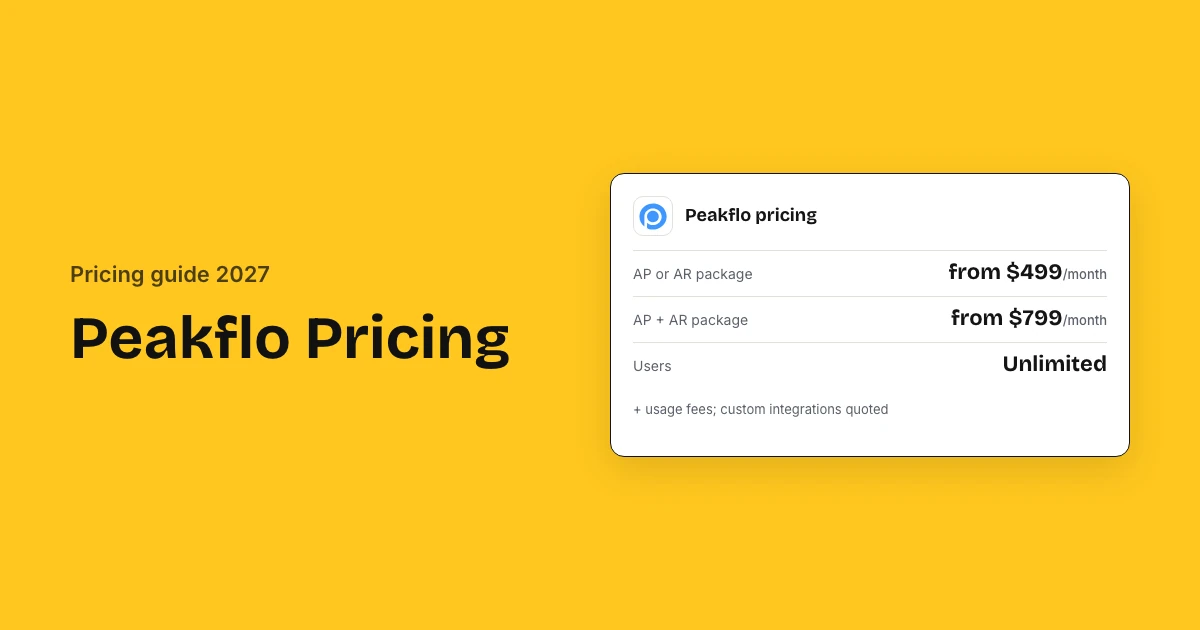
Peakflo costs $499 a month for payables or receivables and $799 a month for both, billed annually with unlimited users, on the packages Peakflo lists on G2. Its own pricing page quotes after a call. Setup is free on supported ERPs, and 69 G2 reviewers rate Peakflo 4.5 out of 5.
Peakflo pricing and reviews: key takeaways
- Packages: Peakflo lists three packages on G2: AP at $499 a month, AR at $499 and both together at $799.
- Users: Every package includes unlimited users with role-based access, so headcount does not change the price.
- Ratings: Peakflo scores 4.5 of 5 from 69 G2 reviews and 4.8 from 5 on Capterra, where value for money scores 5.0.
- What reviewers say: Reviewers credit the automation and the customer success team; the costly complaint is a complicated first setup.
- Usage fees: Receivables usage carries small fees: extra reminder emails at $55 per 100,000, and letters of demand at $1.99 each.
- Setup: Peakflo charges no setup fee for supported ERPs, and work on any other ERP can carry a one-time integration fee.
- Combined saving: Buying AP and AR together at $799 saves $199 a month versus $998 for the two packages separately.
Peakflo ratings and reviews at a glance
Peakflo is rated 4.5 out of 5 by 69 reviewers on G2 and 4.8 by 5 on Capterra, where value for money scores 5.0 out of 5. No G2 reviewer rates it one or two stars. The complaint that costs money is a first setup that runs long when your accounting system is not a standard one.
| Source | Rating | Reviews | What reviewers say |
|---|---|---|---|
| G2 | 4.5 of 5 | 69 | Invoices and reminders run themselves, and the customer success team answers quickly |
| Capterra | 4.8 of 5 | 5 | Good value for the money, though an invoice pulled in from QuickBooks or Zoho cannot be edited |
| Software Advice | 4.8 of 5 | 5 | Same five reviewers as Capterra: easy to use, reports can go straight to customers |
| TrustRadius | No score | 0 | Peakflo has a profile but nobody has reviewed it |
| Gartner Peer Insights | Not listed | 0 | Peakflo has no Gartner Peer Insights page |
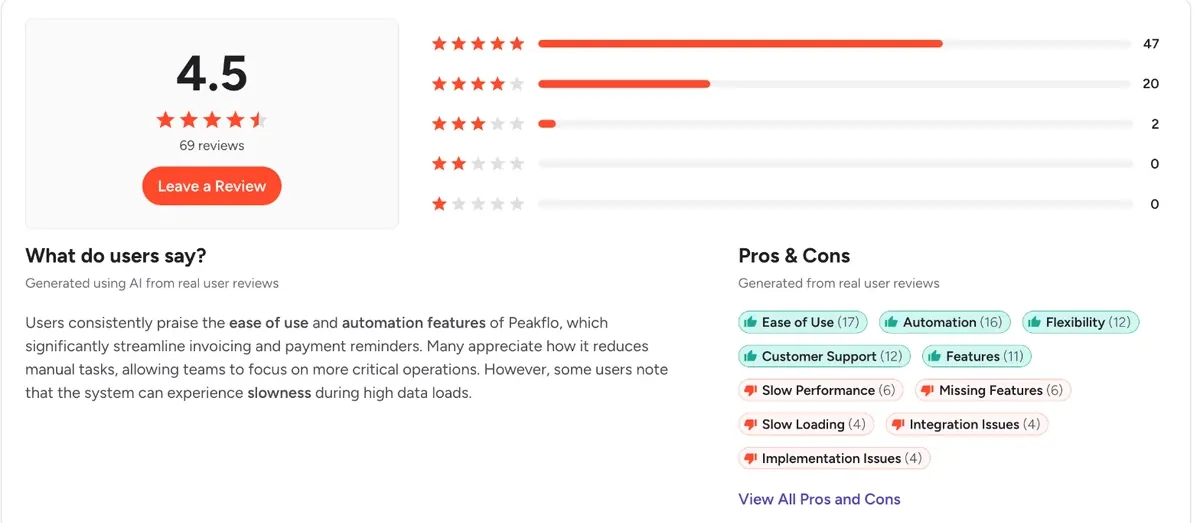
Capterra and Software Advice publish the same five reviews, so treat them as one source; only G2's 69 reviews are a real sample.
How much does Peakflo cost?
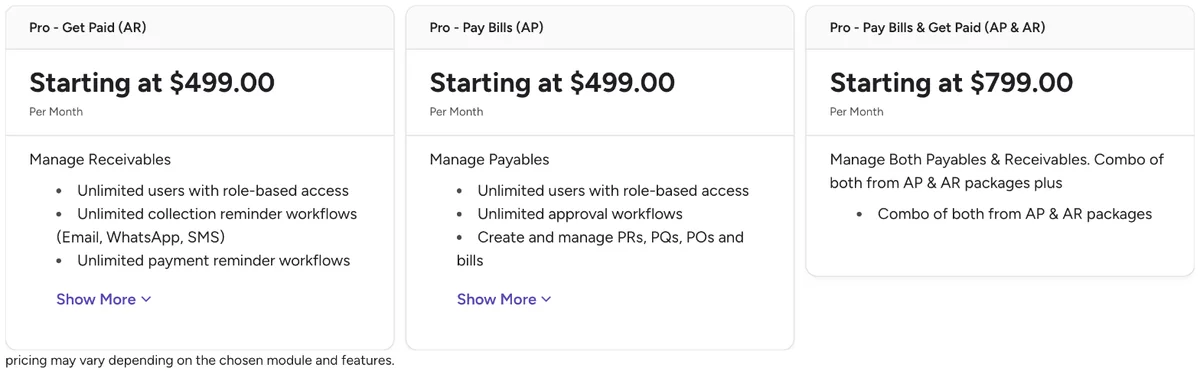
Peakflo costs $499 a month for the Pay Bills (AP) package, $499 for Get Paid (AR) and $799 for both together, each with unlimited users and billed annually. Peakflo's own AP automation pricing page shows no prices and offers a 15 to 30 minute call, so these are the packages it supplies to G2.
| Package | Monthly | Yearly | Includes |
|---|---|---|---|
| Pro – Pay Bills (AP) | From $499 | $5,988 | Unlimited users, approvals, PRs, POs, bills, bill payments, reimbursements, ERP sync, vendor portal |
| Pro – Get Paid (AR) | From $499 | $5,988 | Unlimited users, collection and payment reminders by email, WhatsApp and SMS |
| Pro – AP & AR | From $799 | $9,588 | Both packages combined |
| Custom (agentic workflows) | Quote | Quote | Built after a call with Peakflo |
G2 notes that some plans may need a call for custom pricing, and it last updated these figures on 28 July 2026, so confirm them in your quote.
Why Peakflo's own page shows no price
Peakflo now sells agentic workflow automation and builds each plan after a discovery call, so its pricing page lists modules and an FAQ rather than prices. The G2 packages are the only figures Peakflo itself has supplied to a directory.
What will Peakflo cost for your business?
Peakflo costs a 50 to 200 person company $5,988 a year for AP only or $9,588 for payables and receivables, because users are unlimited and setup is free on supported ERPs. That is also year one. Heavy reminder volumes add usage fees: 2,000,000 emails a month adds $715 a month.
Usage fees only matter at scale. At 1,000,000 reminder emails a month you pay $165 extra a month, and at 2,000,000 you pay $715, while 100 physical letters of demand add $199 a month.
Three example companies
| Monthly cost | AP only | AP + AR | AP + AR, high volume |
|---|---|---|---|
| Package subscription | $499 | $799 | $799 |
| Extra email reminders | – | – | $715 |
| Letters of demand | – | – | $199 |
| Billed per year | $5,988 | $9,588 | $20,556 |
| Setup, one-time | Free for supported ERPs | Free for supported ERPs | Free for supported ERPs |
- AP only: A finance team automating payables only, standard email volumes
- AP + AR: A team automating payables and receivables with standard email volumes
- AP + AR, high volume: AP and AR with 2,000,000 reminder emails and 100 letters of demand a month
Figures exclude SMS and WhatsApp pass-through charges and any custom integration fee.
Estimate your own Peakflo cost
What Peakflo charges on top: usage fees, modules and contract terms
Peakflo charges usage fees on top of the package, almost all on the receivables side: extra reminder emails cost $55 per 100,000 and a physical letter of demand costs $1.99. Email reminders are free up to 700,000 a month, SMS and WhatsApp are passed through at cost, and Peakflo bills the year in advance.
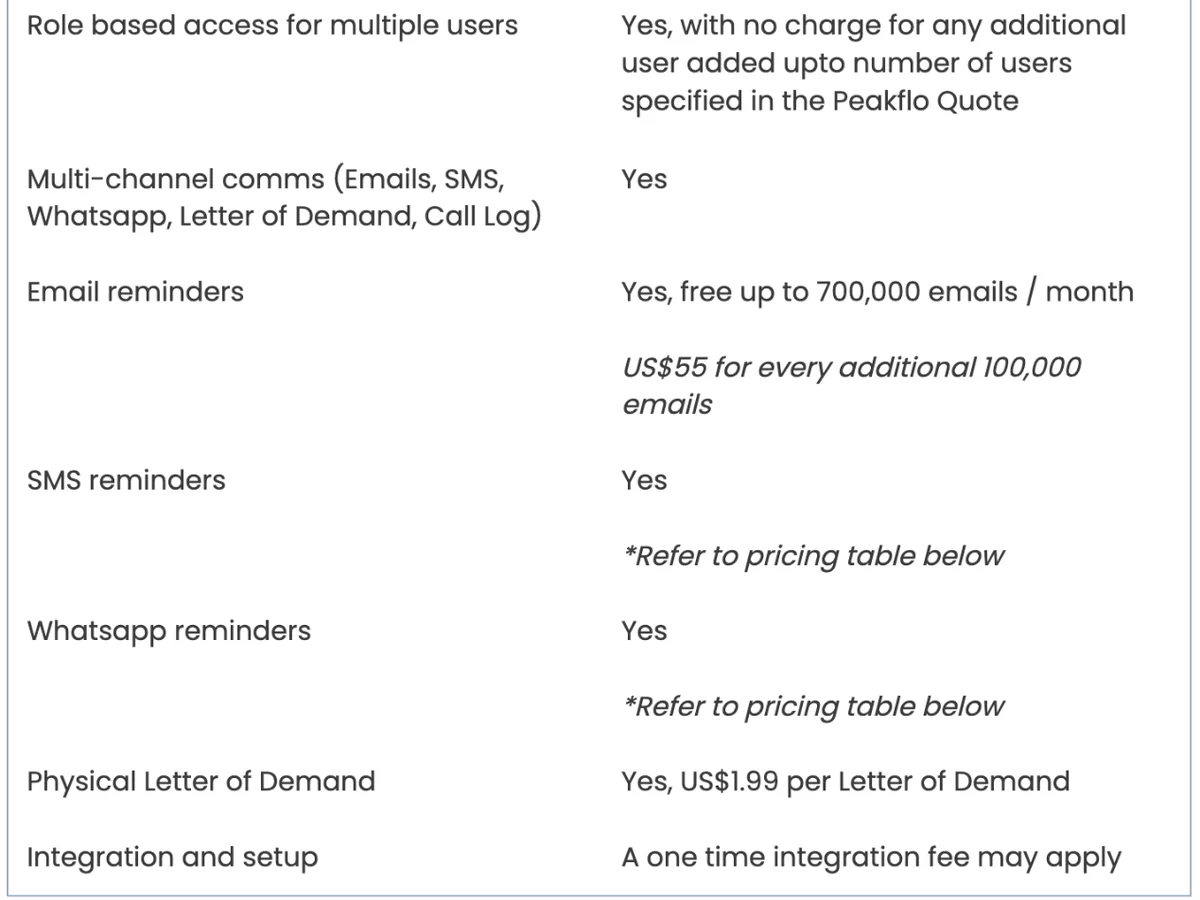
Usage fees from Peakflo's terms
Payables-only teams on normal volumes pay none of these: the charges below land on receivables, where Peakflo sends the reminders for you.
| Fee | Amount |
|---|---|
| Email reminders | Free up to 700,000 a month |
| Extra emails | $55 per 100,000 |
| SMS and WhatsApp | Pass-through, no markup (US rates not listed) |
| Physical letter of demand | $1.99 each |
| Integration and setup | One-time integration fee may apply |
| Payment processing (collections) | By country and method |
Modules you can add
Peakflo prices per module rather than per seat, so the bill moves when you add a module, not when you add people.
- AP: invoice capture, 2-way and 3-way matching, approvals, payments, vendor portal
- AR: reminders, customer portal, cash application, finance CRM
- Peakflo AI: 20X orchestrator, voice, browser and WhatsApp agents
- Reimbursements: travel and expense
Renewal terms to check before you sign
Peakflo's terms bill the subscription at the start of each annual period, payable in advance, so an early exit is a refund question rather than a notice question.
- Annual billing in advance: confirm the refund policy if you cancel early
- Whether your starting package price is locked at renewal
- The user limit stated in your Peakflo quote
- How adding a module mid-year is billed
- Payment processing fees if Peakflo collects payments for you
How much does Peakflo ERP integration cost?
Peakflo charges nothing to connect a supported ERP or accounting system: its pricing page says it does not charge for setup on those, and it publishes API documentation for the rest. A custom integration Peakflo builds for you may cost extra, case by case, and teams with no ERP can upload CSV or Excel files.
| Your system | How it connects | Effect on cost |
|---|---|---|
| Supported ERP or accounting software (e.g. NetSuite, Xero) | Two-way sync | No setup charge |
| Other ERP | Peakflo API or SFTP | Your team's build time |
| Custom integration built by Peakflo | Project | May cost extra, quoted |
| No ERP | CSV or Excel upload | Free |
What to confirm about your ERP
Confirm these four points in writing, because each one decides whether your integration is the free kind or the quoted kind.
- Your ERP is on Peakflo's supported list, so setup is free
- Which records sync both ways: vendors, bills, POs, payments
- Whether a second entity or ERP changes the package price
- The price of any custom integration before you sign
Peakflo also connects to CRM and HR systems and accepts files over SFTP, which helps when your ERP is not on the supported list but can export data on a schedule.
Peakflo implementation cost and setup time
Peakflo charges no setup fee for supported ERPs and publishes no go-live timeline, so year one is the subscription alone: $5,988 for AP or $9,588 for AP and AR. It starts with a 15 to 30 minute call, then sign-up and a short meeting with its experts. Custom ERP work may carry a one-time integration fee.
| Phase | Time | Cost |
|---|---|---|
| Discovery call | 15–30 minutes | Free |
| Sign-up and expert meeting | Short meeting, per Peakflo | Free |
| Connect supported ERP | Self-serve with videos | No setup charge |
| Custom integration (if needed) | By scope | May cost extra |
- Ask for the full onboarding plan and timeline in writing
- Map your invoice approval workflow before go-live so Peakflo's approval rules match how bills are signed off today
- Confirm whether your ERP counts as supported
- Test bill capture and matching on real invoices before go-live
Ask for a reference customer on your ERP before signing an annual contract paid upfront, since the first setup is the step reviewers complain about.
What users say about Peakflo and what they actually pay
Peakflo users rate it 4.5 of 5 and pay the list price: $5,988 a year for AP or AR, $9,588 for both. No buyer benchmark reports a discount on Peakflo. Reviewers praise the automation and the customer success team, and the complaint that costs money is a long first setup.
What reviewers praise
- Invoice data is read accurately enough that staff check exceptions, not every line, and three-way matching runs on its own (G2, 5 of 5, Feb 2026)
- One finance team cut month-end close from 10 business days to 3 after moving bills into Peakflo (G2, enterprise reviewer)
- Peakflo built changes two customers asked for, and named customer success contacts answer quickly (G2, 4 of 5; Capterra 4.6 for customer service)
- Buyers think the price is fair for what it does: Capterra reviewers score value for money 5.0 out of 5
What reviewers complain about
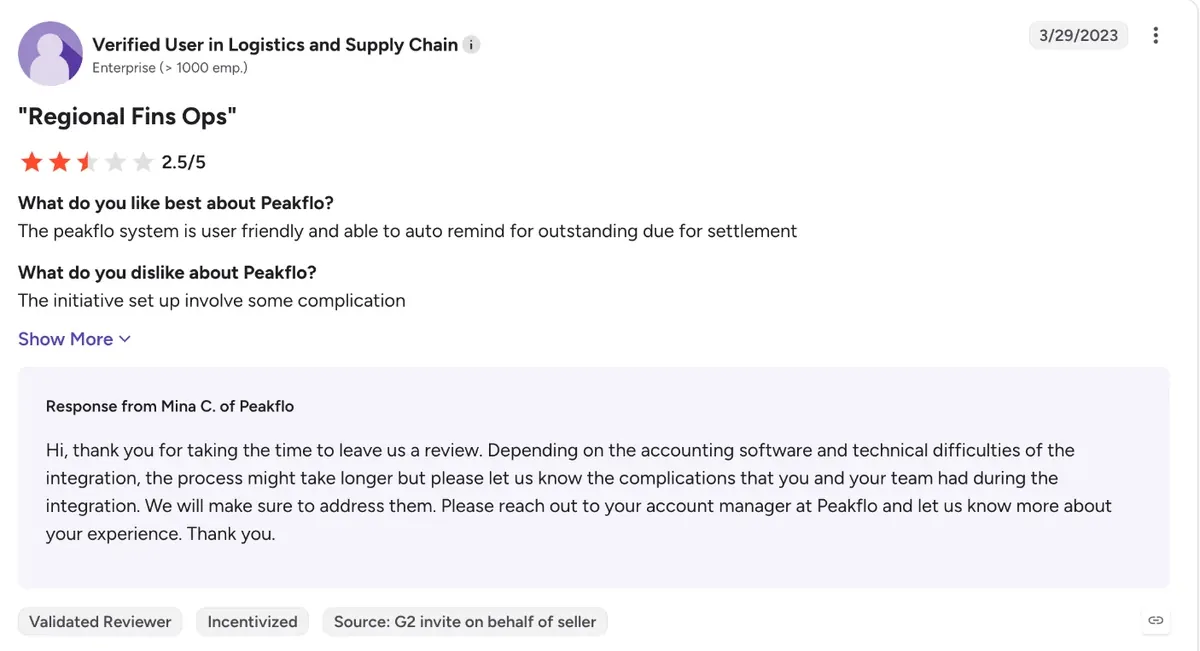
- The first setup can run long and get complicated, and Peakflo's own reply blames the accounting system being connected (G2, 2.5 of 5)
- Reporting is basic, so teams wait on custom reports, and budgets count tax withheld on the company's behalf as spend (G2, consumer goods reviewer)
- A purchase order can only be closed by editing the original amount line by line, and there is no rule to block bills above a threshold (G2)
- An invoice synced in from QuickBooks or Zoho cannot be edited or deleted, and an Excel export only returns the page on screen (Capterra, G2)
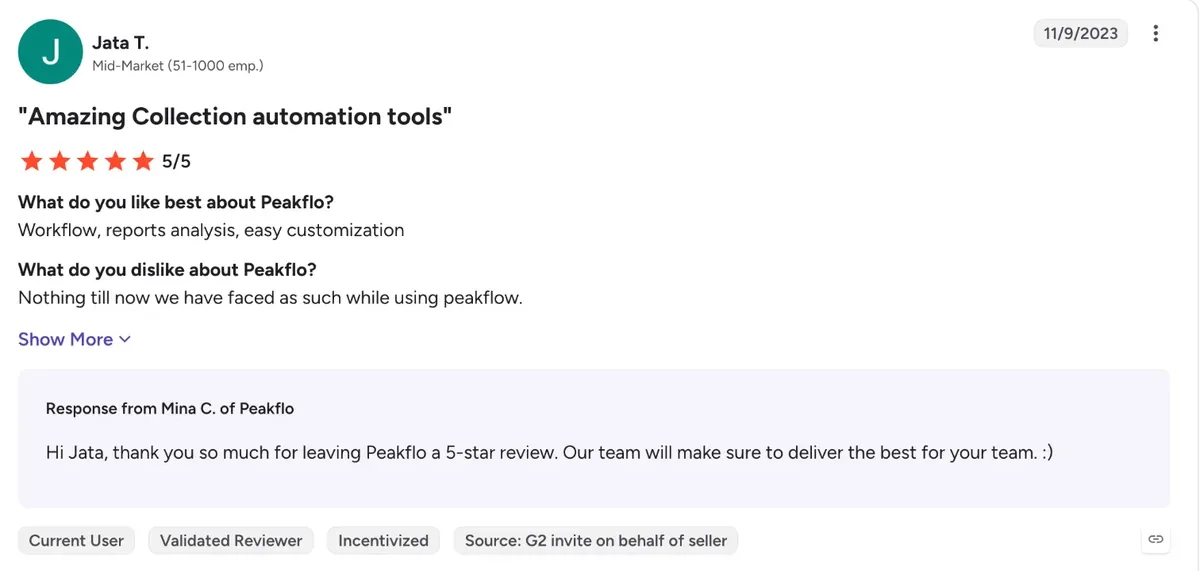
What buyers report paying
No buyer benchmark such as Vendr covers Peakflo and G2's pricing insights are locked, so the list price below is what a buyer should expect to start from.
| Source | What it reports |
|---|---|
| Peakflo on G2 | AP $499, AR $499, AP and AR $799 a month, billed annually; no free trial |
| Capterra | $499 per feature per month, free trial listed, value for money 5.0 of 5 |
| Software Advice | From $499 a month, with a free trial |
| Peakflo pricing page | No price: a custom quote after a 15 to 30 minute call |
Directories disagree on the free trial: G2 says Peakflo offers none, while Capterra and Software Advice list one. Peakflo's own site offers a call, so ask for a sandbox.
Is Peakflo worth the price?
Peakflo is worth its price for finance teams that want payables and receivables automation with unlimited users, free setup on a supported ERP and a combined package. At $499 a month it is dear for a small AP-only team, which is when Peakflo alternatives are worth comparing.
Worth it if
- You need both payables and receivables automation
- Many people approve bills, since users are unlimited
- Your ERP is supported, so setup is free
- You chase customers over WhatsApp or SMS
Look elsewhere if
- You only need simple AP for a small team
- You cannot pay a year in advance
- You need a custom ERP integration
- You want a free trial before talking to sales
Peakflo's own savings calculator estimates $6,467 and 20 hours saved a month for a company with $10M in credit sales, 90 days to get paid and 100 invoices a month. That is the vendor's estimate, so test it against your own numbers.
How to get a better Peakflo price
Ask for the combined AP and AR package if you need both, since it costs $199 a month less than buying them separately. Then get the user limit, usage fees, any integration fee and renewal terms in writing, and ask for quarterly billing if paying a year upfront is a problem.
Get in writing
- Package price and modules
- User limit in the quote
- Email, SMS and WhatsApp fees
- Any integration fee
- Renewal price lock
- Refund terms on annual billing
Ways to pay less
- Buy AP and AR together
- Use a supported ERP to skip setup fees
- Send reminders by email, not letters
- Start with one module
- Ask for a multi-year rate
Peakflo pricing vs alternatives
Peakflo lists AP from $499 a month and AP plus AR from $799. Yooz starts at $215 a month and Tipalti AP at $99 a month plus fees. Zapro pricing has Spark at $699 a month, Growth at $1,999 a month and Scale on custom pricing, all with unlimited users, and your ERP or bank pays suppliers.
| Tool | Pricing model | Starts at | Users priced |
|---|---|---|---|
| Peakflo | Per module, billed annually | $499/month AP; $799 AP + AR | Unlimited users |
| Yooz | By invoice volume | $215/month | Unlimited users |
| Tipalti | Platform + per-invoice and payment fees | $99/month | No |
| BILL | Per user | $49/user/month | Yes |
| Zapro | Flat plans, unlimited users | Spark $699 / Growth $1,999 a month; Scale custom | No per-user fee |
Peakflo pricing FAQs
How much does Peakflo cost?
Peakflo lists its AP or AR package from $499 a month and the combined AP and AR package from $799 a month on G2, billed annually with unlimited users. Its own pricing page offers custom quotes after a short call.
What does Peakflo do?
Peakflo automates finance operations: accounts payable (invoice capture, matching, approvals, payments), accounts receivable (reminders, customer portal, cash application) and travel and expense reimbursements, with AI agents for voice, browser and WhatsApp tasks.
Does Peakflo charge a setup fee?
Not for supported ERP or accounting software, according to Peakflo's pricing page. Its terms add that a one-time integration fee may apply for custom work on other systems, so ask for that fee in your quote before you sign.
Does Peakflo charge per user?
No. Every package includes unlimited users with role-based access, and Peakflo's terms add users at no charge up to the number in your quote. You pay per module, not per seat, plus usage fees such as extra emails.
Is Peakflo any good, and what do Peakflo reviews say?
Yes, on the ratings: Peakflo scores 4.5 out of 5 from 69 G2 reviews and 4.8 from 5 on Capterra, with no one or two-star review on G2. Reviewers praise the automation and customer success, and the common complaint is a complicated first setup.
Is the Peakflo AP and AR bundle cheaper?
Yes. The combined Pay Bills and Get Paid package starts at $799 a month, while the AP and AR packages bought separately cost $998 a month. That saves $199 a month, or $2,388 a year, if you need both modules.
Sources: G2 Peakflo pricing; Peakflo pricing; Peakflo terms and conditions; Capterra Peakflo; G2 Peakflo reviews; Software Advice; TrustRadius. Prices come from Peakflo's own pages where published and from the third-party sources listed, labelled as such. Estimates are not quotes.